Routing System
In the previous chapter, our task management logic has achieved persistence through Pinia. Now we need to inject a soul into the application—Routing System。
In enterprise-level development, routing is not just about switching pages; it also takes onSecurity (permission control)andUser experience (dynamic titles)the important responsibility.
Installation and Basic Configuration
First, install Vue Router:
npm install vue-router
InsrcCreate a router directory under the directory, and createrouter/index.jsfile.
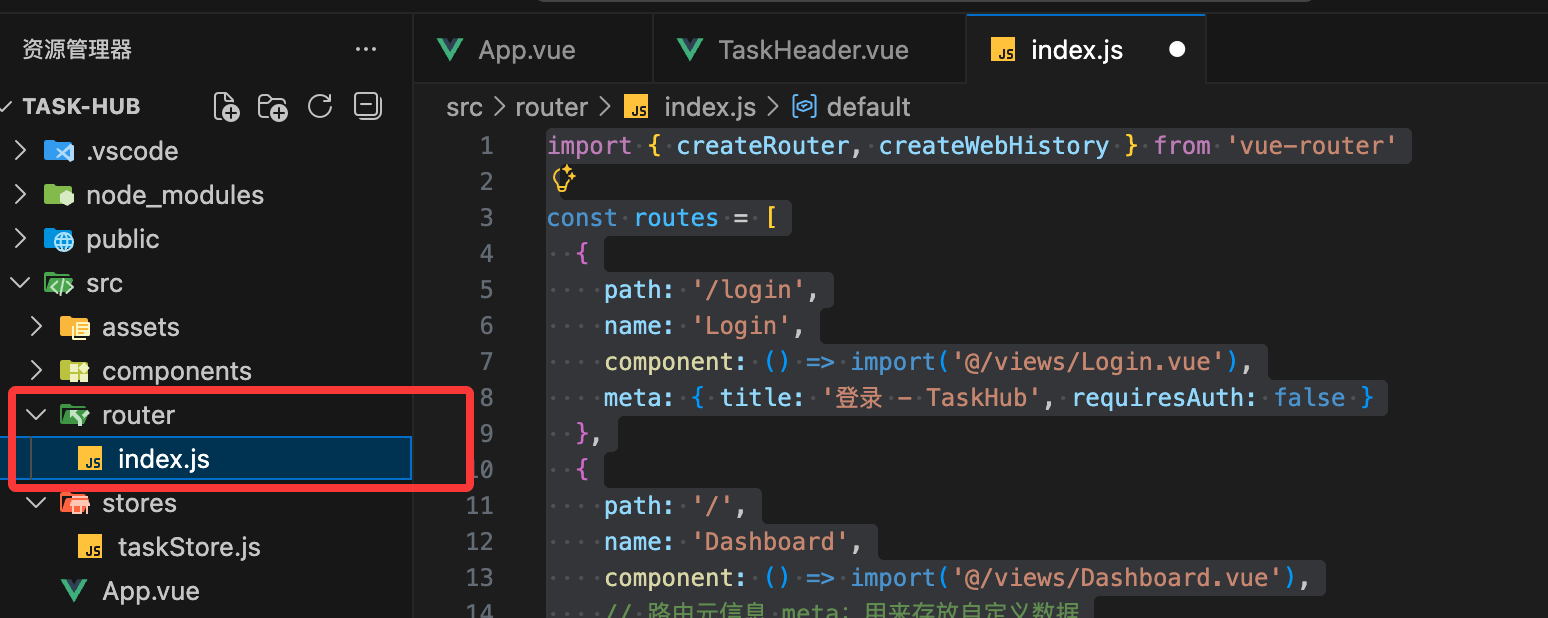
We will define two pages: Dashboard (Workbench) and Login (Login page).
Example
const routes = [
{
path: '/login',
name: 'Login',
component: () => import('@/views/Login.vue'),
meta: { title: 'Login - TaskHub', requiresAuth: false }
},
{
path: '/',
name: 'Dashboard',
component: () => import('@/views/Dashboard.vue'),
// Route meta information meta: used to store custom data
meta: {
title: 'My Dashboard',
requiresAuth: true,
breadcrumb: 'Home'
}
}
]
const router = createRouter({
history: createWebHistory(),
routes
})
export default router
InsrcCreate underviewsthe folder, and allocate the pages.
src/App.vue: the root container, only put<router-view />and global animations.src/views/Dashboard.vue: the original TaskHub core features (task list, input box, etc.).src/views/Login.vue: the newly added login page.
RefactorApp.vue(Make it a clean container)
Example
<div class="min-h-screen bg-slate-50">
<router-view v-slot="{ Component }">
<transition name="page" mode="out-in">
<component :is="Component" />
</transition>
</router-view>
</div>
</template>
<style>
/* Fade effect for page switching */
.page-enter-active, .page-leave-active {
transition: opacity 0.2s ease;
}
.page-enter-from, .page-leave-to {
opacity: 0;
}
</style>
Migrate the original logic intoDashboard.vue
Move the code previously inApp.vuewritten inside (import Store, import components, template layout) all cut and paste intosrc/views/Dashboard.vue.
Dashboard.vue file code
import { storeToRefs } from 'pinia'
import { useTaskStore } from '@/stores/taskStore'
import { useRouter } from 'vue-router' // Import router
import TaskHeader from '@/components/TaskHeader.vue'
import TaskInput from '@/components/TaskInput.vue'
import TaskFilter from '@/components/TaskFilter.vue'
import TaskItem from '@/components/TaskItem.vue'
const taskStore = useTaskStore()
const router = useRouter()
const { filter, filteredTasks } = storeToRefs(taskStore)
const { addTask, removeTask, toggleTask } = taskStore
// Logout method
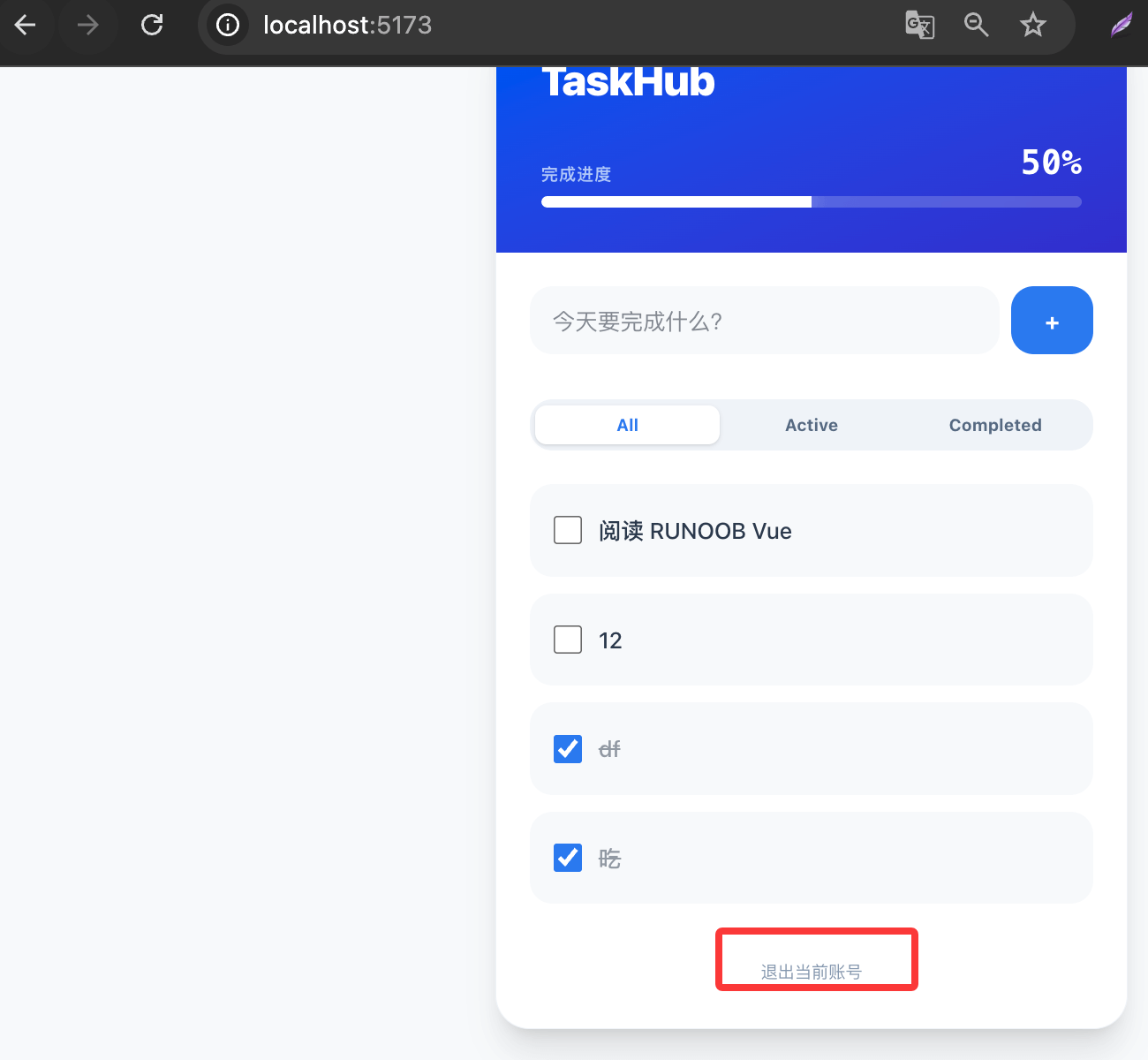
const handleLogout = () => {
localStorage.removeItem('isLoggedIn')
router.push('/login')
}
</script>
<template>
<div class="py-12 px-4">
<div class="max-w-md mx-auto bg-white rounded-3xl shadow-xl border border-slate-100 overflow-hidden">
<TaskHeader />
<main class="p-6">
<TaskInput @add-task="addTask" />
<TaskFilter v-model="filter" />
<ul class="space-y-3">
<TransitionGroup name="list">
<TaskItem
v-for="task in filteredTasks"
:key="task.id"
:task="task"
@toggle="toggleTask"
@remove="removeTask"
/>
</TransitionGroup>
</ul>
<button
@click="handleLogout"
class="mt-8 w-full py-2 text-xs text-slate-400 hover:text-red-500 transition-colors"
>
Log out of current account
</button>
</main>
</div>
</div>
</template>
Login Logic Implementation (Login.vue)
Use Tailwind v4 to quickly build a minimal login page and simulate login behavior.
Example
import { ref } from 'vue'
import { useRouter } from 'vue-router'
const router = useRouter()
const isLoading = ref(false)
const handleLogin = () => {
isLoading.value = true
// Simulate async request
setTimeout(() => {
localStorage.setItem('isLoggedIn', 'true')
router.push('/') // Go to home page after successful login
isLoading.value = false
}, 1000)
}
</script>
<template>
<div class="min-h-screen flex items-center justify-center bg-slate-50">
<div class="p-8 bg-white rounded-3xl shadow-xl w-full max-w-sm border border-slate-100">
<h2 class="text-2xl font-black mb-6 text-slate-800">Welcome back</h2>
<button
@click="handleLogin"
:disabled="isLoading"
class="w-full bg-linear-to-r from-blue-600 to-indigo-600 text-white py-3 rounded-xl font-bold hover:opacity-90 active:scale-95 transition-all disabled:opacity-50"
>
{{ isLoading ? 'Logging in...' : 'One-click enter system' }}
</button>
<p class="mt-4 text-center text-xs text-slate-400">Test environment: click to log in</p>
</div>
</div>
</template>
Improverouter/index.jsthe interception logic
Make sure the security check mode is enabled in your route configuration:
Example
const routes = [
{
path: '/login',
name: 'Login',
component: () => import('@/views/Login.vue'),
meta: { title: 'Login - TaskHub', requiresAuth: false }
},
{
path: '/',
name: 'Dashboard',
component: () => import('@/views/Dashboard.vue'),
// Route meta information meta: used to store custom data
meta: {
title: 'My Dashboard',
requiresAuth: true,
breadcrumb: 'Home'
}
}
]
const router = createRouter({
history: createWebHistory(),
routes
})
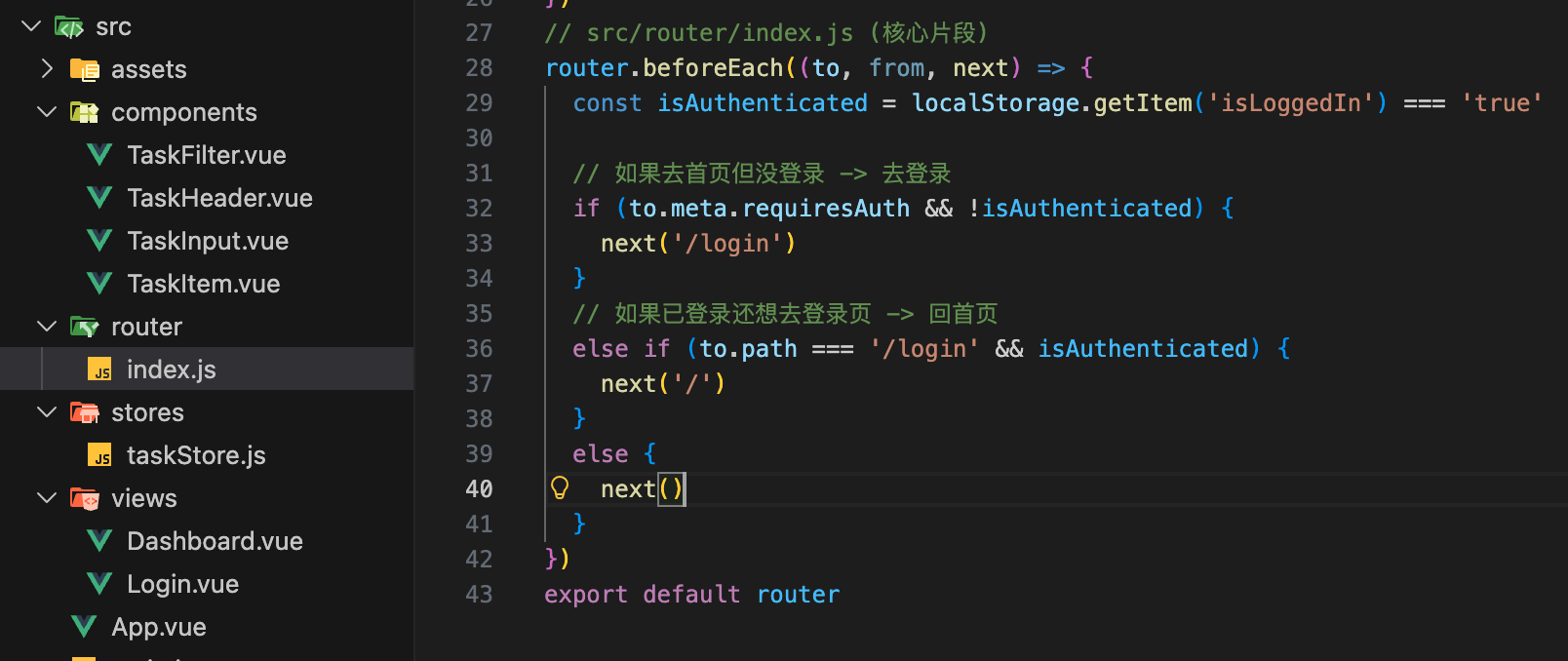
// src/router/index.js (core snippet)
router.beforeEach((to, from, next) => {
const isAuthenticated = localStorage.getItem('isLoggedIn') === 'true'
// If going to home page but not logged in -> go to login
if (to.meta.requiresAuth && !isAuthenticated) {
next('/login')
}
// If already logged in but still wants to go to login page -> go back to home
else if (to.path === '/login' && isAuthenticated) {
next('/')
}
else {
next()
}
})
export default router
Inmain.jsComplete the final piece in
Make sure yourmain.jsimports and mounts the router:
Example
import { createPinia } from 'pinia'
import router from './router' // Import router
import App from './App.vue'
import './style.css'
const app = createApp(App)
app.use(createPinia())
app.use(router) // 2. Register router
app.mount('#app')
Final Effect
- Visit /
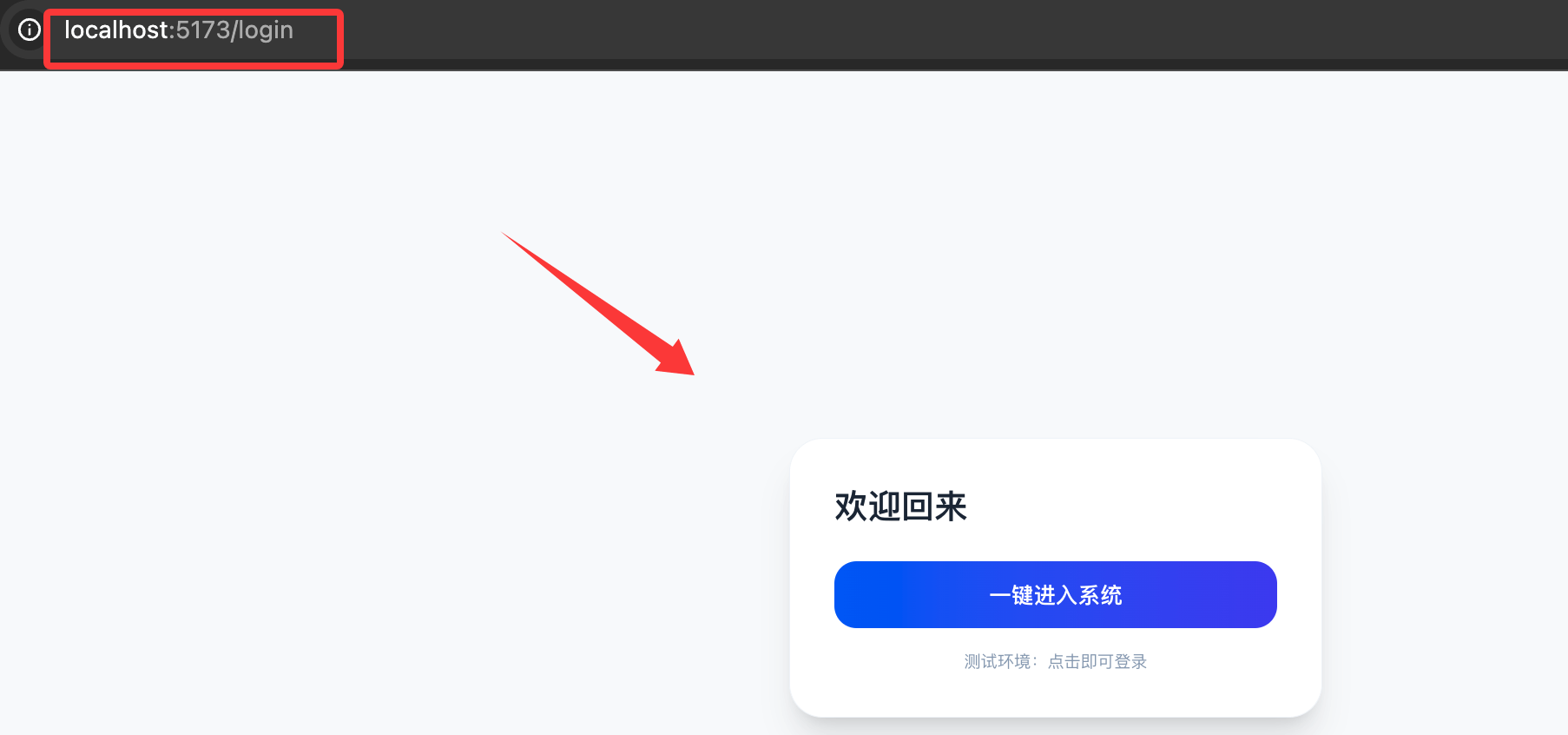
:If you're not logged in, the page will flash briefly and then redirect to/login。 - Visit /login
:Click the button, local storageisLoggedInbecomestrue, then instantly switch to the dashboard. - Refresh the page: Pinia will read tasks from LocalStorage, and the route guard will check the login status. No data will be lost.
After logging in, you can click to log out:
Explanation of Knowledge Points
- Why
App.vuebecame empty?
In a single-page application (SPA),App.vueis the shell of the entire application. We made it empty so that we can dynamically insert different pages (Dashboard or Login) into it based on URL changes. useRouterof the hands-on practice:
InDashboard.vueIn this, we userouter.push('/login')to implement the logout function. Note:pushit will add a new record to the browser history, and clicking the browser back button can go back.- Layout inheritance in Tailwind v4:
Since weApp.vueadded to the global container ofbg-slate-50andmin-h-screen, all child pages (Dashboard, Login) will inherit this light gray background by default, ensuring visual consistency.