Component Splitting
The current App.vue is fully functional, but all the code is crammed together.
Next, we will split it into components. You will learn:
- How to write highly reusable child components in the Tailwind v4 environment.
- How to use defineProps and defineEmits to pass data between JS components.
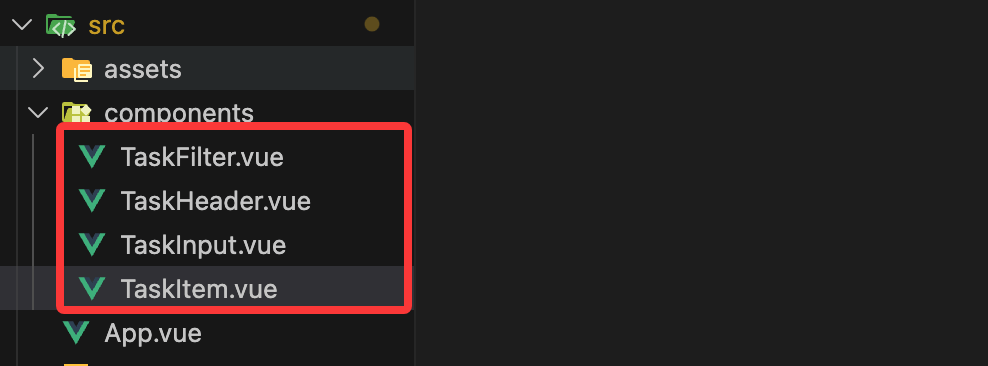
Now insrc/componentscreate the following four files in the directory:
TaskHeader.vue(Pure Display)TaskInput.vue(Input Logic)TaskFilter.vue(State Switching)TaskItem.vue(Single Task)
TaskHeader.vue – Static Display Component
This component doesn't need any JS logic; it only displays UI.
In Tailwind v4, we continue to use the new gradient syntax.
Example
<header class="bg-linear-to-br from-blue-600 to-indigo-700 p-8 text-white">
<h1 class="text-3xl font-black tracking-tight">TaskHub</h1>
<p class="text-blue-100/80 text-sm">Vue 3 + Tailwind v4 Hands-On</p>
</header>
</template>
TaskInput.vue – Using defineEmits to Send Data
This component is responsible for getting user input. When the user clicks "Add", it does not modify data directly; instead, it notifies the parent component via emit.
Example
import { ref } from 'vue';
// Define the event name that the component emits
const emit = defineEmits(['add-task']);
const title = ref('');
const handleSubmit = () => {
const value = title.value.trim();
if (!value) return;
// Emit the event and pass data as an argument
emit('add-task', value);
title.value = '';
};
</script>
<template>
<div class="flex gap-2 mb-8">
<input
v-model="title"
@keyup.enter="handleSubmit"
placeholder="What needs to be done today?"
class="flex-1 bg-slate-50 border-none rounded-2xl px-4 py-3 focus:ring-2 focus:ring-brand/50 outline-none transition-all"
/>
<button @click="handleSubmit" class="bg-brand text-white px-6 rounded-2xl font-bold hover:scale-105 active:scale-95 transition-all">
+
</button>
</div>
</template>
TaskFilter.vue – v-model Communication Between Components
In Vue 3.4+, it is recommended to use defineModel() for two-way binding. This is very efficient for UI toggling in Tailwind v4.
Example
// Define v-model; the value passed from the parent component will sync automatically
const modelValue = defineModel();
const filters = ['all', 'active', 'completed'];
</script>
<template>
<div class="flex p-1 bg-slate-100 rounded-xl mb-6">
<button
v-for="f in filters"
:key="f"
@click="modelValue = f"
:class="[
'flex-1 py-1.5 text-xs font-bold rounded-lg transition-all capitalize',
modelValue === f ? 'bg-white text-brand shadow-sm' : 'text-slate-500'
]"
>
{{ f }}
</button>
</div>
</template>
TaskItem.vue – Using defineProps to Receive Data
It is the core child component, responsible for displaying a single task and reporting modify/delete actions.
Example
// Receive the task object passed from the parent component
defineProps({
task: {
type: Object,
required: true
}
});
// Define events to notify the parent component
const emit = defineEmits(['toggle', 'remove']);
</script>
<template>
<li class="group flex items-center justify-between p-4 bg-slate-50 rounded-2xl border border-transparent hover:border-slate-200 hover:bg-white transition-all">
<div class="flex items-center gap-3">
<input
type="checkbox"
:checked="task.isCompleted"
@change="emit('toggle', task.id)"
class="w-5 h-5 accent-brand cursor-pointer"
/>
<span :class="['text-slate-700 font-medium', task.isCompleted ? 'line-through text-slate-400 opacity-50' : '']">
{{ task.title }}
</span>
</div>
<button @click="emit('remove', task.id)" class="opacity-0 group-hover:opacity-100 text-slate-300 hover:text-red-500 transition-all p-1">
✕
</button>
</li>
</template>
Refactored App.vue (Logic Hub)
The refactored App.vue becomes a clean commander, only responsible for managing raw data and handling instructions from child components.
Example
import { ref, computed } from 'vue';
// Import child components
import TaskHeader from './components/TaskHeader.vue';
import TaskInput from './components/TaskInput.vue';
import TaskFilter from './components/TaskFilter.vue';
import TaskItem from './components/TaskItem.vue';
// --- Data State ---
const tasks = ref([
{ id: '1', title: 'Experience Tailwind v4 new features', isCompleted: false },
{ id: '2', title: 'Master Composition API', isCompleted: true }
]);
const filter = ref('all');
// --- Logic Handling ---
const handleAddTask = (title) => {
tasks.value.unshift({ id: crypto.randomUUID(), title, isCompleted: false });
};
const handleRemoveTask = (id) => {
tasks.value = tasks.value.filter(t => t.id !== id);
};
const handleToggleTask = (id) => {
const task = tasks.value.find(t => t.id === id);
if (task) task.isCompleted = !task.isCompleted;
};
// --- Computed Properties ---
const filteredTasks = computed(() => {
if (filter.value === 'active') return tasks.value.filter(t => !t.isCompleted);
if (filter.value === 'completed') return tasks.value.filter(t => t.isCompleted);
return tasks.value;
});
</script>
<template>
<div class="min-h-screen py-12 px-4">
<div class="max-w-md mx-auto bg-white rounded-3xl shadow-xl shadow-slate-200 border border-slate-100 overflow-hidden">
<TaskHeader />
<main class="p-6">
<TaskInput @add-task="handleAddTask" />
<TaskFilter v-model="filter" />
<ul class="space-y-3">
<TransitionGroup name="list">
<TaskItem
v-for="task in filteredTasks"
:key="task.id"
:task="task"
@toggle="handleToggleTask"
@remove="handleRemoveTask"
/>
</TransitionGroup>
</ul>
<div v-if="filteredTasks.length === 0" class="text-center py-12 text-slate-400 text-sm">
No related tasks...
</div>
</main>
</div>
</div>
</template>
<style scoped>
.list-enter-active, .list-leave-active { transition: all 0.4s cubic-bezier(0.18, 0.89, 0.32, 1.28); }
.list-enter-from, .list-leave-to { opacity: 0; transform: translateX(30px); }
</style>
Summary of Core Knowledge Points
defineProps(Parent to Child):
TaskItemThroughpropsreceive task data. In Vue, Props areread-only. Child components should never directly modifypropsthe value. This is the "one-way data flow".
defineEmits(Child to Parent):
- When a child component needs to change data (e.g., delete, check), it uses
emitto emit a signal, and the parent component executes the actual modification logic. This ensures there is only one source for data changes, making debugging easier.
defineModel(Two-Way Binding Magic Tool):
- In
TaskFilterIn it, we used the one introduced in Vue 3.4defineModelIt greatly simplifies the code for state synchronization between parent and child components, eliminating the need to manually writepropsand listen@update:modelValue。
Reusability of Tailwind v4:
- Even after splitting components, Tailwind's atomic class names still take effect. Because the Vite plugin automatically scans
srcall under.vuefiles and generates the corresponding styles.