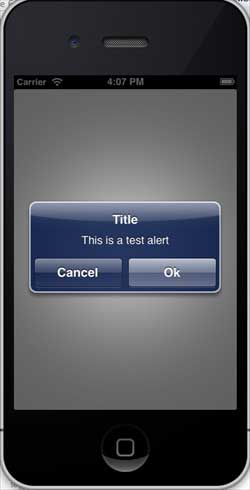
Usage of iOS Alert Dialogs
Alert dialogs are used to provide important information to the user.
Only after selecting an option in the alert dialog view can the user continue using the application.
Important Properties
- alertViewStyle
- cancelButtonIndex
- delegate
- message
- numberOfButtons
- title
Important Methods
- (NSInteger)addButtonWithTitle:(NSString *)title
- (NSString *)buttonTitleAtIndex:(NSInteger)buttonIndex
- (void)dismissWithClickedButtonIndex:
  (NSInteger)buttonIndex animated:(BOOL)animated
- (id)initWithTitle:(NSString *)title message:
  (NSString *)message delegate:(id)delegate
  cancelButtonTitle:(NSString *)cancelButtonTitle
  otherButtonTitles:(NSString*)otherButtonTitles, ...
- (void)show
Update ViewController.h as follows
Make the class conform to the alert dialog view's delegate protocol, as shown below, add <UIAlertViewDelegate> in ViewController.h
#import <UIKit/UIKit.h>

@interface ViewController : UIViewController<UIAlertViewDelegate>{

}
@end
Add a custom method addAlertView
-(void)addAlertView{
    UIAlertView *alertView = [[UIAlertView alloc]initWithTitle:
    @"Title" message:@"This is a test alert" delegate:self
    cancelButtonTitle:@"Cancel" otherButtonTitles:@"Ok", nil];
    [alertView show];
}
Implement the delegate method of the alert dialog view
#pragma mark - Alert view delegate
- (void)alertView:(UIAlertView *)alertView clickedButtonAtIndex:
  (NSInteger)buttonIndex{
    switch (buttonIndex) {
        case 0:
            NSLog(@"Cancel button clicked");
            break;
        case 1:
            NSLog(@"OK button clicked");
            break;

        default:
            break;
    }
}
Modify viewDidLoad in ViewController.m as follows
(void)viewDidLoad
{
   [super viewDidLoad];
   [self addAlertView];
}
Output
Now when we run the application, we will see the following output: