iOS Map Development
Introduction
iOS maps help us locate our position. iOS maps use the MapKit framework.
Example Steps
1. Create a simple View-based application
2. Select the project file, then select the target, and then add MapKit.framework.
3. Add CoreLocation.framework
4. Add a map view to ViewController.xib, create an IBOutlet and name it mapView.
5. Through "File-> New -> File... -> " select Objective C class to create a new file, click Next
6. Set "sub class of" to NSObject, and name the class MapAnnotation
7. Select Create
8. Update MapAnnotation.h as shown below
#import <Foundation/Foundation.h>
#import <MapKit/MapKit.h>

@interface MapAnnotation : NSObject<MKAnnotation>
@property (nonatomic, strong) NSString *title;
@property (nonatomic, readwrite) CLLocationCoordinate2D coordinate;

- (id)initWithTitle:(NSString *)title andCoordinate:
  (CLLocationCoordinate2D)coordinate2d;

@end
9. Update MapAnnotation.m as shown below
#import "MapAnnotation.h"

@implementation MapAnnotation
-(id)initWithTitle:(NSString *)title andCoordinate:
 (CLLocationCoordinate2D)coordinate2d{
    self.title = title;
    self.coordinate =coordinate2d;
    return self;
}
@end
10. Update ViewController.h as shown below
#import <UIKit/UIKit.h>
#import <MapKit/MapKit.h>
#import <CoreLocation/CoreLocation.h>
@interface ViewController : UIViewController<MKMapViewDelegate>
{
    MKMapView *mapView;
}
@end
11. Update ViewController.m as shown below
#import "ViewController.h"
#import "MapAnnotation.h"

@interface ViewController ()

@end

@implementation ViewController

- (void)viewDidLoad
{
   [super viewDidLoad];
   mapView = [[MKMapView alloc]initWithFrame:
   CGRectMake(10, 100, 300, 300)];
   mapView.delegate = self;
   mapView.centerCoordinate = CLLocationCoordinate2DMake(37.32, -122.03);
   mapView.mapType = MKMapTypeHybrid;
   CLLocationCoordinate2D location;
   location.latitude = (double) 37.332768;
   location.longitude = (double) -122.030039;
   // Add the annotation to our map view
   MapAnnotation *newAnnotation = [[MapAnnotation alloc]
   initWithTitle:@"Apple Head quaters" andCoordinate:location];
   [mapView addAnnotation:newAnnotation];
   CLLocationCoordinate2D location2;
   location2.latitude = (double) 37.35239;
   location2.longitude = (double) -122.025919;
   MapAnnotation *newAnnotation2 = [[MapAnnotation alloc]
   initWithTitle:@"Test annotation" andCoordinate:location2];
   [mapView addAnnotation:newAnnotation2];
   [self.view addSubview:mapView];
}
// When a map annotation point is added, zoom to it (1500 range)
- (void)mapView:(MKMapView *)mv didAddAnnotationViews:(NSArray *)views
{
   MKAnnotationView *annotationView = [views objectAtIndex:0];
   id <MKAnnotation> mp = [annotationView annotation];
   MKCoordinateRegion region = MKCoordinateRegionMakeWithDistance
   ([mp coordinate], 1500, 1500);
   [mv setRegion:region animated:YES];
   [mv selectAnnotation:mp animated:YES];
}

- (void)didReceiveMemoryWarning
{
    [super didReceiveMemoryWarning];
    // Dispose of any resources that can be recreated.
}

@end
Output
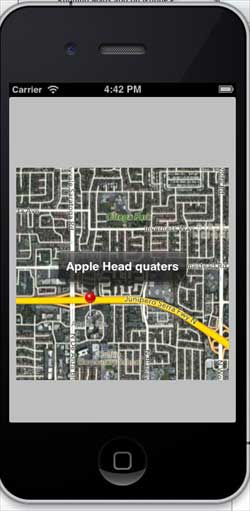
When running the application, the output result is as follows
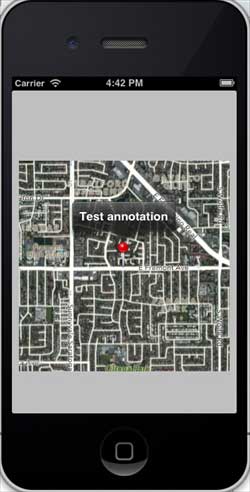
When we scroll the map upward, the output result is as follows