iOS-Twitter and Facebook
Introduction
Twitter has been integrated into iOS 5.0, and Facebook has been integrated into iOS 6.0. This tutorial focuses on how to use Apple-provided classes to deploy Twitter and Facebook in iOS 5.0 and iOS 6.0.
Example Steps
1. Create a simple View-based application
2. Select the project file, then select "targets", then add Social.framework and Accounts.framework in "choose frameworks".
3. Add two buttons named facebookPost and twitterPost, and create ibActions for them.
4. Update ViewController.h as follows
#import <Social/Social.h>
#import <Accounts/Accounts.h>
#import <UIKit/UIKit.h>

@interface ViewController : UIViewController

-(IBAction)twitterPost:(id)sender;
-(IBAction)facebookPost:(id)sender;

@end
5. Update ViewController.m as shown below
#import "ViewController.h"

@interface ViewController ()

@end

@implementation ViewController

- (void)viewDidLoad
{
    [super viewDidLoad];
}

- (void)didReceiveMemoryWarning
{
    [super didReceiveMemoryWarning];
    // Dispose of any resources that can be recreated.
}

-(IBAction)facebookPost:(id)sender{

   SLComposeViewController *controller = [SLComposeViewController
   composeViewControllerForServiceType:SLServiceTypeFacebook];
   SLComposeViewControllerCompletionHandler myBlock =
   ^(SLComposeViewControllerResult result){
          if (result == SLComposeViewControllerResultCancelled)
          {
            NSLog(@"Cancelled");
          }
          else
          {
            NSLog(@"Done");
          }
          [controller dismissViewControllerAnimated:YES completion:nil];
        };
   controller.completionHandler =myBlock;
   //Adding the Text to the facebook post value from iOS
   [controller setInitialText:@"My test post"];
   //Adding the URL to the facebook post value from iOS
   [controller addURL:[NSURL URLWithString:@"http://www.test.com"]];
   //Adding the Text to the facebook post value from iOS
   [self presentViewController:controller animated:YES completion:nil];
}

-(IBAction)twitterPost:(id)sender{
    SLComposeViewController *tweetSheet = [SLComposeViewController
    composeViewControllerForServiceType:SLServiceTypeTwitter];
    [tweetSheet setInitialText:@"My test tweet"];
    [self presentModalViewController:tweetSheet animated:YES];
}

@end
Output
When we run the application and click facebookPost, we will get the following output

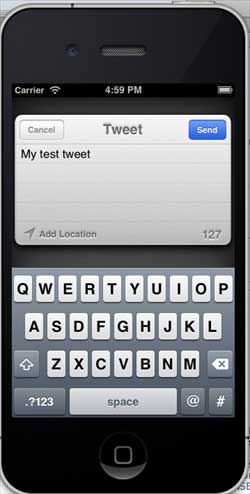
When we click twitterPost, we will get the following output