iOS Auto Layout
Introduction
Auto Layout was introduced in iOS 6.0 and only supports iOS 6.0 and higher versions. It helps us create interfaces for multiple devices.
Example Steps
1. Create a simple View based application
2. Modify the contents of the ViewController.m file, as shown below
#import "ViewController.h"
@interface ViewController ()
@property (nonatomic, strong) UIButton *leftButton;
@property (nonatomic, strong) UIButton *rightButton;
@property (nonatomic, strong) UITextField *textfield;

@end
@implementation ViewController

- (void)viewDidLoad{
    [super viewDidLoad];
    UIView *superview = self.view;
    /*1. Create leftButton and add to our view*/
    self.leftButton = [UIButton buttonWithType:UIButtonTypeRoundedRect];
    self.leftButton.translatesAutoresizingMaskIntoConstraints = NO;
    [self.leftButton setTitle:@"LeftButton" forState:UIControlStateNormal];
    [self.view addSubview:self.leftButton];
    /* 2. Constraint to position LeftButton's X*/
    NSLayoutConstraint *leftButtonXConstraint = [NSLayoutConstraint
    constraintWithItem:self.leftButton attribute:NSLayoutAttributeCenterX
    relatedBy:NSLayoutRelationGreaterThanOrEqual toItem:superview attribute:
    NSLayoutAttributeCenterX multiplier:1.0 constant:-60.0f];
    /* 3. Constraint to position LeftButton's Y*/
    NSLayoutConstraint *leftButtonYConstraint = [NSLayoutConstraint
    constraintWithItem:self.leftButton attribute:NSLayoutAttributeCenterY
    relatedBy:NSLayoutRelationEqual toItem:superview attribute:
    NSLayoutAttributeCenterY multiplier:1.0f constant:0.0f];
    /* 4. Add the constraints to button's superview*/
    [superview addConstraints:@[ leftButtonXConstraint,
    leftButtonYConstraint]];
    /*5. Create rightButton and add to our view*/
    self.rightButton = [UIButton buttonWithType:UIButtonTypeRoundedRect];
    self.rightButton.translatesAutoresizingMaskIntoConstraints = NO;
    [self.rightButton setTitle:@"RightButton" forState:UIControlStateNormal];
    [self.view addSubview:self.rightButton];
    /*6. Constraint to position RightButton's X*/
    NSLayoutConstraint *rightButtonXConstraint = [NSLayoutConstraint
    constraintWithItem:self.rightButton attribute:NSLayoutAttributeCenterX
    relatedBy:NSLayoutRelationGreaterThanOrEqual toItem:superview attribute:
    NSLayoutAttributeCenterX multiplier:1.0 constant:60.0f];
    /*7. Constraint to position RightButton's Y*/
    rightButtonXConstraint.priority = UILayoutPriorityDefaultHigh;
    NSLayoutConstraint *centerYMyConstraint = [NSLayoutConstraint
    constraintWithItem:self.rightButton attribute:NSLayoutAttributeCenterY
    relatedBy:NSLayoutRelationGreaterThanOrEqual toItem:superview attribute:
    NSLayoutAttributeCenterY multiplier:1.0f constant:0.0f];
    [superview addConstraints:@[centerYMyConstraint,
    rightButtonXConstraint]];
   //8. Add Text field
    self.textfield = [[UITextField alloc]initWithFrame:
    CGRectMake(0, 100, 100, 30)];
    self.textfield.borderStyle = UITextBorderStyleRoundedRect;
    self.textfield.translatesAutoresizingMaskIntoConstraints = NO;
    [self.view addSubview:self.textfield];
    //9. Text field Constraints
    NSLayoutConstraint *textFieldTopConstraint = [NSLayoutConstraint
    constraintWithItem:self.textfield attribute:NSLayoutAttributeTop
    relatedBy:NSLayoutRelationGreaterThanOrEqual toItem:superview
    attribute:NSLayoutAttributeTop multiplier:1.0 constant:60.0f];
    NSLayoutConstraint *textFieldBottomConstraint = [NSLayoutConstraint
    constraintWithItem:self.textfield attribute:NSLayoutAttributeTop
    relatedBy:NSLayoutRelationGreaterThanOrEqual toItem:self.rightButton
    attribute:NSLayoutAttributeTop multiplier:0.8 constant:-60.0f];
    NSLayoutConstraint *textFieldLeftConstraint = [NSLayoutConstraint
    constraintWithItem:self.textfield attribute:NSLayoutAttributeLeft
    relatedBy:NSLayoutRelationEqual toItem:superview attribute:
    NSLayoutAttributeLeft multiplier:1.0 constant:30.0f];
    NSLayoutConstraint *textFieldRightConstraint = [NSLayoutConstraint
    constraintWithItem:self.textfield attribute:NSLayoutAttributeRight
    relatedBy:NSLayoutRelationEqual toItem:superview attribute:
    NSLayoutAttributeRight multiplier:1.0 constant:-30.0f];
    [superview addConstraints:@[textFieldBottomConstraint ,
    textFieldLeftConstraint, textFieldRightConstraint,
    textFieldTopConstraint]];
}
- (void)didReceiveMemoryWarning
{
    [super didReceiveMemoryWarning];
    // Dispose of any resources that can be recreated.
}
@end
Output
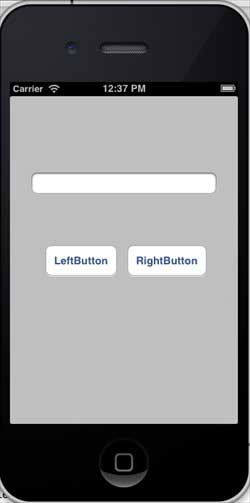
Run the application, and you will see the following output on the iPhone simulator.
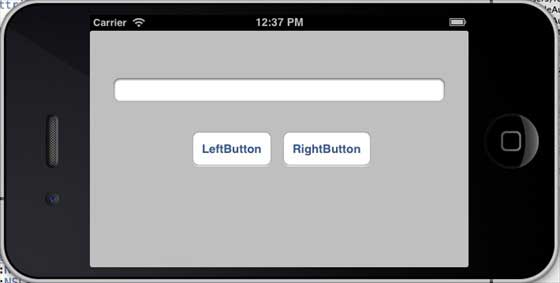
When we change the simulator to landscape orientation, the output is as follows:
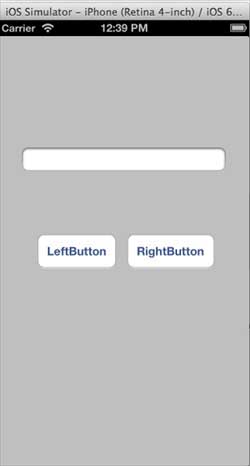
When we run the same application on the iPhone 5 simulator, the output is as follows:
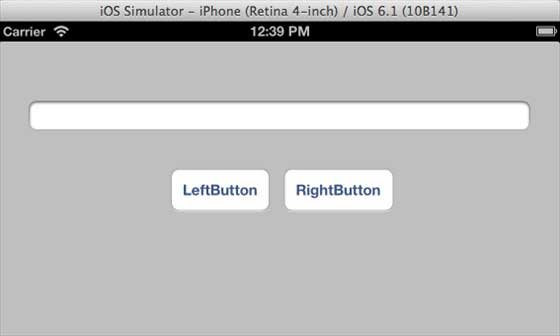
When we change the simulator to landscape orientation, the output is as follows: