Using iOS View Transitions
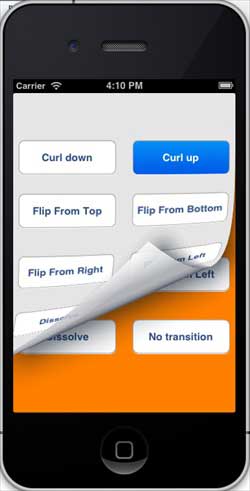
View transitions are implemented through a series of animation effects, including fold transitions, explode transitions, card transitions, and so on.
Modify ViewController.xib, as shown below
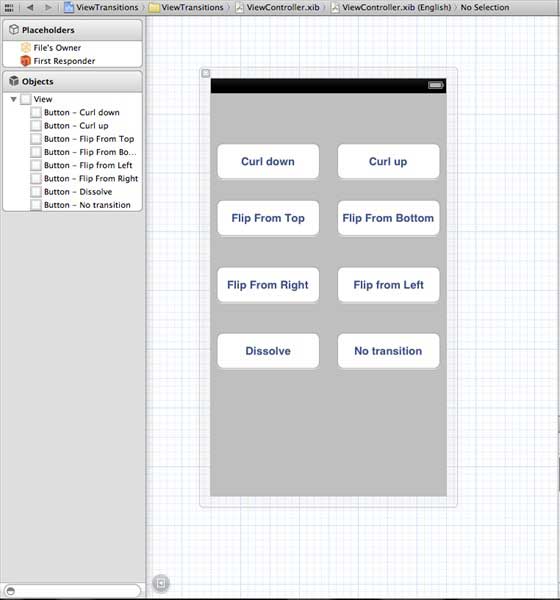
The operation of creating a button in the xib
Modify ViewController.h
#import <UIKit/UIKit.h>

@interface ViewController : UIViewController
{
    UIView *view1;
    UIView *view2;
}

-(IBAction)flipFromLeft:(id)sender;
-(IBAction)flipFromRight:(id)sender;
-(IBAction)flipFromTop:(id)sender;
-(IBAction)flipFromBottom:(id)sender;
-(IBAction)curlUp:(id)sender;
-(IBAction)curlDown:(id)sender;
-(IBAction)dissolve:(id)sender;
-(IBAction)noTransition:(id)sender;

@end
Declare instances of two views in the ViewController class. The ViewController.h file code is as follows:
Modify ViewController.m
We will add a custom method setUpView to initialize the views.
We will also create another method doTransitionWithType: to implement switching from view1 to view2, and vice versa.
After that, we will execute the method created earlier, which is to call doTransitionWithType: with the transition type. The ViewController.m code is as follows:
#import "ViewController.h"

@interface ViewController ()

@end

@implementation ViewController

- (void)viewDidLoad
{
    [super viewDidLoad];
    [self setUpView];
    // Do any additional setup after loading the view, typically from a nib.
}

-(void)setUpView{
    view1 = [[UIView alloc]initWithFrame:self.view.frame];
    view1.backgroundColor = [UIColor lightTextColor];
    view2 = [[UIView alloc]initWithFrame:self.view.frame];
    view2.backgroundColor = [UIColor orangeColor];
    [self.view addSubview:view1];
    [self.view sendSubviewToBack:view1];

}

-(void)doTransitionWithType:(UIViewAnimationTransition)animationTransitionType{
    if ([[self.view subviews] containsObject:view2 ]) {
        [UIView transitionFromView:view2
                            toView:view1
                          duration:2
                           options:animationTransitionType
                        completion:^(BOOL finished){
                            [view2 removeFromSuperview];
                        }];
        [self.view addSubview:view1];
        [self.view sendSubviewToBack:view1];
    }
    else{

        [UIView transitionFromView:view1
                            toView:view2
                          duration:2
                           options:animationTransitionType
                        completion:^(BOOL finished){
                            [view1 removeFromSuperview];
                        }];
        [self.view addSubview:view2];
        [self.view sendSubviewToBack:view2];

    }
}


-(IBAction)flipFromLeft:(id)sender
{
    [self doTransitionWithType:UIViewAnimationOptionTransitionFlipFromLeft];

}
-(IBAction)flipFromRight:(id)sender{
    [self doTransitionWithType:UIViewAnimationOptionTransitionFlipFromRight];

}
-(IBAction)flipFromTop:(id)sender{
    [self doTransitionWithType:UIViewAnimationOptionTransitionFlipFromTop];

}
-(IBAction)flipFromBottom:(id)sender{
    [self doTransitionWithType:UIViewAnimationOptionTransitionFlipFromBottom];

}
-(IBAction)curlUp:(id)sender{
    [self doTransitionWithType:UIViewAnimationOptionTransitionCurlUp];

}
-(IBAction)curlDown:(id)sender{
    [self doTransitionWithType:UIViewAnimationOptionTransitionCurlDown];

}
-(IBAction)dissolve:(id)sender{
    [self doTransitionWithType:UIViewAnimationOptionTransitionCrossDissolve];

}
-(IBAction)noTransition:(id)sender{
    [self doTransitionWithType:UIViewAnimationOptionTransitionNone];

}

- (void)didReceiveMemoryWarning
{
    [super didReceiveMemoryWarning];
    // Dispose of any resources that can be recreated.
}

@end
Output
Now when we run the application, we will see the following output
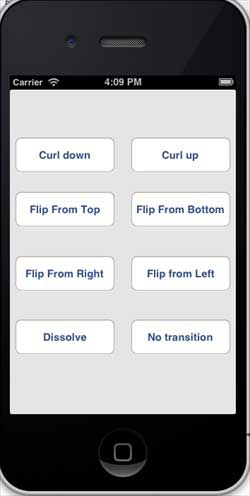
You can choose different buttons to see how the transition works. Selecting the fold transition will produce the effect as shown below