Usage of Table View
The iOS table view consists of cells (generally reusable) and is used to display a vertically scrolling view.
In iOS, table views are used to display data lists, such as contacts, to-do items, or shopping item lists.
Important Properties
- delegate
- dataSource
- rowHeight
- sectionFooterHeight
- sectionHeaderHeight
- separatorColor
- tableHeaderView
- tableFooterView
Important Methods
- (UITableViewCell *)cellForRowAtIndexPath:(NSIndexPath *)indexPath
- (void)deleteRowsAtIndexPaths:(NSArray *)indexPaths
   withRowAnimation:(UITableViewRowAnimation)animation
- (id)dequeueReusableCellWithIdentifier:(NSString *)identifier
- (id)dequeueReusableCellWithIdentifier:(NSString *)identifier
   forIndexPath:(NSIndexPath *)indexPath
- (void)reloadData
- (void)reloadRowsAtIndexPaths:(NSArray *)indexPaths
   withRowAnimation:(UITableViewRowAnimation)animation
- (NSArray *)visibleCells
Example Code and Steps
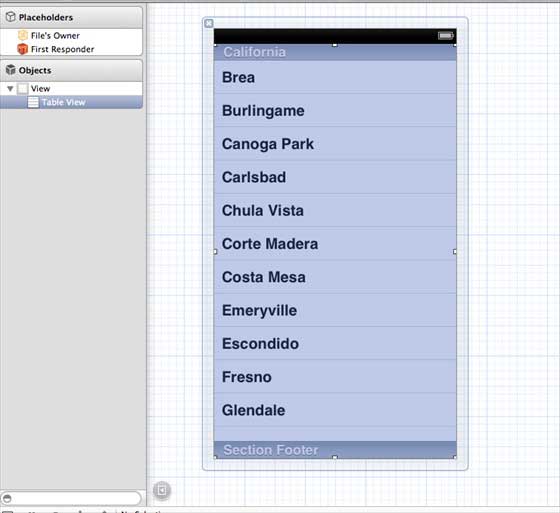
1. Add a table view to ViewController.xib, as shown below
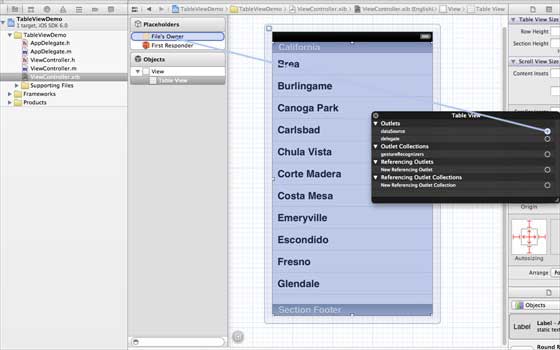
2. Set the delegate and data source to "File's Owner" by right-clicking and selecting data source and delegate. Set the data source as shown below
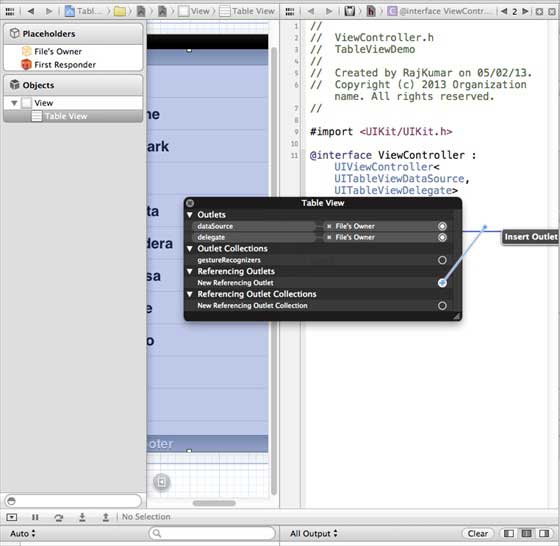
3. Create an IBOutlet for the table view and name it myTableView, as shown in the image below
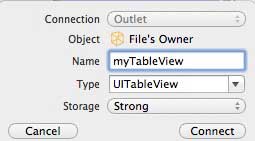
4. To have data, add an NSMutableArray so that it can be displayed in the table view
5. ViewController should adopt the UITableViewDataSource and UITableViewDelegate protocols. The ViewController.h code is as follows
#import <UIKit/UIKit.h>

@interface ViewController : UIViewController<UITableViewDataSource,
UITableViewDelegate>
{

    IBOutlet UITableView *myTableView;
    NSMutableArray *myData;
}

@end
6. Implement the required table view delegate and data source methods. Update ViewController.m, as shown below
#import "ViewController.h"

@interface ViewController ()

@end

@implementation ViewController

- (void)viewDidLoad
{
    [super viewDidLoad];
    // table view data is being set here
    myData = [[NSMutableArray alloc]initWithObjects:
    @"Data 1 in array",@"Data 2 in array",@"Data 3 in array",
    @"Data 4 in array",@"Data 5 in array",@"Data 5 in array",
    @"Data 6 in array",@"Data 7 in array",@"Data 8 in array",
    @"Data 9 in array", nil];
    // Do any additional setup after loading the view, typically from a nib.
}

- (void)didReceiveMemoryWarning
{
    [super didReceiveMemoryWarning];
    // Dispose of any resources that can be recreated.
}

#pragma mark - Table View Data source
- (NSInteger)tableView:(UITableView *)tableView numberOfRowsInSection:
  (NSInteger)section{
    return [myData count]/2;
}

- (UITableViewCell *)tableView:(UITableView *)tableView cellForRowAtIndexPath:
  (NSIndexPath *)indexPath{
    static NSString *cellIdentifier = @"cellID";

    UITableViewCell *cell = [tableView dequeueReusableCellWithIdentifier:
    cellIdentifier];
    if (cell == nil) {
        cell = [[UITableViewCell alloc]initWithStyle:
        UITableViewCellStyleDefault reuseIdentifier:cellIdentifier];
    }
    NSString *stringForCell;
    if (indexPath.section == 0) {
        stringForCell= [myData objectAtIndex:indexPath.row];

    }
    else if (indexPath.section == 1){
        stringForCell= [myData objectAtIndex:indexPath.row+ [myData count]/2];

    }
    [cell.textLabel setText:stringForCell];
    return cell;
}

// Default is 1 if not implemented
- (NSInteger)numberOfSectionsInTableView:(UITableView *)tableView{
    return 2;
}

- (NSString *)tableView:(UITableView *)tableView titleForHeaderInSection:
  (NSInteger)section{
    NSString *headerTitle;
    if (section==0) {
        headerTitle = @"Section 1 Header";
    }
    else{
        headerTitle = @"Section 2 Header";

    }
    return headerTitle;
}
- (NSString *)tableView:(UITableView *)tableView titleForFooterInSection:
  (NSInteger)section{
    NSString *footerTitle;
    if (section==0) {
        footerTitle = @"Section 1 Footer";
    }
    else{
        footerTitle = @"Section 2 Footer";

    }
    return footerTitle;
}

#pragma mark - TableView delegate

-(void)tableView:(UITableView *)tableView didSelectRowAtIndexPath:
 (NSIndexPath *)indexPath{
    [tableView deselectRowAtIndexPath:indexPath animated:YES];
    UITableViewCell *cell = [tableView cellForRowAtIndexPath:indexPath];
    NSLog(@"Section:%d Row:%d selected and its data is %@",
    indexPath.section,indexPath.row,cell.textLabel.text);
}


@end
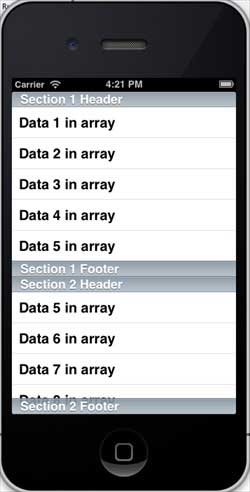
7. Now when we run the application, we will get the following output