Usage of iOS Navigation Bar
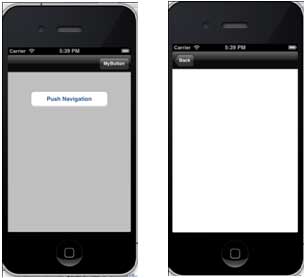
The navigation bar contains the navigation buttons of the navigation controller. The title in the navigation bar is the title of the current view controller.
Example code and steps
1. Create a view application
2. Now, select AppDelegate.h, and add the navigation controller property as shown below:
#import <UIKit/UIKit.h>

@class ViewController;

@interface AppDelegate : UIResponder <UIApplicationDelegate>

@property (strong, nonatomic) UIWindow *window;

@property (strong, nonatomic) ViewController *viewController;

@property (strong, nonatomic) UINavigationController *navController;

@end
3. Update the application: didFinishLaunchingWithOptions: method, assign the navigation controller in the AppDelegate.m file, and make it the root view controller of the window, as shown below:
- (BOOL)application:(UIApplication *)application didFinishLaunchingWithOptions:(NSDictionary *)launchOptions
{
    self.window = [[UIWindow alloc] initWithFrame:
    [[UIScreen mainScreen] bounds]];
    // Override point for customization after application launch.
    self.viewController = [[ViewController alloc]
    initWithNibName:@"ViewController" bundle:nil];
    //Navigation controller init with ViewController as root
    UINavigationController *navController = [[UINavigationController alloc]
    initWithRootViewController:self.viewController];
    self.window.rootViewController = navController;
    [self.window makeKeyAndVisible];
    return YES;
}
4. Now, by selectingFile -> New ->File...-> Objective C Class, add a new class file TempViewController, then name the class TempViewController as a subclass of UIViewController.
5. Add navButon in ViewController.h, as shown below
// ViewController.h
#import <UIKit/UIKit.h>

@interface ViewController : UIViewController
{
    UIButton *navButton;
}
@end
6. Now add the method addNavigationBarItem and call the method in viewDidLoad
7. Create a method for the navigation item
8. We also need to create another method for the other view controller TempViewController.
9. Updated ViewController.m, as shown below:
// ViewController.m
#import "ViewController.h"
#import "TempViewController.h"
@interface ViewController ()

@end
@implementation ViewController

- (void)viewDidLoad
{
    [super viewDidLoad];
    [self addNavigationBarButton];
    //Do any additional setup after loading the view, typically from a nib
}

- (void)didReceiveMemoryWarning
{
    [super didReceiveMemoryWarning];
    // Dispose of any resources that can be recreated.
}

-(IBAction)pushNewView:(id)sender{
   TempViewController *tempVC =[[TempViewController alloc]
   initWithNibName:@"TempViewController" bundle:nil];
   [self.navigationController pushViewController:tempVC animated:YES];
}

-(IBAction)myButtonClicked:(id)sender{
   // toggle hidden state for navButton
   [navButton setHidden:!nav.hidden];
}

-(void)addNavigationBarButton{
   UIBarButtonItem *myNavBtn = [[UIBarButtonItem alloc] initWithTitle:
   @"MyButton" style:UIBarButtonItemStyleBordered target:
   self action:@selector(myButtonClicked:)];

   [self.navigationController.navigationBar setBarStyle:UIBarStyleBlack];
   [self.navigationItem setRightBarButtonItem:myNavBtn];

   // create a navigation push button that is initially hidden
   navButton = [UIButton buttonWithType:UIButtonTypeRoundedRect];
   [navButton setFrame:CGRectMake(60, 50, 200, 40)];
   [navButton setTitle:@"Push Navigation" forState:UIControlStateNormal];
   [navButton addTarget:self action:@selector(pushNewView:)
   forControlEvents:UIControlEventTouchUpInside];
   [self.view addSubview:navButton];
   [navButton setHidden:YES];
}
@end
10. Now when we run the application, we will get the following output
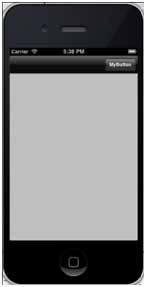
11. Click the MyButton navigation button to toggle the navigation button visibility
12. Click the navigation button to display another view controller, as shown below