Codex Agent Skills Skill System
Agent Skills are Codex's task extension mechanism. By packaging instructions, resources, and optional scripts into standardized skill packages, they enable Codex to reliably execute specific workflows.
An Agent Skill is essentially a folder that must contain aSKILL.mdfile. The file must at least provide metadata such as name and description, along with guidance telling the AI agent how to complete a specific task. Skill packages can also integrate scripts, reference materials, templates, and various other resources.
my-skill/
├── SKILL.md          # 必备文件:元数据 + 执行指引
├── scripts/          # 可选:可执行脚本
├── references/       # 可选:参考文档
├── assets/           # 可选:模板、各类资源文件
└── ...               # 其他额外文件与目录
Terminology
- AI agents: AI intelligent agent (commonly used industry translation)
- Agent Skills: Agent Skill (proprietary concept, retain the fixed designation)
- metadata: metadata
- workflows: business process/execution flow
What are Agent Skills
Skills are an authoring format for reusable workflows.
Each Skill is essentially a directory containing aSKILL.mdfile. Codex reads the instructions within it and executes them step by step.
You can think of a Skill as a "standard operating procedure" written for Codex—clearly defining what to do, when to do it, and how to do it. Codex can then automatically activate it at the right time, or execute it when you explicitly invoke it.
Skills are an "authoring format," while Plugins are a "distribution format." First use Skills to design the workflow itself; package it as a Plugin when you need to distribute it to other developers.
Skills are available in the Codex CLI, IDE extension, and Codex App.
You can view or create Skills in the plugin:
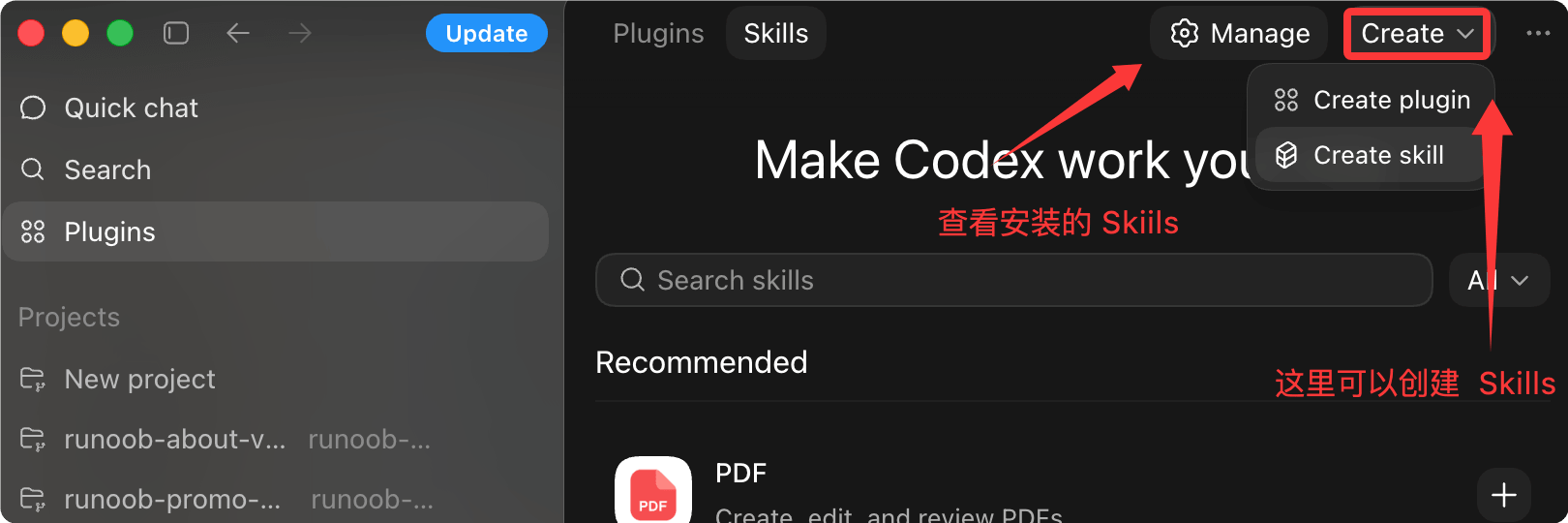
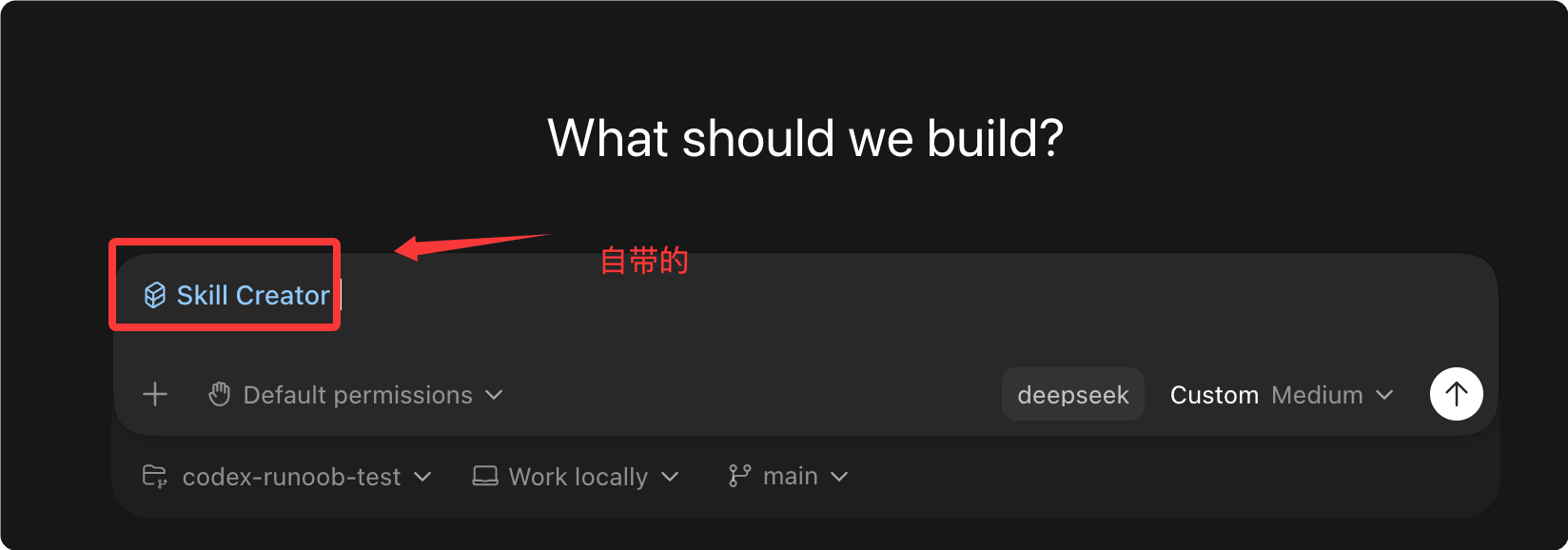
Codex comes with a built-inSkill Creator, click theCreat skillto jump to the Skill creation window, where we can directly tell it what Skill to create:
View installed Skills:

How Skills Work
Codex uses aProgressive Disclosuremechanism to manage the context window, avoiding loading all skill content at once and crowding out prompt space.
Progressive Loading Process
On startup, Codex only loads each skill's name, description, and file path as the initial list.
Only when Codex decides to use a skill does it load the fullSKILL.mdinstruction content.
To avoid crowding out prompt space, the character count of the initial skill list is limited toabout 2% of the model's context window, or 8,000 characters when the context window is unknown.
If too many skills are installed, Codex first shortens the descriptions; if the limit is still exceeded, some skills may not appear in the initial list, and Codex displays a warning.
This budget restriction applies only to the initial skill list. After Codex selects a skill, it still reads the full SKILL.md file for that skill.
Two Trigger Methods
Codex supports two ways to activate skills:
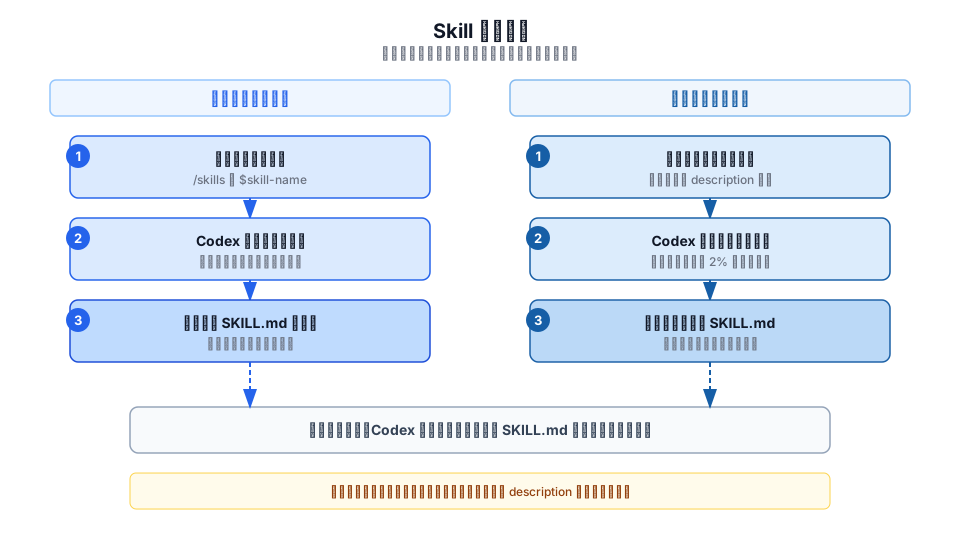
Explicit invocation
Reference the skill directly in the prompt. In the CLI or IDE, use/skillsa command or enter$a symbol to specify a skill.
For explicit invocation, Codex does not need to perform any matching judgment; it directly loads the full SKILL.md and executes it.
Implicit matching
When the task description you provide matches a skill'sdescriptionfield, Codex automatically selects that skill.
The accuracy of implicit matching depends entirely on the quality of the description field.
When writing the description, put core use cases and trigger keywords at the front, so that even if the description is truncated, Codex can still match correctly.
Skill Directory Structure
A Skill is a directory containingSKILL.mdfiles, and may include optional scripts, reference documentation, resource files, and metadata configuration.
my-skill/
├── SKILL.md        # 必备项:使用指引 + 元数据
├── scripts/        # 可选:可执行代码
├── references/     # 可选:参考文档
├── assets/         # 可选:模板、各类资源
└── agents/
    └── openai.yaml
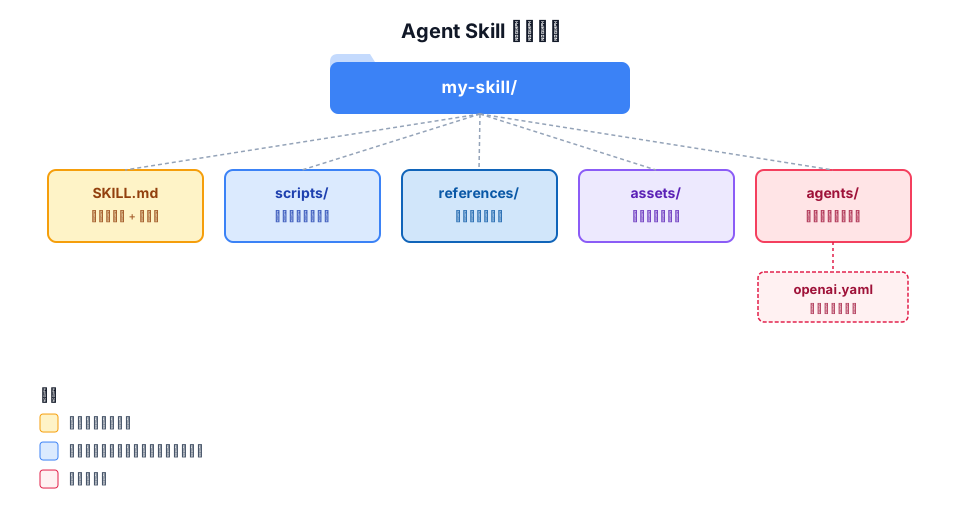
The responsibilities of each file/directory are as follows:
| File/Directory | Required? | Description |
|---|---|---|
| SKILL.md | Required | The core instruction file for the skill; must containnameanddescriptionfield |
| scripts/ | Optional | Stores executable code, used for scenarios requiring deterministic behavior or calling external tools |
| references/ | Optional | Stores additional reference documentation for Codex to consult while executing the skill |
| assets/ | Optional | Stores static resource files such as templates and images |
| agents/openai.yaml | Optional | Configures UI metadata, invocation policy, and tool dependency declarations |
Quick Start: Create Your First Skill
It is recommended to use the built-in skill creator to quickly generate a skill framework.
Create with skill-creator
Enter the following command in Codex to start the interactive creation flow:
Example
$skill-creator
The creator will ask the following questions in order:
| Step | Question | Description |
|---|---|---|
| 1 | What does this skill do? | Define the task the skill is supposed to accomplish |
| 2 | When should it trigger? | Decide whether it is triggered by explicit invocation or implicit matching |
| 3 | Pure instructions or includes scripts? | Pure instruction mode is recommended by default, as it is concise and easy to maintain |
Manual Creation
You can also manually create the skill directory and SKILL.md file:
Example
name: my-skill
description: Explain when this skill should be triggered and when it should not be triggered.
---
Codex will execute the task by following the skill instructions below.
Codex automatically detects changes to skill files. If a skill does not take effect immediately after an update, please restart Codex.
Configuration Instructions
Skill Storage Location
Codex reads skills from four scopes: repository level, user level, admin level, and system level.
For the repository level, Codex scans upward from the current working directory to the repository root, looking for.agents/skillsdirectory.
If two skills have the samename, Codex does not merge them; both will appear in the skill selector.
| Scope | Storage path | Applicable scenario |
|---|---|---|
| REPO | $CWD/.agents/skills | Skills in the current working directory, suitable for team-shared skills for a specific module or microservice |
| REPO | $CWD/../.agents/skills | Skills in parent directories, suitable for shared areas in nested directory structures |
| REPO | $REPO_ROOT/.agents/skills | Skills at the repository root, suitable for base skills shared across all subdirectories of the entire repository |
| USER | $HOME/.agents/skills | A user's personal skill set, suitable for skills that the user can use in any repository |
| ADMIN | /etc/codex/skills | Machine- or container-level shared skills, suitable for SDK scripts, automation, and admin default skills |
| SYSTEM | Packaged by OpenAI by default | Built-in skills for a broad audience, such as skill-creator and plan skills, available to all users as soon as they start Codex |
Codex supports symbolic links for skill directories, and follows the symlink target when scanning.
The above path applies to local development and discovery. If you need to distribute skills to users outside a single repository, or package them together with application integration, use the Plugins mechanism.
Enabling and Disabling Skills
In~/.codex/config.tomlYou can disable a skill without deleting files by using the[[skills.config]]configuration option:
Example
[[skills.config]]
path = "/path/to/skill/SKILL.md"
enabled = false
After modifying the configuration file, you need to restart Codex for the changes to take effect.
Optional Metadata Configuration
Inagents/openai.yamlYou can configure UI metadata, invocation policies, and tool dependency declarations for skills in:
Example
# UI configuration: controls how the skill is displayed in the Codex App
interface:
display_name: "User-facing display name"
short_description: "User-facing short description"
icon_small: "./assets/small-logo.svg"
icon_large: "./assets/large-logo.png"
brand_color: "#3B82F6"
default_prompt: "Optional peripheral prompt to use with the skill"
# Policy configuration: controls the invocation behavior of the skill
policy:
allow_implicit_invocation: false # Set to false to disable implicit matching
# Dependency configuration: declares the tools required by the skill
dependencies:
tools:
- type: "mcp"
value: "openaiDeveloperDocs" # MCP server name
description: "OpenAI Docs MCP server"
transport: "streamable_http" # Transport protocol
url: "https://developers.openai.com/mcp" # MCP service address
allow_implicit_invocationThe default value oftrueis . When set tofalse, Codex will not implicitly invoke the skill based on user prompts, but explicit$skillinvocation still works.
| Configuration item | Type | Default value | Description |
|---|---|---|---|
| interface.display_name | String | Empty | The name displayed in the Codex App |
| interface.short_description | String | Empty | The short description displayed in the Codex App |
| interface.icon_small | Path | Empty | Small icon path (SVG format) |
| interface.icon_large | Path | Empty | Large icon path (PNG format) |
| interface.brand_color | Color value | Empty | Brand color used for UI display |
| interface.default_prompt | String | Empty | The default peripheral prompt used when this skill is used |
| policy.allow_implicit_invocation | Boolean | true | Whether Codex is allowed to implicitly match and invoke the skill |
| dependencies.tools | Array | Empty | Declares the MCP tools the skill depends on; each item must specify type, value, description, etc. |
Skill Distribution and Installation
Distributing Skills via Plugins
A direct skill folder is suitable for local authoring and repository-scoped workflows.
If you need to distribute reusable skills, bundle multiple skills together, or publish skills together with application integration, you should package them as aPlugin。
A Plugin can contain one or more skills, and can optionally bundle application mappings, MCP server configurations, and presentation assets.
Installing Featured Skills
You can use$skill-installerto install curated skills beyond the built-in ones into the local Codex environment.
For example, install the$linearskill:
Example
$skill-installer linear
You can also download skills from other repositories via skill-installer.
Codex automatically detects newly installed skills. If they do not appear immediately, restart Codex.
skill-installer is suitable for local setup and experimentation. To distribute your own skills for reuse, prefer the Plugins mechanism.
Best Practices
| Principle | Description | Applicable scenario |
|---|---|---|
| One skill does one thing | Keep each skill focused on a single responsibility; avoid loading a skill with too many unrelated tasks | All skills should follow |
| Instructions over scripts | If a process can be described with instructions, do not write a script unless deterministic behavior or external tool invocation is required | Pure instruction mode is recommended for most scenarios |
| Use imperative sentence patterns | Write steps with imperative sentences, clearly stating the input and output of each step | When writing SKILL.md instructions |
| Test the matching effectiveness of description | Use real prompts to test whether the skill triggers correctly, ensuring the precision of the description | After writing the skill |
| Prerequisite core trigger words | Put key use cases and trigger words at the beginning of the description to ensure matching even after truncation. | When the description may be truncated |
Frequently Asked Questions
Skill updates not taking effect?
Codex automatically detects changes to skill files.
If the skill does not appear in the list after updating, restart Codex.
What happens if two skills have the same name?
Codex does not merge skills with the same name; both will appear in the skill selector.
It is recommended to avoid using the same skill name in different scopes to prevent confusion.
What if implicit matching is inaccurate?
First checkdescriptionWhether the skill's usage scenarios and boundaries are clearly described.
Place core trigger words at the beginning, and avoid having key information appear in the latter half of the description.
If implicit matching is not needed, you canagents/openai.yamlin theallow_implicit_invocationset tofalse。
When to use Skills and when to use Plugins?
Skills is a authoring format, suitable for local development and team sharing within a repository.
When you need to distribute skills to other developers, package multiple skills, or release them together with application integration, use the Plugins format.
How to handle a truncated initial skill list?
Simplify each skill's description to make it short and precise.
Ensure the core trigger words appear at the very beginning of the description, so matching works correctly even when shortened.
For skills that are not commonly used for the current task, consider temporarily disabling them.
Other extensions