Codex CLI Model Selection
Codex supports multiple AI models, and different models have their own characteristics in terms of speed, capabilities, and cost. This section details how to choose the right model.
Available Models
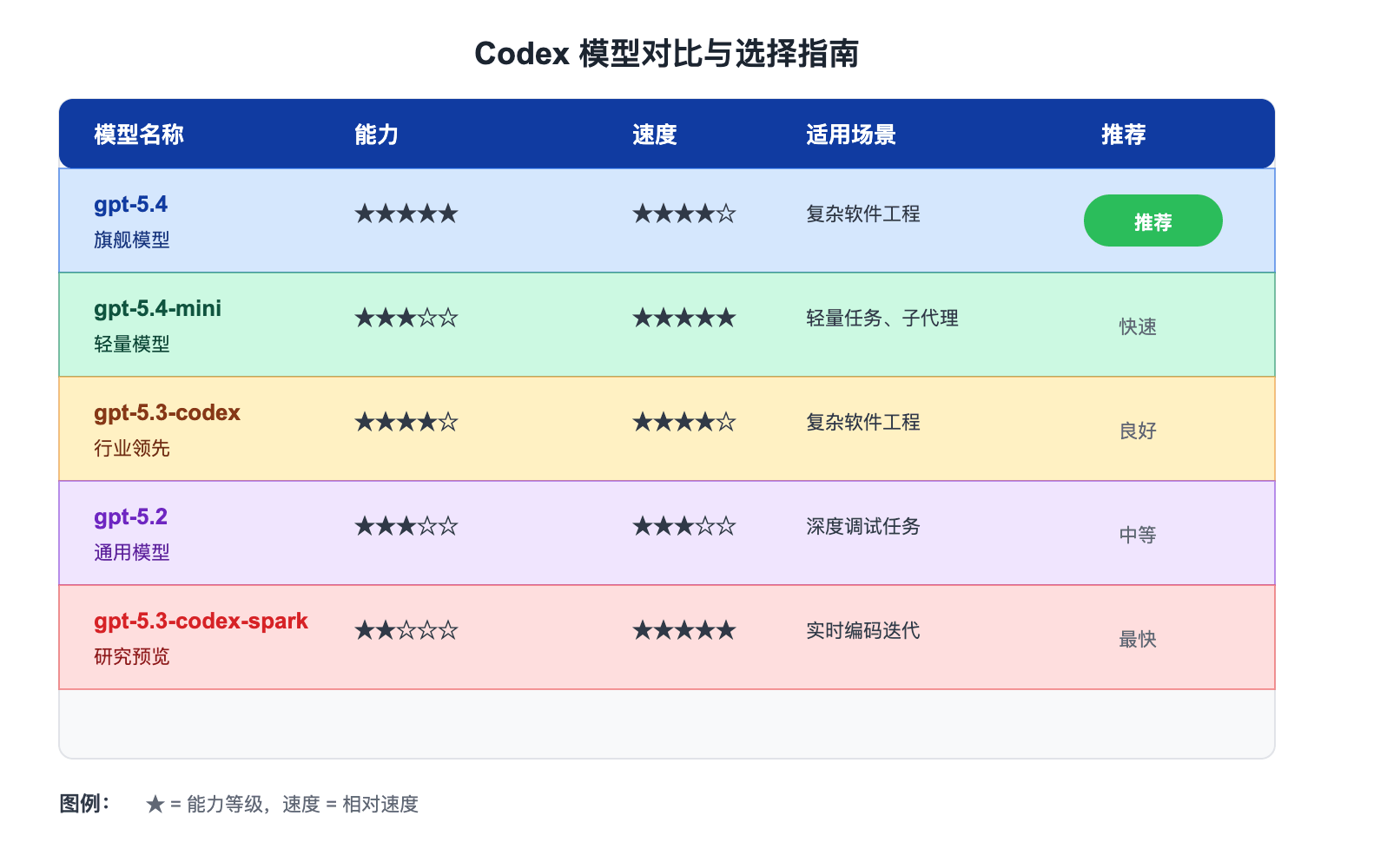
Recommended Models
| Model | Features | Use Cases |
|---|---|---|
| gpt-5.4 | Latest flagship model with the strongest coding capabilities | Complex software engineering, professional work |
| gpt-5.4-mini | Fast and efficient lightweight model | Responsive coding tasks, subagents |
| gpt-5.3-codex | Industry-leading coding model | Complex software engineering tasks |
For most Codex tasks, it's recommended to start with gpt-5.4. It combines powerful coding, reasoning, native computer use, and broader professional workflows in a single model.
Alternative Models
| Model | Features | Use Cases |
|---|---|---|
| gpt-5.2 | General-purpose model previously used for coding and agent tasks | Complex debugging tasks that require deep thinking |
Selection Recommendations
Daily Coding Tasks
Usegpt-5.4as the default choice. It performs excellently across various coding tasks.
Simple/Fast Tasks
Usegpt-5.4-miniwhen you want a faster, lower-cost option for lightweight coding tasks or subagents.
Complex Reasoning Tasks
When encountering difficult debugging tasks that require deep thinking, you can trygpt-5.2。
Configure Default Model
You can set the default model in the configuration file:
Configure Default Model
# Set default model
model = "gpt-5.4"
If no model is specified, the Codex app, CLI, or IDE extension will default to the recommended model.
Temporarily Change Model
Using Command Line Arguments
Specify Model via Command Line
codex -m gpt-5.4
# Using the exec command
codex exec -m gpt-5.4 "fix this bug"
Switching Within a Session
Switching Models Within a Session
/model gpt-5.4-mini
# Or use the /model command
/model gpt-5.2
Switching in the IDE Extension
In the IDE extension, use the model selector below the input box to switch models.
Reasoning Configuration
Codex supports adjusting the reasoning effort:
| Configuration Value | Description |
|---|---|
minimal | Minimal reasoning |
low | Low reasoning |
medium | Medium reasoning (default) |
high | High reasoning |
xhigh | Very high reasoning (depends on the model) |
Configure Reasoning Effort
model_reasoning_effort = "medium"
# Set specific reasoning effort for plan mode
plan_mode_reasoning_effort = "high"
Higher reasoning effort produces more thoughtful responses, but may be slower and consume more resources.
Reasoning Summary
You can control the level of detail of the reasoning summary:
| Configuration value | Description |
|---|---|
auto | Automatic selection |
concise | Concise summary |
detailed | Detailed summary |
none | Disable summary |
Configure Reasoning Summary
model_reasoning_summary = "auto"
Custom Model Providers
In addition to OpenAI models, you can also configure other model providers:
Configure Custom Providers
# Provider display name
name = "My Custom Provider"
# API base URL
base_url = "https://api.example.com/v1"
# API key environment variable
env_key = "CUSTOM_PROVIDER_API_KEY"
# Other configuration
http_headers = {
"X-Custom-Header": "value"
}
Supports any model and provider that supports the Chat Completions or Responses API.
Service Tier
Codex supports different service tiers:
| Service tier | Description |
|---|---|
flex | Flexible tier, optimized for cost |
fast | Fast tier, prioritizing speed |
Configure Service Tier
service_tier = "fast"
Model Selection Best Practices
Starting a New Project
Usegpt-5.4for the best overall experience.
Simple Tasks
Usegpt-5.4-minito save costs.
Complex Debugging
Consider usinggpt-5.2for in-depth debugging.
Subagents
Subagents usegpt-5.4-minifor better efficiency.
Check for updates regularly, as new models and improvements are continuously released.
FAQ
Q: Which model is best for daily coding?
gpt-5.4 is the best choice for everyday coding tasks, providing a balance of powerful capability and reasonable speed.
Q: Why is the mini model recommended for subagents?
Subagents perform simpler tasks, and mini models can complete them faster while saving costs.
Q: Can I use my own model?
Yes, you can use any model that supports the Responses API by configuring model_providers.
Q: Does model selection affect cost?
Yes, different models have different pricing. Check the pricing page for details.
Other extensions