Codex MCP Server Configuration
MCP (Model Context Protocol) allows Codex to integrate with external tools and services.
This section provides detailed instructions on how to configure and use MCP servers.
What is MCP?
MCP is an open protocol that enables standardized interaction between AI models and external tools and services. Through MCP servers, you can extend Codex's capabilities:
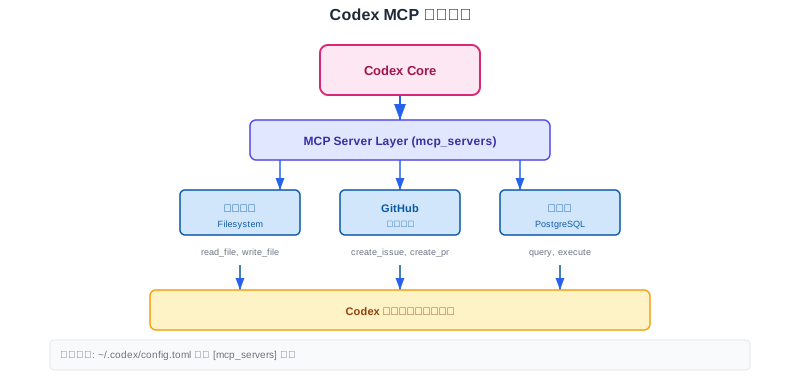
- Connecting the File System
- Access Database
- Integrate project management tools
- Call external API
MCP based on openModel Context ProtocolBuild, with support for standardized integration across different tools.
MCP basic configuration
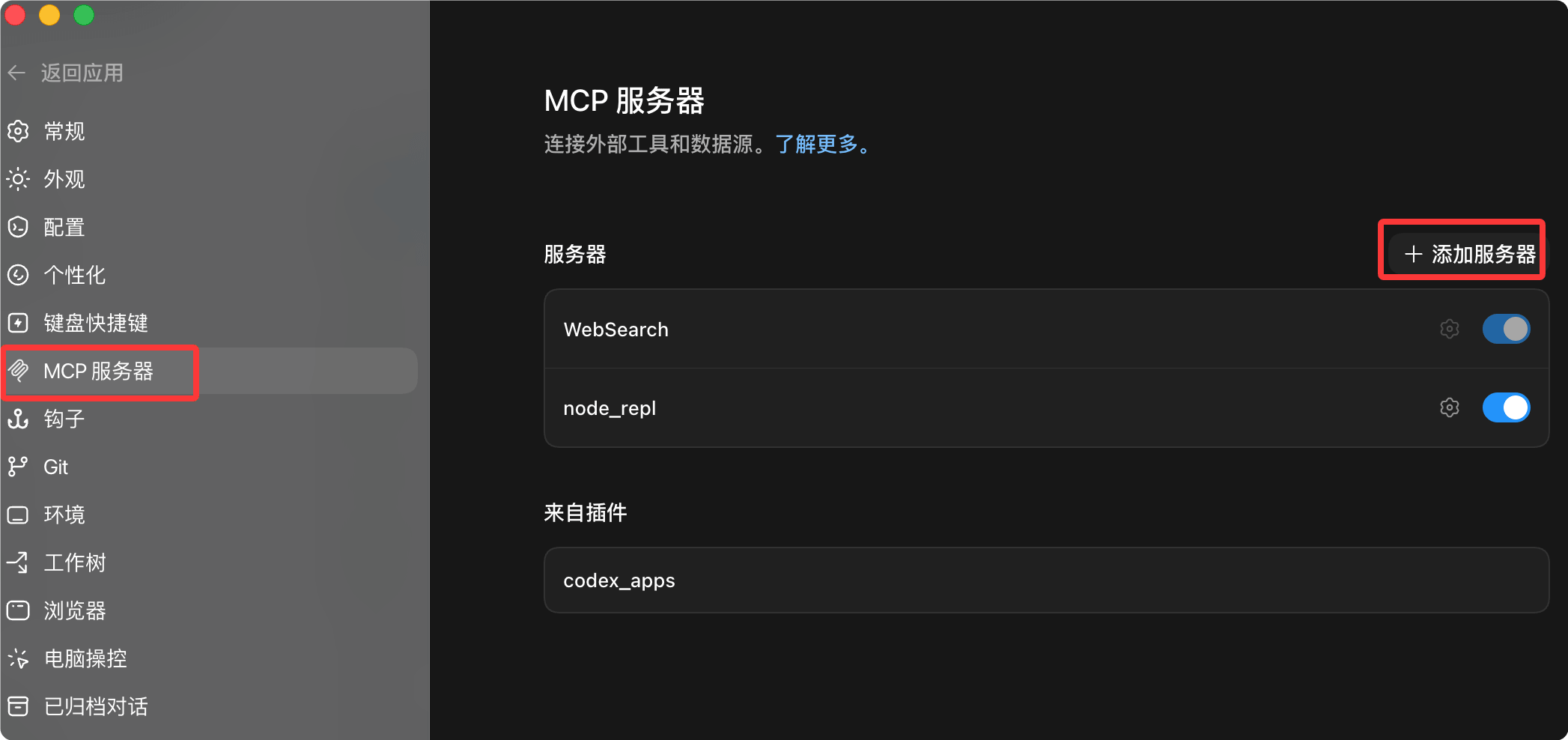
Codex configuration menu
You can manage or add MCP services through the settings menu:
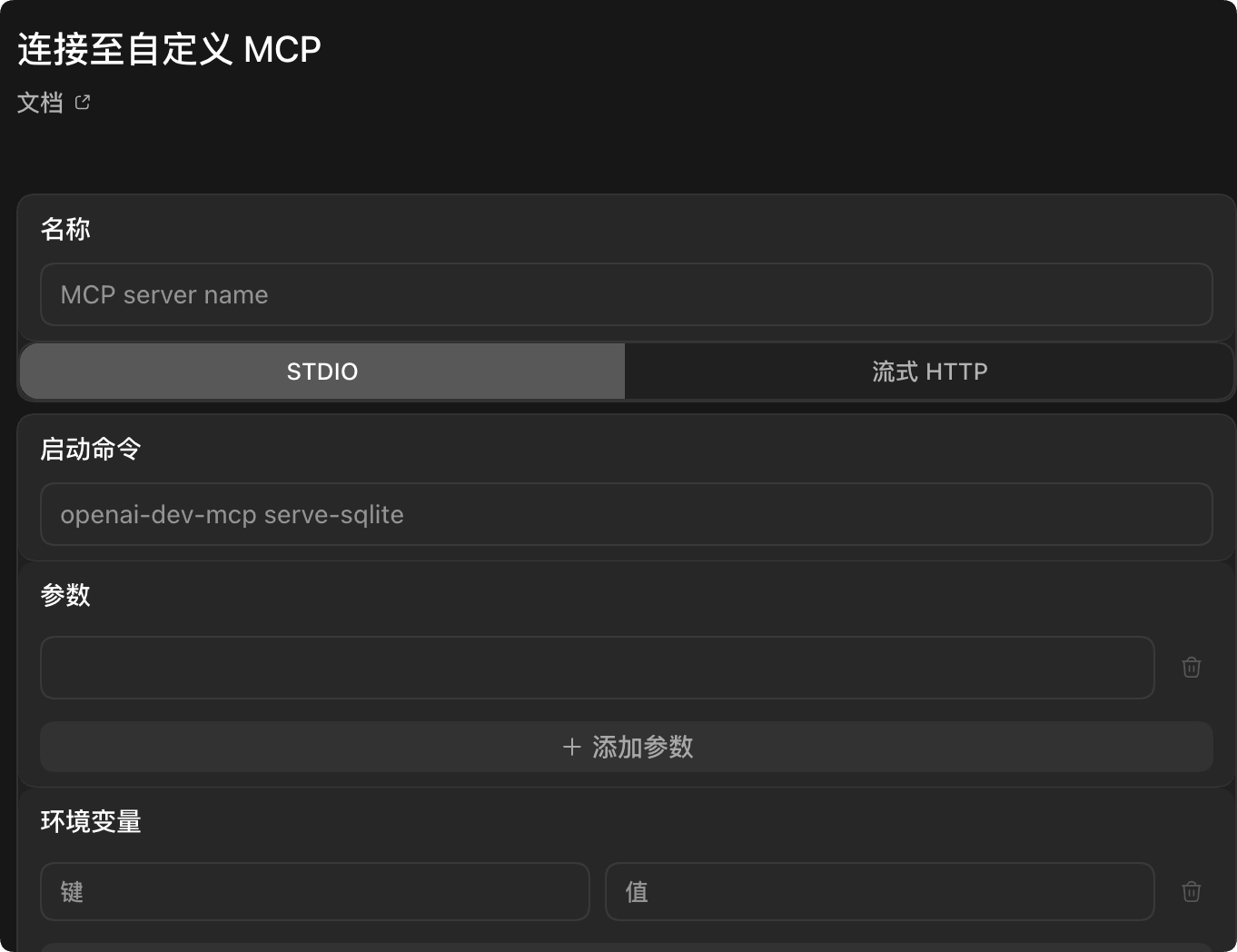
Connect to custom MCP:
Configuration File Location
MCP server at~/.codex/config.tomlofmcp_serversPartial configuration.
stdio type server
Configure stdio MCP server
# Server startup command
command = "npx"
# Arguments passed to the command
args = ["-y", "@modelcontextprotocol/server-filesystem", "./docs"]
# Server working directory
cwd = "/path/to/workdir"
# Pass environment variables
env = {
NODE_ENV = "production"
}
HTTP type server
Configure HTTP MCP server
# MCP HTTP server endpoint
url = "https://docs.example.com/mcp"
# Included HTTP headers
http_headers = {
Authorization = "Bearer token"
}
MCP tool configuration
Restricting Available Tools
You can restrict the tools exposed by the MCP server:
Tool whitelist/blacklist
# Allowed tools list
enabled_tools = ["read_file", "write_file", "list_directory"]
# Denied tools list (applied after enabled_tools)
disabled_tools = ["delete_file"]
Using tool restrictions can improve security by only exposing the tools you need.
Timeout configuration
Configure timeout
command = "python"
args = ["-m", "slow_server"]
# Startup timeout (seconds, default 10)
startup_timeout_sec = 30
# Per-tool call timeout (seconds, default 60)
tool_timeout_sec = 120
MCP authentication configuration
OAuth Configuration
Configure OAuth
url = "https://api.example.com/mcp"
# Requested OAuth scopes
scopes = ["read", "write"]
# OAuth resource parameter
oauth_resource = "codex-integration"
# Bearer token environment variable
bearer_token_env_var = "EXAMPLE_API_TOKEN"
HTTP Header Configuration
Configuring HTTP Headers
url = "https://api.example.com/mcp"
# Populate HTTP headers from environment variables
env_http_headers = {
X_API_KEY = "MY_API_KEY"
}
# Static HTTP headers
http_headers = {
X_Custom_Header = "value"
}
OAuth callback configuration
Configure OAuth callback
mcp_oauth_callback_port = 8080
# Custom callback URL
mcp_oauth_callback_url = "https://my-devbox.example.com/callback"
# Credential storage location
mcp_oauth_credentials_store = "keyring" # file | keyring | auto
MCP tool permissions
You can set permissions individually for each MCP server's tools:
Configuring Tool Permissions
# Permission mode: ask | approve | deny
approval_mode = "approve"
| Permission Mode | Description |
|---|---|
ask | Ask before each execution (default) |
approve | Auto approve |
deny | Auto deny |
Be careful when configuring tool permissions, and only grant auto-approval permissions to tools you trust.
Common MCP servers
File System Server
File system MCP
command = "npx"
args = ["-y", "@modelcontextprotocol/server-filesystem", "./docs"]
GitHub Server
GitHub MCP
command = "npx"
args = ["-y", "@modelcontextprotocol/server-github"]
env = {
GITHUB_PERSONAL_ACCESS_TOKEN = "your-token-here"
}
PostgreSQL Server
PostgreSQL MCP
command = "npx"
args = ["-y", "@modelcontextprotocol/server-postgres", "postgresql://user:pass@localhost/db"]
Common MCP servers
You can install more MCP servers via npm:
# 搜索 MCP 服务器
npm search @modelcontextprotocol/server

# 安装 MCP 服务器
npm install -g @modelcontextprotocol/server-filesystem
OpenAI officially provides a variety of MCP servers. SeeGitHub repositoryGet the full list.
Troubleshooting
Server Failed to Start
Check the following:
- Are the command and parameters correct?
- Are the necessary dependencies installed?
- Are the environment variables set correctly?
Tool Call Timeout
Increase the timeout:
tool_timeout_sec = 120
Authentication issue
Ensure the OAuth callback port is not occupied and the credential storage is configured correctly.
Usagecodex --verboseYou can view detailed MCP debugging information.
FAQ
Q: MCP server cannot start?
Check whether the command is installed correctly, try running the command manually to confirm there are no errors.
Q: Where are tool permissions configured?
In the configuration file'smcp_servers.<id>.tools.<tool>Partial configuration.
Q: How do I disable a specific MCP server?
Add to the configurationenabled = falseOr directly delete the configuration.
Q: How many MCP servers are supported?
There is no strict limit, but it is recommended to configure only the servers you actually need.
other extensions