Codex Deepseek Configuration -- via CC Switch Relay
This article describes how to use CC Switch to let Codex use third-party models, such as DeepSeek, Qwen, ZLM, and others.
CC Switch is a free, open-source cross-platform desktop tool that lets you switch third-party API providers with one click in AI coding assistants like Codex, enabling you to use AI coding capabilities at a lower cost.
This article is based on CC Switch v3.16.0 (it is best to install the latest version) and explains how to configure DeepSeek as the backend API for Codex. Other models can also refer to this configuration.
In addition to the official API, we can also useCoding Plan/Token Plana package that directly connects to mainstream large models such as DeepSeek, Kimi, GLM, Doubao, and MiniMax, without needing to purchase each API separately.
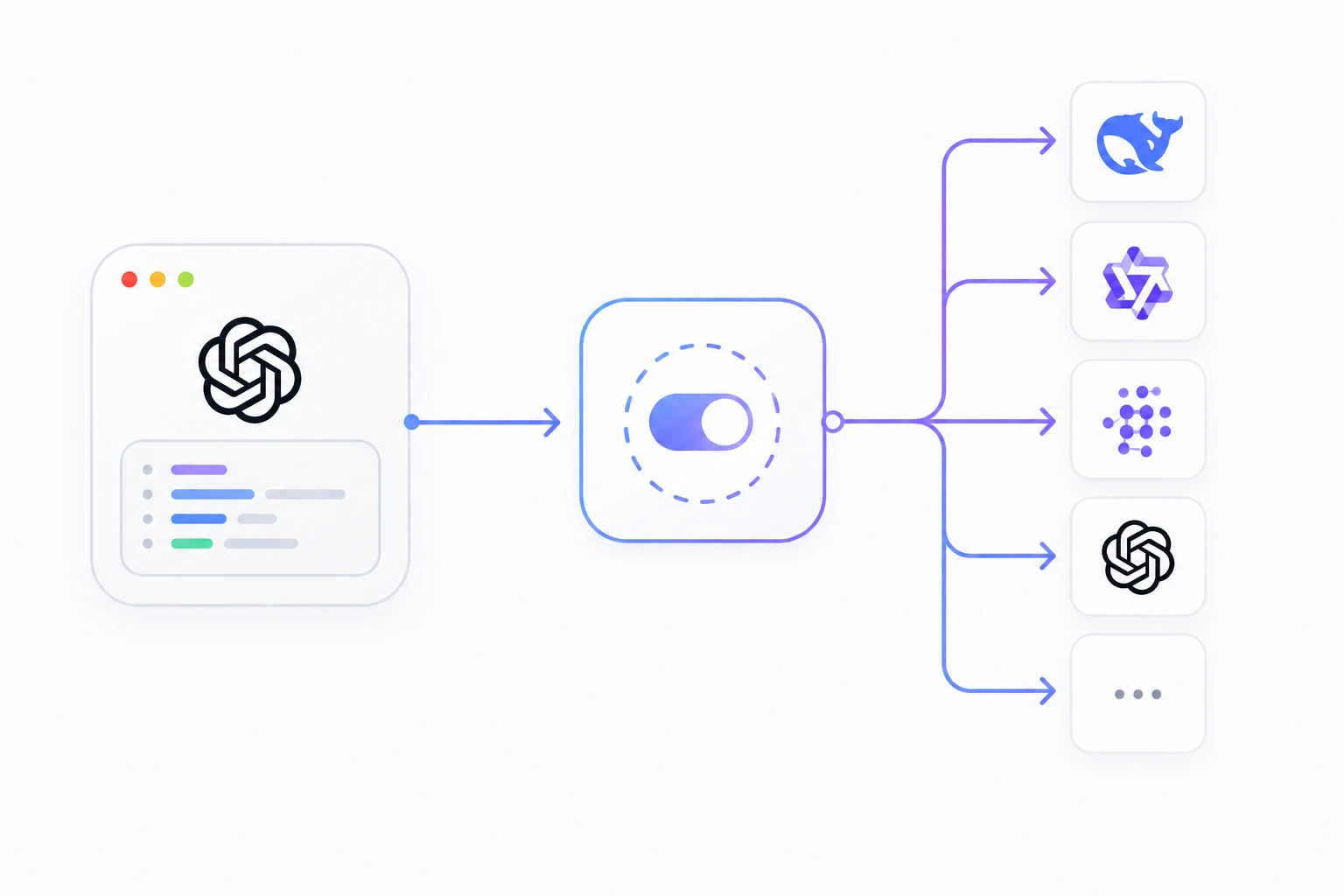
How It Works
CC Switch starts a proxy service on your local machine, transparently forwards requests from Codex to the backend you specify (e.g., DeepSeek), and then sends the response back to Codex.
The entire forwarding process is completely transparent. As far as Codex is concerned, it still thinks it is accessing the official OpenAI interface, but in reality, requests have been forwarded by CC Switch to the third-party model service you specified.

Prerequisites
Before starting the configuration, please make sure you meet the following requirements:
| Requirement | Description |
|---|---|
| Codex installed | Viahttps://openai.com/zh-Hans-CN/codex/Download and install |
| DeepSeek API Key | Go toplatform.deepseek.comRegister and obtain |
| Operating System | Windows 10+, macOS 12+, or mainstream Linux distributions |
Step 1: Install CC Switch
The download address for the installation package ishttps://github.com/farion1231/cc-switch/releases/latest; scroll to the bottom of the page to see download links for each platform:

Choose the corresponding installation method based on your operating system.
| Distribution | Recommended format | Installation method |
|---|---|---|
| Ubuntu / Debian / Linux Mint / Pop!_OS | .deb | sudo dpkg -i CC-Switch-*.deborsudo apt install ./CC-Switch-*.deb |
| Fedora / RHEL / CentOS / Rocky Linux | .rpm | sudo rpm -i CC-Switch-*.rpmorsudo dnf install ./CC-Switch-*.rpm |
| openSUSE | .rpm | sudo zypper install ./CC-Switch-*.rpm |
| Arch Linux / Manjaro | .AppImage | Add execute permission and run directly, or use AUR |
| Other distributions / Not sure | .AppImage | chmod +x CC-Switch-*.AppImage && ./CC-Switch-*.AppImage |
macOS (Recommended)
The macOS version is notarized and can be installed directly using Homebrew:
# 使用 Homebrew 安装 CC Switch(已公证版本)
brew install --cask cc-switch
Windows
fromGitHub ReleasesDownload.msithe installation package, and double-click to run it.
Linux(Ubuntu/Debian)
# 安装 CC Switch deb 包
sudo dpkg -i CC-Switch-*.deb
After installation, launch CC Switch; the main interface will appear on the desktop or in the system tray.

For more CC Switch content, refer to:https://www.example.com/ai-agent/cc-switch.html
Step 2: Add DeepSeek Provider
Add DeepSeek as an API provider in CC Switch so that Codex requests can be forwarded to DeepSeek.
The steps are as follows:
Open CC Switch, in the top app switcher bar selectCodex。
Click in the "Providers" area on the left+ Add Provider。

In the preset list, search forDeepSeek, then select the corresponding preset (v3.16.0 has built-in DeepSeek V4 flash and pro versions).
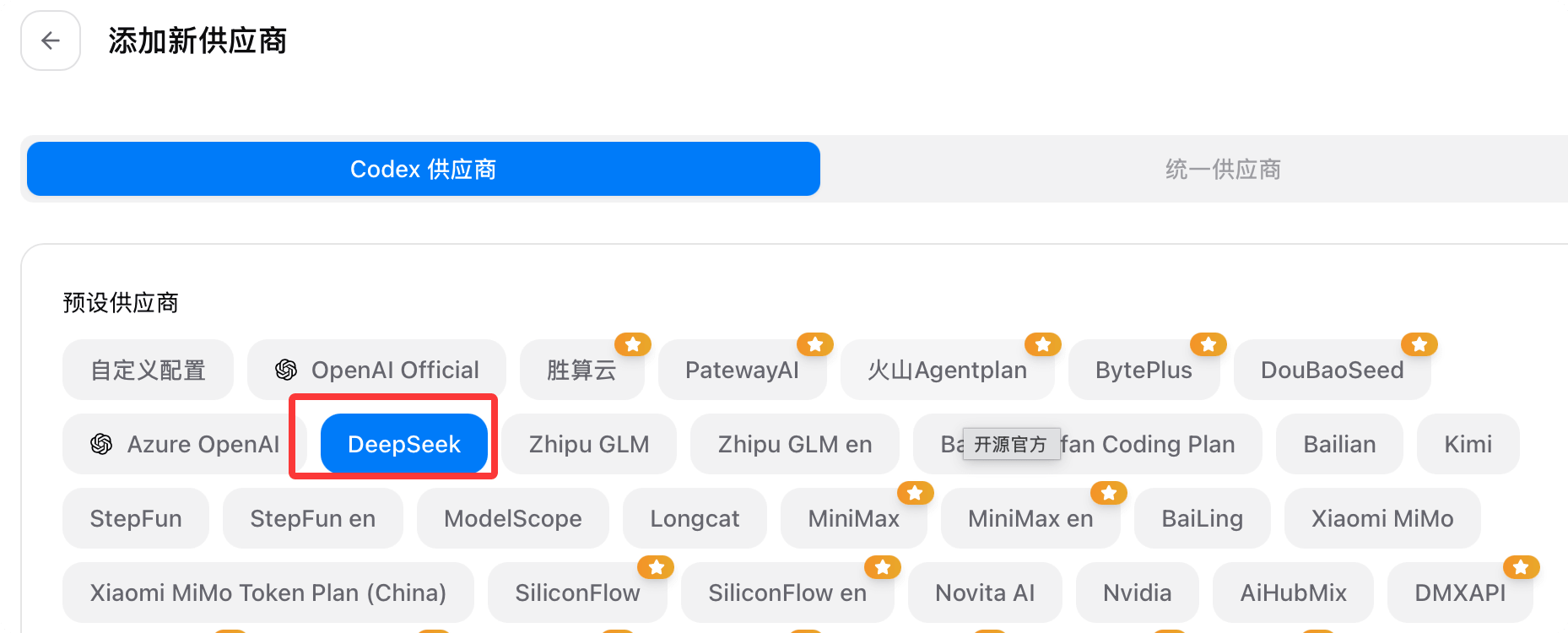
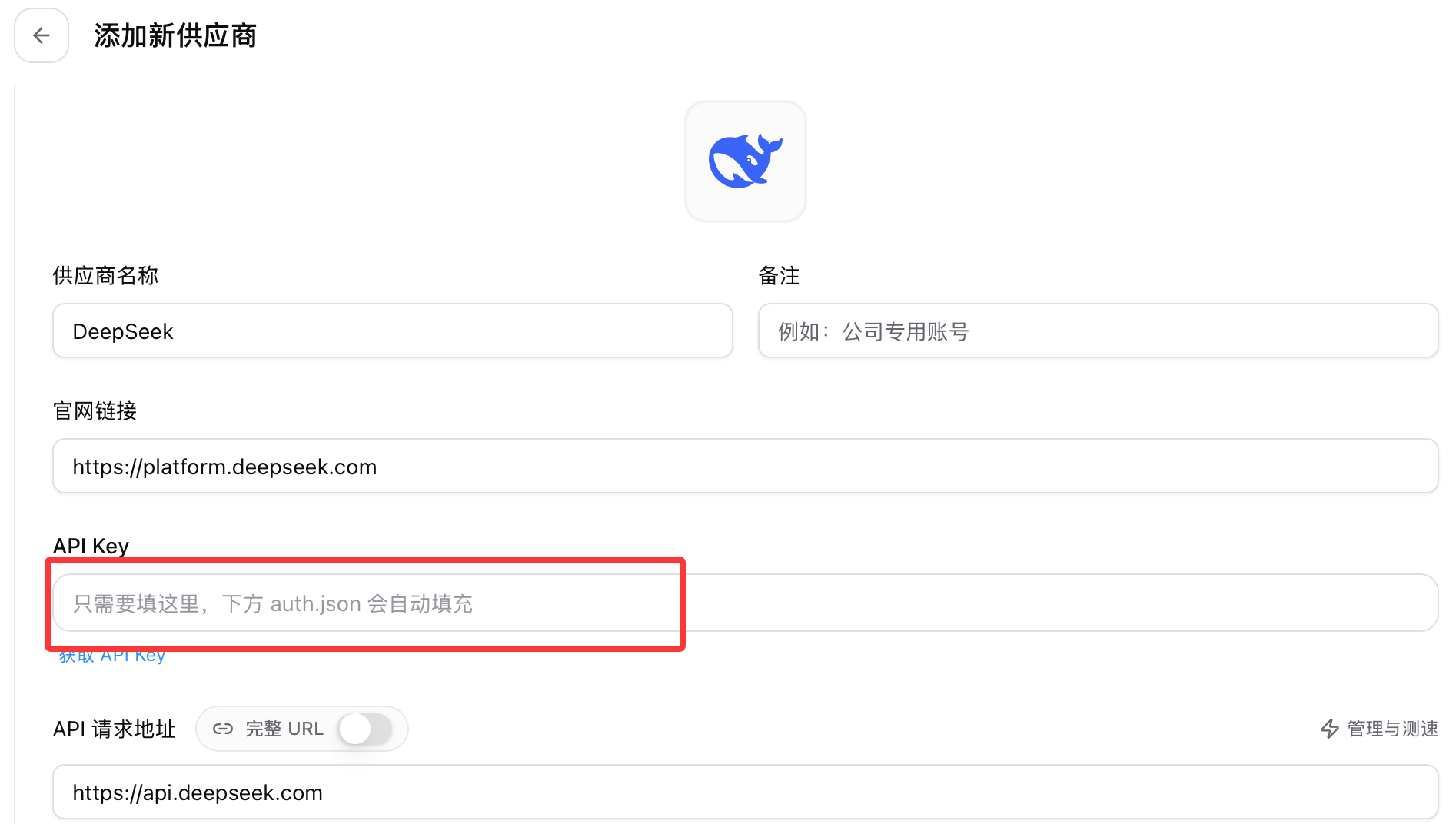
After selecting, fill in yourDeepSeek API Keyin the form below, and leave the remaining fields at their default values.
Remember to enable local route mapping, then clickSave。
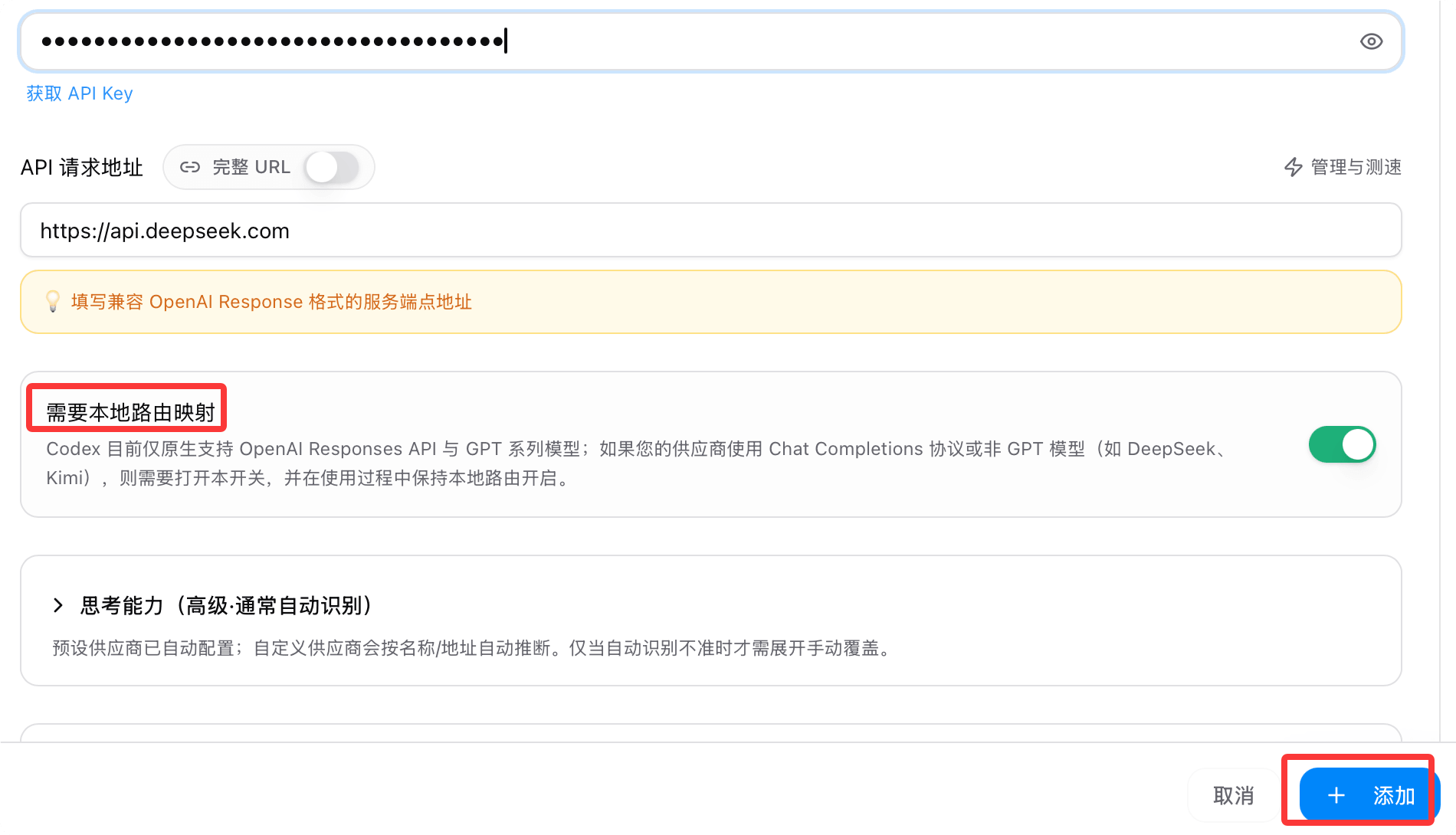
Enable Routing
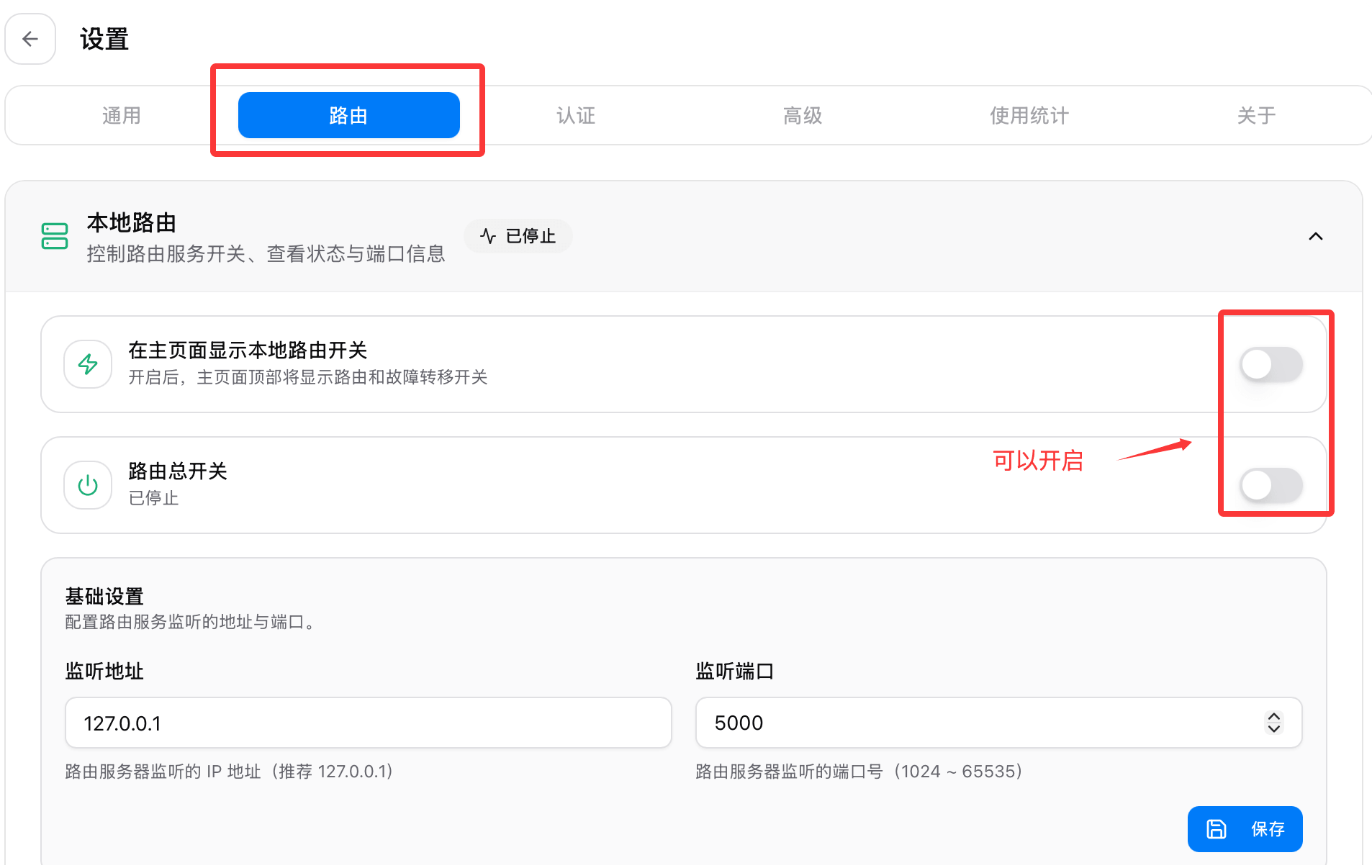
Switch to DeepSeek, the system will prompt us to enable routing. We can click the settings button in the upper-left corner to enter the settings page and enable it:

Click the Routing Settings menu and enable routing:
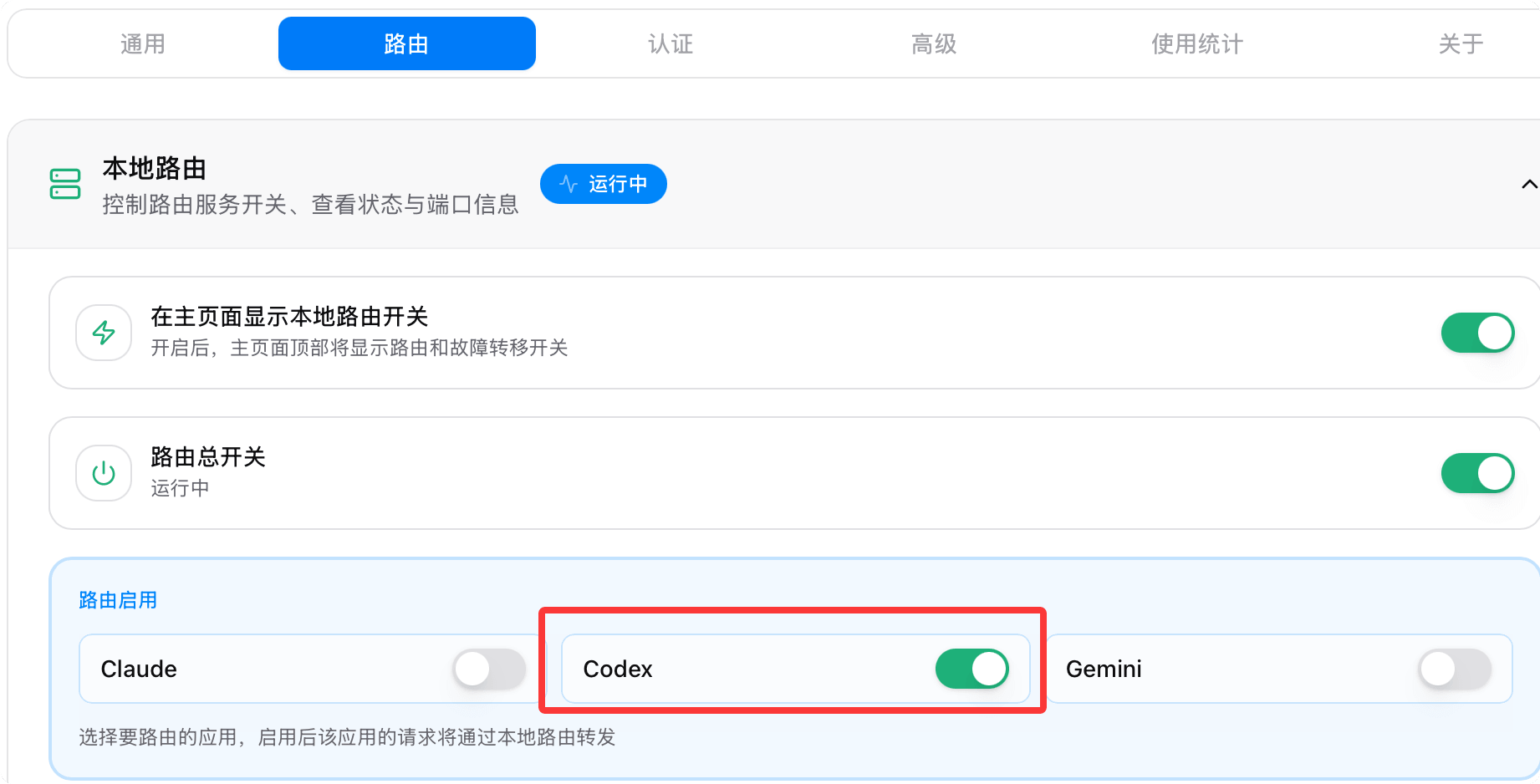
Then select Codex:
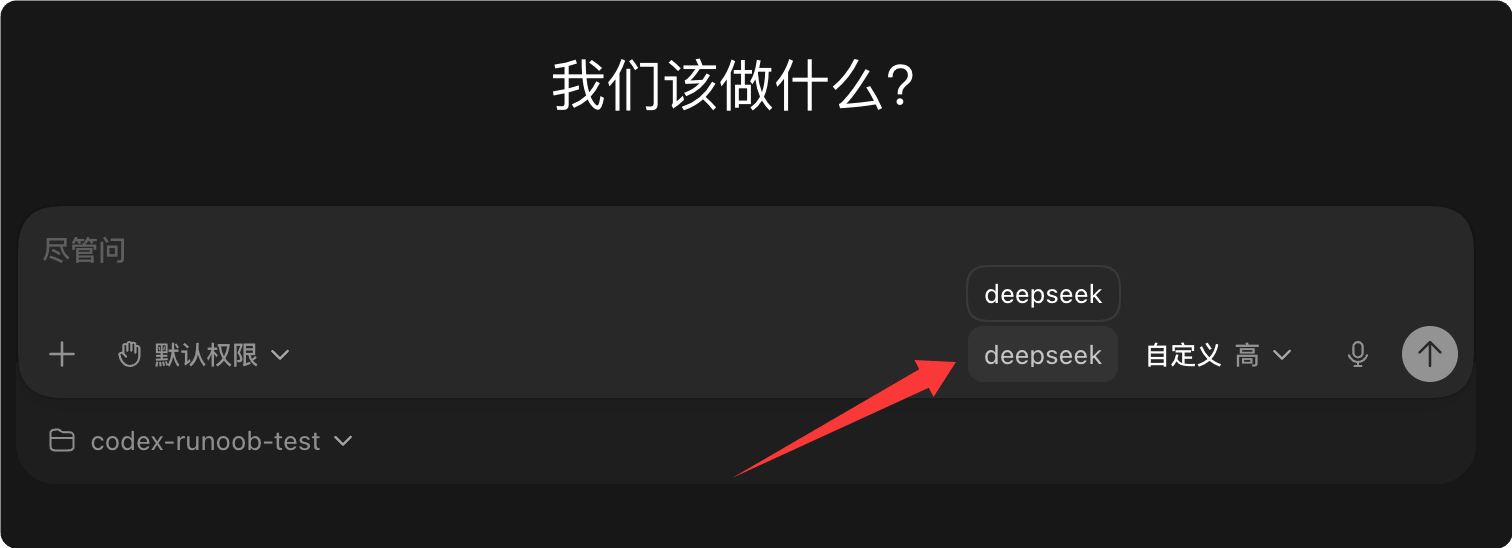
Next, reopen Codex and you will see the DeepSeek model badge:
Choosing a Model: flash or pro?
DeepSeek V4 offers two versions for different use cases. Choosing the right model allows you to strike a balance between cost and capability.
| Model | Features | Use cases |
|---|---|---|
| flash | Fast speed, low cost | Everyday code completion, simple Q&A |
| pro | Strong capability, supports reasoning content | Complex architecture design, multi-step reasoning |
In the CC Switch provider editing interface, you can modify the model in use at any time. The changes take effect immediately without restarting Codex.
FAQ
Codex Reports Connection Error After Switching Providers
Make sure CC Switch's Local Routing is running (green icon).
If you just installed it, you may need to restart the terminal for the environment variables to take effect.
Want to Restore the Official OpenAI Endpoint
In CC Switch, turn off Local Routing takeover, or switch to the official OpenAI provider, and Codex will automatically use the original configuration.
Does CC Switch Record My API Key?
CC Switch is a local application, and all configuration is stored on your local machine. The API Key will not be uploaded to any server.
More Resources
| Resource | URL |
|---|---|
| CC Switch official website | ccswitch.io |
| GitHub repository | github.com/farion1231/cc-switch |
| v3.15.0 release notes | Releases |
| DeepSeek platform | platform.deepseek.com |