Codex CLI Prompting Tips
Mastering effective prompting techniques is key to getting the most out of Codex CLI. This section details how to write efficient prompts to achieve the best results.
Prompt Basics
You interact with Codex by sending prompts that describe the task you want it to accomplish.
Basic Examples
Basic Prompt
"Explain how the transform module works and how other modules use it."
# Add a new feature
"Add a new command-line option `--json` that outputs JSON."
# Fix a bug
"Fix the error in the login function"
How Prompts Work
When you submit a prompt, Codex works in the following loop:
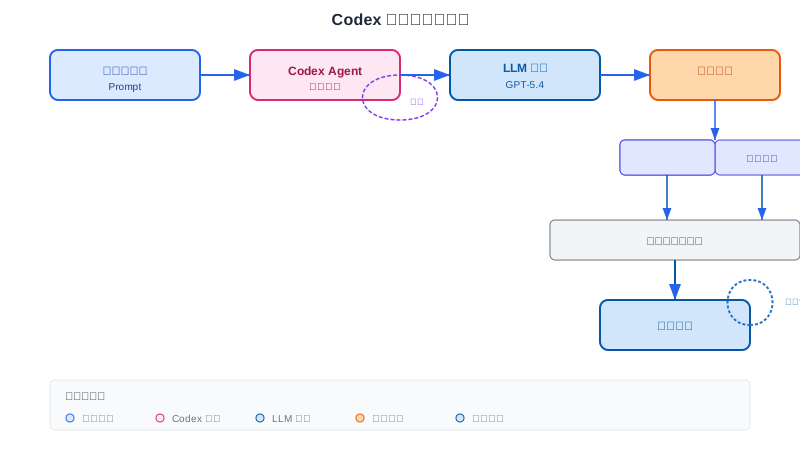
- Call the language model
- Execute the operations indicated by the model's output (read files, edit files, run tools, etc.)
- Repeat until the task is complete or you cancel
Understanding this loop helps you design prompts better, because Codex makes decisions based on context at each step.
Tips for Writing Effective Prompts
Tip 1: Include Verification Steps
Codex produces higher-quality output when it can verify its work. Including verification steps helps Codex ensure correctness:
Prompt with Verification
"Write a function to sort a list"
# Recommended - include verification
"Write a function to sort a list. Include test cases to verify it handles empty lists, already-sorted lists, reverse-sorted lists, and lists with duplicates. Run the tests to confirm they pass."
Tip 2: Break Complex Tasks into Small Steps
Codex performs better on smaller, focused tasks. Small tasks are easier to test and review:
Splitting Tasks
"Create a complete user authentication system with login, registration, password reset, and OAuth"
# Recommended - break into small steps
"Step 1: Create a user model with email and password fields
Step 2: Add a registration endpoint
Step 3: Add a login endpoint with JWT
Step 4: Add password reset functionality
Let me know when Step 1 is done before moving to Step 2"
Tip 3: Provide Context
Provide context that Codex can use, such as references to relevant files and images:
Providing Context
"Fix this bug"
# Recommended - include detailed information
"Fix the bug in src/auth.py where users can't log in with special characters in their password. I've attached a screenshot of the error message and the relevant code section."
Tip 4: Specify the Output Format
Tell Codex the output format you expect:
Specifying the Output Format
"Write a function to calculate Fibonacci numbers. Use TypeScript, include JSDoc comments, and follow functional programming principles."
# Specify output structure
"Explain the codebase structure. Organize your answer with: 1) Overview 2) Key directories 3) Main entry points"
More specific prompts usually produce better results. Codex is good at understanding intent, but the more information you provide, the better it performs.
Threads
A thread is a single conversation: your prompts plus subsequent model outputs and tool calls. A thread can contain multiple prompts.
Local Threads vs Cloud Threads
| Type | Overview | Advantages |
|---|---|---|
| Local threads | Run on your machine | Can read and write files, use existing tools |
| Cloud threads | Run in an isolated environment | Run in parallel, delegate tasks from other devices |
Resuming Conversations
Resuming a Previous Conversation
codex resume
# Jump directly to the most recent session
codex resume --last
# Resume a specific session
codex resume <SESSION_ID>
Conversation Management
Running threads can run in parallel, but avoid having two threads modify the same file at the same time. You can also resume a thread later by continuing with another prompt.
Context Management
When you submit a prompt, include context that Codex can use, such as references to relevant files and images. The IDE extension automatically includes the list of open files and the selected text range as context.
Context Window
All information in a thread must fit within the model's context window. Codex monitors and reports remaining space.
Automatic Compaction
For longer tasks, Codex may automatically compact the context by summarizing relevant information and discarding less relevant details. Codex can continue handling complex tasks over multiple steps.
Manually Managing Context
You can help Codex manage context in the following ways:
- Focus on the current task
- Avoid mixing multiple independent tasks in a single prompt
- Start a new session regularly (using
/new)
When Codex reports high context usage, consider starting a new session or reducing historical messages.
Advanced Prompting Tips
Using Plan Mode
For complex tasks, use plan mode to let Codex plan before executing:
Plan Mode
/plan implement user authentication system
# Or include "plan" in the prompt
"Plan and implement a REST API with CRUD operations for a blog"
Using Review Mode
Ask Codex to review code instead of directly modifying it:
Review Mode
/review src/auth.py
# Or describe the review requirement
"Review this code for potential security vulnerabilities and suggest improvements"
Limiting the Scope of Changes
Clearly tell Codex what it can modify:
Limiting the Scope of Changes
"Explain what this function does, don't make any changes"
# Restrict file scope
"Add logging only to the auth module, don't touch other files"
# Step-by-step confirmation
"Let me know the proposed changes before you make them"
Prompt Templates
Here are some common prompt templates:
Code Generation
Write a [语言] function that [功能描述].
Requirements:
- [需求1]
- [需求2]
Include:
- 详细的文档注释
- 错误处理
- 测试用例
Code Review
Review the [文件/模块] for:
- Potential bugs
- Security issues
- Performance problems
- Code style violations

Provide:
- Issue list with severity
- Suggested fixes
- Overall quality score (1-10)
Bug Fixing
Fix the bug in [文件:行号/函数名].
Error: [错误信息]
Expected behavior: [期望行为]
Steps to reproduce: [复现步骤]
Refactoring
Refactor [文件/函数] to [目标].
Current issues:
- [问题1]
- [问题2]

Constraints:
- 保持功能不变
- 不要改变 API 接口
- 添加单元测试
Practice makes perfect. Practice writing prompts often, and you'll gradually learn how to get the best results.
FAQ
Q: What if Codex doesn't understand my prompt?
Try: 1) Describe more specifically 2) Provide more context 3) Break it into smaller steps 4) Use examples to illustrate the expected output
Q: Should prompts be in English or Chinese?
Codex supports multiple languages, but English usually works best. If you describe in Chinese, make sure the description is detailed and clear enough.
Q: How can I make Codex only analyze code without modifying it?
Clearly tell it "read-only" or "don't make any changes," and it will only provide analysis without modifying.
Q: What if the context window is full?
Start a new session (using /new), or let Codex compact the history (it will handle it automatically).
Other extensions