Node.js net Module
 Node.js Built-in Modules
Node.js'snetThe module is a core module used to create servers and clients based on TCP or IPC. It provides asynchronous network programming capabilities and can be used to build various network applications, such as chat servers, proxy servers, etc.
Main Features
- Create TCP servers and clients
- Create IPC (Inter-Process Communication) servers and clients
- Handle network connections and data transmission
- Manage the lifecycle of network connections
Basic Usage
Create a TCP Server
Example
// Create a TCP server
const server = net.createServer((socket) => {
console.log('Client connected');
// Receive data from the client
socket.on('data', (data) => {
console.log(`Received data: ${data}`);
socket.write(`Server received: ${data}`); // Send data to the client
});
// Client disconnected
socket.on('end', () => {
console.log('Client disconnected');
});
});
// Listen on port 3000
server.listen(3000, () => {
console.log('Server is listening on port 3000');
});
Create a TCP Client
Example
// Create a client and connect to the server
const client = net.createConnection({ port: 3000 }, () => {
console.log('Connected to server');
client.write('Hello Server!'); // Send data to the server
});
// Receive data from the server
client.on('data', (data) => {
console.log(`Received server data: ${data}`);
client.end(); // Disconnect
});
client.on('end', () => {
console.log('Disconnected from server');
});
Core API Details
net.createServer([options][, connectionListener])
Create a new TCP or IPC server.
Parameters:
options: Optional configuration objectallowHalfOpen: Whether to allow half-open connections, defaults to falsepauseOnConnect: Whether to pause the socket on connection, defaults to false
connectionListener: Automatically set as the listener for the 'connection' event
net.createConnection(options[, connectListener])
Create a TCP connection to the specified port and host.
Common options:
port: The port to connect to (required)host: The host to connect to, defaults to 'localhost'localAddress: The local interface used to bind the network connectionfamily: IP protocol family (4 or 6)
Network Socket (Socket)
net.SocketIt is the core class of the net module, representing a network connection.
Common Events
connect: Triggered when a connection is successfully establisheddata: Triggered when data is receivedend: Triggered when the other end of the connection sends a FIN packettimeout: Triggered when the connection times out due to inactivityerror: Triggered when an error occursclose: Triggered when the socket is completely closed
Common Methods
write(data[, encoding][, callback]): Send data on the socketend([data][, encoding]): Half-close the socketdestroy(): Ensure no more I/O activity occurs on this socketpause(): Pause reading dataresume(): Resume reading data
Advanced Applications
Handling Multiple Client Connections
Example
const server = net.createServer((socket) => {
// Set a unique ID for each connection
socket.id = Date.now();
console.log(`Client ${socket.id}connected`);
socket.on('data', (data) => {
console.log(`From client ${socket.id}received data: ${data}`);
// Broadcast a message to all clients
server.getConnections((err, count) => {
if (count > 1) {
socket.write(`There are ${count-1}other clients online`);
}
});
});
socket.on('end', () => {
console.log(`Client ${socket.id}disconnected`);
});
});
server.listen(3000);
Timeout Handling
Example
// Set connection timeout to 5 minutes
socket.setTimeout(5 * 60 * 1000);
socket.on('timeout', () => {
console.log('Connection timed out, disconnecting');
socket.end();
});
});
Methods and Properties
| Function | Description |
|---|---|
| Create Server | net.createServer([options][, connectionListener]): Used to create a TCP server, can listen for connection requests. |
| Connect to Server | net.connect(options[, connectListener])ornet.createConnection(options[, connectListener]): Used to connect to a specified server (create a client). |
| Socket Object | socketThe object represents a connection to a TCP server or client and contains various methods for sending, receiving, and closing connections. |
Methods
| No. | Methods & Description |
|---|---|
| 1 | net.createServer([options][, connectionListener]) Creates a TCP server. The parameter connectionListener automatically creates a listener for the 'connection' event. |
| 2 | net.connect(options[, connectionListener]) Returns a new 'net.Socket' and connects to the specified address and port. When the socket is established, the 'connect' event will be emitted. |
| 3 | net.createConnection(options[, connectionListener]) Creates a TCP connection to port port and host host. host defaults to 'localhost'. |
| 4 | net.connect(port[, host][, connectListener]) Creates a TCP connection with port port and host host. host defaults to 'localhost'. The connectListener parameter will be added as a listener for the 'connect' event. Returns 'net.Socket'. |
| 5 | net.createConnection(port[, host][, connectListener]) Creates a TCP connection with port port and host host. host defaults to 'localhost'. The connectListener parameter will be added as a listener for the 'connect' event. Returns 'net.Socket'. |
| 6 | net.connect(path[, connectListener]) Creates a unix socket connected to path. The connectListener parameter will be added as a listener for the 'connect' event. Returns 'net.Socket'. |
| 7 | net.createConnection(path[, connectListener]) Creates a unix socket connected to path. The connectListener parameter will be added as a listener for the 'connect' event. Returns 'net.Socket'. |
| 8 | net.isIP(input) Checks whether the input is an IP address. Returns 4 for IPV4, 6 for IPV6, and 0 otherwise. |
| 9 | net.isIPv4(input) If the input address is IPV4, return true, otherwise return false. |
| 10 | net.isIPv6(input) If the input address is IPV6, return true, otherwise return false. |
net.Server
net.Server is usually used to create a TCP or local server.
| No. | Methods & Description |
|---|---|
| 1 | server.listen(port[, host][, backlog][, callback]) Listens for connections on the specified port port and host host. By default, host accepts direct connections from any IPv4 address (INADDR_ANY). When port is 0, a random port will be assigned. |
| 2 | server.listen(path[, callback]) Starts a local socket server by listening on the specified path. |
| 3 | server.listen(handle[, callback]) Connect via the specified handle. |
| 4 | server.listen(options[, callback]) The properties of options: port port, host host, and backlog, as well as the optional callback function, together call server.listen(port, [host], [backlog], [callback]). Also, the path parameter can be used to specify a UNIX socket. |
| 5 | server.close([callback]) The server stops accepting new connections and maintains existing connections. This is an asynchronous function. When all connections end, the server will close and the 'close' event will be emitted. |
| 6 | server.address() The operating system returns the bound address, the protocol family name, and the server port. |
| 7 | server.unref() If this is the only active server in the event system, calling unref will allow the program to exit. |
| 8 | server.ref() Opposite of unref. If this is the only server, calling ref on a server that was previously unref'd will not let the program exit (default behavior). If the server has already been ref'd, calling ref again has no effect. |
| 9 | server.getConnections(callback) Asynchronously get the number of currently active connections on the server. It is only valid after the socket is sent to the child process; the callback function has 2 parameters, err and count. |
Events
| No. | Event & Description |
|---|---|
| 1 | listening Triggered when the server calls server.listen to bind. |
| 2 | connection Triggered when a new connection is created. socket is a net.Socket instance. |
| 3 | close Triggered when the server is closed. Note: if connections exist, this event will not be triggered until all connections are closed. |
| 4 | error Triggered when an error occurs. The 'close' event will be called directly by the following events. |
net.Socket
The net.Socket object is an abstraction of TCP or UNIX Socket. net.Socket instances implement a duplex stream interface. They can be used when the user creates a client (using connect()), or they can be created by Node and passed to the user via the connection server event.
Events
net.Socket events include:
| No. | Event & Description |
|---|---|
| 1 | lookup Triggered after the domain name is resolved but before connecting. Not applicable to UNIX sockets. |
| 2 | connect Triggered when a socket connection is successfully established. |
| 3 | data Triggered when data is received. |
| 4 | end Triggered when the other end of the socket sends a FIN packet. |
| 5 | timeout Triggered when the socket times out due to inactivity. This only indicates that the socket has become idle. The user must manually close the connection. |
| 6 | drain Triggered when the write buffer becomes empty. Can be used to control uploads. |
| 7 | error Triggered when an error occurs. |
| 8 | close Triggered when the socket is fully closed. The parameter had_error is a boolean value indicating whether the socket was closed due to a transmission error. |
Properties
net.Socket provides many useful properties for controlling socket interaction:
| No. | Property & Description |
|---|---|
| 1 | socket.bufferSize This property shows the number of bytes to be written to the buffer. |
| 2 | socket.remoteAddress The remote IP address string, e.g., '74.125.127.100' or '2001:4860:a005::68'. |
| 3 | socket.remoteFamily The remote IP protocol family string, e.g., 'IPv4' or 'IPv6'. |
| 4 | socket.remotePort The remote port, represented as a number, e.g., 80 or 21. |
| 5 | socket.localAddress The local interface bound to the network connection. The local IP address to which the remote client is connecting, as a string. For example, if you are listening on '0.0.0.0' and the client connects to '192.168.1.1', the value will be '192.168.1.1'. |
| 6 | socket.localPort The local port address, represented as a number. For example: 80 or 21. |
| 7 | socket.bytesRead The number of bytes received. |
| 8 | socket.bytesWritten The number of bytes sent. |
Methods
| No. | Method & Description |
|---|---|
| 1 | new net.Socket([options]) Constructs a new socket object. |
| 2 | socket.connect(port[, host][, connectListener]) Creates a socket connection with the specified port and host. The host parameter defaults to localhost. Normally there is no need to use net.createConnection to open a socket. It is only used when you implement your own socket. |
| 3 | socket.connect(path[, connectListener]) Opens a unix socket at the specified path. Normally there is no need to use net.createConnection to open a socket. It is only used when you implement your own socket. |
| 4 | socket.setEncoding([encoding]) Set encoding. |
| 5 | socket.write(data[, encoding][, callback]) Sends data on the socket. The second parameter specifies the encoding of the string, which defaults to UTF8 encoding. |
| 6 | socket.end([data][, encoding]) Half-closes the socket. For example, it sends a FIN packet. The server may still be sending data. |
| 7 | socket.destroy() Ensures no I/O activity on this socket. Only needed in the event of an error. (to handle errors, etc.) |
| 8 | socket.pause() Pauses reading data. That is, the data event will no longer be emitted. Very useful for controlling uploads. |
| 9 | socket.resume() Resumes reading data after calling pause(). |
| 10 | socket.setTimeout(timeout[, callback]) Sets the socket to timeout after it has been idle for more than timeout milliseconds. |
| 11 | socket.setNoDelay([noDelay]) Disables the Nagle algorithm. By default, TCP connections use the Nagle algorithm, which buffers data before sending. Setting noDelay to true will send data immediately when calling socket.write(). The default value of noDelay is true. |
| 12 | socket.setKeepAlive([enable][, initialDelay]) Disables/enables keep-alive functionality, and optionally sets an initial delay before sending the first keep-alive probe on an idle socket. Default is false. Set initialDelay (in milliseconds) to set the delay between the last received packet and the first keep-alive probe. Setting initialDelay to 0 will retain the default (or previous) value. The default is 0. |
| 13 | socket.address() Returns the bound address, protocol family name, and server port as reported by the operating system. The returned object has 3 properties, such as { port: 12346, family: 'IPv4', address: '127.0.0.1' }. |
| 14 | socket.unref() If this is the only active server in the event system, calling unref will allow the program to exit. If the server has already been unrefed, calling unref again will have no effect. |
| 15 | socket.ref() Opposite of unref. If this is the only server, calling ref on a server that was previously unrefed will not let the program exit (default behavior). If the server has already been refed, calling ref again will have no effect. |
Example
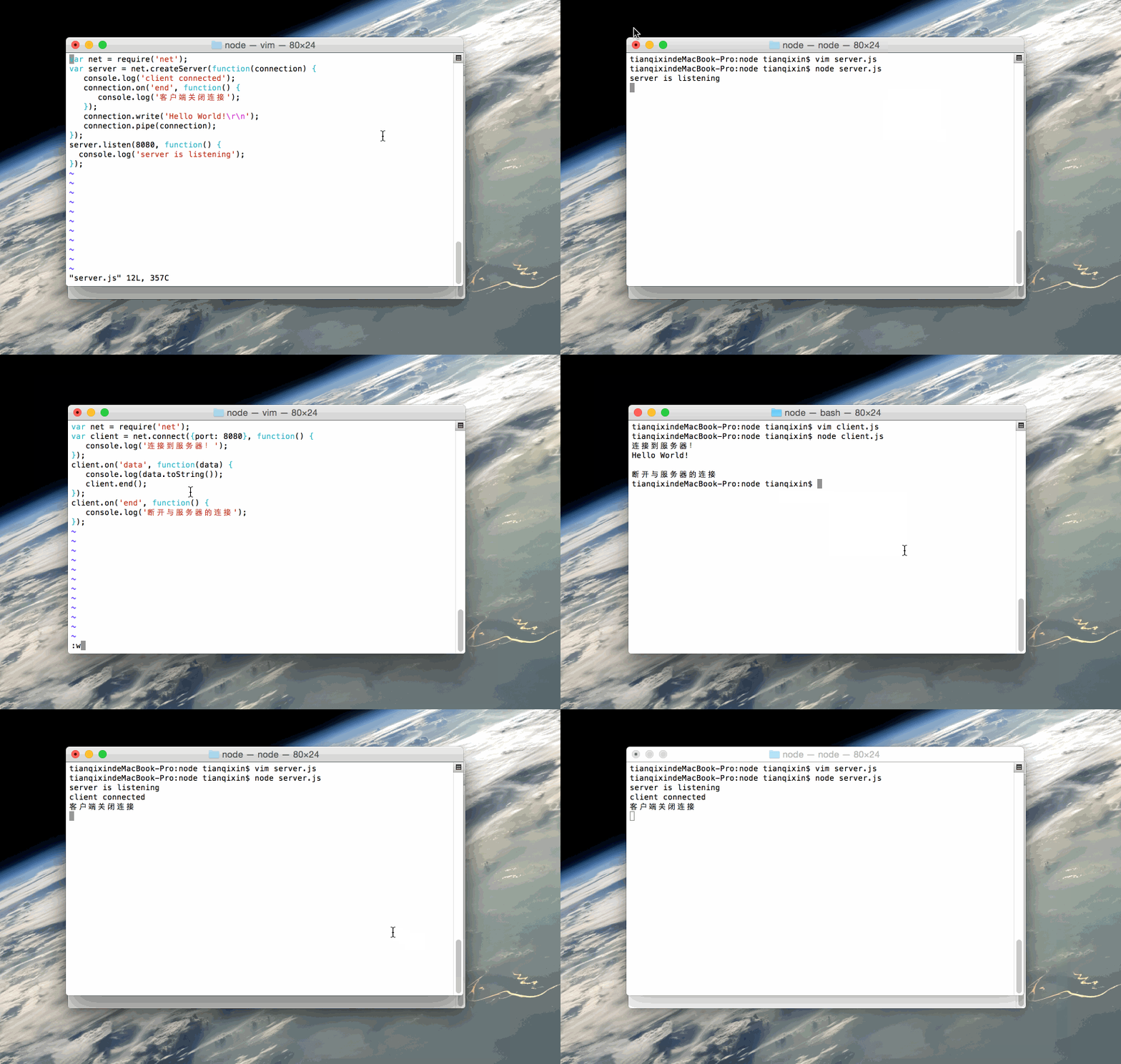
Create a server.js file with the following code:
Example
var server = net.createServer(function(connection) {
console.log('client connected');
connection.on('end', function() {
console.log('Client closed the connection');
});
connection.write('Hello World!\r\n');
connection.pipe(connection);
});
server.listen(8080, function() {
console.log('server is listening');
});
Run the above server code:
$ node server.js
server is listening   # 服务已创建并监听 8080 端口
Open a new window and create a client.js file with the following code:
Example
var client = net.connect({port: 8080}, function() {
console.log('Connected to server!');
});
client.on('data', function(data) {
console.log(data.toString());
client.end();
});
client.on('end', function() {
console.log('Disconnected from server');
});
Run the above client code:
连接到服务器!
Hello World!

断开与服务器的连接
Gif Example Demonstration
Practical Application Scenarios
- Chat application: Build a real-time chat server
- Game server: Handle real-time multi-player interaction
- Proxy server: Forward client requests
- Custom protocol: Implement specific application-layer protocols
- IoT device communication: Communicate with embedded devices
Best Practices
- Error handling: Always listen for the 'error' event
- Resource management: Close connections that are no longer used in a timely manner
- Performance considerations: For high-concurrency scenarios, consider using a connection pool
- Security: Implement appropriate authentication and encryption mechanisms
- Logging: Record important connection events and data
Example
server.on('error', (err) => {
console.error('Server error:', err);
});
client.on('error', (err) => {
console.error('Client error:', err);
});
By mastering the net module, you can build a variety of powerful network applications, understand the underlying principles of network communication, and lay a solid foundation for learning more advanced network frameworks.
Other extensions