Bootstrap ScrollSpy
Description
In this tutorial, you will see how to use the Bootstrap ScrollSpy plugin to automatically update the corresponding navigation target based on the scroll position.
What is required?
You need to reference jQuery, Bootstrap CSS, and a JavaScript file - bootstrap-scrollspy.js, located in the 'js' folder in the Bootstrap main folder. If you use dropdowns, you also need to reference bootstrap-dropdown.js in your HTML file.
jQuery is located under docs > assets > js in your Bootstrap main folder, and is named jquery.js. Or you can directly visithttp://apps.bdimg.com/libs/jquery/1.7.1/jquery.min.jsDownload jQuery.
Below is the output created at the end of this tutorial:
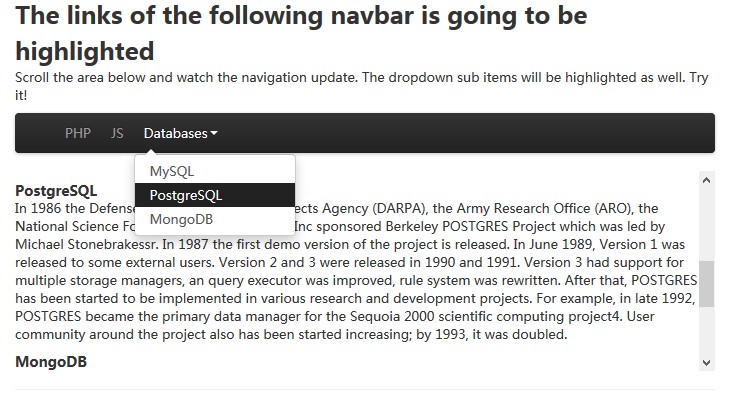
Using Bootstrap ScrollSpy in Your Website
Example
<html lang="en">
<head>
<meta charset="utf-8">
<title>Bootstrap ScrollSpy Example</title>
<meta name="description" content="Twitter Bootstrap ScrollSpy example">
<link href="../twitter-bootstrap/twitter-bootstrap-v2/docs/assets/css/bootstrap.css.html" rel="stylesheet">
<style type="text/css">
.scrollspy-example {
height: 200px;
overflow: auto;
position: relative;
}
</style>
</head>
<body>
<div class="span9 columns">
<h2>The links of the following navbar is going to be highlighted</h2>
<p>Scroll the area below and watch the navigation update. The dropdown sub items will be highlighted as well. Try
it!</p>
<div id="navbarExample" class="navbar navbar-static">
<div class="navbar-inner">
<div class="container" style="width: auto;">
<a class="brand" href="../index.html">w3resource</a>
<ul class="nav">
<li class="active"><a href="../index.html">PHP</a></li>
<li class=""><a href="../index.html">JS</a></li>
<li class="dropdown">
<a href="../index.html" class="dropdown-toggle" data-toggle="dropdown">Databases<b class="caret"></b></a>
<ul class="dropdown-menu">
<li class=""><a href="../index.html">MySQL</a></li>
<li class=""><a href="../index.html">PostgreSQL</a></li>
<li class=""><a href="../index.html">MongoDB</a></li>
</ul>
</li>
</ul>
</div>
</div>
</div>
<div data-spy="scroll" data-target="#navbarExample" data-offset="50" class="scrollspy-example">
<h4 id="php">PHP</h4>
<p>PHP, an acronym for Hypertext Preprocessor, is a widely-used open source general-purpose scripting language.
It is an HTML embedded scripting language and is especially suited for web development. The basic syntax of PHP is similar to
C, Java, and Perl, and is easy to learn. PHP is used for creating interactive and dynamic web pages quickly, but you can do
much more with PHP.
</p>
<h4 id="js">JS</h4>
<p>
JavaScript is a cross-platform, object-oriented scripting language developed by Netscape. JavaScript was created
by Netscape programmer Brendan Eich. It was first released under the name of LiveScript as part of Netscape Navigator 2.0 in
September 1995. It was renamed JavaScript on December 4, 1995. As JavaScript works on the client side, It is mostly used for
client-side web development.
</p>
<h4 id="mysql">MySQL</h4>
<p>
MySQL tutorial of w3resource is a comprehensive tutorial to learn MySQL. We have hundreds of examples covered,
often with PHP code. This helps you to learn how to create PHP-MySQL based web applications.
</p>
<h4 id="pgsql">PostgreSQL</h4>
<p>
In 1986 the Defense Advanced Research Projects Agency (DARPA), the Army Research Office (ARO), the National
Science Foundation (NSF), and ESL, Inc sponsored Berkeley POSTGRES Project which was led by Michael Stonebrakessr. In 1987
the first demo version of the project is released. In June 1989, Version 1 was released to some external users. Version 2 and
3 were released in 1990 and 1991. Version 3 had support for multiple storage managers, an query executor was improved, rule
system was rewritten. After that, POSTGRES has been started to be implemented in various research and development projects.
For example, in late 1992, POSTGRES became the primary data manager for the Sequoia 2000 scientific computing project4. User
community around the project also has been started increasing; by 1993, it was doubled.
</p>
<h4 id="mgdb">MongoDB</h4>
<p>
The term NoSQL was coined by Carlo Strozzi in the year 1998. He used this term to name his Open Source, Light
Weight, DataBase which did not have an SQL interface.In the early 2009, when last.fm wanted to organize an event on open-
source distributed databases, Eric Evans, a Rackspace employee, reused the term to refer databases which are non-relational,
distributed, and does not conform to atomicity, consistency, isolation, durability - four obvious features of traditional
relational database systems.</p>
<p>After reading the largest third party online MySQL tutorial by w3resource, you will be able to install, manage
and develop PHP-MySQL web applications by your own. We have a comprehensive, SQL TUTORIAL, which will help you to understand
how to prepare queries to fetch data against various conditions.
</p>
</div>
<hr>
<script src="../twitter-bootstrap/twitter-bootstrap-v2/docs/assets/js/jquery.js.html"></script>
<script src="../twitter-bootstrap/twitter-bootstrap-v2/docs/assets/js/bootstrap-dropdown.js.html"></script>
<script src="../twitter-bootstrap/twitter-bootstrap-v2/docs/assets/js/bootstrap-scrollspy.js.html"></script>
</body>
</html>
View example online
Explanation
So, you need to add 'data-spy="scroll"' to the target div.
Note that we have additionally added the .scrollspy-example styles in the head section of the example file. Because .scrollspy-example is not in bootstrap.css, it is written in docs.css.
The value of the 'data-offset' attribute is a number that determines the number of pixels to offset from the top when calculating the scroll position.
Call .scrollspy()
You can call .scrollspy() via JavaScript to make ScrollSpy work properly. The following code demonstrates how to do this:
$('#navbar').scrollspy();
Where #navbar is the id of the related navigation.
Methods
You can use scrollspy when adding and removing elements from the DOM. However, you must call the refresh method. The following code demonstrates how to do this:
$('[data-spy="scroll"]').each(function () {
  var $spy = $(this).scrollspy('refresh')
});
Options
If you call scrollspy via JavaScript, you can use the 'offset' option to determine the number of pixels to offset from the top when calculating the scroll position. The option type is number, and the default value is 10. You need to increase or decrease this value to make scrollspy work properly.
Events
When a new item is activated by scrollspy, the 'activate' event is triggered.
Click here to download all HTML, CSS, JS, and image files used in this tutorial.
Other Extensions