Maven Plugins
Maven plugins are executable components that extend Maven's functionality. Each plugin contains one or more goals, used to execute specific tasks (such as compiling, testing, packaging, etc.).
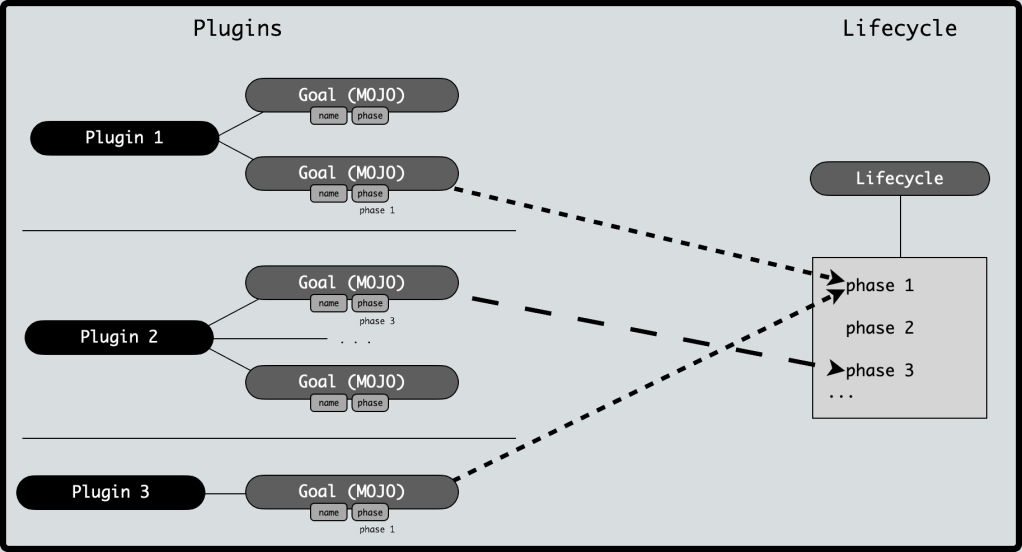
The relationship between plugins and the lifecycle:
Lifecycle: Defines the order of build phases
Plugin: Provides concrete implementations (goals) to complete the tasks of these phases
Maven has the following three standard lifecycles:
- clean: Handles project cleaning
- default (or build): Handles project deployment
- site: Handles creation of project site documentation
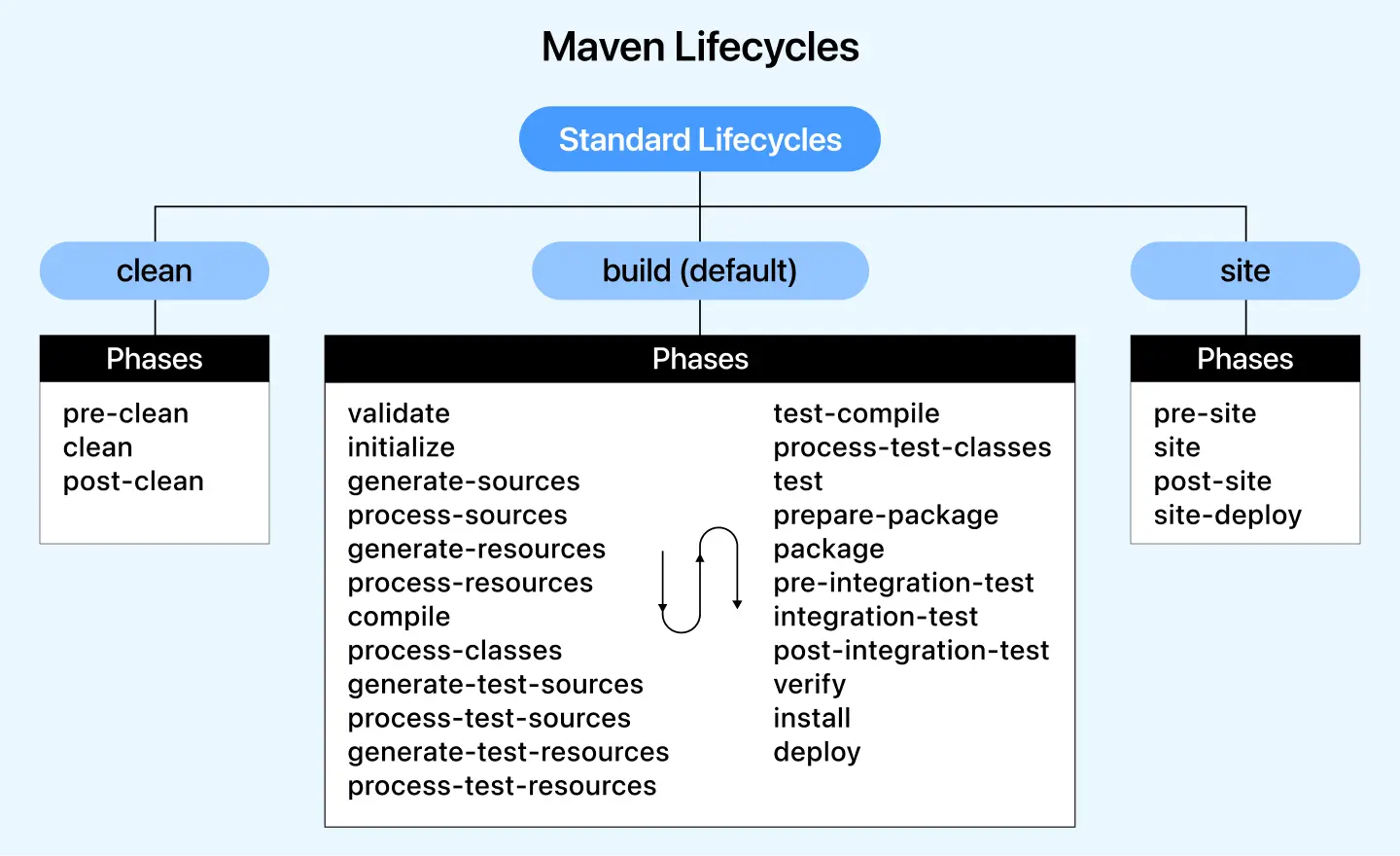
Each lifecycle contains a series of phases. These phases are equivalent to the unified interfaces provided by Maven, and the implementation of these phases is accomplished by Maven plugins.
When we input an mvn command, for examplemvn clean, clean corresponds to the clean phase of the Clean lifecycle. However, the specific operation of clean relies onmaven-clean-pluginto implement it.
Therefore, the specific implementation of every phase in the Maven lifecycle is realized by Maven plugins.
Maven is actually a framework that relies on plugins for execution. Every task is actually completed by plugins. Maven plugins are commonly used to:
- Create jar files
- Create war files
- Compile code files
- Unit test code
- Create project documentation
- Create project reports
Plugins usually provide a collection of goals and can be executed using the following syntax:
<code>mvn [plugin-name]:[goal-name]</code>
For example, a Java project can use the compile-goal of maven-compiler-plugin to compile, using the following command:
<code>mvn compiler:compile</code>
Plugin Core Mechanism
Plugin Coordinates
Similar to dependencies, plugins are also uniquely identified by groupId, artifactId, and version:
| Attribute | Description | Common values |
|---|---|---|
groupId | Plugin organization | org.apache.maven.plugins(Official plugins) |
artifactId | Plugin name | maven-compiler-plugin |
version | Plugin version | 3.8.1 |
Plugin Goals
Each plugin can contain multiple goals, for example:
maven-compiler-plugin:compile: Compile main codetestCompile: Compile test code
maven-surefire-plugin:test: Run unit tests
Plugin Binding Methods
1. Built-in binding
Maven has pre-bound plugin goals to lifecycle phases:
| Lifecycle phase | Bound plugin goal |
|---|---|
compile | maven-compiler-plugin:compile |
test | maven-surefire-plugin:test |
package | maven-jar-plugin:jar(ormaven-war-plugin:war) |
2. Custom binding
Explicitly configure in pom.xml:
<build>
    <plugins>
        <plugin>
            <groupId>org.apache.maven.plugins</groupId>
            <artifactId>maven-compiler-plugin</artifactId>
            <version>3.8.1</version>
            <executions>
                <execution>
                    <phase>compile</phase>  <!-- 绑定到 compile 阶段 -->
                    <goals>
                        <goal>compile</goal>
                    </goals>
                </execution>
            </executions>
        </plugin>
    </plugins>
</build>
Common Official Plugins
Compilation Related
| Plugin | Purpose | Common goals |
|---|---|---|
maven-compiler-plugin | Compile Java code | compile, testCompile |
maven-resources-plugin | Process resource files | resources, testResources |
Configuration example:
<plugin>
    <groupId>org.apache.maven.plugins</groupId>
    <artifactId>maven-compiler-plugin</artifactId>
    <version>3.8.1</version>
    <configuration>
        <source>11</source>  <!-- Java 版本 -->
        <target>11</target>
    </configuration>
</plugin>
Testing Related
| Plugin | Purpose | Common goals |
|---|---|---|
maven-surefire-plugin | Run unit tests | test |
maven-failsafe-plugin | Run integration tests | integration-test |
Configuration for skipping tests:
<plugin>
    <groupId>org.apache.maven.plugins</groupId>
    <artifactId>maven-surefire-plugin</artifactId>
    <version>2.22.2</version>
    <configuration>
        <skipTests>true</skipTests>  <!-- 跳过测试 -->
    </configuration>
</plugin>
Packaging Related
| Plugin | Purpose | Common goals |
|---|---|---|
maven-jar-plugin | Package JAR files | jar |
maven-war-plugin | Package WAR files | war |
maven-assembly-plugin | Custom packaging | single |
Executable JAR configuration:
<plugin>
    <groupId>org.apache.maven.plugins</groupId>
    <artifactId>maven-jar-plugin</artifactId>
    <version>3.2.0</version>
    <configuration>
        <archive>
            <manifest>
                <mainClass>com.example.Main</mainClass>  <!-- 指定主类 -->
            </manifest>
        </archive>
    </configuration>
</plugin>
Deployment Related
| Plugin | Purpose | Common goals |
|---|---|---|
maven-install-plugin | Install to the local repository | install |
maven-deploy-plugin | Deploy to the remote repository | deploy |
Plugin Invocation Methods
Invoke through the lifecycle:
mvn compile # 触发 maven-compiler-plugin:compile
Directly invoke a plugin goal:
mvn compiler:compile # 直接调用编译目标
Command-line parameter configuration:
mvn compiler:compile -Dmaven.compiler.source=11
Custom Plugin Configuration
Parameter Configuration
Viaconfigurationtag settings:
<plugin>
    <groupId>org.apache.maven.plugins</groupId>
    <artifactId>maven-surefire-plugin</artifactId>
    <version>2.22.2</version>
    <configuration>
        <includes>
            <include>**/*Test.java</include>  <!-- 只包含特定测试 -->
        </includes>
    </configuration>
</plugin>
Multi-goal execution:
<executions>
    <execution>
        <id>run-tests</id>
        <phase>test</phase>
        <goals>
            <goal>test</goal>
        </goals>
    </execution>
</executions>
Plugin Development Basics
Mojo Concept
The Java class corresponding to a plugin goal is called aMojo(Maven plain Old Java Object)。
Must inherit from
AbstractMojoand implement theexecute()method.
Simple Plugin Example
Example
public class GreetingMojo extends AbstractMojo {
@Parameter(property = "name", defaultValue = "World")
private String name;
public void execute() throws MojoExecutionException {
getLog().info("Hello, " + name + "!");
}
}
Packaging and Installing Plugins
mvn clean install # 将插件安装到本地仓库
Plugin Types
Maven provides the following two types of plugins:
| Type | Description |
|---|---|
| Build plugins | Executed at build time and configured in the pom.xml's |
| Reporting plugins | Executed during site generation and configured in the pom.xml's |
Below is a list of some commonly used plugins:
| Plugin | Description |
|---|---|
| clean | Cleans up target files after the build. Deletes the target directory. |
| compiler | Compiles Java source files. |
| surefile | Runs JUnit unit tests. Creates test reports. |
| jar | Builds a JAR file from the current project. |
| war | Builds a WAR file from the current project. |
| javadoc | Generates Javadoc for the project. |
| antrun | Runs a set of Ant tasks from any phase of the build process. |
Example
We have already extensively used in our examplesmaven-antrun-pluginto output data to the console. Please refer to theMaven - Build Profileschapter. Let's understand this content in a better way. Create a pom.xml file in the C:\MVN\project directory.
Next, open a command terminal, navigate to the directory where pom.xml is located, and execute the following mvn command.
mvn clean
Maven will start processing and display the clean phase of the clean lifecycle.
[INFO] Scanning for projects...
[INFO] ------------------------------------------------------------------
[INFO] Building Unnamed - com.companyname.projectgroup:project:jar:1.0
[INFO]    task-segment: [post-clean]
[INFO] ------------------------------------------------------------------
[INFO] [clean:clean {execution: default-clean}]
[INFO] [antrun:run {execution: id.clean}]
[INFO] Executing tasks
     [echo] clean phase
[INFO] Executed tasks
[INFO] ------------------------------------------------------------------
[INFO] BUILD SUCCESSFUL
[INFO] ------------------------------------------------------------------
[INFO] Total time: < 1 second
[INFO] Finished at: Sat Jul 07 13:38:59 IST 2012
[INFO] Final Memory: 4M/44M
[INFO] ------------------------------------------------------------------
The above example demonstrates the following key concepts:
- Plugins are defined in pom.xml using the plugins element.
- Each plugin can have multiple goals.
- You can define a phase, and the plugin will use its phase element to start processing. We have used thecleanphase.
- You can configure the tasks to be executed by binding to the plugin's goals. We have bound theechotask to maven-antrun-plugin'srungoal.
- That's it. Maven will handle the rest. It will download plugins that are not available in the local repository and start processing.