Maven Dependency Management
One of Maven's core features is dependency management. When we deal with multi-module projects (containing hundreds or thousands of modules or subprojects), the dependency relationships between modules become very complex, and management becomes very difficult. In this situation, Maven provides a highly controlled approach.
Transitive Dependency Discovery
A fairly common situation, for example, A depends on another library B. If another project C wants to use A, then project C also needs to use library B.
Maven can avoid the need to search for all required libraries. Maven reads the project files (pom.xml) to find the dependency relationships between projects.
All we need to do is define the direct dependencies in each project's pom. Maven will handle everything else for us.
With transitive dependencies, the graph of all included libraries can grow rapidly. When there are duplicate libraries, the possible situations will continue to increase. Maven provides some features to control the degree of transitive dependencies.
| Feature | Feature Description |
|---|---|
| Dependency Mediation | Determines which dependency version will be used when multiple manually created versions appear at the same time. If two dependency versions are at the same depth in the dependency tree, the first declared dependency will be used. |
| Dependency Management | You can directly specify a manually created version to be used. For example, suppose project C includes project B as its dependency, and project B depends on project A. In this case, you can explicitly specify the version of project A to be used when project B is referenced. This means you can control which specific version of project A will be used by project B. |
| Dependency Scope | Dependencies included in each phase of the build process. |
| Dependency Exclusion | Any transitive dependency can be excluded through the "exclusion" element. For example, A depends on B, B depends on C, so A can mark C as "excluded". |
| Dependency Optional | Any transitive dependency can be marked as optional by using the "optional" element. For example: A depends on B, and B depends on C. Therefore, B can mark C as optional, so that A no longer uses C. |
Dependency Scope
Transitive dependency discovery can be limited by using the following dependency scopes:
| Scope | Description |
|---|---|
| Compile | This scope indicates that the related dependency is only valid on the project's classpath. Default value. |
| Provided | This scope indicates that the related dependency is provided by the runtime JDK or a web server. |
| Runtime | This scope indicates that the related dependency is not required during the compile phase, but is required during the execution phase. |
| Test | This scope indicates that the related dependency is only for the test compilation and execution phases. |
| System | This scope indicates that you need to provide a system path. |
| Import | This scope is only used when the dependency is defined in a pom. At the same time, the current project's POM file's |
Dependency Management
Usually, under a common project, there are a series of projects. In this case, we can create a common dependency pom file that contains all the common dependencies, which we call the parent pom of the other subproject poms. The following example can help you better understand this concept.
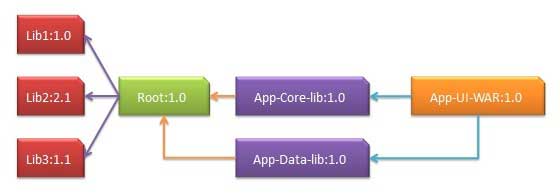
The following is a detailed explanation of the dependency graph above:
App-UI-WAR depends on App-Core-lib and App-Data-lib.
Root is the parent project of App-Core-lib and App-Data-lib.
Root defines Lib1, lib2, and Lib3 as dependencies in its dependencies section.
The pom.xml file code of App-UI-WAR is as follows:
The pom.xml file code of App-Core-lib is as follows:
The pom.xml file code of App-Data-lib is as follows:
The pom.xml file code of Root is as follows:
Now when we build the App-UI-WAR project, Maven will find all dependencies by traversing the dependency graph and build the application.
Through the above example, we can learn the following key concepts:
- Common dependencies can be unified together using the parent pom concept. The dependencies of the App-Data-lib and App-Core-lib projects are listed in the Root project (refer to Root's packaging type, it is a POM).
- There is no need to declare Lib1, lib2, Lib3 as dependencies in App-UI-W. Maven implements this detail through the transitive dependency mechanism.