Maven NetBeans
NetBeans 6.7 and later versions have Maven built-in. For earlier versions, the Maven plugin can be obtained in the Plugin Manager. In this example, we are using NetBeans 6.9. Some features of NetBeans are as follows:
- You can run Maven goals through NetBeans.
- You can use NetBeans' own console to view the output of Maven commands.
- You can update Maven and IDE dependencies.
- You can start Maven builds in NetBeans.
- NetBeans automates dependency management based on Maven's pom.xml.
- NetBeans can resolve Maven dependencies through its own workspace without needing to install them into the local Maven repository, although the dependent projects need to be in the same workspace.
- NetBeans can automatically download required dependencies and source code from remote Maven repositories.
- NetBeans provides a wizard for creating Maven projects and pom.xml files.
- NetBeans provides a Maven repository browser, allowing you to view the local repository and external registered Maven repositories.
Opening a Maven Project in NetBeans
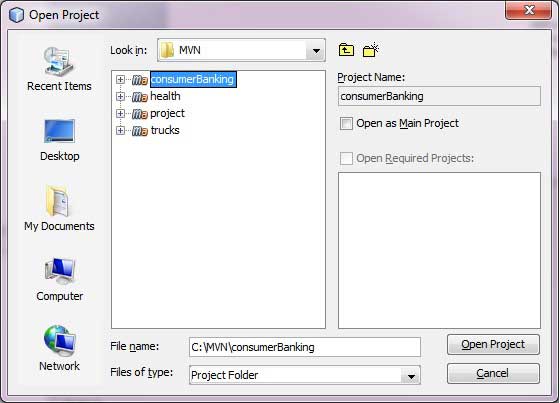
- Open NetBeans
- SelectFile Menu > Open ProjectOptions
Select the project path, i.e., the storage path used when creating a project with Maven. Suppose we created a project: consumerBanking. ThroughMaven Build Java ProjectSee how to create a project using Maven.
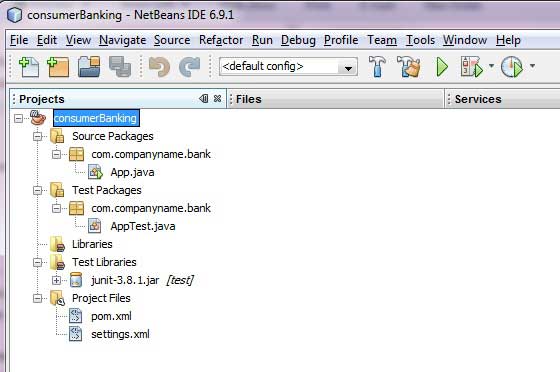
By now, you can see the Maven project in NetBeans. Take a look at the Libraries and Test Libraries of the consumerBanking project. You can see that NetBeans has added all Maven dependencies to its build path.
Building a Maven Project in NetBeans
Alright, let's use NetBeans' build function to build this Maven project
- Right-click the consumerBanking project to open the context menu.
- Select the "Clean and Build" option
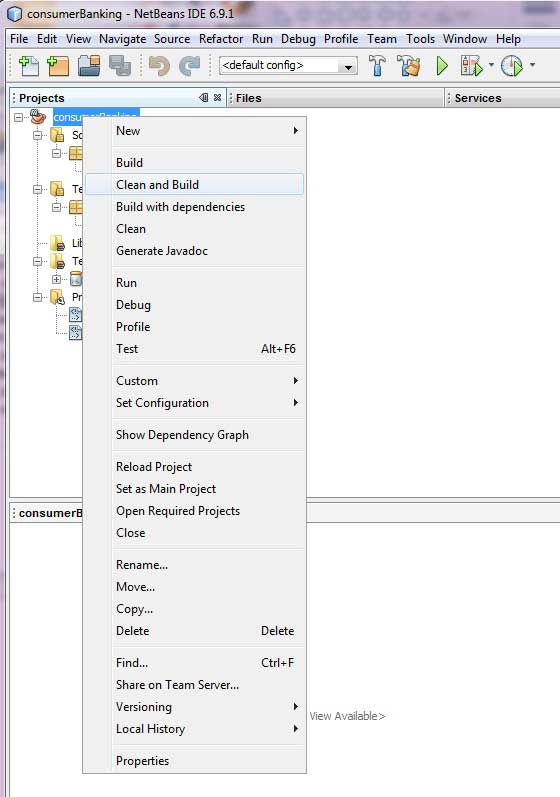
Maven will start building the project. You can view the output log information in NetBeans' terminal:
NetBeans: Executing 'mvn.bat -Dnetbeans.execution=true clean install'
NetBeans:      JAVA_HOME=C:\Program Files\Java\jdk1.6.0_21
Scanning for projects...
------------------------------------------------------------------------
Building consumerBanking
   task-segment: [clean, install]
------------------------------------------------------------------------
[clean:clean]
[resources:resources]
[WARNING] Using platform encoding (Cp1252 actually)
to copy filtered resources, i.e. build is platform dependent!
skip non existing resourceDirectory C:\MVN\consumerBanking\src\main\resources
[compiler:compile]
Compiling 2 source files to C:\MVN\consumerBanking\target\classes
[resources:testResources]
[WARNING] Using platform encoding (Cp1252 actually)
to copy filtered resources, i.e. build is platform dependent!
skip non existing resourceDirectory C:\MVN\consumerBanking\src\test\resources
[compiler:testCompile]
Compiling 1 source file to C:\MVN\consumerBanking\target\test-classes
[surefire:test]
Surefire report directory: C:\MVN\consumerBanking\target\surefire-reports

-------------------------------------------------------
 T E S T S
-------------------------------------------------------
Running com.companyname.bank.AppTest
Tests run: 1, Failures: 0, Errors: 0, Skipped: 0, Time elapsed: 0.023 sec

Results :

Tests run: 1, Failures: 0, Errors: 0, Skipped: 0

[jar:jar]
Building jar: C:\MVN\consumerBanking\target\consumerBanking-1.0-SNAPSHOT.jar
[install:install]
Installing C:\MVN\consumerBanking\target\consumerBanking-1.0-SNAPSHOT.jar
to C:\Users\GB3824\.m2\repository\com\companyname\bank\consumerBanking\
1.0-SNAPSHOT\consumerBanking-1.0-SNAPSHOT.jar
------------------------------------------------------------------------
BUILD SUCCESSFUL
------------------------------------------------------------------------
Total time: 9 seconds
Finished at: Thu Jul 19 12:57:28 IST 2012
Final Memory: 16M/85M
------------------------------------------------------------------------
Running an Application in NetBeans
Now, right-click the App.java file. Select the Run File option. You can see the following result in the terminal:
NetBeans: Executing 'mvn.bat -Dexec.classpathScope=runtime
-Dexec.args=-classpath %classpath com.companyname.bank.App
-Dexec.executable=C:\Program Files\Java\jdk1.6.0_21\bin\java.exe
-Dnetbeans.execution=true process-classes
org.codehaus.mojo:exec-maven-plugin:1.1.1:exec'
NetBeans:      JAVA_HOME=C:\Program Files\Java\jdk1.6.0_21
Scanning for projects...
------------------------------------------------------------------------
Building consumerBanking
   task-segment: [process-classes,
   org.codehaus.mojo:exec-maven-plugin:1.1.1:exec]
------------------------------------------------------------------------
[resources:resources]
[WARNING] Using platform encoding (Cp1252 actually)
to copy filtered resources, i.e. build is platform dependent!
skip non existing resourceDirectory C:\MVN\consumerBanking\src\main\resources
[compiler:compile]
Nothing to compile - all classes are up to date
[exec:exec]
Hello World!
------------------------------------------------------------------------
BUILD SUCCESSFUL
------------------------------------------------------------------------
Total time: 1 second
Finished at: Thu Jul 19 14:18:13 IST 2012
Final Memory: 7M/64M
------------------------------------------------------------------------
Other Extensions