Maven Build Lifecycle
The Maven build lifecycle defines a process for building and releasing a project, and includes three standard lifecycles:
- clean: cleans the project
- default (or build): the core build process
- site: generates project documentation
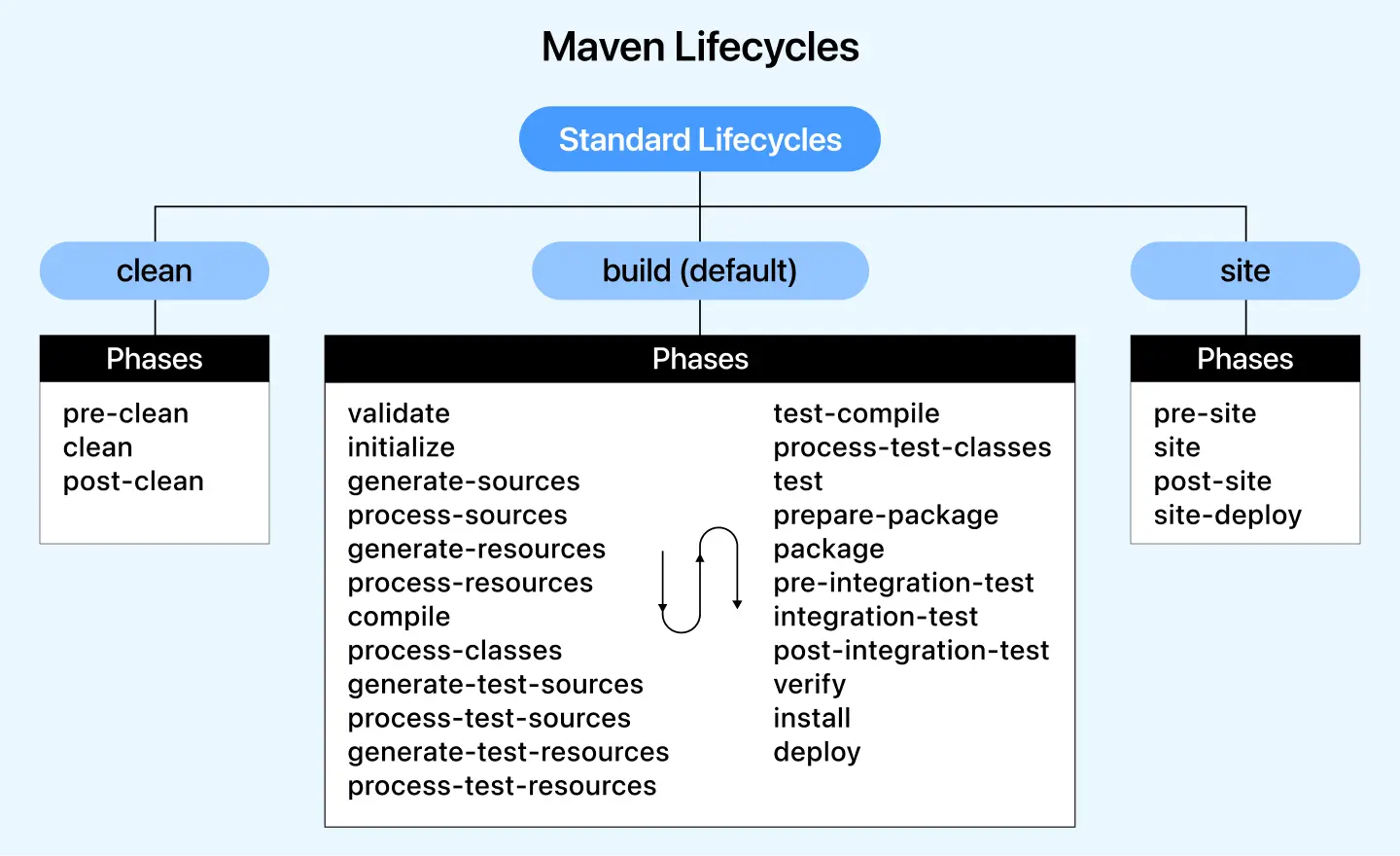
Each lifecycle consists of multiple phases, which are executed in order.
1. Clean Lifecycle
The clean lifecycle is responsible for cleaning up the project's temporary files and directories (mainly target/), and includes the following main phases:
| Phase | Description | Automatically Bound Plugin Goals |
|---|---|---|
pre-clean | Work performed before cleaning | No default binding |
clean | Deletetarget/directory | maven-clean-plugin:clean |
post-clean | Post-clean wrap-up work | No default binding |
Common commands:
mvn clean # 执行clean阶段(包含pre-clean和clean)
2. Default Lifecycle
The default lifecycle is Maven's most important lifecycle, containing all core steps for building and deploying a project.
A typical Maven build lifecycle consists of the following sequence of phases:
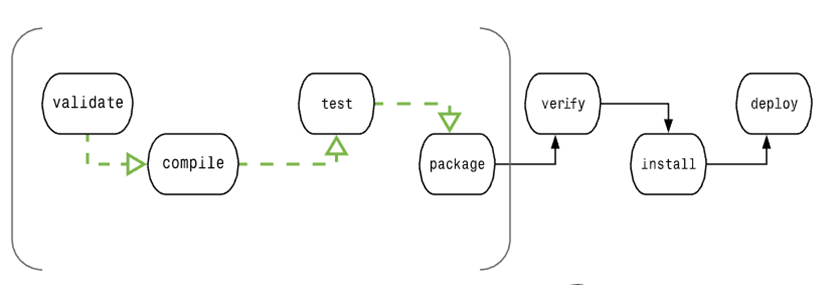
| Phase | Operation | Description |
|---|---|---|
| validate | Validate the project | Validate that the project is correct and all necessary information is available. |
| compile | Perform compilation | Source code compilation is completed in this phase. |
| test | Test | Run tests using an appropriate unit testing framework (e.g., JUnit). |
| package | Package | Package the compiled code into a distributable format, such as JAR or WAR. |
| verify | Check | Check the results of integration tests to ensure quality meets the standards. |
| install | Install | Install the packaged project into the local repository for use by other projects. |
| deploy | Deploy | Copy the final project package to the remote repository to share with other developers and projects. |
To complete the default lifecycle, these phases (including other lifecycle phases not listed above) will be executed in order.
Phase Dependencies:

Common commands:
mvn compile     # 编译主代码
mvn test        # 运行测试
mvn package     # 打包(生成target/*.jar)
mvn install     # 安装到本地仓库(~/.m2/repository)
mvn deploy      # 部署到远程仓库(需配置distributionManagement)
3. Site Lifecycle
The site lifecycle is used to generate project site documentation:
| Phase | Description | Automatically Bound Plugin Goals |
|---|---|---|
pre-site | Preparation before site generation | No default binding |
site | Generate project site documentation | maven-site-plugin:site |
post-site | Post-site wrap-up | No default binding |
site-deploy | Deploy the site to a server | maven-site-plugin:deploy |
Common commands:
mvn site        # 生成站点(输出在target/site/)
mvn site-deploy # 部署站点(需配置site URL)
Lifecycle Summary
Maven has the following three standard lifecycles:
1. Clean Lifecycle:
- clean: Deletes the compiled output files in the target directory. This is usually executed before building to ensure the project starts from a clean state.
2. Default Lifecycle (also known as the Build Lifecycle):
- validate: Validate the correctness of the project, for example, check whether the project version is correct.
- compile: Compile the project's source code.
- test: Run the project's unit tests.
- package: Package the compiled code into a distributable format, such as JAR or WAR.
- verify: Perform additional checks on the project to ensure quality.
- install: Install the project's build output into the local Maven repository for use by other projects.
- deploy: Copy the project's build output to the remote repository for use by other developers or teams.
3. Site Lifecycle:
- site: Generate project documentation and site information.
- deploy-site: Publish the generated site information to a remote server to share project documentation.
Build Phases Are Composed of Plugin Goals
A plugin goal represents a specific task (more fine-grained than a build phase), which helps with the construction and management of a project. These goals may be bound to multiple phases or to no phase at all. Goals that are not bound to any build phase can be executed outside the build lifecycle by direct invocation. The execution order of these goals depends on the order of the invoked goals and build phases.
For example, consider the following command:
clean and package are build phases, and dependency:copy-dependencies is a goal.
mvn clean dependency:copy-dependencies package
Here, the clean phase will be executed first, then the dependency:copy-dependencies goal will be executed, and finally the package phase is executed.
1. Clean Lifecycle
When we execute the mvn post-clean command, Maven invokes the clean lifecycle, which includes the following phases:
- pre-clean: performs some work that needs to be completed before clean.
- clean: removes all files generated by the previous build.
- post-clean: performs some work that needs to be done immediately after clean.
The clean in mvn clean is the same clean as above. In a lifecycle, when a certain phase is executed, all phases before it are also executed. That is, if you run mvn clean, the following two lifecycle phases will be executed:
pre-clean, clean
If we run mvn post-clean, the following three lifecycle phases will be executed:
pre-clean, clean, post-clean
We can modify the operational behavior of this part by defining goals in any phase of the clean lifecycle described above.
In the following example, we add the maven-antrun-plugin:run goal to the pre-clean, clean, and post-clean phases. This way, we can display text information at each phase of the clean lifecycle.
We have created a pom.xml file in the C:\MVN\project directory.
Now open the command console, navigate to the directory containing pom.xml, and execute the following mvn command.
C:\MVN\project>mvn post-clean
Maven will begin processing and display all phases of the clean lifecycle.
[INFO] Scanning for projects...
[INFO] ------------------------------------------------------------------
[INFO] Building Unnamed - com.companyname.projectgroup:project:jar:1.0
[INFO]    task-segment: [post-clean]
[INFO] ------------------------------------------------------------------
[INFO] [antrun:run {execution: id.pre-clean}]
[INFO] Executing tasks
     [echo] pre-clean phase
[INFO] Executed tasks
[INFO] [clean:clean {execution: default-clean}]
[INFO] [antrun:run {execution: id.clean}]
[INFO] Executing tasks
     [echo] clean phase
[INFO] Executed tasks
[INFO] [antrun:run {execution: id.post-clean}]
[INFO] Executing tasks
     [echo] post-clean phase
[INFO] Executed tasks
[INFO] ------------------------------------------------------------------
[INFO] BUILD SUCCESSFUL
[INFO] ------------------------------------------------------------------
[INFO] Total time: < 1 second
[INFO] Finished at: Sat Jul 07 13:38:59 IST 2012
[INFO] Final Memory: 4M/44M
[INFO] ------------------------------------------------------------------
You can try modifying the mvn clean command to display pre-clean and clean, while not executing any operations in the post-clean phase.
2. Default (Build) Lifecycle
This is Maven's main lifecycle, used for building applications, and includes the following 23 phases:
| Lifecycle Phase | Description |
|---|---|
| validate (validation) | Validate that the project is correct and all necessary information is available to complete the project build process. |
| initialize (initialization) | Initialize the build state, such as setting property values. |
| generate-sources (generate source code) | Generate any source code that will be included in the compilation phase. |
| process-sources (process source code) | Process the source code, for example, filter any values. |
| generate-resources (generate resource files) | Generate resource files that will be included in the project package. |
| process-resources (process resource files) | Copy and process resources to the target directory, preparing for the packaging phase. |
| compile (compilation) | Compile the project's source code. |
| process-classes (process class files) | Process the files generated by compilation, for example, perform bytecode improvement and optimization on Java class files. |
| generate-test-sources (generate test source code) | Generate any test source code that will be included in the compilation phase. |
| process-test-sources (process test source code) | Process the test source code, for example, filter any values. |
| generate-test-resources (generate test resource files) | Create resource files for tests. |
| process-test-resources (process test resource files) | Copy and process test resources to the target directory. |
| test-compile (compile test source code) | Compile test source code to the test target directory. |
| process-test-classes (process test class files) | Process files generated by the compilation of test source code. |
| test (test) | Run tests using a suitable unit testing framework (JUnit is one of them). |
| prepare-package (prepare packaging) | Perform any necessary operations to prepare for packaging before the actual packaging. |
| package (package) | Package the compiled code into a distributable format, such as JAR, WAR, or EAR files. |
| pre-integration-test (before integration testing) | Perform necessary actions before executing integration tests. For example, set up the required environment. |
| integration-test (integration test) | Process and deploy the project into an environment where integration tests can be run. |
| post-integration-test (after integration testing) | Perform necessary actions after the integration tests have been executed. For example, clean up the integration test environment. |
| verify (verify) | Run any checks to verify that the project package is valid and meets quality standards. |
| install (install) | Install the project package into the local repository, so it can be used as a dependency for other local projects. |
| deploy (deploy) | Copy the final project package to the remote repository to share it with other developers and projects. |
There are some important concepts related to the Maven lifecycle that need to be explained:
When a phase is invoked via a Maven command, such as mvn compile, only all phases up to and including that phase will be executed.
Different Maven goals will be bound to different Maven lifecycle phases depending on the packaging type (JAR / WAR / EAR).
In the following example, we will add the maven-antrun-plugin:run goal to some phases of the Build lifecycle. This way we can display the textual information of the lifecycle.
We have already updated the pom.xml file in the C:\MVN\project directory.
Now open the command console, navigate to the directory containing pom.xml, and execute the following mvn command.
C:\MVN\project>mvn compile
Maven will start processing and display the various phases of the build lifecycle up to the compile phase.
[INFO] Scanning for projects...
[INFO] ------------------------------------------------------------------
[INFO] Building Unnamed - com.companyname.projectgroup:project:jar:1.0
[INFO]    task-segment: [compile]
[INFO] ------------------------------------------------------------------
[INFO] [antrun:run {execution: id.validate}]
[INFO] Executing tasks
     [echo] validate phase
[INFO] Executed tasks
[INFO] [resources:resources {execution: default-resources}]
[WARNING] Using platform encoding (Cp1252 actually) to copy filtered resources,
i.e. build is platform dependent!
[INFO] skip non existing resourceDirectory C:\MVN\project\src\main\resources
[INFO] [compiler:compile {execution: default-compile}]
[INFO] Nothing to compile - all classes are up to date
[INFO] [antrun:run {execution: id.compile}]
[INFO] Executing tasks
     [echo] compile phase
[INFO] Executed tasks
[INFO] ------------------------------------------------------------------
[INFO] BUILD SUCCESSFUL
[INFO] ------------------------------------------------------------------
[INFO] Total time: 2 seconds
[INFO] Finished at: Sat Jul 07 20:18:25 IST 2012
[INFO] Final Memory: 7M/64M
[INFO] ------------------------------------------------------------------
Command Line Invocation
In a development environment, use the following command to build and install the project into the local repository.
mvn install
This command executes the phases of the default lifecycle (validate, compile, package, etc.) in order before executing the install phase. We only need to invoke the last phase, such as install here.
In a build environment, use the following invocation to cleanly build and deploy the project to the shared repository.
mvn clean deploy
This command can also be used in a multi-module scenario, i.e., a project containing multiple sub-projects. Maven will execute the clean command on each sub-project, and then execute the deploy command.
3. Site Lifecycle
The Maven Site plugin is generally used to create new report documents, deploy sites, etc.
- pre-site: Perform some work that needs to be completed before generating the site documentation.
- site: Generate the project's site documentation.
- post-site: Perform some work that needs to be completed after generating the site documentation, and prepare for deployment.
- site-deploy: Deploy the generated site documentation to a specific server.
The most commonly used phases here are the site phase and the site-deploy phase, which are used to generate and publish the Maven site. This is a quite powerful feature of Maven, and managers like it very much because documentation and statistics are automatically generated and look great. In the following example, we will add the maven-antrun-plugin:run goal to all phases of the Site lifecycle. This way we can display all the textual information of the lifecycle.
We have already updated the pom.xml file in the C:\MVN\project directory.
Now open the command console, navigate to the directory containing pom.xml, and execute the following mvn command.
C:\MVN\project>mvn site
Maven will start processing and display the various phases of the Site lifecycle up to the site phase.
[INFO] Scanning for projects...
[INFO] ------------------------------------------------------------------
[INFO] Building Unnamed - com.companyname.projectgroup:project:jar:1.0
[INFO]    task-segment: [site]
[INFO] ------------------------------------------------------------------
[INFO] [antrun:run {execution: id.pre-site}]
[INFO] Executing tasks
     [echo] pre-site phase
[INFO] Executed tasks
[INFO] [site:site {execution: default-site}]
[INFO] Generating "About" report.
[INFO] Generating "Issue Tracking" report.
[INFO] Generating "Project Team" report.
[INFO] Generating "Dependencies" report.
[INFO] Generating "Project Plugins" report.
[INFO] Generating "Continuous Integration" report.
[INFO] Generating "Source Repository" report.
[INFO] Generating "Project License" report.
[INFO] Generating "Mailing Lists" report.
[INFO] Generating "Plugin Management" report.
[INFO] Generating "Project Summary" report.
[INFO] [antrun:run {execution: id.site}]
[INFO] Executing tasks
     [echo] site phase
[INFO] Executed tasks
[INFO] ------------------------------------------------------------------
[INFO] BUILD SUCCESSFUL
[INFO] ------------------------------------------------------------------
[INFO] Total time: 3 seconds
[INFO] Finished at: Sat Jul 07 15:25:10 IST 2012
[INFO] Final Memory: 24M/149M
[INFO] ------------------------------------------------------------------```
Other extensions