Maven Introducing External Dependencies
What if we need to introduce a third-party library file into the project, how should we do it?
The dependencies list in pom.xml lists all the external dependencies that our project needs to build.
To add a dependency, we generally first add a lib folder under the src folder, and then copy the jar files needed by your project into the lib folder. We are using ldapjdk.jar, which is a helper library for LDAP operations:
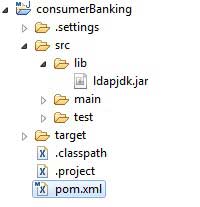
Then add the following dependency to the pom.xml file:
<dependencies>
<!--Add your dependency here-->
<dependency>
<groupId>ldapjdk</groupId> <!--Library name, can also be customized-->
<artifactId>ldapjdk</artifactId> <!--Library name, can also be customized-->
<version>1.0</version> <!--Version number-->
<scope>system</scope> <!--Scope-->
<systemPath>${basedir}\src\lib\ldapjdk.jar</systemPath> <!--In the lib folder under the project root directory-->
</dependency>
</dependencies>
The complete code of the pom.xml file is as follows:
<project xmlns="http://maven.apache.org/POM/4.0.0"
xmlns:xsi="http://www.w3.org/2001/XMLSchema-instance"
xsi:schemaLocation="http://maven.apache.org/POM/4.0.0
http://maven.apache.org/maven-v4_0_0.xsd">
<modelVersion>4.0.0</modelVersion>
<groupId>com.companyname.bank</groupId>
<artifactId>consumerBanking</artifactId>
<packaging>jar</packaging>
<version>1.0-SNAPSHOT</version>
<name>consumerBanking</name>
<url>http://maven.apache.org</url>
<dependencies>
<dependency>
<groupId>junit</groupId>
<artifactId>junit</artifactId>
<version>3.8.1</version>
<scope>test</scope>
</dependency>
<dependency>
<groupId>ldapjdk</groupId>
<artifactId>ldapjdk</artifactId>
<scope>system</scope>
<version>1.0</version>
<systemPath>${basedir}\src\lib\ldapjdk.jar</systemPath>
</dependency>
</dependencies>
</project>