Operating R in Java
First, install the package "Rserve" in R.
If you are using the RGui graphical interface, you can do this in the menu bar under Packages - Install packages. If you are using a pure R Console, you can use the following command:
install.packages("Rserve", repos = "https://mirrors.ustc.edu.cn/CRAN/")
After Rserve is installed, there will be a library directory under the R root directory. Find the Rserve/java directory in it, and you will see two files: REngine.jar and Rserve.jar.
These two files are the R interface library in Java.
Note:Java cannot independently use R functionality without the R system!
Step 1: Start Rserve
Enter R, and enter the following code to start Rserve:
library("Rserve")
Rserve()
If startup is successful, R will output the path to Rserve.
Step 2: Write a Java program
First import the two jar libraries from earlier.
After importing, we get to know a key class: RConnection. This class can be used to connect to Rserve.
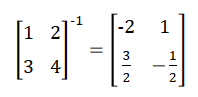
Now let's use R in Java to perform an inverse matrix calculation:
Example
public class Main {
public static void main(String[] args) {
RConnection rcon = null;
try {
// Establish connection with Rserve
rcon = new RConnection("127.0.0.1");
// The eval() function is used to make R execute R statements
// Here a matrix m1 is created
rcon.eval("m1 = matrix(c(1, 2, 3, 4), 2, 2, byrow=TRUE)");
// The solve() function computes the inverse of the matrix m1 in R
// And returns the result. The asDoubleMatrix function can convert the data into
// a two-dimensional double array in Java to represent the matrix
double[][] m1 = rcon.eval("solve(m1)").asDoubleMatrix();
// Output the contents of the matrix
for (int i = 0; i < m1.length; i++) {
for (int j = 0; j < m1[0].length; j++)
System.out.print(m1[i][j] + "\t");
System.out.println();
}
} catch (Exception e) {
e.printStackTrace();
} finally {
if (rcon != null) rcon.close();
}
}
}
Execution result:
-1.9999999999999998    1.0
1.4999999999999998    -0.49999999999999994
Obviously, the result is correct, but after all, it is floating-point numbers, so the printed output may not look very nice; it does not affect the use of the data.
Other extensions