R Graphics - Chinese Support
Font library directories for different systems:
-
Linux is generally/usr/share/fontsunder, we can usefc-listcommand to view:
# fc-list
/usr/share/fonts/truetype/dejavu/DejaVuSerif-Bold.ttf: DejaVu Serif:style=Bold
/usr/share/fonts/truetype/dejavu/DejaVuSansMono.ttf: DejaVu Sans Mono:style=Book
/usr/share/fonts/truetype/dejavu/DejaVuSans.ttf: DejaVu Sans:style=Book
/usr/share/fonts/truetype/dejavu/DejaVuSans-Bold.ttf: DejaVu Sans:style=Bold
/usr/share/fonts/truetype/dejavu/DejaVuSansMono-Bold.ttf: DejaVu Sans Mono:style=Bold
/usr/share/fonts/truetype/dejavu/DejaVuSerif.ttf: DejaVu Serif:style=Book
-
Windows fonts are inC:\Windows\Fonts\under the folder, you can see them by opening it directly.
-
macOS fonts are in/System/Library/Fontsand/Library/Fontsunder the directory.
The font libraries supported by the system can be viewed by installing showtext:
> install.packages("showtext", repos = "https://mirrors.ustc.edu.cn/CRAN/")  # 安装 showtext
...
> font_files()   # 查看字体
            path              file           family    face       version
1 /Library/Fonts Arial Unicode.ttf Arial Unicode MS Regular Version 1.01x
         ps_name
1 ArialUnicodeMS
Once you see ArialUnicodeMS, we can use it:
pie3D(info,labels = names,explode = 0.1, main = "3D 图",family = "ArialUnicodeMS")
Load custom fonts
The system font library is sometimes not well supported. The showtext() function can load our custom fonts. You can download the ttf font package, and then use the font_add() function to add it.
Here we use Source Han Sans. Source Han Sans is an open-source font launched by Adobe and Google.
Official website:https://source.typekit.com/source-han-serif/cn/
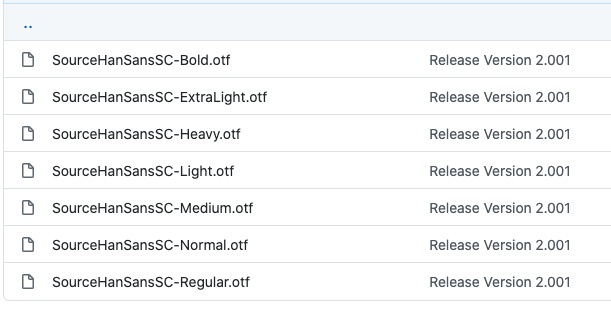
GitHub address:https://github.com/adobe-fonts/source-han-sans/tree/release/OTF/SimplifiedChinese
After opening the link, just pick one from inside:
You can also download from the cloud drive:https://pan.baidu.com/s/14cRhgYvvYotVIFkRVd71fQ 。
You can download an OTF font, such as SourceHanSansSC-Bold.otf, and put this file in the currently executing code file:
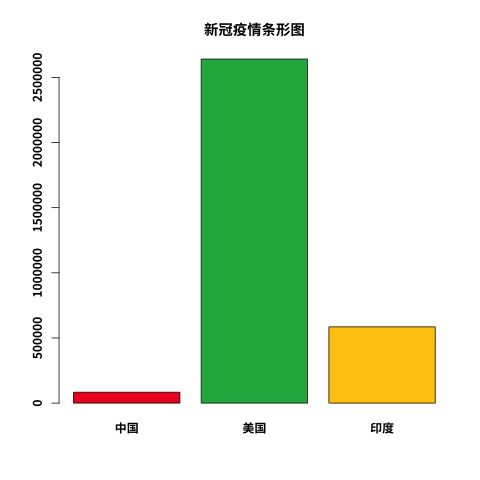
Bar chart using the font library:
Example
library(showtext);
# The first parameter sets the font name, the second parameter is the font library path. In the same directory, we just write the font library name.
font_add("SyHei", "SourceHanSansSC-Bold.otf");
# Set the file name, output as png
png(file = "example-bar-cn.png")
cvd19 = c(83534,2640626,585493)
# Load font
showtext_begin();
barplot(cvd19,
main="COVID-19 Pandemic Bar Chart",
col=c("#ED1C24","#226AB1","#FFC90E"),
names.arg=c("China","United States","India"),
family='SyHei' # Set font library
)
# Remove font
showtext_end();
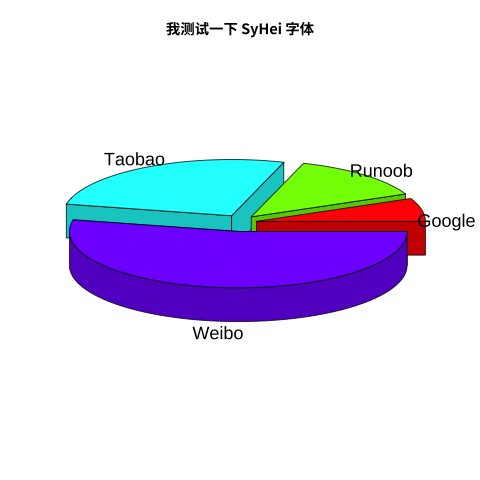
Using Chinese in a 3D pie chart:
Example
library(showtext);
# The first parameter sets the font name, the second parameter is the font library path. In the same directory, we just write the font library name.
font_add("SyHei", "SourceHanSansSC-Bold.otf");
# Data preparation
info = c(1, 2, 4, 8)
# Naming
names = c("Google", "Example", "Taobao", "Weibo")
# Coloring (optional)
cols = c("#ED1C24","#226AB1","#FFC90E","#3f48CC")
# Set the file name, output as png
png(file = "3d_pie_chart.png")
# Load font
showtext_begin();
# Draw 3D chart
pie3D(info,labels = names,explode = 0.1, main = "I am testing the SyHei font",family = "SyHei")
# Remove font
showtext_end();
# Close the graphics device
dev.off();