R Decision Making
Decision-making structures require the programmer to specify one or more conditions to be evaluated or tested, along with a statement or statements to be executed if the condition is determined to be true (required) and, optionally, other statements to be executed if the condition is determined to be false.
The following is the general form of a typical decision-making structure found in most programming languages:
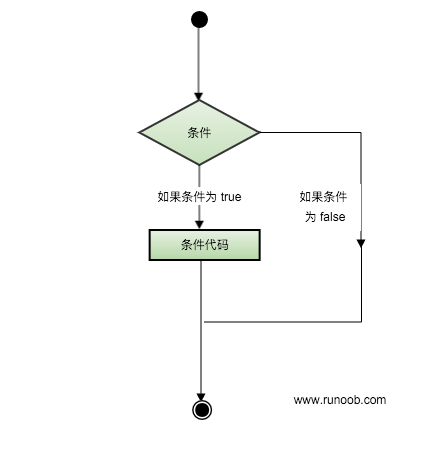
The R language provides the following types of decision-making statements:
- if statement
- if...else statement
- switch statement
if statement
An if statement consists of a Boolean expression followed by one or more statements.
The syntax is as follows:if(boolean_expression) {
// 布尔表达式为真将执行的语句
}
If the Boolean expression boolean_expression is true, the code inside will be executed; if it is false, it will not be executed.
Example
if(is.integer(x)) {
print("X is an integer")
}
Executing the above code produces the following result:
[1] "X 是一个整数"
if...else statement
An if statement can be followed by an optional else statement, which executes when the Boolean expression is false.
The syntax is as follows:
if(boolean_expression) {
    // 如果布尔表达式为真将执行的语句
} else {
    // 如果布尔表达式为假将执行的语句
}
If the Boolean expression boolean_expression is true, the code inside the if block is executed. If the Boolean expression is false, the code inside the else block is executed.
Example
if("example" %in% x) {
print("contains example")
} else {
print("does not contain example")
}
Executing the above code produces the following result:
[1] "包含 example"
If there are multiple conditions to evaluate, you can use if...else if...else:
if(boolean_expression 1) {
    // 如果布尔表达式 boolean_expression 1 为真将执行的语句
} else if( boolean_expression 2) {
    // 如果布尔表达式 boolean_expression 2 为真将执行的语句
} else if( boolean_expression 3) {
    // 如果布尔表达式 boolean_expression 3 为真将执行的语句
} else {
    // 以上所有的布尔表达式都为 false 时执行
}
Example
if("weibo" %in% x) {
print("The first if contains weibo")
} else if ("example" %in% x) {
print("The second if contains example")
} else {
print("Not found")
}
Executing the above code produces the following result:
[1] "第二个 if 包含 example"
switch statement
A switch statement allows testing a variable for equality against a list of values. Each value is called a case.
The syntax is as follows:
switch(expression, case1, case2, case3....)
switchThe statement must follow the rules below:
- switchIn the statement,expressionis a constant expression, which can be an integer or a string. If it is an integer, it returns the value at the corresponding case position; if the integer is not within the range of positions, it returns NULL.
- If multiple values match, the first one is returned.
- expressionIf it is a string, it corresponds to the value of the variable name in the case; if there is no match, no value is returned.
- switch has no default argument available.
Example
3,
"google",
"example",
"taobao",
"weibo"
)
print(x)
Executing the above code produces the following result:
[1] "taobao"
If it is a string, the value corresponding to the string variable is returned:
Example
switch(you.like, google="www.google.com", example = "www.example.com", taobao = "www.taobao.com")
Executing the above code produces the following result:
[1] "www.example.com"
If the integer is not within the range, NULL is returned.
Example
> x
NULL
> x <- switch(4,"google","example","taobao")
> x
NULL