R Data Reshaping
Merge Data Frames
R language merges data frames using themerge()function.
The syntax format of the merge() function is as follows:
# S3 方法
merge(x, y, …)

# data.frame 的 S3 方法
merge(x, y, by = intersect(names(x), names(y)),
      by.x = by, by.y = by, all = FALSE, all.x = all, all.y = all,
      sort = TRUE, suffixes = c(".x",".y"), no.dups = TRUE,
      incomparables = NULL, …)
Common parameter description:
- x, y: data frames.
- by, by.x, by.y: specify the names of matching columns in the two data frames. By default, the same column names in the two data frames are used.
- all: logical value; all = L is a shorthand for all.x = L and all.y = L, where L can be TRUE or FALSE.
- all.x: logical value, default is FALSE. If TRUE, display the matching rows in x, even if there are no corresponding matching rows in y; rows in y without matches are represented as NA.
- all.y: logical value, default is FALSE. If TRUE, display the matching rows in y, even if there are no corresponding matching rows in x; rows in x without matches are represented as NA.
- sort: logical value, whether to sort the columns.
The merge() function is very similar to the JOIN functionality in SQL:
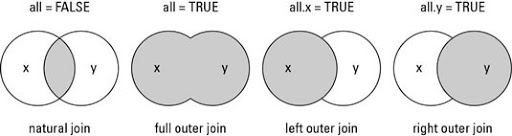
- Natural join or INNER JOIN: if there is at least one match in the tables, return rows
- Left outer join or LEFT JOIN: returns all rows from the left table even if there are no matches in the right table.
- Right outer join or RIGHT JOIN: returns all rows from the right table even if there are no matches in the left table.
- Full outer join or FULL JOIN: returns rows as long as there is a match in one of the tables.
Example
df1 = data.frame(SiteId = c(1:6), Site = c("Google","Example","Taobao","Facebook","Zhihu","Weibo"))
# data frame 2
df2 = data.frame(SiteId = c(2, 4, 6, 7, 8), Country = c("CN","USA","CN","USA","IN"))
# INNER JOIN
df1 = merge(x=df1,y=df2,by="SiteId")
print("----- INNER JOIN -----")
print(df1)
# FULL JOIN
df2 = merge(x=df1,y=df2,by="SiteId",all=TRUE)
print("----- FULL JOIN -----")
print(df2)
# LEFT JOIN
df3 = merge(x=df1,y=df2,by="SiteId",all.x=TRUE)
print("----- LEFT JOIN -----")
print(df3)
# RIGHT JOIN
df4 = merge(x=df1,y=df2,by="SiteId",all.y=TRUE)
print("----- RIGHT JOIN -----")
print(df4)
Executing the above code outputs the following result:
[1] "----- INNER JOIN -----"
  SiteId     Site Country
1      2   Example      CN
2      4 Facebook     USA
3      6    Weibo      CN
[1] "----- FULL JOIN -----"
  SiteId     Site Country.x Country.y
1      2   Example        CN        CN
2      4 Facebook       USA       USA
3      6    Weibo        CN        CN
4      7     <NA>      <NA>       USA
5      8     <NA>      <NA>        IN
[1] "----- LEFT JOIN -----"
  SiteId   Site.x Country   Site.y Country.x Country.y
1      2   Example      CN   Example        CN        CN
2      4 Facebook     USA Facebook       USA       USA
3      6    Weibo      CN    Weibo        CN        CN
[1] "----- RIGHT JOIN -----"
  SiteId   Site.x Country   Site.y Country.x Country.y
1      2   Example      CN   Example        CN        CN
2      4 Facebook     USA Facebook       USA       USA
3      6    Weibo      CN    Weibo        CN        CN
4      7     <NA>    <NA>     <NA>      <NA>       USA
5      8     <NA>    <NA>     <NA>      <NA>        IN
Data Aggregation and Splitting
R language usesmelt()andcast()functions to aggregate and split data.
- melt(): converts wide-format data into long-format data.
- cast(): converts long-format data into wide-format data.
The following diagram clearly shows the functionality of the melt() and cast() functions (the following examples will explain in detail):
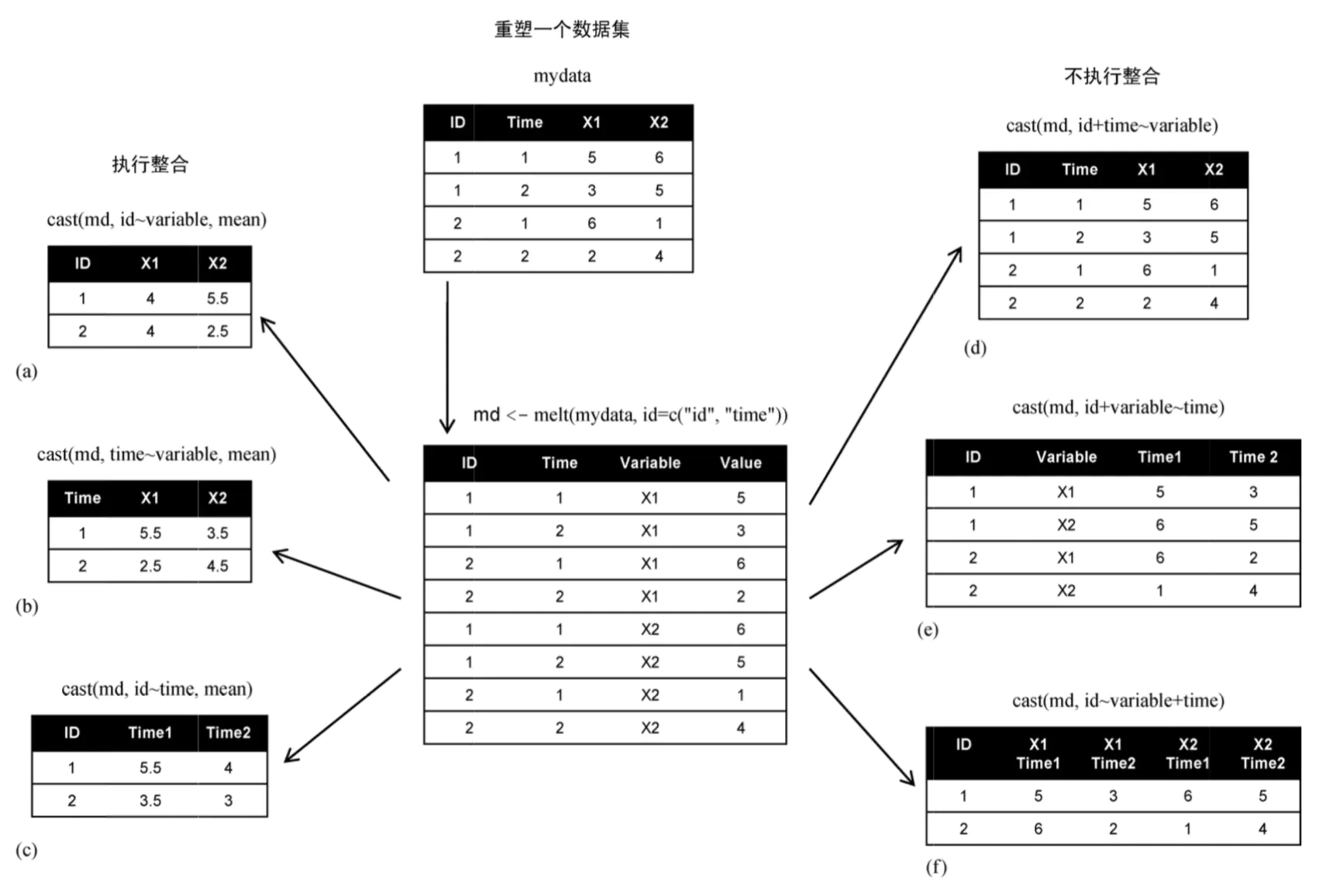
melt() stacks each column of the dataset into a single column. The function syntax format is:
melt(data, ..., na.rm = FALSE, value.name = "value")
Parameter description:
- data: dataset.
- ...: additional arguments passed to or from other methods.
- na.rm: whether to remove NA values from the dataset.
- value.name: a variable name used to store values.
Before performing the following operations, we first install the dependency packages:
# 安装库,MASS 包含很多统计相关的函数,工具和数据集
install.packages("MASS", repos = "https://mirrors.ustc.edu.cn/CRAN/")

#  melt() 和 cast() 函数需要对库
install.packages("reshape2", repos = "https://mirrors.ustc.edu.cn/CRAN/")
install.packages("reshape", repos = "https://mirrors.ustc.edu.cn/CRAN/")
Test example:
Example
library(MASS)
library(reshape2)
library(reshape)
# Create a data frame
id<- c(1, 1, 2, 2)
time <- c(1, 2, 1, 2)
x1 <- c(5, 3, 6, 2)
x2 <- c(6, 5, 1, 4)
mydata <- data.frame(id, time, x1, x2)
# Original data frame
cat("Original data frame:\n")
print(mydata)
# Aggregate
md <- melt(mydata, id = c("id","time"))
cat("\nAfter aggregation:\n")
print(md)
Executing the above code outputs the following result:
原始数据框:
id time x1 x2
1  1    1  5  6
2  1    2  3  5
3  2    1  6  1
4  2    2  2  4

整合后:
id time variable value
1  1    1       x1     5
2  1    2       x1     3
3  2    1       x1     6
4  2    2       x1     2
5  1    1       x2     6
6  1    2       x2     5
7  2    1       x2     1
8  2    2       x2     4
The cast function is used to restore the merged data frame; dcast() returns a data frame, and acast() returns a vector/matrix/array.
The syntax format of the cast() function is:
dcast(
  data,
  formula,
  fun.aggregate = NULL,
  ...,
  margins = NULL,
  subset = NULL,
  fill = NULL,
  drop = TRUE,
  value.var = guess_value(data)
)
acast(
  data,
  formula,
  fun.aggregate = NULL,
  ...,
  margins = NULL,
  subset = NULL,
  fill = NULL,
  drop = TRUE,
  value.var = guess_value(data)
)
Parameter description:
- data: the merged data frame.
- formula: the format of the reshaped data, similar to the x ~ y format, where x is the row label and y is the column label.
- fun.aggregate: aggregate function, used to process the value values.
- margins: a vector of variable names (can include \"grand_col\" and \"grand_row\"), used to calculate margins; set to TRUE to compute all margins.
- subset: filter the result based on conditions, with a format similar tosubset = .(variable=="length")。
- drop: whether to keep the default value.
- value.var: followed by the field to be processed.
Example
library(MASS)
library(reshape2)
library(reshape)
# Create a data frame
id<- c(1, 1, 2, 2)
time <- c(1, 2, 1, 2)
x1 <- c(5, 3, 6, 2)
x2 <- c(6, 5, 1, 4)
mydata <- data.frame(id, time, x1, x2)
# Aggregate
md <- melt(mydata, id = c("id","time"))
# Print recasted dataset using cast() function
cast.data <- cast(md, id~variable, mean)
print(cast.data)
cat("\n")
time.cast <- cast(md, time~variable, mean)
print(time.cast)
cat("\n")
id.time <- cast(md, id~time, mean)
print(id.time)
cat("\n")
id.time.cast <- cast(md, id+time~variable)
print(id.time.cast)
cat("\n")
id.variable.time <- cast(md, id+variable~time)
print(id.variable.time)
cat("\n")
id.variable.time2 <- cast(md, id~variable+time)
print(id.variable.time2)
Executing the above code outputs the following result:
id x1  x2
1  1  4 5.5
2  2  4 2.5

  time  x1  x2
1    1 5.5 3.5
2    2 2.5 4.5

  id   1 2
1  1 5.5 4
2  2 3.5 3

  id time x1 x2
1  1    1  5  6
2  1    2  3  5
3  2    1  6  1
4  2    2  2  4

  id variable 1 2
1  1       x1 5 3
2  1       x2 6 5
3  2       x1 6 2
4  2       x2 1 4

  id x1_1 x1_2 x2_1 x2_2
1  1    5    3    6    5
2  2    6    2    1    4
Other extensions