Servlet Session tracking
HTTP is a "stateless" protocol, which means that each time a client retrieves a webpage, the client opens a separate connection to the web server, and the server automatically does not retain any record of previous client requests.
However, there are still the following three ways to maintain the session between a web client and a web server:
Cookies
A web server can assign a unique session ID as a cookie to each web client. For subsequent client requests, the received cookie can be used for identification.
This may not be an effective method because many browsers do not support cookies, so we recommend not using this method to maintain the session.
Hidden form fields
A web server can send a hidden HTML form field along with a unique session ID, as shown below:
<input type="hidden" name="sessionid" value="12345">
This entry means that when the form is submitted, the specified name and value are automatically included in the GET or POST data. Each time the web browser sends back a request, the session_id value can be used to maintain tracking of different web browsers.
This may be an effective way to maintain session tracking, but clicking a regular hypertext link (<A HREF...>) does not cause form submission, so hidden form fields also do not support regular session tracking.
URL rewriting
You can append some additional data to the end of each URL to identify the session, and the server will associate the session identifier with the stored session-related data.
For example, http://w3cschool.cc/file.htm;sessionid=12345, the session identifier is appended as sessionid=12345, and the identifier can be accessed by the web server to identify the client.
URL rewriting is a better way to maintain the session; it works well when browsers do not support cookies, but its disadvantage is that it dynamically generates each URL to assign a session ID to the page, even for very simple static HTML pages.
HttpSession object
In addition to the above three methods, Servlet also provides the HttpSession interface, which provides a way to identify users across multiple page requests or website visits and to store information about users.
The Servlet container uses this interface to create a session between an HTTP client and an HTTP server. The session lasts for a specified period of time, spanning multiple connections or page requests.
You can call the public method of HttpServletRequestgetSession()to obtain the HttpSession object, as shown below:
HttpSession session = request.getSession();
You need to call this before sending any document content to the client.request.getSession()The following summarizes several important methods available in the HttpSession object:
| No. | Method & Description |
|---|---|
| 1 | public Object getAttribute(String name) This method returns the object with the specified name bound in this session, or returns null if no object with the specified name exists. |
| 2 | public Enumeration getAttributeNames() This method returns an enumeration of String objects; the String objects contain the names of all objects bound to this session. |
| 3 | public long getCreationTime() This method returns the time this session was created, measured in milliseconds since midnight of January 1, 1970 Greenwich Mean Time. |
| 4 | public String getId() This method returns a string containing the unique identifier assigned to this session. |
| 5 | public long getLastAccessedTime() This method returns the time the client last sent a request associated with this session, measured in milliseconds since midnight of January 1, 1970 Greenwich Mean Time. |
| 6 | public int getMaxInactiveInterval() This method returns the maximum time interval, in seconds, that the Servlet container keeps the session open during client access. |
| 7 | public void invalidate() This method invalidates this session and unbinds any objects bound to it. |
| 8 | public boolean isNew() This method returns true if the client does not yet know about this session, or if the client chooses not to participate in this session. |
| 9 | public void removeAttribute(String name) This method removes the object with the specified name from this session. |
| 10 | public void setAttribute(String name, Object value) This method binds an object to this session using the specified name. |
| 11 | public void setMaxInactiveInterval(int interval) This method specifies the time, in seconds, between client requests before the Servlet container invalidates this session. |
Session tracking example
This example demonstrates how to use the HttpSession object to obtain the session creation time and last access time. If the session does not exist, we create a new session via the request.
package com.example.test;

import java.io.IOException;
import java.io.PrintWriter;
import java.text.SimpleDateFormat;
import java.util.Date;

import javax.servlet.ServletException;
import javax.servlet.annotation.WebServlet;
import javax.servlet.http.HttpServlet;
import javax.servlet.http.HttpServletRequest;
import javax.servlet.http.HttpServletResponse;
import javax.servlet.http.HttpSession;

/**
 * Servlet implementation class SessionTrack
 */
@WebServlet("/SessionTrack")
public class SessionTrack extends HttpServlet {
    private static final long serialVersionUID = 1L;

    public void doGet(HttpServletRequest request, HttpServletResponse response) throws ServletException, IOException
    {
        // 如果不存在 session 会话,则创建一个 session 对象
        HttpSession session = request.getSession(true);
        // 获取 session 创建时间
        Date createTime = new Date(session.getCreationTime());
        // 获取该网页的最后一次访问时间
        Date lastAccessTime = new Date(session.getLastAccessedTime());

        //设置日期输出的格式
        SimpleDateFormat df=new SimpleDateFormat("yyyy-MM-dd HH:mm:ss");

        String title = "Servlet Session 实例 - Example";
        Integer visitCount = new Integer(0);
        String visitCountKey = new String("visitCount");
        String userIDKey = new String("userID");
        String userID = new String("Example");
        if(session.getAttribute(visitCountKey) == null) {
            session.setAttribute(visitCountKey, new Integer(0));
        }


        // 检查网页上是否有新的访问者
        if (session.isNew()){
            title = "Servlet Session 实例 - Example";
             session.setAttribute(userIDKey, userID);
        } else {
             visitCount = (Integer)session.getAttribute(visitCountKey);
             visitCount = visitCount + 1;
             userID = (String)session.getAttribute(userIDKey);
        }
        session.setAttribute(visitCountKey,  visitCount);

        // 设置响应内容类型
        response.setContentType("text/html;charset=UTF-8");
        PrintWriter out = response.getWriter();

        String docType = "<!DOCTYPE html>\n";
        out.println(docType +
                "<html>\n" +
                "<head><title>" + title + "</title></head>\n" +
                "<body bgcolor=\"#F0F0F0\">\n" +
                "<h1 align=\"center\">" + title + "</h1>\n" +
                 "<h2 align=\"center\">Session 信息</h2>\n" +
                "<table border=\"1\" align=\"center\">\n" +
                "<tr bgcolor=\"#949494\">\n" +
                "  <th>Session 信息</th><th>值</th></tr>\n" +
                "<tr>\n" +
                "  <td>id</td>\n" +
                "  <td>" + session.getId() + "</td></tr>\n" +
                "<tr>\n" +
                "  <td>创建时间</td>\n" +
                "  <td>" +  df.format(createTime) +
                "  </td></tr>\n" +
                "<tr>\n" +
                "  <td>最后访问时间</td>\n" +
                "  <td>" + df.format(lastAccessTime) +
                "  </td></tr>\n" +
                "<tr>\n" +
                "  <td>用户 ID</td>\n" +
                "  <td>" + userID +
                "  </td></tr>\n" +
                "<tr>\n" +
                "  <td>访问统计:</td>\n" +
                "  <td>" + visitCount + "</td></tr>\n" +
                "</table>\n" +
                "</body></html>");
    }
}
Compile the above ServletSessionTrackand create an appropriate entry in the web.xml file.
<?xml version="1.0" encoding="UTF-8"?>
<web-app>
  <servlet>
    <!-- 类名 -->
    <servlet-name>SessionTrack</servlet-name>
    <!-- 所在的包 -->
    <servlet-class>com.example.test.SessionTrack</servlet-class>
  </servlet>
  <servlet-mapping>
    <servlet-name>SessionTrack</servlet-name>
    <!-- 访问的网址 -->
    <url-pattern>/TomcatTest/SessionTrack</url-pattern>
  </servlet-mapping>
</web-app>
Enter this in the browser address barhttp://localhost:8080/TomcatTest/SessionTrackWhen you run it for the first time, the following result will be displayed:
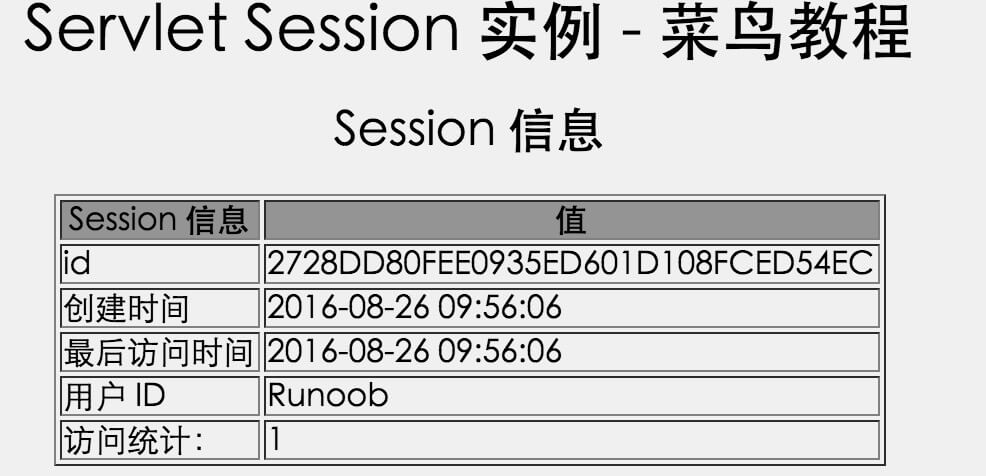
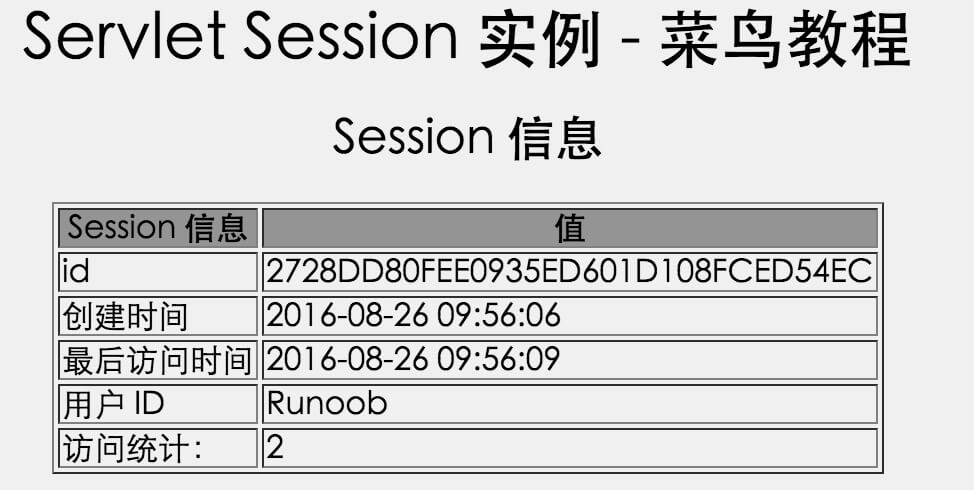
Try running the same Servlet again, and it will display the following result:
Deleting Session data
When you are finished with a user's session data, you have the following options:
- Remove a specific attribute:You can call thepublic void removeAttribute(String name)method to remove the value associated with a specific key.
- Delete the entire session:You can call thepublic void invalidate()method to discard the entire session.
- Set session timeout:You can call thepublic void setMaxInactiveInterval(int interval)method to individually set the session timeout.
- Log out the user:If you are using a server that supports Servlet 2.4, you can calllogoutto log out the Web server client and set all sessions belonging to all users as invalid.
- web.xml configuration:If you are using Tomcat, in addition to the above methods, you can also configure the session timeout in the web.xml file, as shown below:
  <session-config>
    <session-timeout>15</session-timeout>
  </session-config>
The timeout in the above example is in minutes and will override the default 30-minute timeout in Tomcat.
The getMaxInactiveInterval() method in a Servlet returns the session timeout in seconds. Therefore, if you configure the session timeout as 15 minutes in web.xml, getMaxInactiveInterval() will return 900.
Other extensions