Servlet Client HTTP Request
When a browser requests a web page, it sends specific information to the web server. This information cannot be read directly because it is transmitted as part of the HTTP request header. You can refer toHTTP Protocolfor more related information.
The following are important header information from the browser that you can frequently use in web programming:
| Header Information | Description |
|---|---|
| Accept | This header specifies the MIME types that the browser or other clients can handle. The valueimage/pngorimage/jpegare the two most common possible values. |
| Accept-Charset | This header specifies the character set that the browser can use to display information. For example, ISO-8859-1. |
| Accept-Encoding | This header specifies the encoding types that the browser knows how to handle. The valuegziporcompressare the two most common possible values. |
| Accept-Language | This header specifies the preferred language of the client, in which case the Servlet can produce results in multiple languages. For example, en, en-us, ru, etc. |
| Authorization | This header is used by the client to identify itself when accessing password-protected web pages. |
| Connection | This header indicates whether the client can handle persistent HTTP connections. Persistent connections allow the client or other browsers to retrieve multiple files with a single request. The valueKeep-Alivemeans that a persistent connection is used. |
| Content-Length | This header applies only to POST requests and gives the size of the POST data (in bytes). |
| Cookie | This header returns cookies previously sent to the browser back to the server. |
| Host | This header specifies the host and port in the original URL. |
| If-Modified-Since | This header indicates that the client wants the page only if it has been modified after the specified date. If no new result is available, the server sends a 304 code, indicatingNot Modifiedheader. |
| If-Unmodified-Since | This header is the opposite of If-Modified-Since; it specifies that the operation succeeds only when the document is older than the specified date. |
| Referer | This header indicates the URL of the referenced web page. For example, if you are on page 1 and click a link to page 2, when the browser requests page 2, the URL of page 1 is included in the Referer header. |
| User-Agent | This header identifies the browser or other client making the request, and can return different content to different types of browsers. |
Methods to Read HTTP Headers
The following methods can be used in a Servlet program to read HTTP headers. These methods are available through theHttpServletRequestobject.
| No. | Method & Description |
|---|---|
| 1 | Cookie[] getCookies() Returns an array containing all the Cookie objects sent by the client with the request. |
| 2 | Enumeration getAttributeNames() Returns an enumeration containing the names of attributes available to the request. |
| 3 | Enumeration getHeaderNames() Returns an enumeration containing all the header names included in the request. |
| 4 | Enumeration getParameterNames() Returns an enumeration of String objects containing the names of the parameters included in the request. |
| 5 | HttpSession getSession() Returns the current session associated with the request, or creates one if the request has no session. |
| 6 | HttpSession getSession(boolean create) Returns the current HttpSession associated with the request, or if there is no current session and create is true, returns a new session. |
| 7 | Locale getLocale() Returns the preferred locale for the client to accept content, based on the Accept-Language header. |
| 8 | Object getAttribute(String name) Returns the value of a named attribute as an object, or returns null if no attribute with the given name exists. |
| 9 | ServletInputStream getInputStream() Retrieves the body of the request as binary data using ServletInputStream. |
| 10 | String getAuthType() Returns the name of the authentication scheme used to protect the Servlet, for example, "BASIC" or "SSL", or returns null if the JSP is not protected. |
| 11 | String getCharacterEncoding() Returns the name of the character encoding used in the request body. |
| 12 | String getContentType() Returns the MIME type of the request body, or returns null if the type is unknown. |
| 13 | String getContextPath() Returns the part of the request URI that indicates the context of the request. |
| 14 | String getHeader(String name) Returns the value of the specified request header as a string. |
| 15 | String getMethod() Returns the name of the HTTP method of the request, for example, GET, POST, or PUT. |
| 16 | String getParameter(String name) Returns the value of a request parameter as a string, or null if the parameter does not exist. |
| 17 | String getPathInfo() Returns any extra path information associated with the URL the client sent when the request was made. |
| 18 | String getProtocol() Returns the name and version of the request protocol. |
| 19 | String getQueryString() Returns the query string in the request URL contained after the path. |
| 20 | String getRemoteAddr() Returns the Internet Protocol (IP) address of the client that sent the request. |
| 21 | String getRemoteHost() Returns the fully qualified name of the client that sent the request. |
| 22 | String getRemoteUser() Returns the logged-in user making the request if the user has been authenticated, or returns null if the user has not been authenticated. |
| 23 | String getRequestURI() Returns the part of the request URL from the protocol name up to the query string in the first line of the HTTP request. |
| 24 | String getRequestedSessionId() Returns the session ID specified by the client. |
| 25 | String getServletPath() Returns the part of the request URL that called the JSP. |
| 26 | String[] getParameterValues(String name) Returns an array of String objects containing all the values of the given request parameter, or null if the parameter does not exist. |
| 27 | boolean isSecure() Returns a boolean indicating whether the request uses a secure channel, such as HTTPS. |
| 28 | int getContentLength() Returns the length of the request body in bytes and provides an input stream, or returns -1 if the length is unknown. |
| 29 | int getIntHeader(String name) Returns the value of the specified request header as an int value. |
| 30 | int getServerPort() Returns the port number that received this request. |
| 31 | int getParameterMap() Encapsulates the parameters into a Map type. |
HTTP Header Request Example
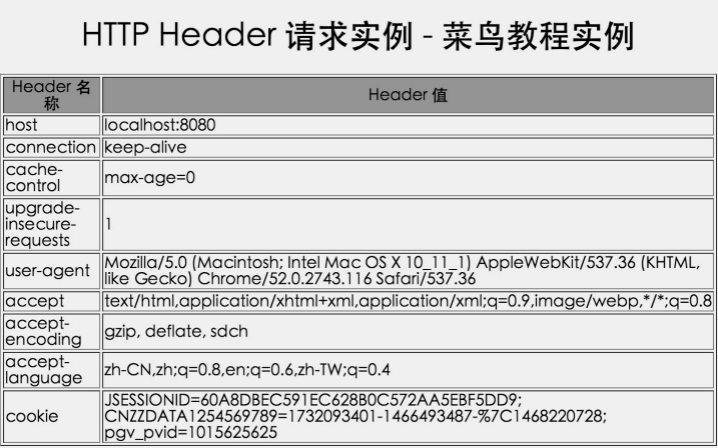
The following example uses HttpServletRequest'sgetHeaderNames()method to read HTTP header information. This method returns an enumeration containing the header information related to the current HTTP request.
Once we have an enumeration, we can loop through it in the standard way, usinghasMoreElements()method to determine when to stop, usingnextElement()method to get the name of each parameter.
//导入必需的 java 库
import java.io.IOException;
import java.io.PrintWriter;
import java.util.Enumeration;

import javax.servlet.ServletException;
import javax.servlet.annotation.WebServlet;
import javax.servlet.http.HttpServlet;
import javax.servlet.http.HttpServletRequest;
import javax.servlet.http.HttpServletResponse;

@WebServlet("/DisplayHeader")

//扩展 HttpServlet 类
public class DisplayHeader extends HttpServlet {

    // 处理 GET 方法请求的方法
    public void doGet(HttpServletRequest request, HttpServletResponse response) throws ServletException, IOException
    {
        // 设置响应内容类型
        response.setContentType("text/html;charset=UTF-8");

        PrintWriter out = response.getWriter();
        String title = "HTTP Header 请求实例 - Example实例";
        String docType =
            "<!DOCTYPE html> \n";
            out.println(docType +
            "<html>\n" +
            "<head><meta charset=\"utf-8\"><title>" + title + "</title></head>\n"+
            "<body bgcolor=\"#F0F0F0\">\n" +
            "<h1 align=\"center\">" + title + "</h1>\n" +
            "<table width=\"100%\" border=\"1\" align=\"center\">\n" +
            "<tr bgcolor=\"#949494\">\n" +
            "<th>Header 名称</th><th>Header 值</th>\n"+
            "</tr>\n");

        Enumeration headerNames = request.getHeaderNames();

        while(headerNames.hasMoreElements()) {
            String paramName = (String)headerNames.nextElement();
            out.print("<tr><td>" + paramName + "</td>\n");
            String paramValue = request.getHeader(paramName);
            out.println("<td> " + paramValue + "</td></tr>\n");
        }
        out.println("</table>\n</body></html>");
    }
    // 处理 POST 方法请求的方法
    public void doPost(HttpServletRequest request, HttpServletResponse response) throws ServletException, IOException {
        doGet(request, response);
    }
}
The above test example is located in the TomcatTest project, and the corresponding web.xml configuration is:
<?xml version="1.0" encoding="UTF-8"?>
<web-app>
  <servlet>
    <!-- 类名 -->
    <servlet-name>DisplayHeader</servlet-name>
    <!-- 所在的包 -->
    <servlet-class>com.example.test.DisplayHeader</servlet-class>
  </servlet>
  <servlet-mapping>
    <servlet-name>DisplayHeader</servlet-name>
    <!-- 访问的网址 -->
    <url-pattern>/TomcatTest/DisplayHeader</url-pattern>
  </servlet-mapping>
</web-app>
Now, call the above Servlet and accesshttp://localhost:8080/TomcatTest/DisplayHeader will produce the following result: