Servlet Handling Dates
One of the most important advantages of using Servlets is that you can use most of the available methods in core Java. This chapter will explain the Java-providedjava.utilpackage'sDateclass, which encapsulates the current date and time.
The Date class supports two constructors. The first constructor initializes an object with the current date and time.
Date( )
The following constructor accepts a parameter that equals the number of milliseconds elapsed since midnight, January 1, 1970.
Date(long millisec)
Once you have a usable Date object, you can call any of the following supported methods to use the date:
| Serial number | Method & Description |
|---|---|
| 1 | boolean after(Date date) Returns true if the date contained in the invoked Date object is after the date specified by date, otherwise returns false. |
| 2 | boolean before(Date date) Returns true if the date contained in the invoked Date object is before the date specified by date, otherwise returns false. |
| 3 | Object clone( ) Duplicates the invoking Date object. |
| 4 | int compareTo(Date date) Compares the value of the invoking object with the value of date. Returns 0 if the two values are equal. Returns a negative value if the invoking object is before date. Returns a positive value if the invoking object is after date. |
| 5 | int compareTo(Object obj) If obj is of the Date class, the operation is equivalent to compareTo(Date). Otherwise, it throws a ClassCastException. |
| 6 | boolean equals(Object date) Returns true if the time and date contained in the invoked Date object are the same as those specified by date, otherwise returns false. |
| 7 | long getTime( ) Returns the number of milliseconds elapsed since January 1, 1970. |
| 8 | int hashCode( ) Returns a hash code for the invoking object. |
| 9 | void setTime(long time) Sets the time and date specified by time, which represents the time elapsed since midnight, January 1, 1970 (in milliseconds). |
| 10 | String toString( ) Converts the invoking Date object to a string and returns the result. |
Get the current date and time
Getting the current date and time in a Java Servlet is very easy. You can use a simple Date object'stoString()method to output the current date and time, as shown below:
package com.example.test;

import java.io.IOException;
import java.io.PrintWriter;
import java.util.Date;

import javax.servlet.ServletException;
import javax.servlet.annotation.WebServlet;
import javax.servlet.http.HttpServlet;
import javax.servlet.http.HttpServletRequest;
import javax.servlet.http.HttpServletResponse;

/**
 * Servlet implementation class CurrentDate
 */
@WebServlet("/CurrentDate")
public class CurrentDate extends HttpServlet {
    private static final long serialVersionUID = 1L;

    public CurrentDate() {
        super();
    }

    protected void doGet(HttpServletRequest request, HttpServletResponse response) throws ServletException, IOException {

        response.setContentType("text/html;charset=UTF-8");
        PrintWriter out = response.getWriter();
          String title = "显示当前的日期和时间";
        Date date = new Date();
        String docType = "<!DOCTYPE html> \n";
          out.println(docType +
            "<html>\n" +
            "<head><title>" + title + "</title></head>\n" +
            "<body bgcolor=\"#F0F0F0\">\n" +
            "<h1 align=\"center\">" + title + "</h1>\n" +
            "<h2 align=\"center\">" + date.toString() + "</h2>\n" +
            "</body></html>");
    }

}
Now, let's compile the above Servlet and create the appropriate entry in the web.xml file:
<?xml version="1.0" encoding="UTF-8"?>
<web-app>
  <servlet>
    <servlet-name>CurrentDate</servlet-name>
    <servlet-class>com.example.test.CurrentDate</servlet-class>
  </servlet>
  <servlet-mapping>
    <servlet-name>CurrentDate</servlet-name>
    <url-pattern>/TomcatTest/CurrentDate</url-pattern>
  </servlet-mapping>
</web-app>
Then invoke the Servlet by accessing http://localhost:8080/TomcatTest/CurrentDate. This will produce the following result:
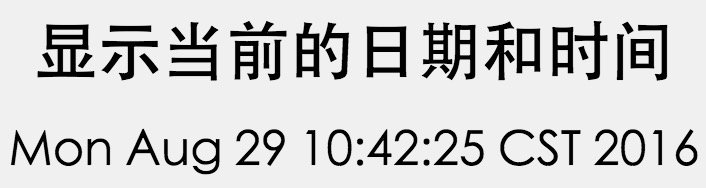
Try refreshing the URL http://localhost:8080/TomcatTest/CurrentDate. Every time you refresh after a few seconds, you will notice a difference in the displayed time.
Date comparison
As mentioned above, you can use all available Java methods in a Servlet. If you need to compare two dates, here are the methods:
- You can use getTime() to obtain the time elapsed since midnight, January 1, 1970 (in milliseconds) for both objects, and then compare these two values.
- You can use the methods before(), after(), and equals(). Since the 12th comes before the 18th in a month, for example, new Date(99, 2, 12).before(new Date(99, 2, 18)) returns true.
- You can use the compareTo() method, which is defined by the Comparable interface and implemented by Date.
Use SimpleDateFormat to format dates
SimpleDateFormat is a concrete class for formatting and parsing dates in a locale-sensitive manner. SimpleDateFormat allows you to choose any user-defined date-time formatting pattern.
Let's modify the above example as follows:
package com.example.test;

import java.io.IOException;
import java.io.PrintWriter;
import java.text.SimpleDateFormat;
import java.util.Date;

import javax.servlet.ServletException;
import javax.servlet.annotation.WebServlet;
import javax.servlet.http.HttpServlet;
import javax.servlet.http.HttpServletRequest;
import javax.servlet.http.HttpServletResponse;

/**
 * Servlet implementation class CurrentDate
 */
@WebServlet("/CurrentDate")
public class CurrentDate extends HttpServlet {
    private static final long serialVersionUID = 1L;

    public CurrentDate() {
        super();
    }

    protected void doGet(HttpServletRequest request, HttpServletResponse response) throws ServletException, IOException {

        response.setContentType("text/html;charset=UTF-8");

        PrintWriter out = response.getWriter();
        String title = "显示当前的日期和时间";
        Date dNow = new Date( );
        SimpleDateFormat ft =
                new SimpleDateFormat ("yyyy.MM.dd  hh:mm:ss E a ");
        String docType = "<!DOCTYPE html> \n";
        out.println(docType +
            "<html>\n" +
            "<head><title>" + title + "</title></head>\n" +
            "<body bgcolor=\"#F0F0F0\">\n" +
            "<h1 align=\"center\">" + title + "</h1>\n" +
            "<h2 align=\"center\">" + ft.format(dNow) + "</h2>\n" +
            "</body></html>");
    }

}
Compile the above Servlet again, then invoke it by accessing http://localhost:8080/TomcatTest/CurrentDate. This will produce the following result:
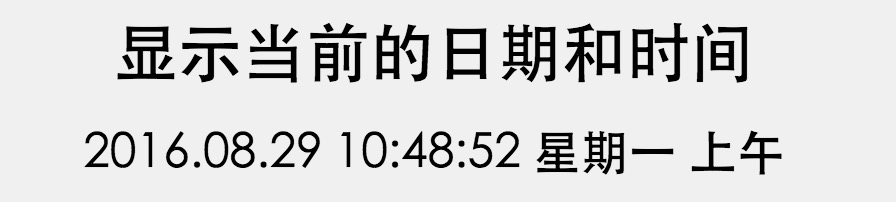
Simple date format format codes
Use time pattern strings to specify the time format. In this mode, all ASCII letters are reserved as pattern letters, which are defined as follows:
| Character | Description | Example |
|---|---|---|
| G | Era indicator | AD |
| y | Year represented by four digits | 2001 |
| M | Month in the year | July or 07 |
| d | Day in the month | 10 |
| h | Hour with A.M./P.M. (1-12) | 12 |
| H | Hour in the day (0-23) | 22 |
| m | Minute in the hour | 30 |
| s | Second in the minute | 55 |
| S | Millisecond | 234 |
| E | Day of the week | Tuesday |
| D | Day of the year | 360 |
| F | Week of the month | 2 (second Wed. in July) |
| w | Week of the year | 40 |
| W | Week in the month | 1 |
| a | A.M./P.M. marker | PM |
| k | Hour in the day (1-24) | 24 |
| K | Hour with A.M./P.M. (0-11) | 10 |
| z | Time zone | Eastern Standard Time |
| ' | Escape for text | Delimiter |
| " | Single quote | ` |
For a complete list of available date-handling methods, you can refer to the standard Java documentation.
Other extensions