Servlet File Upload
Servlet can be used with the HTML form tag to allow users to upload files to the server. The uploaded file can be a text file, an image file, or any document.
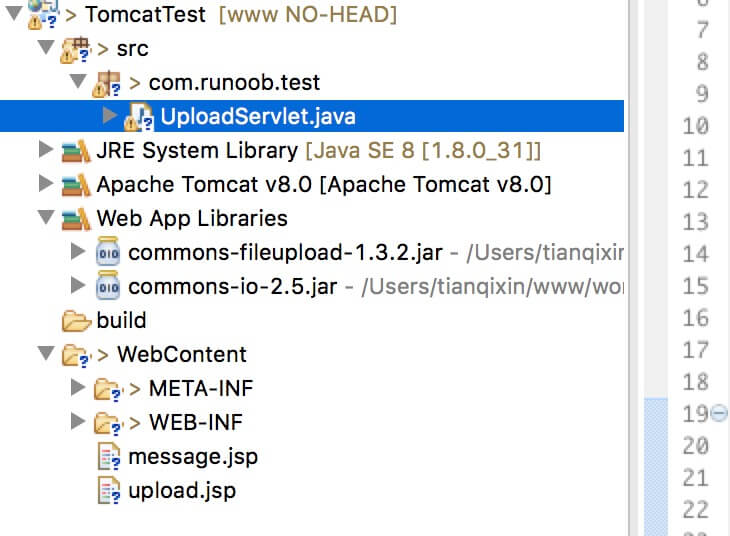
The files used in this article are:
- upload.jsp : file upload form.
- message.jsp : the page to redirect to after successful upload.
- UploadServlet.java : the upload handling Servlet.
- Required jar files: commons-fileupload-1.3.2, commons-io-2.5.jar.
The structure diagram is as follows:
Note:Servlet 3.0 has built-in file upload functionality, so developers no longer need to import the Commons FileUpload component into the project.
Next, we introduce it in detail.
Create a file upload form
The following HTML code creates a file upload form. The following points need attention:
- The form'smethodattribute should be set toPOSTmethod; the GET method cannot be used.
- The form'senctypeattribute should be set tomultipart/form-data.
- The form'sactionattribute should be set to the Servlet file that handles file upload on the backend server. The following example usesUploadServletServlet to upload files.
- To upload a single file, you should use a single <input .../> tag with the attribute type="file". To allow multiple file uploads, include multiple input tags with different name attribute values. The input tags have different name attribute values. The browser will associate a browse button with each input tag.
The upload.jsp file code is as follows:
<%@ page language="java" contentType="text/html; charset=UTF-8"
    pageEncoding="UTF-8"%>
<!DOCTYPE html PUBLIC "-//W3C//DTD HTML 4.01 Transitional//EN"
    "http://www.w3.org/TR/html4/loose.dtd">
<html>
<head>
<meta http-equiv="Content-Type" content="text/html; charset=UTF-8">
<title>文件上传实例 - Example</title>
</head>
<body>
<h1>文件上传实例 - Example</h1>
<form method="post" action="../TomcatTest/UploadServlet" enctype="multipart/form-data">
    选择一个文件:
    <input type="file" name="uploadFile" />
    <br/><br/>
    <input type="submit" value="上传" />
</form>
</body>
</html>
Write the backend Servlet
The following is the source code of UploadServlet, which handles file upload. Before this, we first ensure that the dependency packages have been imported into the project's WEB-INF/lib directory:
- The following example depends on FileUpload, so make sure you have the latest version in your classpathcommons-fileupload.x.x.jarfile. You can download it fromhttp://commons.apache.org/proper/commons-fileupload/download.
- FileUpload depends on Commons IO, so make sure you have the latest version in your classpathcommons-io-x.x.jarfile. You can download it fromhttp://commons.apache.org/proper/commons-io/download.
You can directly download the two dependency packages provided by this site:
- commons-fileupload-1.3.2.jar
- commons-io-2.5.jar
The source code of UploadServlet is as follows:
package com.example.test;

import java.io.File;
import java.io.IOException;
import java.io.PrintWriter;
import java.util.List;

import javax.servlet.ServletException;
import javax.servlet.annotation.WebServlet;
import javax.servlet.http.HttpServlet;
import javax.servlet.http.HttpServletRequest;
import javax.servlet.http.HttpServletResponse;

import org.apache.commons.fileupload.FileItem;
import org.apache.commons.fileupload.disk.DiskFileItemFactory;
import org.apache.commons.fileupload.servlet.ServletFileUpload;


/**
 * Servlet implementation class UploadServlet
 */
@WebServlet("/UploadServlet")
public class UploadServlet extends HttpServlet {
    private static final long serialVersionUID = 1L;

    // 上传文件存储目录
    private static final String UPLOAD_DIRECTORY = "upload";

    // 上传配置
    private static final int MEMORY_THRESHOLD   = 1024 * 1024 * 3;  // 3MB
    private static final int MAX_FILE_SIZE      = 1024 * 1024 * 40; // 40MB
    private static final int MAX_REQUEST_SIZE   = 1024 * 1024 * 50; // 50MB

    /**
     * 上传数据及保存文件
     */
    protected void doPost(HttpServletRequest request,
        HttpServletResponse response) throws ServletException, IOException {
        // 检测是否为多媒体上传
        if (!ServletFileUpload.isMultipartContent(request)) {
            // 如果不是则停止
            PrintWriter writer = response.getWriter();
            writer.println("Error: 表单必须包含 enctype=multipart/form-data");
            writer.flush();
            return;
        }

        // 配置上传参数
        DiskFileItemFactory factory = new DiskFileItemFactory();
        // 设置内存临界值 - 超过后将产生临时文件并存储于临时目录中
        factory.setSizeThreshold(MEMORY_THRESHOLD);
        // 设置临时存储目录
        factory.setRepository(new File(System.getProperty("java.io.tmpdir")));

        ServletFileUpload upload = new ServletFileUpload(factory);

        // 设置最大文件上传值
        upload.setFileSizeMax(MAX_FILE_SIZE);

        // 设置最大请求值 (包含文件和表单数据)
        upload.setSizeMax(MAX_REQUEST_SIZE);

        // 中文处理
        upload.setHeaderEncoding("UTF-8");

        // 构造临时路径来存储上传的文件
        // 这个路径相对当前应用的目录
        String uploadPath = request.getServletContext().getRealPath("./") + File.separator + UPLOAD_DIRECTORY;


        // 如果目录不存在则创建
        File uploadDir = new File(uploadPath);
        if (!uploadDir.exists()) {
            uploadDir.mkdir();
        }

        try {
            // 解析请求的内容提取文件数据
            @SuppressWarnings("unchecked")
            List<FileItem> formItems = upload.parseRequest(request);

            if (formItems != null && formItems.size() > 0) {
                // 迭代表单数据
                for (FileItem item : formItems) {
                    // 处理不在表单中的字段
                    if (!item.isFormField()) {
                        String fileName = new File(item.getName()).getName();
                        String filePath = uploadPath + File.separator + fileName;
                        File storeFile = new File(filePath);
                        // 在控制台输出文件的上传路径
                        System.out.println(filePath);
                        // 保存文件到硬盘
                        item.write(storeFile);
                        request.setAttribute("message",
                            "文件上传成功!");
                    }
                }
            }
        } catch (Exception ex) {
            request.setAttribute("message",
                    "错误信息: " + ex.getMessage());
        }
        // 跳转到 message.jsp
        request.getServletContext().getRequestDispatcher("/message.jsp").forward(
                request, response);
    }
}
The message.jsp file code is as follows:
<%@ page language="java" contentType="text/html; charset=UTF-8"
    pageEncoding="UTF-8"%>
<!DOCTYPE html PUBLIC "-//W3C//DTD HTML 4.01 Transitional//EN"
    "http://www.w3.org/TR/html4/loose.dtd">
<html>
<head>
<meta http-equiv="Content-Type" content="text/html; charset=UTF-8">
<title>文件上传结果</title>
</head>
<body>
    <center>
        <h2>${message}</h2>
    </center>
</body>
</html>
Compile and run the Servlet
Compile the above Servlet UploadServlet, and create the required entry in the web.xml file, as follows:
<?xml version="1.0" encoding="UTF-8"?>
<web-app xmlns:xsi="http://www.w3.org/2001/XMLSchema-instance"
    xmlns="http://java.sun.com/xml/ns/javaee"
    xmlns:web="http://java.sun.com/xml/ns/javaee/web-app_2_5.xsd"
    xsi:schemaLocation="http://java.sun.com/xml/ns/javaee
        http://java.sun.com/xml/ns/javaee/web-app_2_5.xsd"
    id="WebApp_ID" version="2.5">
  <servlet>
    <display-name>UploadServlet</display-name>
    <servlet-name>UploadServlet</servlet-name>
    <servlet-class>com.example.test.UploadServlet</servlet-class>
  </servlet>

  <servlet-mapping>
    <servlet-name>UploadServlet</servlet-name>
    <url-pattern>/TomcatTest/UploadServlet</url-pattern>
  </servlet-mapping>
</web-app>
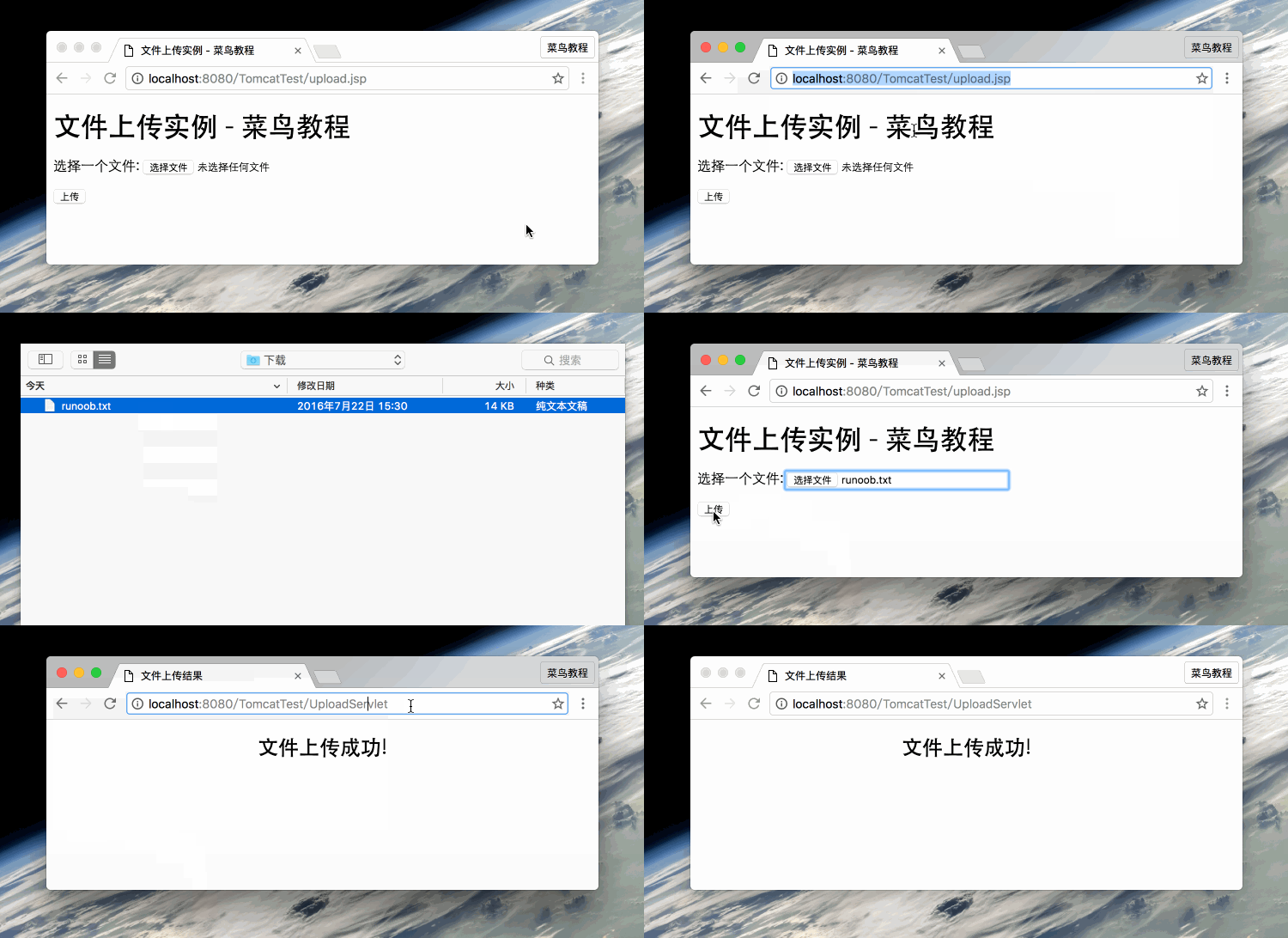
Now try to upload files using the HTML form you created above. When you access http://localhost:8080/TomcatTest/upload.jsp in your browser, the demonstration is as follows: