Servlet Form Data
In many cases, you need to pass some information from the browser to the web server, and finally to the backend program. The browser uses two methods to pass this information to the web server, namely the GET method and the POST method.
GET Method
The GET method sends encoded user information appended to the page request. The page and the encoded information are separated by the ? character, as shown below:
http://www.test.com/hello?key1=value1&key2=value2
The GET method is the default method for passing information from the browser to the web server. It produces a long string that appears in the browser's address bar. If you want to pass passwords or other sensitive information to the server, do not use the GET method. The GET method has a size limit: the request string can contain at most 1024 characters.
This information is passed using the QUERY_STRING header and can be accessed through the QUERY_STRING environment variable. The Servlet usesdoGet()method to handle this type of request.
POST Method
Another reliable way to pass information to the backend program is the POST method. The POST method packages information in basically the same way as the GET method, but instead of sending the information as a text string after the ? character in the URL, it sends the information as a separate message. The message is sent to the backend program in the form of standard output, and you can parse and use this standard output. The Servlet uses the doPost() method to handle this type of request.
Using Servlet to Read Form Data
The Servlet processes form data, and this data is automatically parsed using different methods depending on the situation:
- getParameter():You can call the request.getParameter() method to get the value of a form parameter.
- getParameterValues():If the parameter appears more than once, call this method and it will return multiple values, such as checkboxes.
- getParameterNames():If you want to get a complete list of all parameters in the current request, call this method.
GET Method Example Using URL
The following is a simple URL that will pass two values to the HelloForm program using the GET method.
http://localhost:8080/TomcatTest/HelloForm?name=Example&url=www.example.com
The following is the Servlet program that handles web browser input.HelloForm.javaWe will use thegetParameter()method to easily access the passed information:
package com.example.test;

import java.io.IOException;
import java.io.PrintWriter;

import javax.servlet.ServletException;
import javax.servlet.annotation.WebServlet;
import javax.servlet.http.HttpServlet;
import javax.servlet.http.HttpServletRequest;
import javax.servlet.http.HttpServletResponse;

/**
 * Servlet implementation class HelloForm
 */
@WebServlet("/HelloForm")
public class HelloForm extends HttpServlet {
    private static final long serialVersionUID = 1L;

    /**
     * @see HttpServlet#HttpServlet()
     */
    public HelloForm() {
        super();
        // TODO Auto-generated constructor stub
    }

    /**
     * @see HttpServlet#doGet(HttpServletRequest request, HttpServletResponse response)
     */
    protected void doGet(HttpServletRequest request, HttpServletResponse response) throws ServletException, IOException {
        // 设置响应内容类型
        response.setContentType("text/html;charset=UTF-8");

        PrintWriter out = response.getWriter();
        String title = "使用 GET 方法读取表单数据";
        // 处理中文
        String name =new String(request.getParameter("name").getBytes("ISO-8859-1"),"UTF-8");
        String docType = "<!DOCTYPE html> \n";
        out.println(docType +
            "<html>\n" +
            "<head><title>" + title + "</title></head>\n" +
            "<body bgcolor=\"#F0F0F0\">\n" +
            "<h1 align=\"center\">" + title + "</h1>\n" +
            "<ul>\n" +
            "  <li><b>站点名</b>:"
            + name + "\n" +
            "  <li><b>网址</b>:"
            + request.getParameter("url") + "\n" +
            "</ul>\n" +
            "</body></html>");
    }

    // 处理 POST 方法请求的方法
    public void doPost(HttpServletRequest request, HttpServletResponse response) throws ServletException, IOException {
        doGet(request, response);
    }
}
Then weweb.xmlcreate the following entry in the file:
<?xml version="1.0" encoding="UTF-8"?>
<web-app>
  <servlet>
    <servlet-name>HelloForm</servlet-name>
    <servlet-class>com.example.test.HelloForm</servlet-class>
  </servlet>
  <servlet-mapping>
    <servlet-name>HelloForm</servlet-name>
    <url-pattern>/TomcatTest/HelloForm</url-pattern>
  </servlet-mapping>
</web-app>
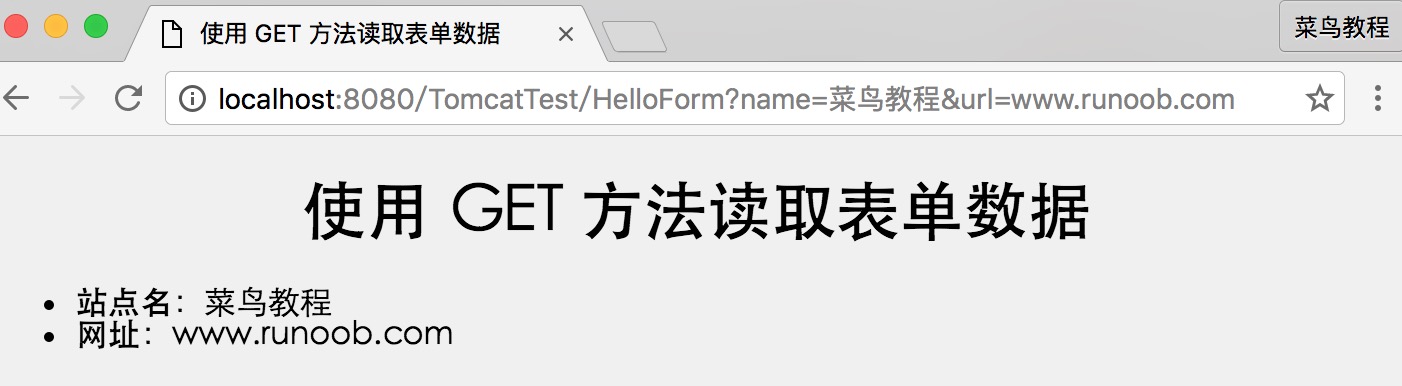
Now enter the following in the browser's address bar:http://localhost:8080/TomcatTest/HelloForm?name=Example&url=www.example.com, and make sure the Tomcat server has been started before triggering the above command. If all goes well, you will get the following result:
GET Method Example Using Form
The following is a simple example that uses an HTML form and a submit button to pass two values. We will use the same Servlet HelloForm to process the input.
<!DOCTYPE html>
<html>
<head>
<meta charset="utf-8">
<title>Example(example.com)</title>
</head>
<body>
<form action="HelloForm" method="GET">
网址名:<input type="text" name="name">
<br />
网址:<input type="text" name="url" />
<input type="submit" value="提交" />
</form>
</body>
</html>
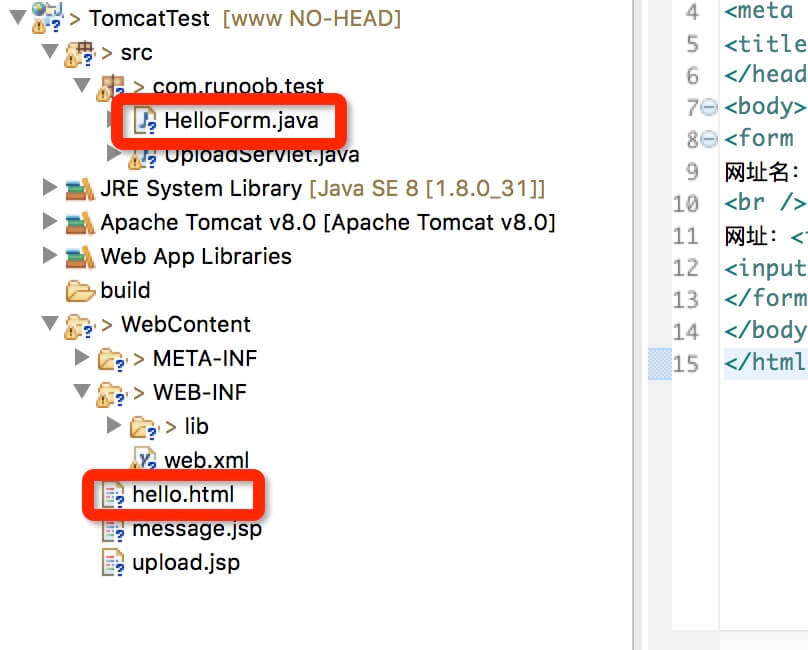
Save this HTML to the hello.html file, the directory structure is as follows:
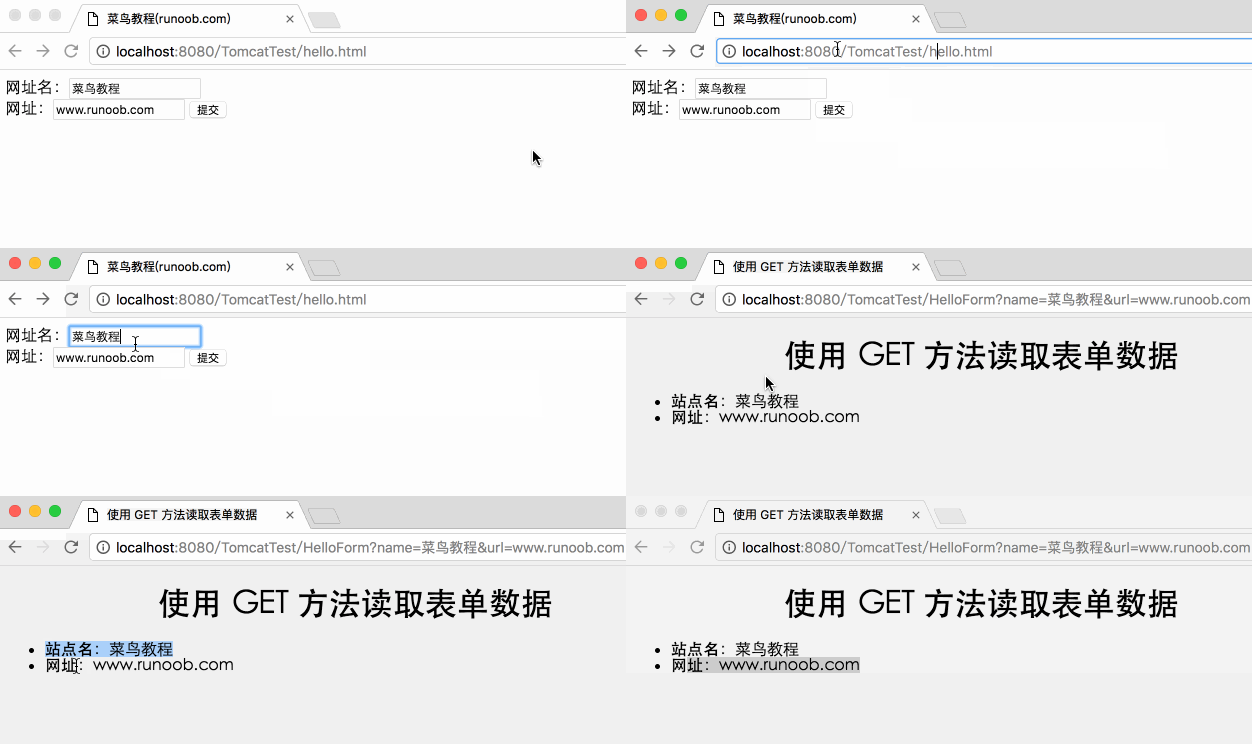
Try entering the website name and URL, then click the "Submit" button. The Gif demonstration is as follows:
POST Method Example Using Form
Let's make a small modification to the above Servlet so that it can handle both GET and POST methods. The followingHelloForm.javaServlet program uses GET and POST methods to process input given by the web browser.
Note: If the data submitted by the form contains Chinese data, encoding conversion is required:
String name =new String(request.getParameter("name").getBytes("ISO8859-1"),"UTF-8");
package com.example.test;

import java.io.IOException;
import java.io.PrintWriter;

import javax.servlet.ServletException;
import javax.servlet.annotation.WebServlet;
import javax.servlet.http.HttpServlet;
import javax.servlet.http.HttpServletRequest;
import javax.servlet.http.HttpServletResponse;

/**
 * Servlet implementation class HelloForm
 */
@WebServlet("/HelloForm")
public class HelloForm extends HttpServlet {
    private static final long serialVersionUID = 1L;

    /**
     * @see HttpServlet#HttpServlet()
     */
    public HelloForm() {
        super();
        // TODO Auto-generated constructor stub
    }

    /**
     * @see HttpServlet#doGet(HttpServletRequest request, HttpServletResponse response)
     */
    protected void doGet(HttpServletRequest request, HttpServletResponse response) throws ServletException, IOException {
        // 设置响应内容类型
        response.setContentType("text/html;charset=UTF-8");

        PrintWriter out = response.getWriter();
        String title = "使用 POST 方法读取表单数据";
        // 处理中文
        String name =new String(request.getParameter("name").getBytes("ISO8859-1"),"UTF-8");
        String docType = "<!DOCTYPE html> \n";
        out.println(docType +
            "<html>\n" +
            "<head><title>" + title + "</title></head>\n" +
            "<body bgcolor=\"#F0F0F0\">\n" +
            "<h1 align=\"center\">" + title + "</h1>\n" +
            "<ul>\n" +
            "  <li><b>站点名</b>:"
            + name + "\n" +
            "  <li><b>网址</b>:"
            + request.getParameter("url") + "\n" +
            "</ul>\n" +
            "</body></html>");
    }

    // 处理 POST 方法请求的方法
    public void doPost(HttpServletRequest request, HttpServletResponse response) throws ServletException, IOException {
        doGet(request, response);
    }
}
Now, compile and deploy the above Servlet, and test it with hello.html using the POST method, as shown below:
<!DOCTYPE html>
<html>
<head>
<meta charset="utf-8">
<title>Example(example.com)</title>
</head>
<body>
<form action="HelloForm" method="POST">
网址名:<input type="text" name="name">
<br />
网址:<input type="text" name="url" />
<input type="submit" value="提交" />
</form>
</body>
</html>
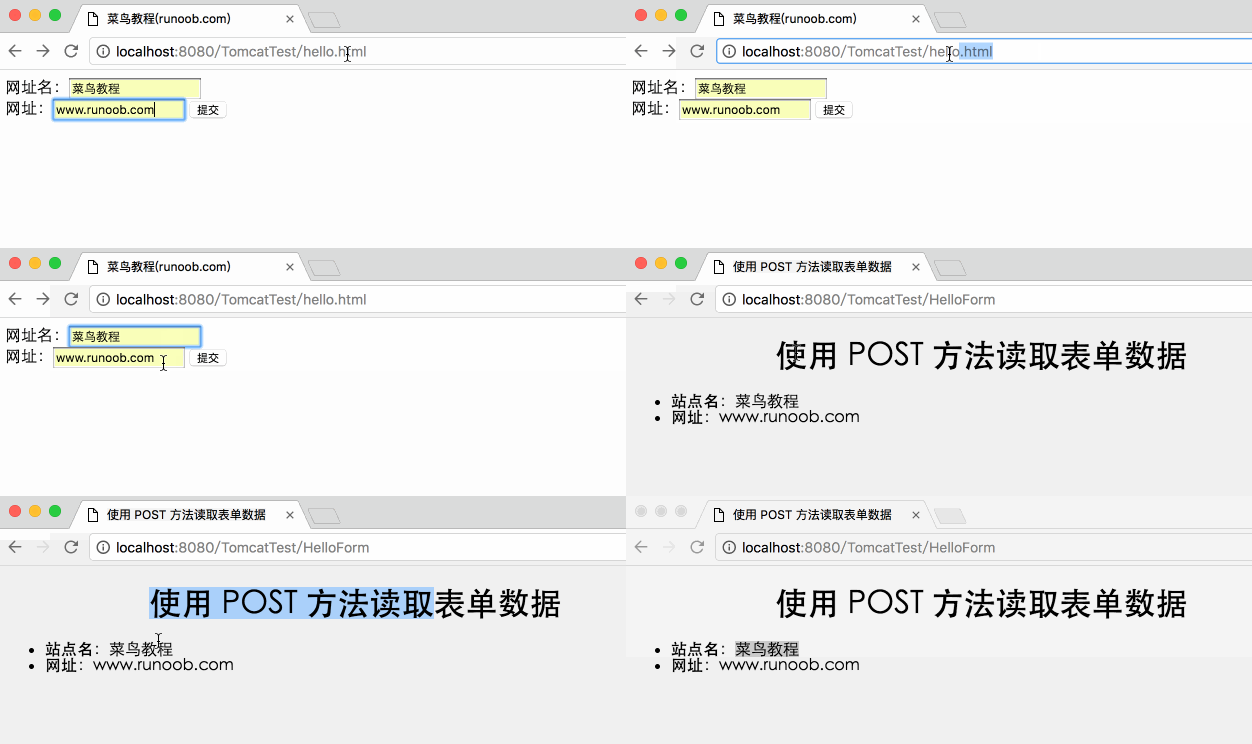
The following is the actual output of the above form. Try entering the website name and URL, then click the "Submit" button. The Gif demonstration is as follows:
Passing Checkbox Data to Servlet Program
When you need to select more than one option, use checkboxes.
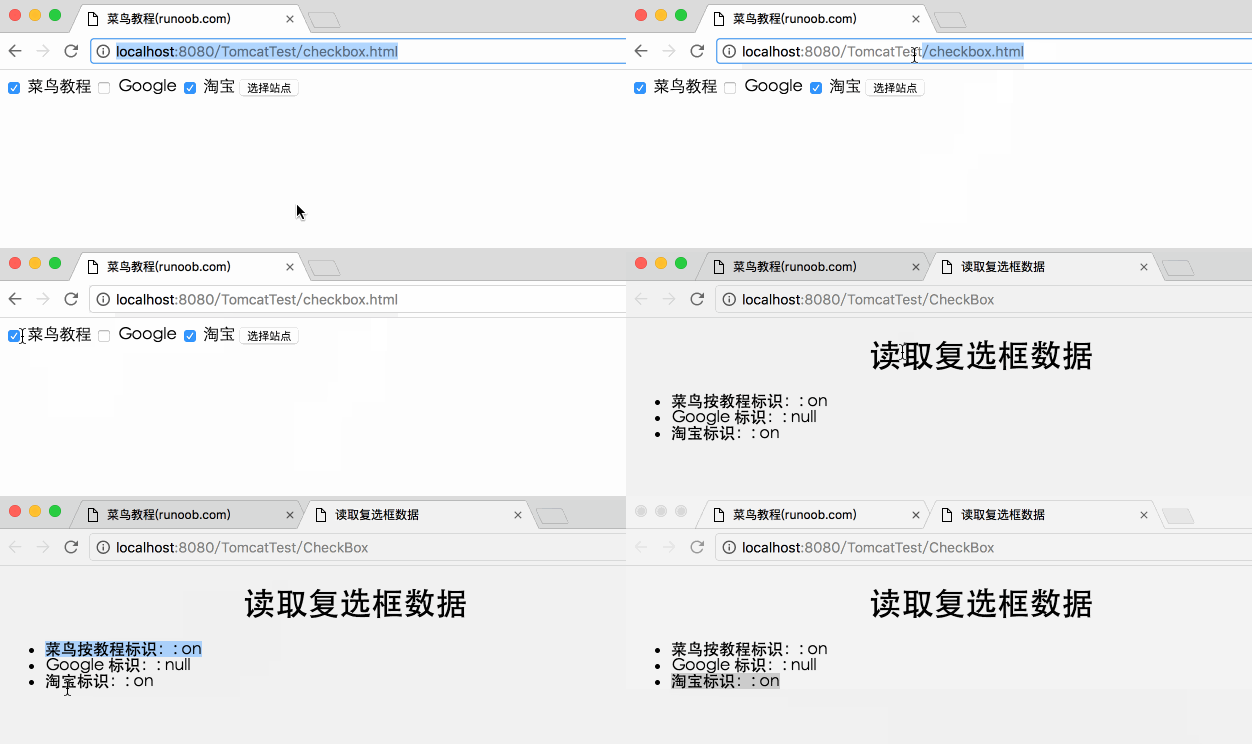
The following is an HTML code example, checkbox.html, a form with two checkboxes.
<!DOCTYPE html>
<html>
<head>
<meta charset="utf-8">
<title>Example(example.com)</title>
</head>
<body>
<form action="CheckBox" method="POST" target="_blank">
<input type="checkbox" name="example" checked="checked" /> Example
<input type="checkbox" name="google"  /> Google
<input type="checkbox" name="taobao" checked="checked" /> 淘宝
<input type="submit" value="选择站点" />
</form>
</body>
</html>
The following is the CheckBox.java Servlet program, which processes the checkbox input given by the web browser.
package com.example.test;

import java.io.IOException;
import java.io.PrintWriter;

import javax.servlet.ServletException;
import javax.servlet.annotation.WebServlet;
import javax.servlet.http.HttpServlet;
import javax.servlet.http.HttpServletRequest;
import javax.servlet.http.HttpServletResponse;

/**
 * Servlet implementation class CheckBox
 */
@WebServlet("/CheckBox")
public class CheckBox extends HttpServlet {
    private static final long serialVersionUID = 1L;

    protected void doGet(HttpServletRequest request, HttpServletResponse response) throws ServletException, IOException {

        // 设置响应内容类型
        response.setContentType("text/html;charset=UTF-8");

        PrintWriter out = response.getWriter();
        String title = "读取复选框数据";
        String docType = "<!DOCTYPE html> \n";
            out.println(docType +
                "<html>\n" +
                "<head><title>" + title + "</title></head>\n" +
                "<body bgcolor=\"#F0F0F0\">\n" +
                "<h1 align=\"center\">" + title + "</h1>\n" +
                "<ul>\n" +
                "  <li><b>Example按教程标识:</b>: "
                + request.getParameter("example") + "\n" +
                "  <li><b>Google 标识:</b>: "
                + request.getParameter("google") + "\n" +
                "  <li><b>淘宝标识:</b>: "
                + request.getParameter("taobao") + "\n" +
                "</ul>\n" +
                "</body></html>");
    }

    // 处理 POST 方法请求的方法
    public void doPost(HttpServletRequest request, HttpServletResponse response) throws ServletException, IOException {
        doGet(request, response);
    }
}
Set the corresponding web.xml:
<?xml version="1.0" encoding="UTF-8"?>
<web-app>
  <servlet>
    <servlet-name>CheckBox</servlet-name>
    <servlet-class>com.example.test.CheckBox</servlet-class>
  </servlet>
  <servlet-mapping>
    <servlet-name>CheckBox</servlet-name>
    <url-pattern>/TomcatTest/CheckBox</url-pattern>
  </servlet-mapping>
</web-app>
The above example will display the following result:
Reading All Form Parameters
The following is a general example, using HttpServletRequest'sgetParameterNames()method to read all available form parameters. This method returns an enumeration containing parameter names in unspecified order.
Once we have an enumeration, we can loop through the enumeration in the standard way, usinghasMoreElements()method to determine when to stop, usingnextElement()method to get the name of each parameter.
import java.io.IOException;
import java.io.PrintWriter;
import java.util.Enumeration;

import javax.servlet.ServletException;
import javax.servlet.annotation.WebServlet;
import javax.servlet.http.HttpServlet;
import javax.servlet.http.HttpServletRequest;
import javax.servlet.http.HttpServletResponse;

/**
 * Servlet implementation class ReadParams
 */
@WebServlet("/ReadParams")
public class ReadParams extends HttpServlet {
    private static final long serialVersionUID = 1L;

    /**
     * @see HttpServlet#HttpServlet()
     */
    public ReadParams() {
        super();
        // TODO Auto-generated constructor stub
    }

    /**
     * @see HttpServlet#doGet(HttpServletRequest request, HttpServletResponse response)
     */
    protected void doGet(HttpServletRequest request, HttpServletResponse response) throws ServletException, IOException {
        // 设置响应内容类型
        response.setContentType("text/html;charset=UTF-8");
        PrintWriter out = response.getWriter();
        String title = "读取所有的表单数据";
        String docType =
            "<!doctype html public \"-//w3c//dtd html 4.0 " +
            "transitional//en\">\n";
            out.println(docType +
            "<html>\n" +
            "<head><meta charset=\"utf-8\"><title>" + title + "</title></head>\n" +
            "<body bgcolor=\"#F0F0F0\">\n" +
            "<h1 align=\"center\">" + title + "</h1>\n" +
            "<table width=\"100%\" border=\"1\" align=\"center\">\n" +
            "<tr bgcolor=\"#949494\">\n" +
            "<th>参数名称</th><th>参数值</th>\n"+
            "</tr>\n");

        Enumeration paramNames = request.getParameterNames();

        while(paramNames.hasMoreElements()) {
            String paramName = (String)paramNames.nextElement();
            out.print("<tr><td>" + paramName + "</td>\n");
            String[] paramValues =
            request.getParameterValues(paramName);
            // 读取单个值的数据
            if (paramValues.length == 1) {
                String paramValue = paramValues[0];
                if (paramValue.length() == 0)
                    out.println("<td><i>没有值</i></td>");
                else
                    out.println("<td>" + paramValue + "</td>");
            } else {
                // 读取多个值的数据
                out.println("<td><ul>");
                for(int i=0; i < paramValues.length; i++) {
                out.println("<li>" + paramValues[i]);
            }
                out.println("</ul></td>");
            }
            out.print("</tr>");
        }
        out.println("\n</table>\n</body></html>");
    }

    /**
     * @see HttpServlet#doPost(HttpServletRequest request, HttpServletResponse response)
     */
    protected void doPost(HttpServletRequest request, HttpServletResponse response) throws ServletException, IOException {
        // TODO Auto-generated method stub
        doGet(request, response);
    }

}
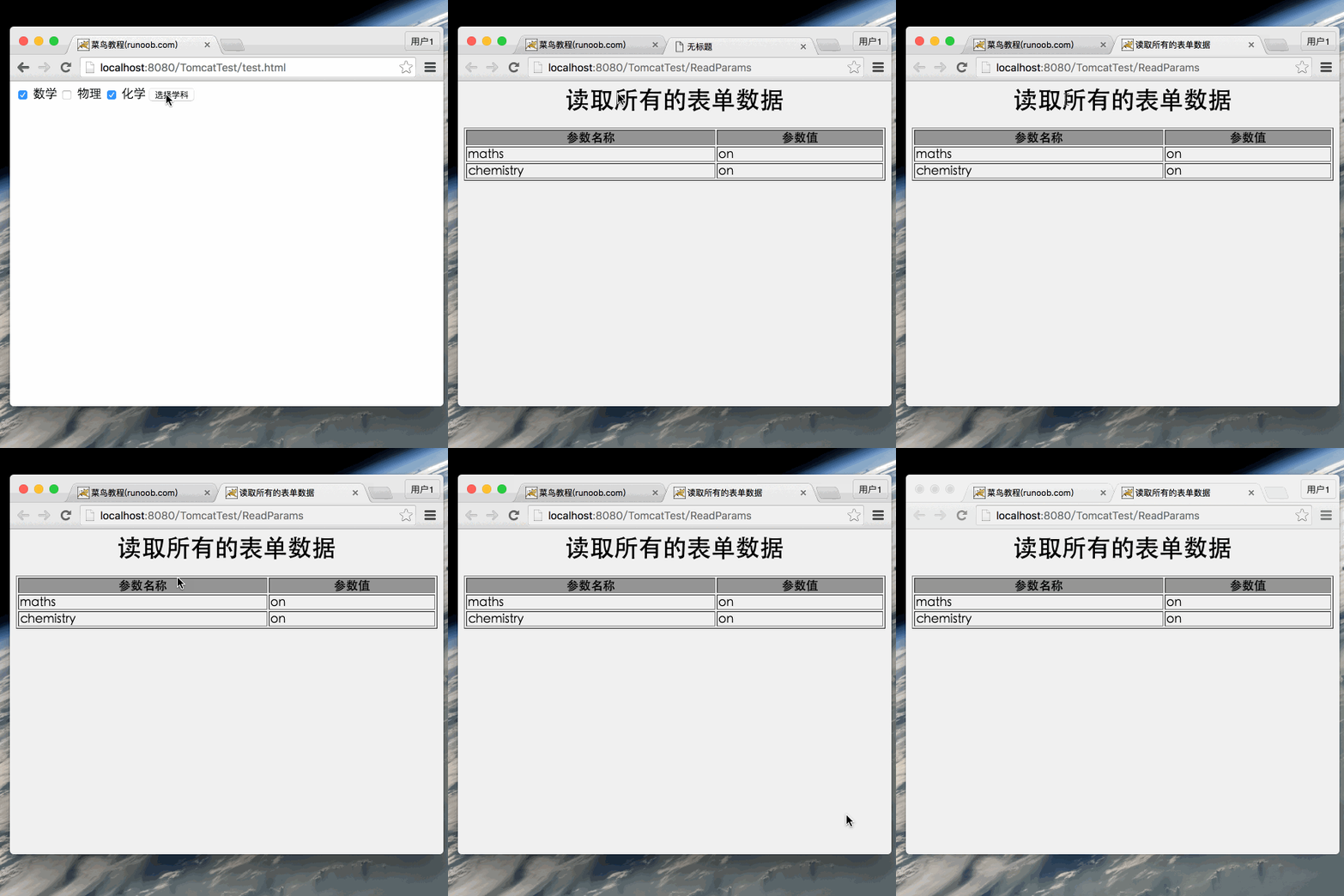
Now, try the above Servlet with the following form:
<!DOCTYPE html>
<html>
<head>
<meta charset="utf-8">
<title>Example(example.com)</title>
</head>
<body>

<form action="ReadParams" method="POST" target="_blank">
<input type="checkbox" name="maths" checked="checked" /> 数学
<input type="checkbox" name="physics"  /> 物理
<input type="checkbox" name="chemistry" checked="checked" /> 化学
<input type="submit" value="选择学科" />
</form>

</body>
</html>
Set the corresponding web.xml:
<?xml version="1.0" encoding="UTF-8"?>
<web-app>
  <servlet>
    <servlet-name>ReadParams</servlet-name>
    <servlet-class>com.example.test.ReadParams</servlet-class>
  </servlet>
  <servlet-mapping>
    <servlet-name>ReadParams</servlet-name>
    <url-pattern>/TomcatTest/ReadParams</url-pattern>
  </servlet-mapping>
</web-app>
Now calling the Servlet with the above form will produce the following result:
You can try using the above Servlet to read other form data, such as text boxes, radio buttons, or dropdown boxes, etc.
Other Extensions