OpenCode oh-my-openagent Usage Tutorial
Oh My OpenAgent(abbreviated asOmO) is an open-source AI programming assistant enhancement plugin, formerly calledoh-my-opencode。
oh-my-openagent runs on top of OpenCode, the AI programming tool, turning it into11 professional AI Agentsforming a development team.
Explained in one sentence:
You submit a request → OmO automatically orchestrates multiple AIs to work in parallel → Several times faster than a single AI
Currently has on GitHub54k+ Stars, it is the most popular OpenCode plugin.
- GitHub URL:https://github.com/code-yeongyu/oh-my-openagent
- Official website:https://ohmyopenagent.com/zh
Installation
Copy and paste the following prompt into your LLM tool (OpenCode, Claude Code, AmpCode, Cursor, etc.):
按照此链接说明安装并配置 oh-my-opencode:https://raw.githubusercontent.com/code-yeongyu/oh-my-openagent/refs/heads/dev/docs/guide/installation.md
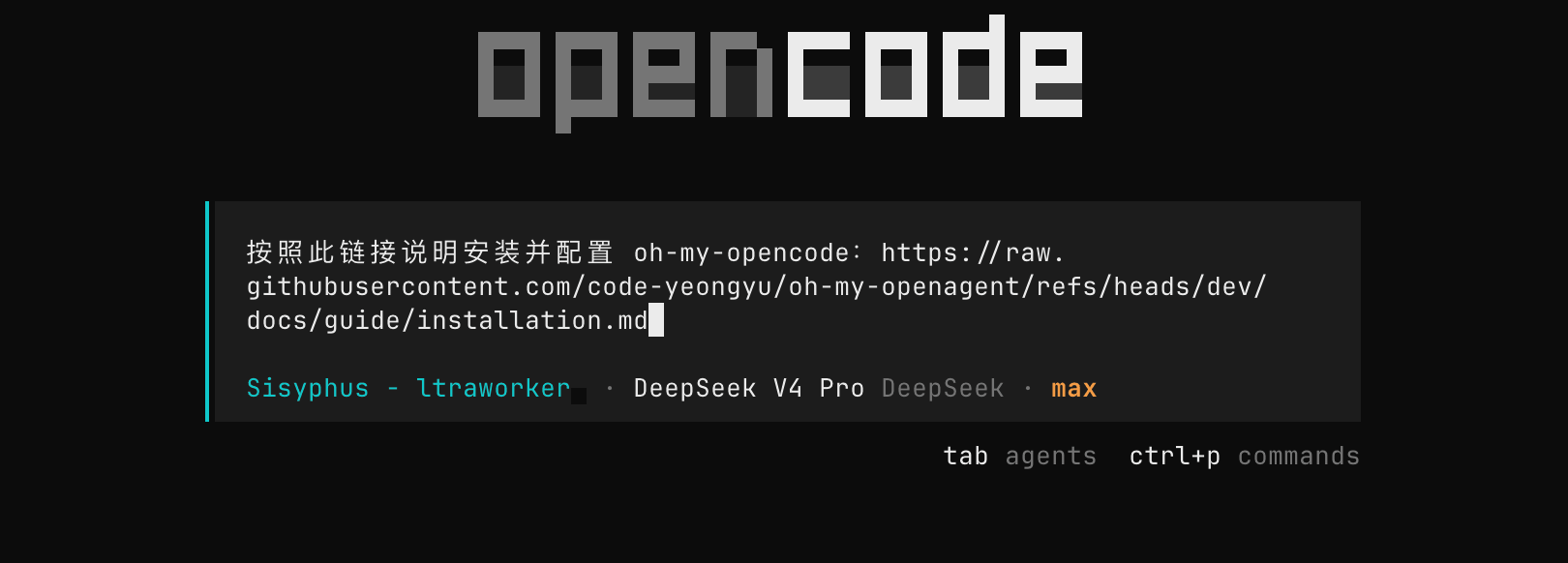
After executing, it will install itself. During installation, there may be API key configuration options; you can choose to configure them or not:

Meet the 11 AI Team Members (Agents)
OmO has 11 specialized Agents built in, each with its own role:
Core Agents
| Agent | Role | Default Model | When to Use |
|---|---|---|---|
| Sisyphus | Main coordinator, all-around developer | Claude Opus | Entry point for all tasks, automatically orchestrates other Agents |
| Prometheus | Strategic Planner | Claude Opus / GPT-5.4 | Planning for complex tasks |
| Atlas | Todo task management | Kimi K2.5 | Track multi-step task progress |
Professional Agents
| Agent | Role | Default Model | Specializes in |
|---|---|---|---|
| Hephaestus | Deep autonomous worker | GPT-5.3-codex | Long-duration, high-intensity independent coding tasks |
| Oracle | Architecture consultant/debugging expert | GPT-5.4 | System design, locating difficult bugs |
| Momus | High-precision reviewer | GPT-5.4 | Code review, output verification |
| Metis | Plan review | Claude Opus | Check whether Prometheus's plan has any omissions |
Tool-type Agents (Fast, Low-cost)
| Agent | Role | Default Model | Why use cheap models |
|---|---|---|---|
| Explore | Quick codebase search | MiniMax / Grok Code Fast | Search tasks don't require high intelligence; speed matters more |
| Librarian | Document/code retrieval | MiniMax (Free) | Document retrieval doesn't require deep reasoning |
| Multimodal Looker | Screenshot/visual analysis | Kimi K2.5 | Kimi excels at multimodal understanding |
💡 Beginner tip: You don't need to manually select Agents. Sisyphus will automatically orchestrate the appropriate Agent combination based on your task type.
Three Working Modes
Mode 1: ultrawork (Easiest)
Add to the promptultraworkorulw, everything is automated:
ultrawork 帮我把这个 React 组件改成 TypeScript
Suitable for: daily development tasks, scenarios where you want AI to complete everything automatically.
Mode 2: Prometheus Planning Mode (Most Precise)
pressTab keyEnter Prometheus mode. The AI will first understand your requirements through Q&A, generate a detailed execution plan, and start executing after you confirm.
Workflow:
- press
TabSwitch to Prometheus mode - Describe your requirements; the AI will ask you some clarifying questions
- AI generates an execution plan, you confirm
- Enter
/start-workto start execution
Suitable for: complex feature development, architecture refactoring, and other scenarios requiring precise planning.
Mode 3: Normal Conversation (Most Flexible)
Directly enter your question or requirement without adding any keywords:
解释一下 src/auth.ts 里的 JWT 验证逻辑
Suitable for: lightweight tasks such as asking questions, code explanation, and small modifications.
Configuration File Details
OmO has two configuration files with different priorities:
- Project-level configuration (higher priority):.opencode/oh-my-opencode.jsonc
- User-level configuration (global default):~/.config/opencode/oh-my-opencode.jsonc
Configuration files support comments (JSONC format) and JSON Schema auto-completion:
{
  "$schema": "https://raw.githubusercontent.com/code-yeongyu/oh-my-openagent/dev/assets/oh-my-opencode.schema.json",

  "agents": {
    // 主协调 Agent,建议用 Claude Opus 系列或 Kimi
    "sisyphus": {
      "model": "anthropic/claude-opus-4-6"
    },
    // 架构顾问,建议用 GPT 系列
    "oracle": {
      "model": "openai/gpt-5.4",
      "variant": "high"
    }
  }
}
Beginner advice: Don't modify the configuration right after installation; the default settings are already good.
Common Commands Quick Reference
| Command | Description |
|---|---|
opencode |
Start OmO |
bunx oh-my-opencode install |
Install/reconfigure plugin |
bunx oh-my-opencode doctor |
Diagnose configuration issues |
opencode auth login |
Log in to AI provider account |
opencode models |
View all available models |
bunx oh-my-opencode refresh-model-capabilities |
Refresh model capability cache |
Within the conversation interface:
| Shortcut/Command | Description |
|---|---|
Tab |
Switch to Prometheus planning mode |
/start-work |
Start executing the plan in Prometheus mode |
ultrawork / ulw |
Add to the prompt to activate full-featured parallel mode |
Common Issues Troubleshooting
Q: After installation, runningopencodedoesn't show OmO features
Solution: Check whether the plugin is correctly registered in the configuration file:
cat ~/.config/opencode/opencode.json
Confirmpluginfield contains"oh-my-opencode". If not, re-runbunx oh-my-opencode install。
Q: Runtime warning "Using legacy package name"
Solution: Changeopencode.jsonthe plugin name in ... from"oh-my-opencode"to"oh-my-openagent":
{
  "plugin": ["oh-my-openagent"]
}
Q: Sisyphus Agent performs poorly, feels the same as regular Claude
Cause: Possibly not using the Claude Opus model, or not addingultrawork。
Solution:
- Confirm you're logged into a Claude Pro/Max account
- Add
ultraworkkeyword to the prompt - Run
bunx oh-my-opencode doctorto check model configuration
Q: Task stops halfway through
Solution: Continue promptingultrawork 继续之前的任务, Sisyphus will resume progress through the Todo system.
Q: Want to disable anonymous telemetry data
OmO enables anonymous telemetry by default (uses PostHog, data is hashed). To turn it off:
export OMO_SEND_ANONYMOUS_TELEMETRY=0
# 或
export OMO_DISABLE_POSTHOG=1
Other Extensions