JavaScript Strict Mode (use strict)
JavaScript strict mode runs under strict conditions.
Using the "use strict" Directive
The "use strict" directive is new in JavaScript 1.8.5 (ECMAScript5).
It is not a statement, but a literal expression, and is ignored in older versions of JavaScript.
The purpose of "use strict" is to specify that the code should be executed under strict conditions.
In strict mode, you cannot use undeclared variables.
 |
Browsers supporting strict mode: Internet Explorer 10 +、Firefox 4+、 Chrome 13+、 Safari 5.1+、 Opera 12+。 |
|---|
Strict Mode Declaration
Strict mode is declared by adding at the beginning of a script or functionuse strict; expression to declare.
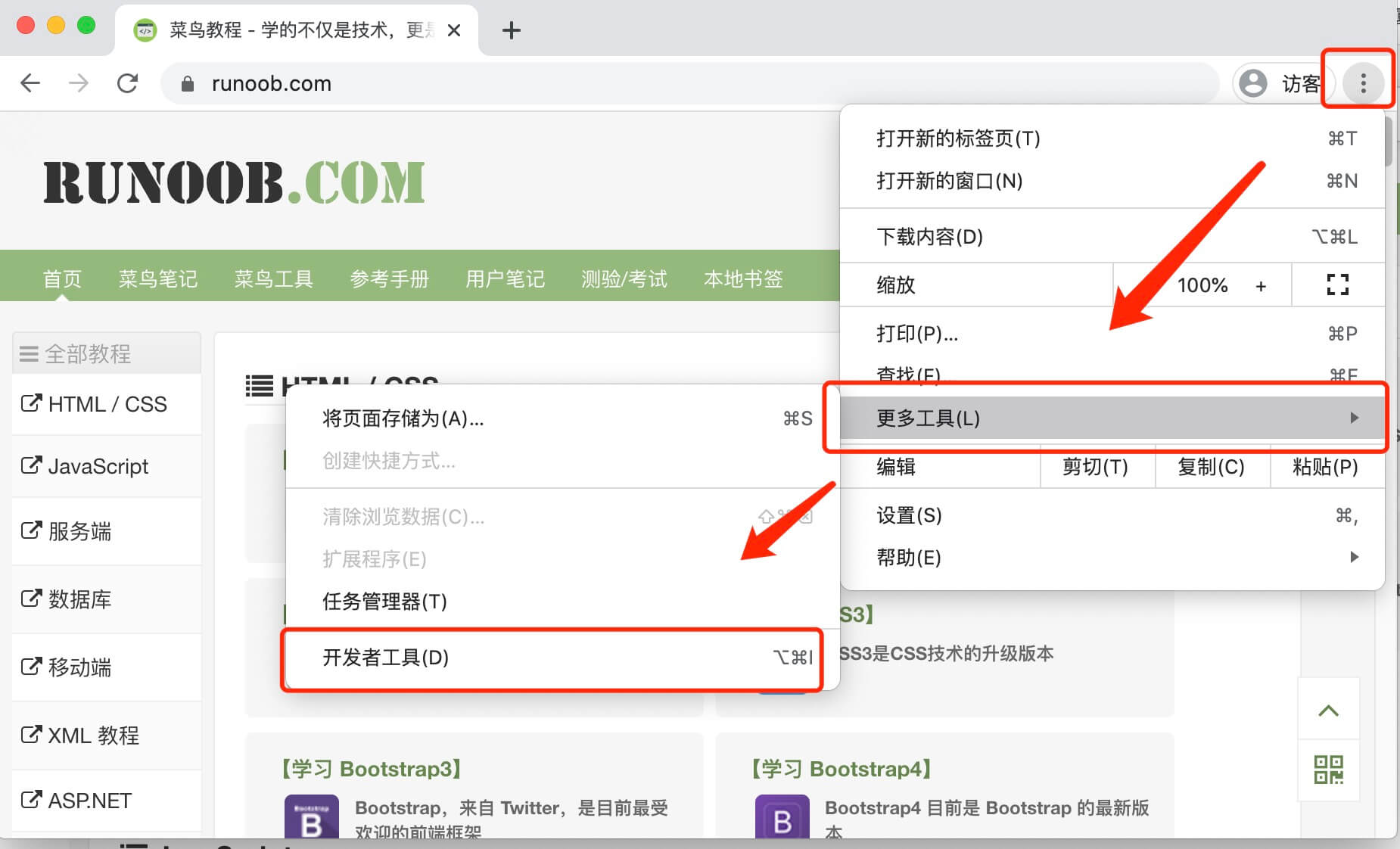
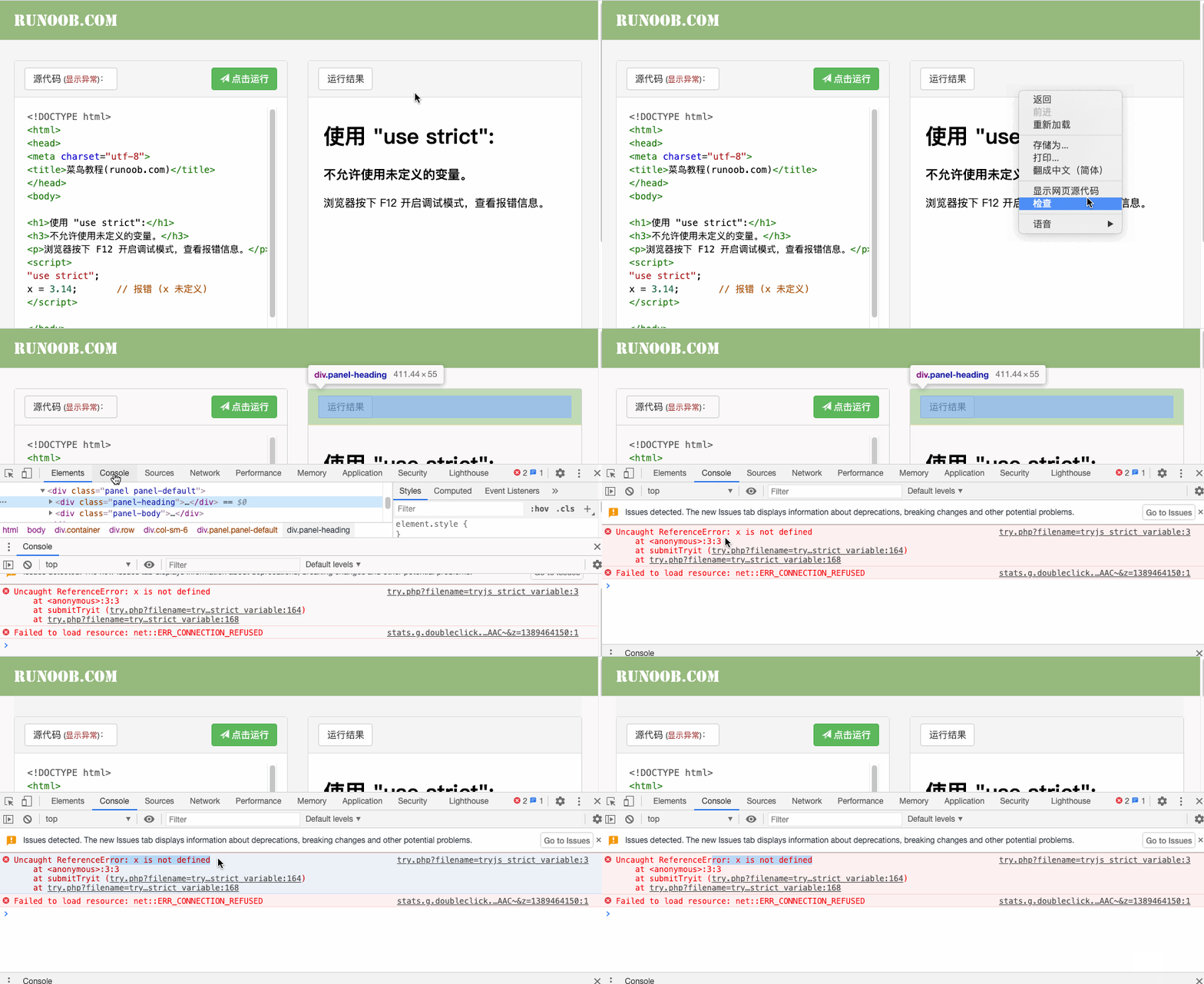
In the example, we can press in the browserF12 (or click "Tools > More Tools > Developer Tools")Enable debug mode and view error messages.
You can also right-click and select"Inspect"to view. The GIF demonstration is as follows:
Example
myFunction();
function myFunction() {
y = 3.14; // Error (y is not defined)
}
Try it »
Declaring strict mode inside a function is local scope (strict mode is applied only inside the function):
Example
myFunction();
function myFunction() {
"use strict";
y = 3.14; // Error (y is not defined)
}
Try it »
Why use strict mode:
- Eliminate some unreasonable and imprecise aspects of JavaScript syntax, and reduce some strange behaviors.
- Eliminate some unsafe aspects of code running and ensure the safety of code execution.
- Improve compiler efficiency and increase running speed.
- Pave the way for future new versions of JavaScript.
"Strict mode" reflects a more reasonable, safer, and more rigorous development direction for JavaScript. Mainstream browsers, including IE 10, already support it, and many large projects have begun to fully embrace it.
On the other hand, the same code may produce different results in "strict mode"; some statements that work in "normal mode" will not work in "strict mode". Mastering these contents will help you understand JavaScript more deeply and make you a better programmer.
Strict Mode Restrictions
Undeclared variables are not allowed:
|
|
An object is also a variable. |
|---|
Deleting a variable or object is not allowed.
Deleting a function is not allowed.
Duplicate variable names are not allowed:
Octal literals are not allowed:
Escape characters are not allowed:
Assignment to a read-only property is not allowed:
var obj = {};
Object.defineProperty(obj, "x", {value:0, writable:false});
obj.x = 3.14; // Error
Try it »
Assigning to a property that is read using a getter method is not allowed:
Deleting an undeletable property is not allowed:
Variable names cannot use the string "eval":
Variable names cannot use the string "arguments":
The following statement is not allowed:
For security reasons, variables created within the scope of eval() cannot be called:
The this keyword is forbidden to point to the global object.
function f(){
    return !this;
}
// 返回false,因为"this"指向全局对象,"!this"就是false

function f(){
    "use strict";
    return !this;
}
// 返回true,因为严格模式下,this的值为undefined,所以"!this"为true。
Therefore, when using a constructor, if you forget to add new, this no longer points to the global object, but instead throws an error.
function f(){
    "use strict";
    this.a = 1;
};
f();// 报错,this未定义
Reserved Keywords
In order to transition to future new versions of JavaScript, strict mode adds some reserved keywords:
- implements
- interface
- let
- package
- private
- protected
- public
- static
- yield
|
The "use strict" directive is only allowed to appear at the beginning of a script or function. |
|---|