JavaScript NumberObject
JavaScript has only one type of number.
Numbers can be written with or without a decimal point.
JavaScript Numbers
JavaScript numbers can be written with or without a decimal point:
Examples
var x=34; // Does not use a decimal point
Very large or very small numbers can be written using scientific (exponential) notation:
Examples
var z=123e-5; // 0.00123
All JavaScript numbers are 64-bit
JavaScript is not a typed language. Unlike many other programming languages, JavaScript does not define different types of numbers, such as integers, short, long, floating-point, and so on.
In JavaScript, numbers are not divided into integer and floating-point types; all numbers are of the floating-point type. JavaScript uses the 64-bit floating-point format defined by the IEEE754 standard to represent numbers. It can represent a maximum value (Number.MAX_VALUE) of±1.7976931348623157e+308, and a minimum value (Number.MIN_VALUE) of±5e-324。
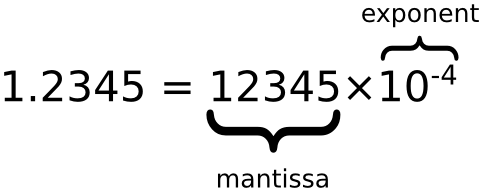
This format uses 64 bits to store numeric values, where bits 0 to 51 store the number (fraction), bits 52 to 62 store the exponent, and bit 63 stores the sign:

| Value (aka Fraction/Mantissa) | Exponent | Sign |
|---|---|---|
| 52 bits (0 - 51) | 11 bits (52 - 62) | 1 bit (63) |
Precision
Integers (without a decimal point or exponent notation) can have up to 15 digits.
Examples
Try it »
The maximum number of decimal places is 17, but floating-point arithmetic is not always 100% accurate:
Octal and Hexadecimal
If the prefix is 0, JavaScript interprets the numeric constant as an octal number; if the prefix is 0 and "x", it interprets it as a hexadecimal number.
 |
Never write a zero before a number, unless you need an octal conversion. |
|---|
By default, JavaScript numbers are displayed in decimal.
But you can use the toString() method to output hexadecimal, octal, and binary.
Examples
myNumber.toString(16); // Returns 80
myNumber.toString(8); // Returns 200
myNumber.toString(2); // Returns 10000000
Try it »
Infinity
When a numeric operation exceeds the upper limit of numbers that JavaScript can represent (overflow), the result is a special infinity value, represented as Infinity in JavaScript. Similarly, when a negative number exceeds the range of negative numbers that JavaScript can represent, the result is negative infinity, represented as -Infinity in JavaScript. The behavior of infinity values is consistent with what we expect: the results of addition, subtraction, multiplication, and division based on them are still infinity (of course retaining their signs).
Examples
while (myNumber!=Infinity)
{
myNumber=myNumber*myNumber; // Repeat the calculation until myNumber equals Infinity
}
Try it »
Dividing by 0 also produces infinity:
NaN - Non-numeric Value
The NaN property is a special value representing a non-numeric value. This property is used to indicate that a value is not a number. You can set a Number object to this value to indicate that it is not a numeric value.
You can use the isNaN() global function to determine whether a value is a NaN value.
Examples
isNaN(x); // Returns true
var y = 100 / "1000";
isNaN(y); // Returns false
Try it »
Dividing by 0 gives infinity, and infinity is a number:
Numbers can be numbers or objects
Numbers can be initialized with primitive data, like x = 123;
JavaScript Number objects are initialized with data, var y = new Number(123);
Examples
var y = new Number(123);
typeof(x) // Returns Number
typeof(y) // Returns Object
Try it »
Examples
var y = new Number(123);
(x === y) // is false, because x is a number and y is an object
Try it »
Number Properties
| Property | Description |
|---|---|
| Number.MAX_VALUE | Maximum value |
| Number.MIN_VALUE | Minimum value |
| Number.NaN | Non-numeric |
| Number.NEGATIVE_INFINITY | Negative infinity, returned on overflow |
| Number.POSITIVE_INFINITY | Positive infinity, returned on overflow |
| Number.EPSILON |
Represents the difference between 1 and the smallest Number greater than 1 and closest to 1. |
| Number.MIN_SAFE_INTEGER | Minimum safe integer. |
| Number.MAX_SAFE_INTEGER | Maximum safe integer. |
Number Methods
| Method | Description |
|---|---|
| Number.parseFloat() | Converts a string to a floating-point number. Same as the global methodparseFloat()in effect. |
| Number.parseInt() |
Converts a string to an integer. Same as the global methodparseInt()in effect. |
| Number.isFinite() | Determines whether the passed parameter is a finite number. |
| Number.isInteger() | Determines whether the passed parameter is an integer. |
| Number.isNaN() | Determines whether the passed parameter is NaN. |
| Number.isSafeInteger() | Determines whether the passed parameter is a safe integer. |
Some methods on the number type prototype
| Method | Description |
|---|---|
| toExponential() | Returns a string of a number in exponential notation, e.g.: 1.23e+2 |
| toFixed() |
Returns a representation with the specified number of decimal places. var a=123; b=a.toFixed(2); // b="123.00" |
| toPrecision() |
Returns a number with the specified precision. In the example below, in a=123, the 3 will disappear due to precision limitations: var a=123; b=a.toPrecision(2); // b="1.2e+2" |