JavaScript async/await
Before explaining async/await, we need to understand the asynchronous programming concepts in JavaScript; you can refer to:JavaScript Asynchronous Programming。
JavaScript is a single-threaded language, meaning it can only execute one task at a time. To avoid long-running tasks blocking the main thread, JavaScript uses an asynchronous programming model.
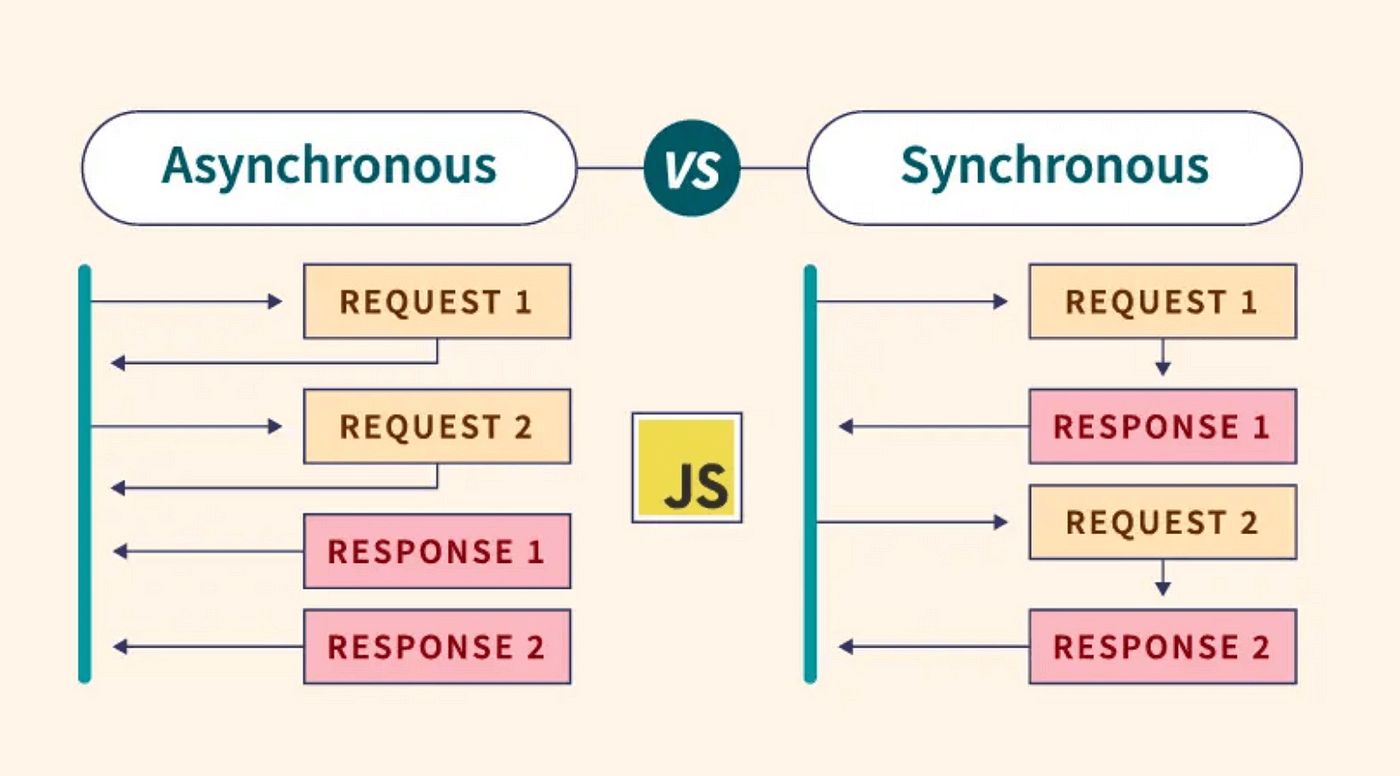
Asynchronous vs Synchronous
- Synchronous programming: Code executes sequentially, and the next operation runs only after the previous one completes.
- Asynchronous programming: Some operations are placed in the "task queue". The main thread continues to execute subsequent code, and processes the tasks in the queue when the main thread is idle.
Examples
console.log('1');
console.log('2');
// Output: 1, 2
// Asynchronous example
console.log('1');
setTimeout(() => console.log('2'), 0);
console.log('3');
// Output: 1, 3, 2
The Problem with Callback Functions
Before async/await, JavaScript mainly used callback functions to handle asynchronous operations, but this could lead to "Callback Hell".
Examples
getMoreData(a, function(b) {
getMoreData(b, function(c) {
getMoreData(c, function(d) {
console.log(d);
});
});
});
});
This nested structure makes code difficult to read and maintain.
Introduction of Promise
ES6 introduced the Promise object to solve the callback hell problem.
Examples
return new Promise((resolve, reject) => {
// Asynchronous operation
setTimeout(() => resolve('data'), 1000);
});
}
getData()
.then(data => {
console.log(data);
return getMoreData(data);
})
.then(moreData => {
console.log(moreData);
})
.catch(error => {
console.error(error);
});
Although Promise improved the callback problem, the then() chained calls are still not intuitive enough.
async/await Syntax
ES2017 introduced async/await, which is built on Promise and makes asynchronous code look like synchronous code.
async Functions
Add the async keyword before a function declaration to indicate that the function is asynchronous:
// Function body
}
async functions always return a Promise:
- If the return value is not a Promise, it will be automatically wrapped into a resolved Promise
- If an exception is thrown, it returns a rejected Promise
await Expressions
await can only be used inside async functions:
const result = await somePromise;
console.log(result);
}
await pauses the execution of the async function until the Promise settles:
- If the Promise is resolved, it returns the resolved value
- If the Promise is rejected, it throws an error (which can be caught with try/catch)
Practical Application Examples
Basic Usage
Examples
return new Promise(resolve => setTimeout(resolve, ms));
}
async function showMessage() {
console.log('Start');
await delay(1000);
console.log('After 1 second');
await delay(1000);
console.log('After another 1 second');
}
showMessage();
Error Handling
Examples
try {
const response = await fetch('https://api.example.com/user');
if (!response.ok) {
throw new Error('Network response is not ok');
}
const data = await response.json();
console.log(data);
} catch (error) {
console.error('Failed to fetch data:', error);
}
}
Parallel Execution
If you need to execute multiple asynchronous operations in parallel, you can use Promise.all:
Examples
const [userData, productData] = await Promise.all([
fetch('/api/user'),
fetch('/api/products')
]);
const user = await userData.json();
const products = await productData.json();
return { user, products };
}
Common Problems and Best Practices
1. Don't Forget await
Examples
async function example() {
const data = fetch('/api'); // Missing await
console.log(data); // Outputs Promise object
}
// Correct example
async function example() {
const data = await fetch('/api');
console.log(data); // Outputs actual data
}
2. Avoid Unnecessary async
Examples
async function unnecessaryAsync() {
return 42;
}
// Simpler way to write it
function simpleFunction() {
return 42;
}
3. Top-Level await
await can be used directly at the top level of a module (ES2022 feature):
Examples
const data = await fetch('/api');
console.log(data);
4. Performance Considerations
- Sequential execution vs parallel execution: use Promise.all appropriately to improve performance
- Error handling: ensure all possible errors are caught
async/await vs Traditional Promise
| Feature | async/await | Promise then/catch |
|---|---|---|
| Readability | High, similar to synchronous code | Medium, chained calls |
| Error handling | Uses try/catch | Uses .catch() |
| Debugging | Easier, with clear call stack | More difficult, call stack may be unclear |
| Code structure | Flatter | Nested or chained |
Summary
async/await is a major improvement in JavaScript asynchronous programming. It:
- Makes asynchronous code more readable and maintainable
- Is based on Promise and compatible with existing Promise code
- Provides a more intuitive way of error handling
- Improves the debugging experience
Although async/await does not completely replace Promise, in most cases it provides a more elegant solution. Understanding how async/await works and its best practices will greatly improve your JavaScript asynchronous programming skills.
Other Extensions