JavaScript Async Programming
The Concept of Asynchrony
Asynchronous (async) is the opposite concept of Synchronous (sync).
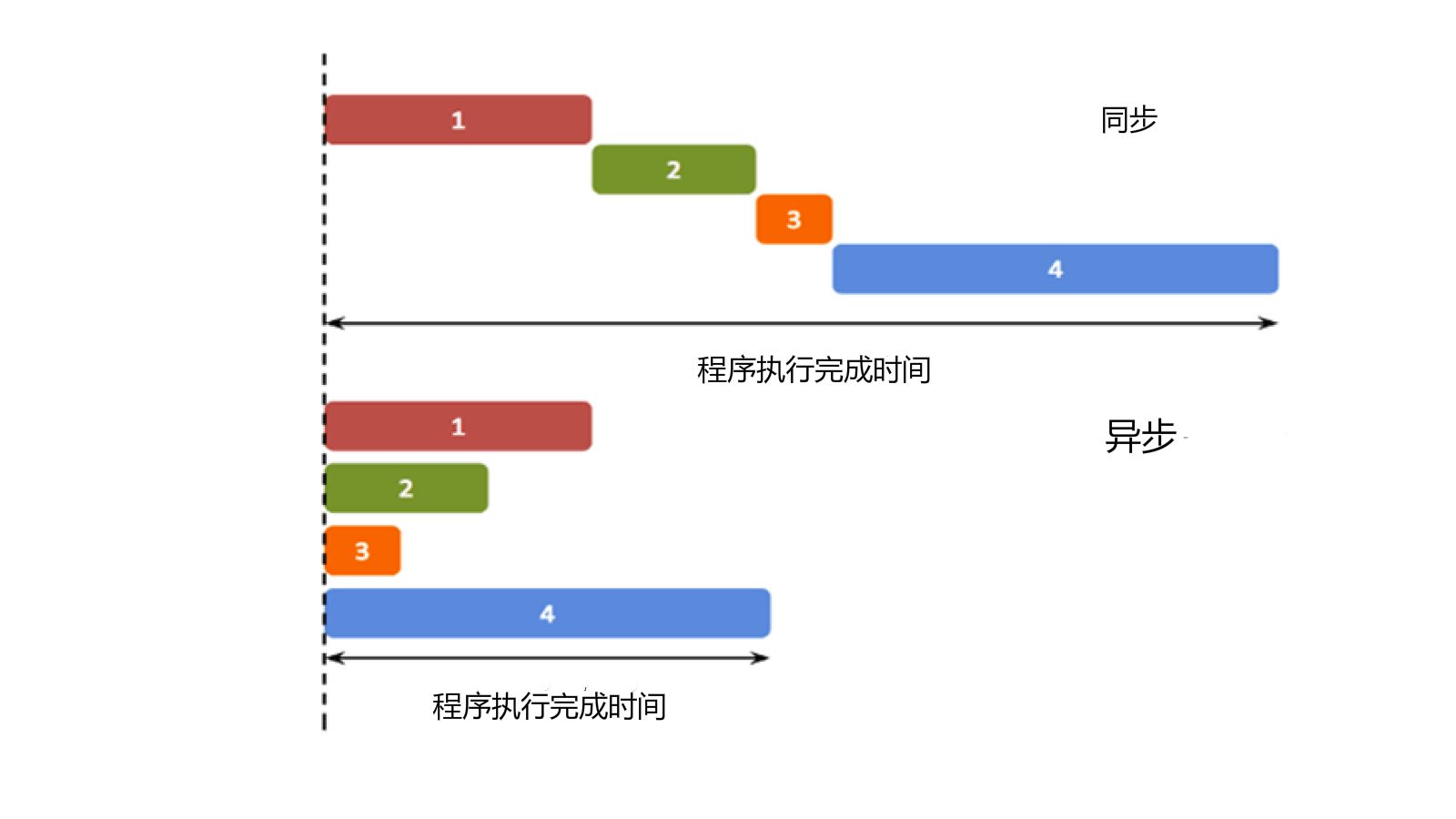
In the traditional single-threaded programming we learn, program execution is synchronous (synchronous does not mean all steps run simultaneously, but rather that steps execute sequentially in a control flow sequence). The concept of asynchrony, however, does not guarantee synchronization, meaning that the execution of an asynchronous process no longer has a sequential relationship with the original sequence.
Simply put: synchronous execution follows the order of your code, asynchronous execution does not follow code order, and asynchronous execution is more efficient.
The above is an explanation of the concept of asynchrony. Next, let's explain asynchrony in plain terms: asynchrony means spawning a child thread from the main thread to complete a task.
When to Use Async Programming
In front-end programming (and sometimes in back-end as well), when handling short, fast operations, such as calculating the result of 1 + 1, it can often be completed in the main thread. As a thread, the main thread cannot accept multiple requests at the same time. Therefore, when an event has not finished, the interface cannot handle other requests.
Now consider a button. If we set its onclick event to an infinite loop, then when the button is pressed, the entire webpage will become unresponsive.
To avoid this situation, we often use child threads to handle tasks that may take long enough to be noticed by the user, such as reading a large file or making a network request. Because a child thread is independent of the main thread, even if blocking occurs, it will not affect the main thread's operation. However, child threads have a limitation: once spawned, they lose synchronization with the main thread, and we cannot determine when they finish. If there are things to handle after they finish, such as processing information from a server, we cannot merge it back into the main thread.
To solve this problem, asynchronous operation functions in JavaScript often use callback functions to handle the results of asynchronous tasks.
Callback Functions
A callback function is a function that we tell when starting an asynchronous task: what to do after you complete this task. In this way, the main thread hardly needs to care about the status of the asynchronous task; it will handle itself from start to finish.
Examples
Try it »
The setTimeout in this program is a process that takes a long time (3 seconds). Its first parameter is a callback function, and the second parameter is the number of milliseconds. After this function is executed, it creates a child thread. The child thread waits for 3 seconds, then executes the callback function "print", which outputs "EXAMPLE!" to the command line.
Of course, JavaScript syntax is very friendly. We don't need to define a separate function print; we often write the above program as:
Examples
Try it »
Note:Since setTimeout waits for 3 seconds in a child thread, the main thread does not stop after the setTimeout function is executed, so:
Examples
Try it »
The execution result of this program is:
EXAMPLE-1!    // 三秒后子线程执行
EXAMPLE-2!    // 主线程先执行
Async AJAX
Besides the setTimeout function, asynchronous callbacks are widely used in AJAX programming. For details about AJAX, please see:https://www.example.com/ajax/ajax-tutorial.html
XMLHttpRequest is often used to request XML or JSON data from a remote server. A standard XMLHttpRequest object often contains multiple callbacks:
Examples
Try it »
The onload and onerror properties of XMLHttpRequest are both functions, called when the request succeeds and fails, respectively. If you use the complete jQuery library, you can use asynchronous AJAX more elegantly:
Examples
Try it »