JavaScript Class Inheritance
JavaScript class inheritance uses the extends keyword.
Inheritance allows us to define a class based on another class, making it easier to create and maintain an application.
super()The method is used to call the parent class's constructor.
When creating a class, you do not need to rewrite new data members and member functions; you only need to specify that the new class inherits the members of an existing class. This existing class is called thebase class (parent class), and the new class is called thederived class (child class)。
Inheritance represents ais arelationship. For example, a mammal is an animal, a dog is a mammal, therefore, a dog is an animal, and so on.
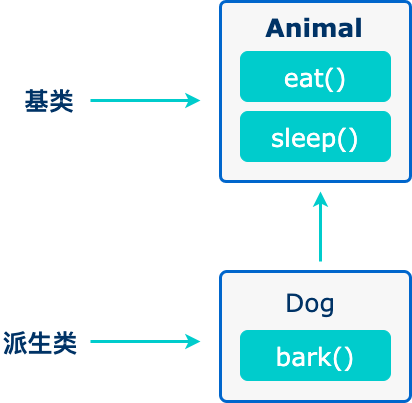
The code is as follows:
The following example creates a class "Example" that inherits the "Site" class:
Example
Try it Yourself »
super()The method calls the parent class's constructor.
By calling a method in the constructor,super()we call the parent class's constructor, allowing access to the parent class's properties and methods.
Inheritance is useful for code reusability.
JavaScript does not have traditional classes like other programming languages; it is based on a prototype inheritance model.
ES6 introduced the class andclasskeyword, but the underlying mechanism is still based on prototype inheritance.
Using Prototype Chain Inheritance
In the following example, Animal is a base class and Dog is a subclass that inherits from Animal. Dog.prototype uses Object.create(Animal.prototype) to create a new object that inherits the methods and properties of Animal.prototype. By setting Dog.prototype.constructor to Dog, the constructor on the inheritance chain is ensured correct.
Example
Using ES6 Class Inheritance
ES6 introduced the class keyword, making class definition and inheritance clearer. The extends keyword is used to establish an inheritance relationship, and the super keyword is used to call the parent class's constructor in the subclass constructor.
Example
Whether using prototype chain inheritance or ES6 class inheritance, similar inheritance effects can be achieved. When choosing a method, you can decide based on personal preference and project requirements.
Getters and Setters
In classes, we can use getters and setters to get and set values. Getters and setters need to be executed in strict mode.
Getters and setters make operations on properties very flexible.
To add getters and setters in a class, use the get and set keywords.
The following example creates a getter and a setter for the sitename property:
Example
Try it Yourself »
Note:Even though a getter is a method, do not use parentheses when you want to get the property value.
The names of getter/setter methods cannot be the same as the property name; in this example, the property is named sitename.
Many developers use an underscore character before the property name_to separate the getter/setter from the actual property:
The following example uses an underscore_to set the property, and creates the corresponding getter/setter methods:
Example
Try it Yourself »
To use a setter, use the same syntax as when setting a property value. Although set is a method, it should be withoutparentheses:
Example
Try it Yourself »
Hoisting
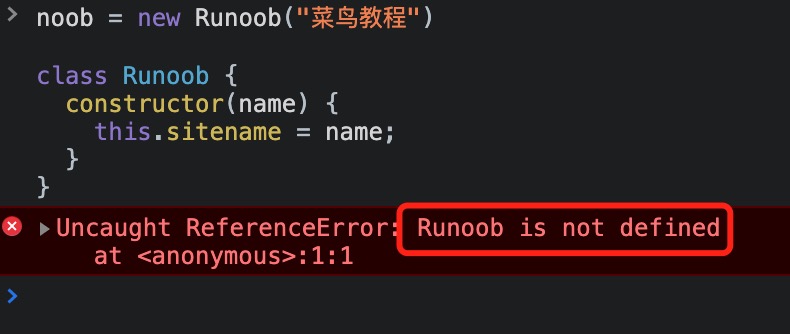
An important difference between function declarations and class declarations is that function declarations are hoisted, but class declarations are not.
You need to declare your class first and then access it; otherwise, code like the following will throw a ReferenceError:
Example
Using it without declaration will cause an error:
If it is declared before use, it executes normally: