JavaScript Closures
JavaScript variables can be local variables or global variables.
Private variables can make use of closures.
Global Variables
A function can access variables defined inside the function, for example:
Functions can also access variables defined outside the function, for example:
In the latter example,ais aglobalvariable.
On a web page, global variables belong to the window object.
Global variables can be used by all scripts on the page.
In the first example,ais alocalvariable.
Local variables can only be used inside the function that defines them. They are not available to other functions or script code.
Even if global and local variables have the same name, they are two different variables. Modifying one does not affect the value of the other.
 |
If a variable is declared without using thevarkeyword, then it is a global variable, even if it is defined inside a function. |
|---|
Variable Lifecycle
The scope of global variables is global; that is, throughout the entire JavaScript program, global variables are everywhere.
Variables declared inside a function only work inside the function. These variables are local variables, and their scope is local; function parameters are also local, and they only work inside the function.
The Counter Dilemma
Imagine if you want to count some values, and the counter is available in all functions.
You can use a global variable, and a function increments the counter:
Examples
Try it Yourself »
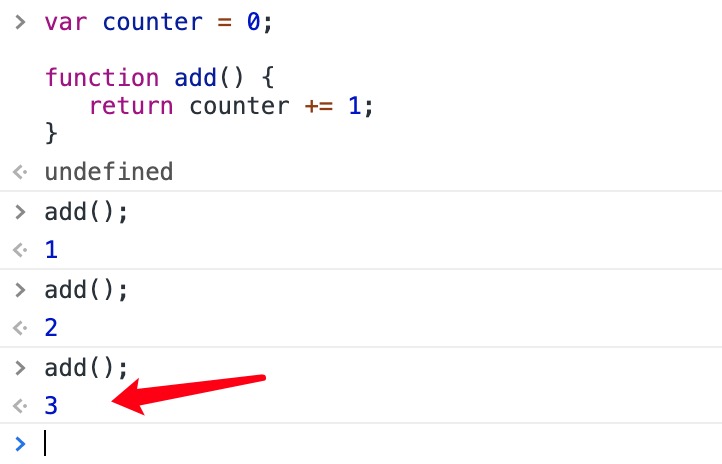
The counter value changes when the add() function is executed.
But here's the problem: any script on the page can change the counter, even without calling the add() function.
If I declare the counter inside a function, the counter's value cannot be modified without calling the function:
Examples
Try it Yourself »
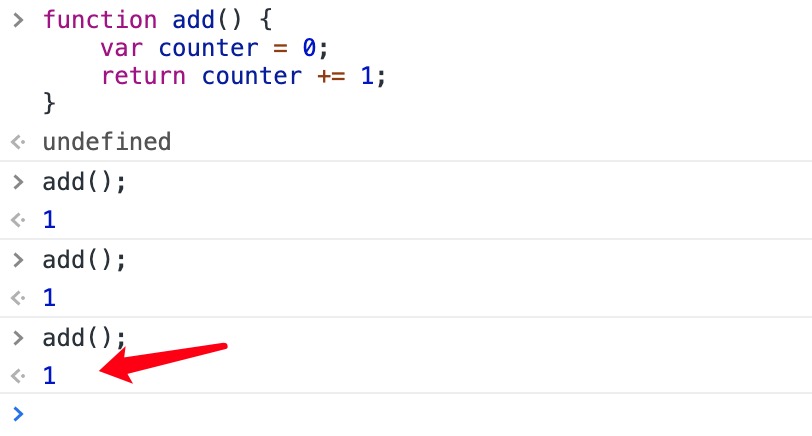
The above code will not output correctly; every time I call the add() function, the counter is set to 1.
JavaScript nested functions can solve this problem.
JavaScript Nested Functions
All functions can access global variables.
In fact, in JavaScript, all functions can access the scope one level above them.
JavaScript supports nested functions. Nested functions can access variables of the function one level above.
In this example, the nested functionplus()can access the parent function'scountervariables:
Examples
Try it Yourself »
If we can access theplus()function from the outside, this solves the counter dilemma.
We also need to ensurecounter = 0it is executed only once.
We need closures.
JavaScript Closures
Remember self-invoking functions? What does this function do?
Examples
Try it Yourself »
Example Analysis
The variableaddis assigned the return value of the self-invoking function.
The self-invoking function executes only once. It sets the counter to 0 and returns a function expression.
The add variable can be used as a function. The great part is that it can access the counter in the parent function's scope.
This is called JavaScriptclosures.It makes it possible for functions to have private variables.
The counter is protected by the scope of the anonymous function and can only be modified through the add method.
|
Closures are a mechanism for protecting private variables. They create a private scope when a function executes, thereby protecting internal private variables from outside interference. Intuitively, a closure is like a stack environment that is never destroyed. |
|---|