Java Objects and Classes
As an object-oriented programming language, Java supports the following basic concepts:
1、Class:
- A blueprint that defines objects, including attributes and methods.
- Example:
public class Car { ... }
2. Object:
- An instance of a class, having state and behavior.
- Example:
Car myCar = new Car();
3. Inheritance:
- A class can inherit the attributes and methods of another class.
- Example:
public class Dog extends Animal { ... }
4. Encapsulation:
- Make the object's state (fields) private, and access it through public methods.
- Example:
private String name;
public String getName() { return name; }
5. Polymorphism:
- Objects can appear in multiple forms, mainly implemented through method overloading and method overriding.
- Example:
- Method Overloading:
public int add(int a, int b) { ... }andpublic double add(double a, double b) { ... } - Method Overriding:
@Override public void makeSound() { System.out.println("Meow"); }
- Method Overloading:
6. Abstraction:
- Use abstract classes and interfaces to define methods that must be implemented, without providing concrete implementations.
- Example:
- Abstract Class:
public abstract class Shape { abstract void draw(); } - Interface:
public interface Animal { void eat(); }
- Abstract Class:
7. Interface:
- Defines methods that a class must implement, supporting multiple inheritance.
- Example:
public interface Drivable { void drive(); }
8. Method:
- Defines the behavior of a class; functions contained in a class.
- Example:
public void displayInfo() { System.out.println("Info"); }
9. Method Overloading:
- The same class can have multiple methods with the same name but different parameters.
- Example:
public class MathUtils {
    public int add(int a, int b) {
        return a + b;
    }

    public double add(double a, double b) {
        return a + b;
    }
}
In this section, we focus on the concepts of objects and classes.
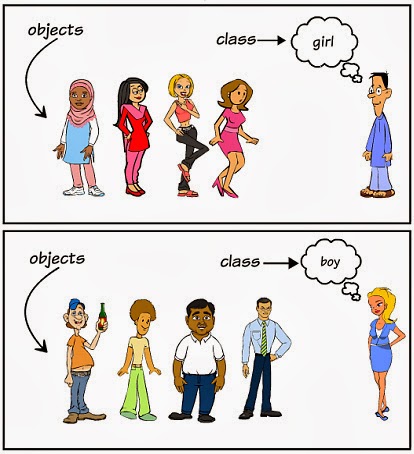
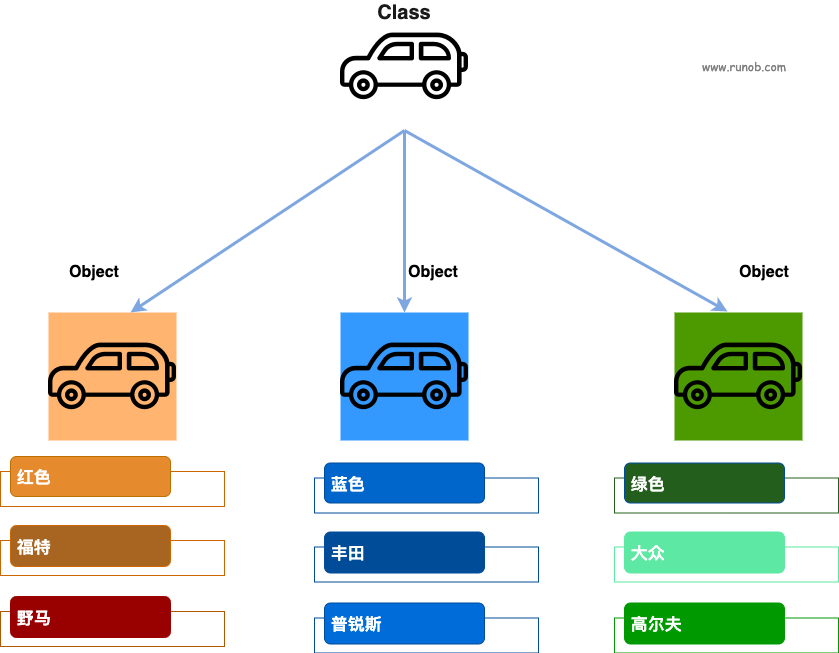
- Object: An object is an instance of a class (an object is not about finding a girlfriend), and it has state and behavior.
- Class: A class is a template that describes the behavior and state of a type of object.
In the figure belowboy、girlisclass, and each specific person is anobject:
In the figure belowcarisclass, and each specific car is ancarclass'sobject, and the object contains the car's color, brand, name, etc.
Objects in Java
Now let's gain a deeper understanding of what an object is. Look at the real world around you; you will find many objects around you, such as cars, dogs, people, and so on. All these objects have their own state and behavior.
Take a dog as an example: its state includes name, breed, and color, and its behavior includes barking, wagging its tail, and running.
Comparing real-world objects with software objects, they are very similar.
Software objects also have state and behavior. The state of a software object is its attributes, and its behavior is reflected through methods.
In software development, methods operate on changes to the internal state of objects, and the mutual invocation of objects is also accomplished through methods.
Classes in Java
A class can be viewed as a template for creating Java objects.
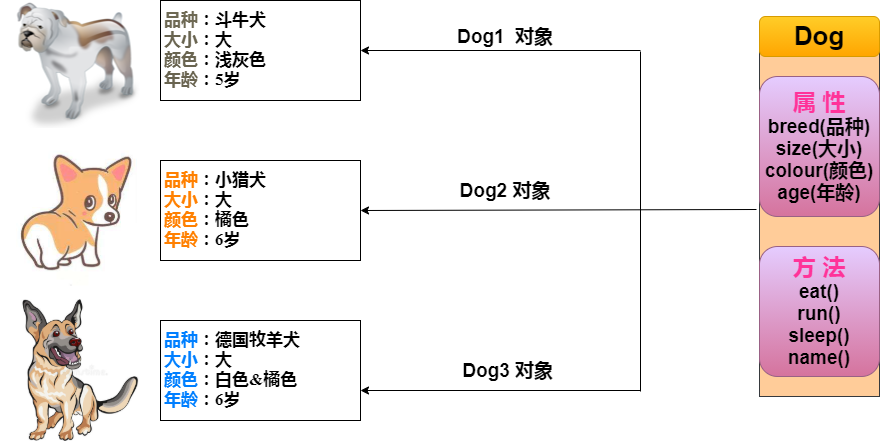
Create a simple class as shown in the figure above to understand the definition of a class in Java:
A class can contain the following types of variables:
- Local variables: Variables defined in methods, constructors, or statement blocks are called local variables. The declaration and initialization of the variable are both in the method, and when the method ends, the variable is automatically destroyed.
- Member variables: Member variables are variables defined in a class but outside the method bodies. Such variables are instantiated when an object is created. Member variables can be accessed by methods, constructors, and statement blocks of a specific class.
- Class variables: Class variables are also declared in a class, outside method bodies, but they must be declared as static.
A class can have multiple methods. In the example above, eat(), run(), sleep(), and name() are all methods of the Dog class.
Constructor Methods
Every class has a constructor. If a constructor is not explicitly defined for a class, the Java compiler will provide a default constructor for that class.
When creating an object, at least one constructor must be called. The constructor's name must be the same as the class name, and a class can have multiple constructors.
Below is an example of a constructor:
Creating Objects
Objects are created from classes. In Java, the keyword new is used to create a new object. Creating an object requires the following three steps:
- Declaration: Declare an object, including the object name and object type.
- Instantiation: Use the keyword new to create an object.
- Initialization: When an object is created with new, the constructor is called to initialize the object.
Below is an example of creating an object:
Compile and run the above program, and it will print the following result:
小狗的名字是 : tommy
Accessing Instance Variables and Methods
Access member variables and member methods through the created object, as shown below:
Using the Object type to declare a variable can only access the methods and properties of the Object class at compile time, but at runtime, you can cast it to a specific type for type conversion, so as to access the methods and properties of that specific type.
Example
The following example shows how to access instance variables and call member methods:
Puppy.java file code:
Compile and run the above program, producing the following result:
小狗的名字是 : tommy
小狗的年龄为 : 2
变量值 : 2
Source File Declaration Rules
In the final part of this section, we will learn the declaration rules for source files. When multiple classes are defined in a source file, and there are also import statements and package statements, special attention should be paid to these rules.
- A source file can have only one public class
- A source file can have multiple non-public classes
- The name of the source file should be consistent with the class name of the public class. For example, if the public class in the source file is named Employee, then the source file should be named Employee.java.
- If a class is defined in a package, then the package statement should be the first line of the source file.
- If a source file contains import statements, they should be placed between the package statement and the class definition. If there is no package statement, the import statements should be at the very beginning of the source file.
- The import statements and package statement are valid for all classes defined in the source file. In the same source file, you cannot give different classes different package declarations.
Classes have several access levels, and classes are also divided into different types: abstract classes, final classes, and so on. These will be introduced in the Access Control chapter.
In addition to the types mentioned above, Java also has some special classes, such as:Inner classes、Anonymous classes。
Java Packages
Packages are mainly used to categorize classes and interfaces. When developing Java programs, you may write hundreds or thousands of classes, so it is necessary to categorize classes and interfaces.
import Statements
In Java, if a complete qualified name is given, including the package name and class name, the Java compiler can easily locate the source code or class. The import statement is used to provide a reasonable path so that the compiler can find a certain class.
For example, the following command line will instruct the compiler to load all classes under the java_installation/java/io path.
import java.io.*;
A Simple Example
In this example, we create two classes:EmployeeandEmployeeTest。
First open the code editor, paste the following code into it, and save the file asEmployee.java。
The Employee class has four member variables: name, age, designation, and salary. This class explicitly declares a constructor method, which has only one parameter.
Employee.java file code:
Java programs all start execution from themainmethod. To run this program, you must include the main method and create an instance object.
Below is the EmployeeTest class, which instantiates two instances of the Employee class and calls methods to set variable values.
Save the following code in the EmployeeTest.java file.
EmployeeTest.java file code:
Compile these two files and run the EmployeeTest class, and you can see the following result:
$ javac EmployeeTest.java Employee.java
$ java EmployeeTest
名字:EXAMPLE1
年龄:26
职位:高级程序员
薪水:1000.0
名字:EXAMPLE2
年龄:21
职位:Example程序员
薪水:500.0
Other extensions