Java Basic Data Types
A variable is used to allocate memory to store values. That is, when you create a variable, you need to allocate space in memory.
The memory management system allocates storage space to the variable based on its type, and the allocated space can only be used to store data of that type.
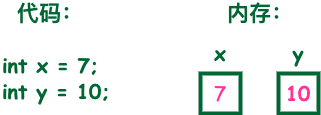
Therefore, by defining variables of different types, you can store integers, decimals, or characters in memory.
Java's two major data types:
- Built-in data types
- Reference data types
Built-in Data Types
The Java language provides eight primitive types. Six numeric types (four integer types, two floating-point types), one character type, and one boolean type.
byte:
- The byte data type is an 8-bit signed integer represented in two's complement;
- Minimum value is-128(-2^7);
- Maximum value is127(2^7-1);
- Default value is0;
- The byte type is used in large arrays to save space, mainly replacing integers, because a byte variable occupies only one-fourth of the space of an int type;
- Example: byte a = 100, byte b = -50.
short:
- The short data type is a 16-bit signed integer represented in two's complement;
- Minimum value is-32768(-2^15);
- Maximum value is32767(2^15 - 1);
- The short data type can also save space like byte. A short variable occupies one-half of the space taken by an int variable;
- Default value is0;
- Example: short s = 1000, short r = -20000.
int:
- The int data type is a 32-bit signed integer represented in two's complement;
- Minimum value is-2,147,483,648(-2^31);
- Maximum value is2,147,483,647(2^31 - 1);
- Generally, integer variables default to the int type;
- Default value is0 ;
- Example: int a = 100000, int b = -200000.
long:
- The long data type is a 64-bit signed integer represented in two's complement;
- Minimum value is-9,223,372,036,854,775,808(-2^63);
- Maximum value is9,223,372,036,854,775,807(2^63 -1);
- This type is mainly used in systems that require relatively large integers;
- Default value is0L;
- Example:long a = 100000L,long b = -200000L。
"L" is theoretically case-insensitive, but if written as "l", it is easy to confuse with the number "1" and hard to distinguish. So it is best to use uppercase.
float:
- The float data type is a single-precision, 32-bit floating-point number conforming to the IEEE 754 standard;
- float can save memory space when storing large floating-point arrays;
- Default value is0.0f;
- Floating-point numbers cannot be used to represent precise values, such as currency;
- Example: float f1 = 234.5f.
double:
- The double data type is a double-precision, 64-bit floating-point number conforming to the IEEE 754 standard;
- The default type for floating-point numbers is double;
- The double type also cannot represent precise values, such as currency;
- Default value is0.0d;
-
Example:
double   d1  = 7D ;
double   d2  = 7.;
double   d3  =  8.0;
double   d4  =  8.D;
double   d5  =  12.9867;
7 is an int literal, while 7D, 7., and 8.0 are double literals.
boolean:
- The boolean data type represents one bit of information;
- It has only two values: true and false;
- This type is used only as a flag to record true/false conditions;
- Default value isfalse;
- Example: boolean one = true.
char:
- The char type is a single 16-bit Unicode character;
- Minimum value is\u0000(decimal equivalent is 0);
- Maximum value is\uffff(i.e., 65535);
- The char data type can store any character;
- Example: char letter = 'A';.
Example
For the value ranges of numeric primitive types, we do not need to memorize them forcibly, because their values are already defined as constants in the corresponding wrapper classes. See the example below:
Example
Run example »
Compiling the above code produces the following output:
基本类型:byte 二进制位数:8
包装类:java.lang.Byte
最小值:Byte.MIN_VALUE=-128
最大值:Byte.MAX_VALUE=127

基本类型:short 二进制位数:16
包装类:java.lang.Short
最小值:Short.MIN_VALUE=-32768
最大值:Short.MAX_VALUE=32767

基本类型:int 二进制位数:32
包装类:java.lang.Integer
最小值:Integer.MIN_VALUE=-2147483648
最大值:Integer.MAX_VALUE=2147483647

基本类型:long 二进制位数:64
包装类:java.lang.Long
最小值:Long.MIN_VALUE=-9223372036854775808
最大值:Long.MAX_VALUE=9223372036854775807

基本类型:float 二进制位数:32
包装类:java.lang.Float
最小值:Float.MIN_VALUE=1.4E-45
最大值:Float.MAX_VALUE=3.4028235E38

基本类型:double 二进制位数:64
包装类:java.lang.Double
最小值:Double.MIN_VALUE=4.9E-324
最大值:Double.MAX_VALUE=1.7976931348623157E308

基本类型:char 二进制位数:16
包装类:java.lang.Character
最小值:Character.MIN_VALUE=0
最大值:Character.MAX_VALUE=65535
The minimum and maximum values of Float and Double are both output in scientific notation. The trailing "E+number" indicates that the number before E is to be multiplied by 10 to the power of that number. For example, 3.14E3 is 3.14 × 103=3140, and 3.14E-3 is 3.14 x 10-3 =0.00314。
Actually, there is another primitive type in Java, void, which also has a corresponding wrapper class java.lang.Void, but we cannot directly operate on them.
Type Default Values
The following table lists the default values for each Java type:
| Data Type | Default Value |
|---|---|
| int | 0 |
| long | 0L |
| short | 0 |
| char | '\u0000' |
| byte | 0 |
| float | 0.0f |
| double | 0.0d |
| boolean | false |
| Reference types (classes, interfaces, arrays) | null |
Notes:
int,short,long,byteThe default value is 0.charThe default value is\u0000(null character).floatThe default value is0.0f。doubleThe default value is0.0d。booleanThe default value isfalse。- The default value for reference types (classes, interfaces, arrays) is
null。
Example
The example outputs:
Bool     :false
Byte     :0
Character:
Double   :0.0
Float    :0.0
Integer  :0
Long     :0
Short    :0
String   :null
Reference Types
- In Java, reference-type variables are very similar to pointers in C/C++. A reference type points to an object, and the variable pointing to the object is a reference variable. These variables are specified as a specific type when declared, such as Employee, Puppy, etc. Once a variable is declared, its type cannot be changed.
- Objects and arrays are reference data types.
- The default value of all reference types is null.
- A reference variable can be used to reference any compatible type.
- Example: Site site = new Site("Example").
Java Constants
Constants cannot be modified while the program is running.
In Java, the final keyword is used to modify constants. The declaration method is similar to variables:
final double PI = 3.1415927;
Although constant names can also be lowercase, for ease of identification, uppercase letters are usually used for constants.
Literals can be assigned to variables of any built-in type. For example:
byte a = 68;
char a = 'A'
byte, int, long, and short can all be represented in decimal, hexadecimal, and octal.
When using literals, the prefix0indicates octal, while the prefix0xrepresents hexadecimal, for example:
int decimal = 100;
int octal = 0144;
int hexa =  0x64;
As with other languages, Java string constants are also character sequences enclosed between two quotes. Below are examples of string literals:
"Hello World"
"two\nlines"
"\"This is in quotes\""
Both string constants and character variables can contain any Unicode characters. For example:
char a = '\u0001';
String a = "\u0001";
The Java language supports some special escape character sequences.
| Symbol | Character meaning |
|---|---|
| \n | Newline (0x0a) |
| \r | Carriage return (0x0d) |
| \f | Form feed (0x0c) |
| \b | Backspace (0x08) |
| \0 | Null character (0x0) |
| \s | Space (0x20) |
| \t | Tab |
| \" | Double quote |
| \' | Single quote |
| \\ | Backslash |
| \ddd | Octal character (ddd) |
| \uxxxx | Hexadecimal Unicode character (xxxx) |
Automatic Type Conversion
Integer, real (constant), and character data can be mixed in operations. During operations, different types of data are first converted to the same type, then the operation is performed.
Conversion goes from low level to high level.
低  ------------------------------------>  高

byte,short,char—> int —> long—> float —> double
Data type conversion must satisfy the following rules:
1. Type conversion cannot be performed on the boolean type.
-
2. Object types cannot be converted to objects of unrelated classes.
-
3. When converting a type with a larger capacity to a type with a smaller capacity, a forced type conversion (cast) must be used.
-
4. The conversion process may cause overflow or loss of precision, for example:
int i =128;
byte b = (byte)i;
Because the byte type is 8 bits and its maximum value is 127, when an int is forced to convert to byte, the value 128 will cause overflow.
-
5. Conversion from floating-point to integer is done by discarding the fractional part, not by rounding, for example:
(int)23.7 == 23;
(int)-45.89f == -45
Automatic Type Conversion
The bit width of the data type before conversion must be lower than that of the data type after conversion. For example: the short data type has 16 bits, so it can be automatically converted to the int type with 32 bits; similarly, the float data type has 32 bits and can be automatically converted to the double type with 64 bits.
Example
The running result is:
char自动类型转换为int后的值等于97
char类型和int计算后的值等于66
Analysis:The value of c1 is the charactera, checking the ASCII code table shows the corresponding int value is 97, and A corresponds to 65, soi2=65+1=66。
Type Casting
1. The condition is that the data types being converted must be compatible.
2. Format: (type)value, where type is the data type after forced type conversion. Example:
Example
public class ForceTransform { public static void main(String[] args){ int i1 = 123; byte b = (byte)i1;//Forced type conversion to byte System.out.println("The value after int is forced type-converted to byte equals"+b); } }Running result:
int强制类型转换为byte后的值等于123
Implicit Type Conversion
1. The default type for integers is int.
2. Decimals default to the double floating-point type; when defining a float type, you must append F or f after the number.
This section explained the basic data types of Java. The next section will discuss different variable types and their usage.
Other extensions