Java Basic Syntax
A Java program can be considered as a collection of objects that work together by calling each other's methods. The following briefly introduces the concepts of classes, objects, methods, and instance variables.
- Object: An object is an instance of a class, with state and behavior. For example, a dog is an object; its states include color, name, breed; its behaviors include wagging its tail, barking, eating, etc.
- Class: A class is a template that describes the behavior and state of a class of objects.
- Method: Methods are behaviors. A class can have many methods. Logical operations, data modifications, and all actions are completed within methods.
- Instance Variables: Each object has unique instance variables. The state of an object is determined by the values of these instance variables.
First Java Program
Below is a simple Java program that will output the stringHello World
Example
Run Example »
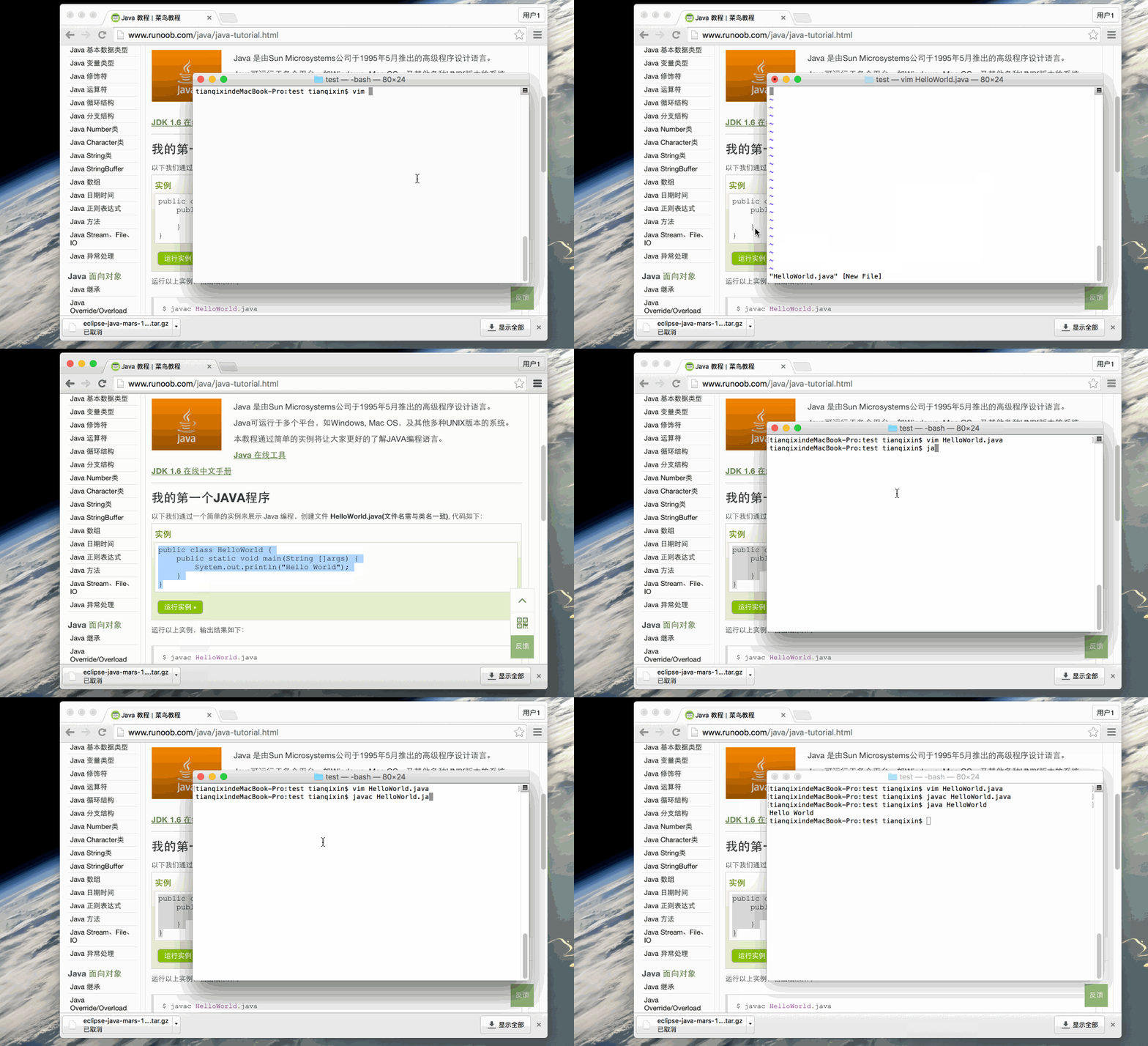
Below is a step-by-step guide on how to save, compile, and run this program:
- Open a code editor, and add the above code to it;
- Save the file name as: HelloWorld.java;
- Open the cmd command window, and navigate to the location of the target file, for example C:\
- In the command line window, typejavac HelloWorld.javaPress Enter to compile the code. If there are no errors in the code, the cmd command prompt will move to the next line (assuming the environment variables are set up correctly).
- Then typejava HelloWorldPress Enter to run the program.
You will see Hello World in the window.
$ javac HelloWorld.java
$ java HelloWorld
Hello World
If you encounter encoding problems, we can use-encodingthe option settingutf-8to compile:
javac -encoding UTF-8 HelloWorld.java
java HelloWorld
Gif illustration:
Basic Syntax
When writing Java programs, you should pay attention to the following points:
- Case sensitivity: Java is case-sensitive, which means the identifiers Hello and hello are different.
- Class name: For all classes, the first letter of the class name should be capitalized. If the class name consists of several words, the first letter of each word should be capitalized, for exampleMyFirstJavaClass 。
- Method name: All method names should start with a lowercase letter. If a method name contains several words, the first letter of each subsequent word should be capitalized.
- Source file name: The source file name must be the same as the class name. When saving the file, you should use the class name as the file name (remember that Java is case-sensitive). The file extension is.java. (If the file name and the class name are not the same, it will cause a compilation error).
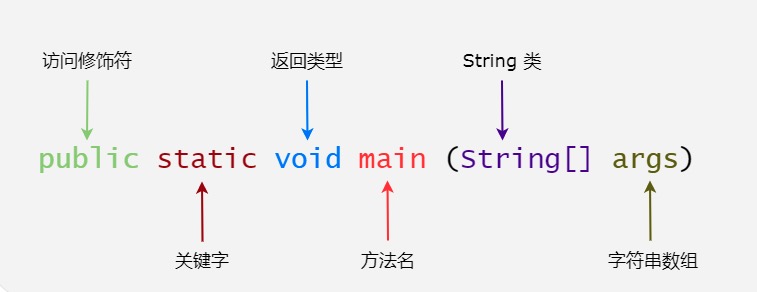
- Main method entry: All Java programs start executing from thepublic static void main(String[] args)method.
Java Identifiers
All components of Java require names. Class names, variable names, and method names are all called identifiers.
Regarding Java identifiers, there are several points to note:
- All identifiers should begin with a letter (A-Z or a-z), a dollar sign ($), or an underscore (_)
- After the first character, it can be any combination of letters (A-Z or a-z), dollar signs ($), underscores (_), or digits
- Keywords cannot be used as identifiers
- Identifiers are case-sensitive
- Examples of legal identifiers: age, $salary, _value, __1_value
- Examples of illegal identifiers: 123abc, -salary
Java Modifiers
Like other languages, Java can use modifiers to modify methods and attributes in classes. There are mainly two types of modifiers:
- Access control modifiers: default, public, protected, private
- Non-access control modifiers: final, abstract, static, synchronized
We will discuss Java modifiers in depth in later chapters.
Java Variables
Java mainly has the following types of variables- Local variables
- Class variables (static variables)
- Member variables (non-static variables)
Java Arrays
Arrays are objects stored on the heap that can hold multiple variables of the same type. In later chapters, we will learn how to declare, construct, and initialize an array.
Java Enums
Java 5.0 introduced enums. Enums restrict variables to only pre-set values. Using enums can reduce bugs in code.
For example, if we design a program for a juice shop, it will restrict juice to small, medium, and large cups. This means it does not allow customers to order juice in any size other than these three.
Example
Note:Enums can be declared separately or within a class. Methods, variables, and constructors can also be defined in enums.
Java Keywords
The following lists the Java keywords. These reserved words cannot be used for constants, variables, or the names of any identifiers.
| Category | Keyword | Description |
|---|---|---|
| Access control | private | Private |
| protected | Protected | |
| public | Public | |
| default | Default | |
| Class, method, and variable modifiers | abstract | Declare abstract |
| class | Class | |
| extends | Extend, inherit | |
| final | Final value, unchangeable | |
| implements | Implement (interface) | |
| interface | Interface | |
| native | Local, native method (non-Java implementation) | |
| new | Create | |
| static | Static | |
| strictfp | Strict floating point, precise floating point | |
| synchronized | Thread, synchronization | |
| transient | Transient | |
| volatile | Volatile | |
| Program control statements | break | Break out of loop |
| case | Define a value for switch selection | |
| continue | Continue | |
| do | Run | |
| else | Otherwise | |
| for | Loop | |
| if | If | |
| instanceof | Instance | |
| return | Return | |
| switch | Execute according to value selection | |
| while | Loop | |
| Error handling | assert | Assert whether an expression is true |
| catch | Catch exception | |
| finally | Execute regardless of whether an exception occurs | |
| throw | Throw an exception object | |
| throws | Declare that an exception may be thrown | |
| try | Catch exception | |
| Package-related | import | Import |
| package | Package | |
| Primitive types | boolean | Boolean |
| byte | Byte | |
| char | Character | |
| double | Double-precision floating point | |
| float | Single-precision floating point | |
| int | Integer | |
| long | Long integer | |
| short | Short integer | |
| Variable references | super | Parent class, superclass |
| this | Current class | |
| void | No return value | |
| Reserved keywords | goto | Is a keyword, but cannot be used |
| const | Is a keyword, but cannot be used |
Note:Java's null is not a keyword; similar to true and false, it is a literal constant and is not allowed to be used as an identifier.
Java Comments
Similar to C/C++, Java also supports single-line and multi-line comments.
Characters in comments will be ignored by the Java compiler.
For more content, you can refer to:Java Comments。
Java Blank Lines
Blank lines or lines with comments will be ignored by the Java compiler.
Inheritance
In Java, a class can be derived from other classes. If you want to create a class and there is already a class that has the properties or methods you need, you can have the newly created class inherit that class.
Using inheritance, you can reuse the methods and properties of existing classes without rewriting the code. The inherited class is called the super class, and the derived class is called the subclass.
Interface
In Java, an interface can be understood as a protocol for communication between objects. Interfaces play a very important role in inheritance.
An interface only defines the methods to be used by derived classes, but the specific implementation of the methods depends entirely on the derived class.
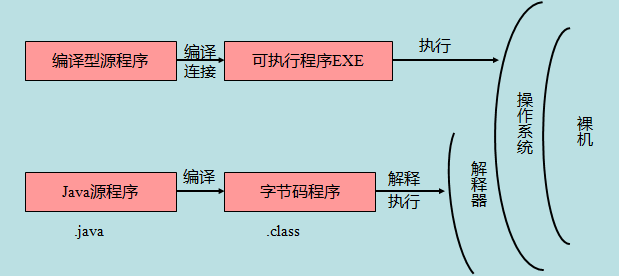
Difference Between Java Source Programs and Compiled Execution
As shown in the figure below:
The next section introduces classes and objects in Java programming. After that, you will have a clearer understanding of classes and objects in Java.
Other extensions