Java LinkedList
 Java Collections Framework
A linked list is a common basic data structure. It is a linear list, but it does not store data in linear order; instead, each node stores the address of the next node.
Linked lists can be divided into singly linked lists and doubly linked lists.
A singly linked list contains two values: the value of the current node and a link pointing to the next node.

A doubly linked list has three integer values: the value, a backward node link, and a forward node link.

Java LinkedList is similar to ArrayList and is a commonly used data container.
Compared with ArrayList, LinkedList is more efficient at add and delete operations, but less efficient at search and modify operations.
Use ArrayList in the following cases:
- Frequently accessing a particular element in the list.
- Only needing to add and delete elements at the end of the list.
Use LinkedList in the following cases:
- You need to access certain elements in the list through loop iteration.
- Needing to frequently add and delete elements at positions such as the beginning, middle, and end of the list.
LinkedList inherits the AbstractSequentialList class.
LinkedList implements the Queue interface and can be used as a queue.
LinkedList implements the List interface and can perform list-related operations.
LinkedList implements the Deque interface and can be used as a queue.
LinkedList implements the Cloneable interface and can be cloned.
LinkedList implements the java.io.Serializable interface, which supports serialization and allows transmission through serialization.
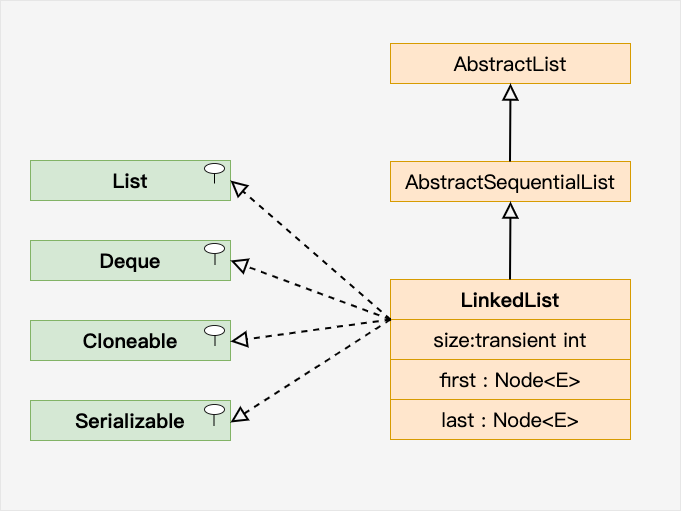
The LinkedList class is located in the java.util package. You need to import it before use. The syntax is as follows:
// 引入 LinkedList 类
import java.util.LinkedList;

LinkedList<E> list = new LinkedList<E>();   // 普通创建方法
或者
LinkedList<E> list = new LinkedList(Collection<? extends E> c); // 使用集合创建链表
Create a simple linked list example:
Example
import java.util.LinkedList;
public class ExampleTest {
public static void main(String[] args) {
LinkedList<String> sites = new LinkedList<String>();
sites.add("Google");
sites.add("Example");
sites.add("Taobao");
sites.add("Weibo");
System.out.println(sites);
}
}
The output of the above example is:
[Google, Example, Taobao, Weibo]
In most cases, using ArrayList to access random elements in a list is more efficient, but in the following cases LinkedList provides more efficient methods.
Add elements at the beginning of the list:
Example
import java.util.LinkedList;
public class ExampleTest {
public static void main(String[] args) {
LinkedList<String> sites = new LinkedList<String>();
sites.add("Google");
sites.add("Example");
sites.add("Taobao");
// Use addFirst() to add elements at the head
sites.addFirst("Wiki");
System.out.println(sites);
}
}
The output of the above example is:
[Wiki, Google, Example, Taobao]
Add elements at the end of the list:
Example
import java.util.LinkedList;
public class ExampleTest {
public static void main(String[] args) {
LinkedList<String> sites = new LinkedList<String>();
sites.add("Google");
sites.add("Example");
sites.add("Taobao");
// Use addLast() to add elements at the tail
sites.addLast("Wiki");
System.out.println(sites);
}
}
The output of the above example is:
[Google, Example, Taobao, Wiki]
Remove elements at the beginning of the list:
Example
import java.util.LinkedList;
public class ExampleTest {
public static void main(String[] args) {
LinkedList<String> sites = new LinkedList<String>();
sites.add("Google");
sites.add("Example");
sites.add("Taobao");
sites.add("Weibo");
// Use removeFirst() to remove the head element
sites.removeFirst();
System.out.println(sites);
}
}
The output of the above example is:
[Example, Taobao, Weibo]
Remove elements at the end of the list:
Example
import java.util.LinkedList;
public class ExampleTest {
public static void main(String[] args) {
LinkedList<String> sites = new LinkedList<String>();
sites.add("Google");
sites.add("Example");
sites.add("Taobao");
sites.add("Weibo");
// Use removeLast() to remove the tail element
sites.removeLast();
System.out.println(sites);
}
}
The output of the above example is:
[Google, Example, Taobao]
Get the element at the beginning of the list:
Example
import java.util.LinkedList;
public class ExampleTest {
public static void main(String[] args) {
LinkedList<String> sites = new LinkedList<String>();
sites.add("Google");
sites.add("Example");
sites.add("Taobao");
sites.add("Weibo");
// Use getFirst() to get the head element
System.out.println(sites.getFirst());
}
}
The output of the above example is:
Get the element at the end of the list:
Example
import java.util.LinkedList;
public class ExampleTest {
public static void main(String[] args) {
LinkedList<String> sites = new LinkedList<String>();
sites.add("Google");
sites.add("Example");
sites.add("Taobao");
sites.add("Weibo");
// Use getLast() to get the tail element
System.out.println(sites.getLast());
}
}
The output of the above example is:
Iterating over elements
We can use a for loop with the size() method to iterate over the elements in the list:
Example
import java.util.LinkedList;
public class ExampleTest {
public static void main(String[] args) {
LinkedList<String> sites = new LinkedList<String>();
sites.add("Google");
sites.add("Example");
sites.add("Taobao");
sites.add("Weibo");
for (int size = sites.size(), i = 0; i < size; i++) {
System.out.println(sites.get(i));
}
}
}
The size() method is used to calculate the size of the linked list.
The output of the above example is:
Google
Example
Taobao
Weibo
You can also use for-each to iterate over elements:
Example
import java.util.LinkedList;
public class ExampleTest {
public static void main(String[] args) {
LinkedList<String> sites = new LinkedList<String>();
sites.add("Google");
sites.add("Example");
sites.add("Taobao");
sites.add("Weibo");
for (String i : sites) {
System.out.println(i);
}
}
}
The output of the above example is:
Google
Example
Taobao
Weibo
Common Methods
| Method | Description |
|---|---|
| public boolean add(E e) | Adds an element at the end of the linked list, returns whether it was successful, true for success, false for failure. |
| public void add(int index, E element) | Inserts an element at the specified position. |
| public boolean addAll(Collection c) | Adds all elements of a collection to the end of the linked list, returns whether it was successful, true for success, false for failure. |
| public boolean addAll(int index, Collection c) | Adds all elements of a collection after the specified position in the linked list, returns whether it was successful, true for success, false for failure. |
| public void addFirst(E e) | Adds an element to the head. |
| public void addLast(E e) | Adds an element to the tail. |
| public boolean offer(E e) | Adds an element to the end of the linked list, returns whether it was successful, true for success, false for failure. |
| public boolean offerFirst(E e) | Inserts an element at the head, returns whether it was successful, true for success, false for failure. |
| public boolean offerLast(E e) | Inserts an element at the tail, returns whether it was successful, true for success, false for failure. |
| public void clear() | Clears the linked list. |
| public E removeFirst() | Removes and returns the first element. |
| public E removeLast() | Removes and returns the last element. |
| public boolean remove(Object o) | Removes a certain element, returns whether it was successful, true for success, false for failure. |
| public E remove(int index) | Removes the element at the specified position. |
| public E poll() | Removes and returns the first element. |
| public E remove() | Removes and returns the first element. |
| public boolean contains(Object o)</td> | Determines whether it contains a certain element. |
| public E get(int index) | Returns the element at the specified position. |
| public E getFirst() | Returns the first element. |
| public E getLast() | Returns the last element. |
| public int indexOf(Object o) | Finds the index of the first occurrence of the specified element from front to back. |
| public int lastIndexOf(Object o) | Finds the index of the last occurrence of the specified element. |
| public E peek() | Returns the first element. |
| public E element() | Returns the first element. |
| public E peekFirst() | Returns the head element. |
| public E peekLast() | Returns the tail element. |
| public E set(int index, E element) | Sets the element at the specified position. |
| public Object clone() | Clones this list. |
|
public Iterator | Returns a reverse-order iterator. |
| public int size() | Returns the number of elements in the linked list. |
|
public ListIterator | Returns an iterator starting from the specified position to the end. |
| public Object[] toArray() | Returns an array composed of the linked list elements. |
|
public | Returns an array created by converting the type of the linked list elements. |
For more API methods, you can view:https://www.example.com/manual/jdk11api/java.base/java/util/LinkedList.html
Other Extensions