Java Multithreading Programming
Java provides built-in support for multithreading programming. A thread refers to a single sequential control flow within a process. A process can have multiple threads running concurrently, and each thread executes different tasks in parallel.
Multithreading is a special form of multitasking, but multithreading uses smaller resource overhead.
Here is another term related to threads - process: A process includes memory space allocated by the operating system and contains one or more threads. A thread cannot exist independently; it must be part of a process. A process keeps running until all non-daemon threads have finished running.
Multithreading enables programmers to write highly efficient programs to make full use of the CPU.
The Lifecycle of a Thread
A thread is a dynamic execution process, and it also has a process from creation to death.
The following diagram shows the complete lifecycle of a thread.
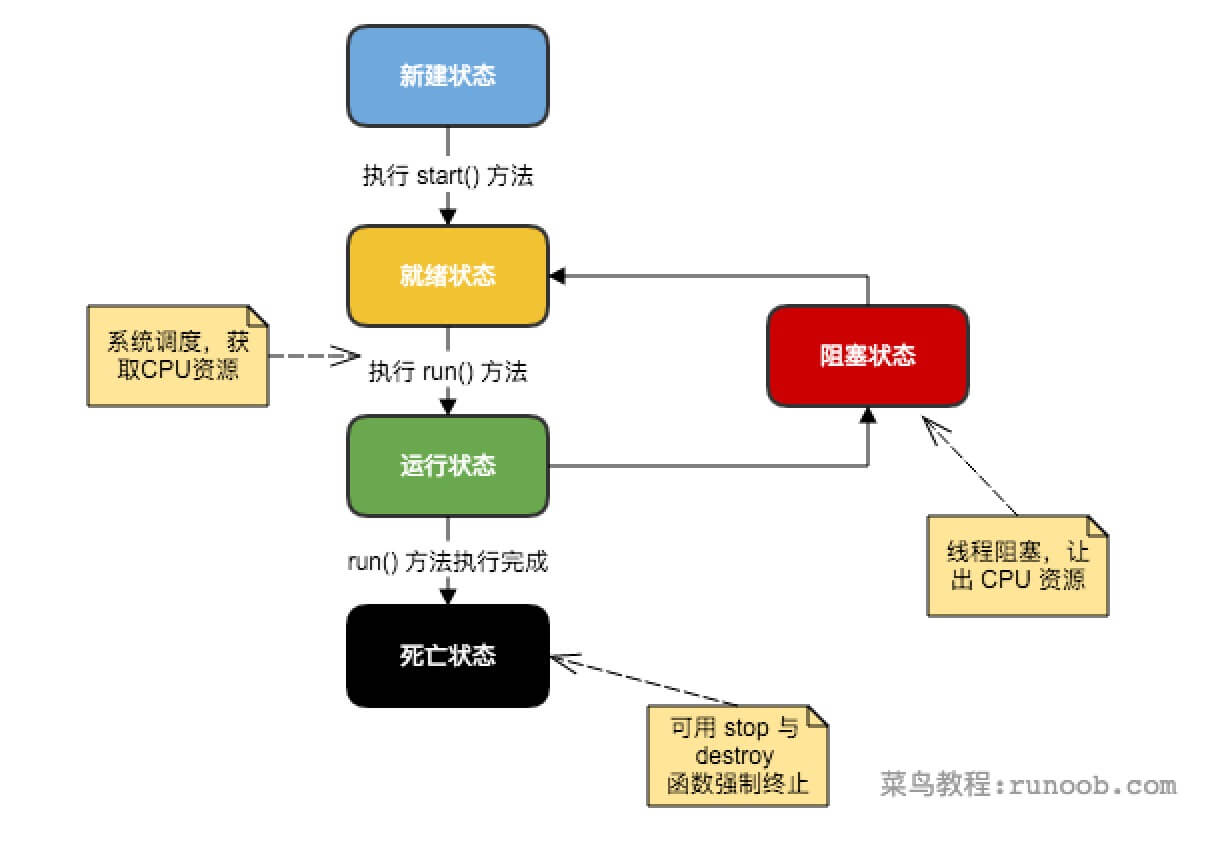
- New state:
Usingnewthe keyword andThreadAfter a class or its subclass creates a thread object, the thread object is in the new state. It remains in this state until the programstart()this thread.
- Ready state:
After the thread object calls the start() method, the thread enters the ready state. A thread in the ready state is in the ready queue and waits for scheduling by the thread scheduler in the JVM.
- Running state:
If a thread in the ready state obtains CPU resources, it can executerun(), at this point the thread is in the running state. A thread in the running state is the most complex; it can change to the blocked state, ready state, and dead state.
- Blocked state:
If a thread executes methods such as sleep, suspend, and so on, after losing the occupied resources, the thread transitions from the running state to the blocked state. When the sleep time expires or device resources are obtained, it can re-enter the ready state. It can be divided into three types:
Waiting blocked: A thread in the running state executes the wait() method, causing the thread to enter the waiting blocked state.
Synchronous blocked: The thread fails to acquire the synchronized lock (because the lock is occupied by another thread).
Other blocking: When an I/O request is issued by calling the thread's sleep() or join(), the thread enters the blocked state. When the sleep() state times out, join() waits for the thread to terminate or times out, or when I/O processing completes, the thread transitions back to the ready state.
- Dead state:
When a running thread completes its task or other termination conditions occur, the thread switches to the terminated state.
Thread Priority
Every Java thread has a priority, which helps the operating system determine the order in which threads are scheduled.
The priority of a Java thread is an integer whose value ranges from 1 (Thread.MIN_PRIORITY) to 10 (Thread.MAX_PRIORITY).
By default, every thread is assigned a priority of NORM_PRIORITY (5).
Threads with higher priority are more important to the program and should be allocated processor resources before lower-priority threads. However, thread priority does not guarantee the order of thread execution and is highly platform-dependent.
Creating a Thread
Java provides three ways to create threads:
- By implementing the Runnable interface;
- By extending the Thread class itself;
- By creating threads through Callable and Future.
Creating a Thread by Implementing the Runnable Interface
To create a thread, the simplest way is to create a class that implements the Runnable interface.
To implement Runnable, a class only needs to implement one method call, run(), declared as follows:
You can override this method. It is important to understand that run() can call other methods, use other classes, and declare variables, just like the main thread.
After creating a class that implements the Runnable interface, you can instantiate a thread object within the class.
Thread defines several constructors. The following is the one we often use:
Here, threadOb is an instance of a class that implements the Runnable interface, and threadName specifies the name of the new thread.
After the new thread is created, it will run only when you call its start() method.
The following is an example of creating a thread and starting it:
Example
Compile the above program. The running result is as follows:
Creating Thread-1
Starting Thread-1
Creating Thread-2
Starting Thread-2
Running Thread-1
Thread: Thread-1, 4
Running Thread-2
Thread: Thread-2, 4
Thread: Thread-1, 3
Thread: Thread-2, 3
Thread: Thread-1, 2
Thread: Thread-2, 2
Thread: Thread-1, 1
Thread: Thread-2, 1
Thread Thread-1 exiting.
Thread Thread-2 exiting.
Creating a Thread by Extending Thread
The second way to create a thread is to create a new class that extends the Thread class, and then create an instance of that class.
The extending class must override the run() method, which is the entry point of the new thread. It must also call the start() method to execute.
Although this method is listed as a multithreading implementation approach, it is essentially an instance that implements the Runnable interface.
Example
Compile the above program. The running result is as follows:
Creating Thread-1
Starting Thread-1
Creating Thread-2
Starting Thread-2
Running Thread-1
Thread: Thread-1, 4
Running Thread-2
Thread: Thread-2, 4
Thread: Thread-1, 3
Thread: Thread-2, 3
Thread: Thread-1, 2
Thread: Thread-2, 2
Thread: Thread-1, 1
Thread: Thread-2, 1
Thread Thread-1 exiting.
Thread Thread-2 exiting.
Thread Methods
The following table lists some important methods of the Thread class:
| No. | Method description |
|---|---|
| 1 |
public void start() Causes this thread to begin execution;JavaThe Java virtual machine calls the run method of this thread. |
| 2 |
public void run() If this thread was constructed using a separate Runnable run object, then the run method of that Runnable object is called; otherwise, this method does nothing and returns. |
| 3 |
public final void setName(String name) Changes the name of this thread to be equal to the argument name. |
| 4 |
public final void setPriority(int priority) Changes the priority of this thread. |
| 5 |
public final void setDaemon(boolean on) Marks this thread as a daemon thread or a user thread. |
| 6 |
public final void join(long millisec) Waits at most millis milliseconds for this thread to terminate. |
| 7 |
public void interrupt() Interrupts this thread. |
| 8 |
public final boolean isAlive() Tests whether this thread is alive. |
The above methods are called by Thread objects. The methods in the following table are static methods of the Thread class.
| No. | Method description |
|---|---|
| 1 |
public static void yield() Pauses the currently executing thread object and executes other threads. |
| 2 |
public static void sleep(long millisec) Causes the currently executing thread to sleep (suspend execution) for the specified number of milliseconds, subject to the precision and accuracy of the system timer and scheduler. |
| 3 |
public static boolean holdsLock(Object x) Returns true if and only if the current thread holds the monitor lock on the specified object. |
| 4 |
public static Thread currentThread() Returns a reference to the currently executing thread object. |
| 5 |
public static void dumpStack() Prints the stack trace of the current thread to the standard error stream. |
Example
The following ThreadClassDemo program demonstrates some methods of the Thread class:
DisplayMessage.java file code:
GuessANumber.java file code:
ThreadClassDemo.java file code:
The running result is as follows; the result is different each time.
Starting hello thread...
Starting goodbye thread...
Hello
Hello
Hello
Hello
Hello
Hello
Goodbye
Goodbye
Goodbye
Goodbye
Goodbye
.......
Creating a Thread via Callable and Future
1. Create an implementation class of the Callable interface and implement the call() method. The call() method will serve as the thread execution body and has a return value.
2. Create an instance of the Callable implementation class, and use the FutureTask class to wrap the Callable object. The FutureTask object encapsulates the return value of the call() method of that Callable object.
3. Use the FutureTask object as the target of a Thread object to create and start a new thread.
4. Call the FutureTask object's get() method to obtain the return value after the child thread finishes execution.
Example
Comparison of the Three Ways to Create Threads
1. When creating multithreading by implementing the Runnable or Callable interfaces, the thread class only implements the Runnable or Callable interface and can still inherit other classes.
2. When creating multithreading by inheriting the Thread class, the code is simple. If you need to access the current thread, you don't need to use Thread.currentThread(); you can directly use this to obtain the current thread.
Several Key Concepts of Threads
In multithreaded programming, you need to understand the following concepts:
- Thread synchronization
- Inter-thread communication
- Thread deadlock
- Thread control: suspension, stop, and resume
Usage of Multithreading
The key to effectively using multithreading is understanding that programs execute concurrently rather than serially. For example, if a program has two subsystems that need to execute concurrently, multithreaded programming is needed at that point.
By using multithreading, you can write very efficient programs. However, please note that if you create too many threads, the execution efficiency of the program actually decreases rather than increases.
Remember, context-switching overhead is also important. If you create too many threads, the CPU will spend more time switching contexts than executing the program!
Other extensions