Java HashMap
 Java Collections Framework
HashMap is a hash table that stores key-value mappings.
HashMap implements the Map interface, stores data based on the HashCode value of the key, has very fast access speed, allows at most one record with a null key, and does not support thread synchronization.
HashMap is unordered, that is, it does not record the insertion order.
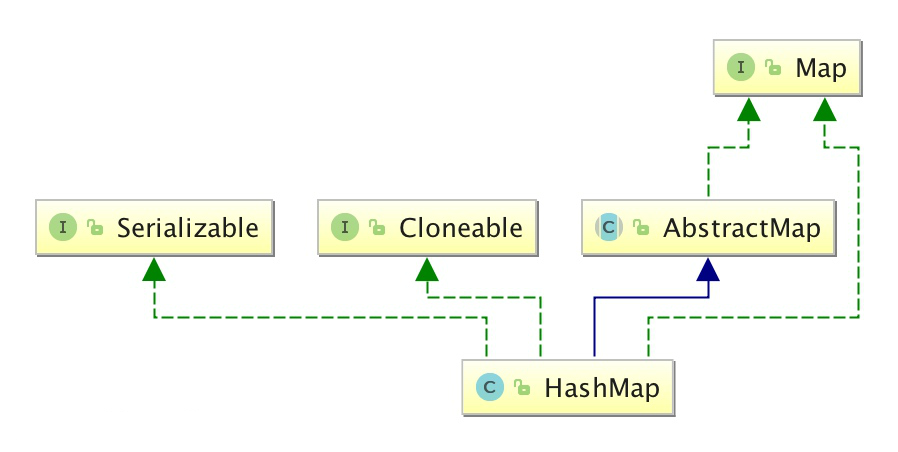
HashMap inherits from AbstractMap and implements the Map, Cloneable, and java.io.Serializable interfaces.
The key and value types of HashMap can be the same or different. They can be String keys and values, or Integer keys and String values.

The elements in HashMap are actually objects. Some common basic types can use their wrapper classes.
The table of wrapper classes corresponding to basic types is as follows:
| Basic type | Reference type |
|---|---|
| boolean | Boolean |
| byte | Byte |
| short | Short |
| int | Integer |
| long | Long |
| float | Float |
| double | Double |
| char | Character |
The HashMap class is located in the java.util package. You need to import it before use. The syntax is as follows:
import java.util.HashMap; // 引入 HashMap 类
In the following example, we create a HashMap object Sites, with Integer keys and String values:
HashMap<Integer, String> Sites = new HashMap<Integer, String>();
Add elements
The HashMap class provides many useful methods. You can use the put() method to add key-value pairs:
Example
import java.util.HashMap;
public class ExampleTest {
public static void main(String[] args) {
// Create HashMap object Sites
HashMap<Integer, String> Sites = new HashMap<Integer, String>();
// Add key-value pairs
Sites.put(1, "Google");
Sites.put(2, "Example");
Sites.put(3, "Taobao");
Sites.put(4, "Zhihu");
System.out.println(Sites);
}
}
Executing the above code produces the following output:
{1=Google, 2=Example, 3=Taobao, 4=Zhihu}
The following example creates a HashMap with String keys and String values:
Example
import java.util.HashMap;
public class ExampleTest {
public static void main(String[] args) {
// Create HashMap object Sites
HashMap<String, String> Sites = new HashMap<String, String>();
// Add key-value pairs
Sites.put("one", "Google");
Sites.put("two", "Example");
Sites.put("three", "Taobao");
Sites.put("four", "Zhihu");
System.out.println(Sites);
}
}
Executing the above code produces the following output:
{four=Zhihu, one=Google, two=Example, three=Taobao}
Access elements
We can use the get(key) method to get the value corresponding to the key:
Example
import java.util.HashMap;
public class ExampleTest {
public static void main(String[] args) {
// Create HashMap object Sites
HashMap<Integer, String> Sites = new HashMap<Integer, String>();
// Add key-value pairs
Sites.put(1, "Google");
Sites.put(2, "Example");
Sites.put(3, "Taobao");
Sites.put(4, "Zhihu");
System.out.println(Sites.get(3));
}
}
Executing the above code produces the following output:
Taobao
Delete elements
We can use the remove(key) method to delete the key-value pair corresponding to the key:
Example
import java.util.HashMap;
public class ExampleTest {
public static void main(String[] args) {
// Create HashMap object Sites
HashMap<Integer, String> Sites = new HashMap<Integer, String>();
// Add key-value pairs
Sites.put(1, "Google");
Sites.put(2, "Example");
Sites.put(3, "Taobao");
Sites.put(4, "Zhihu");
Sites.remove(4);
System.out.println(Sites);
}
}
Executing the above code produces the following output:
{1=Google, 2=Example, 3=Taobao}
To delete all key-value pairs, you can use the clear method:
Example
import java.util.HashMap;
public class ExampleTest {
public static void main(String[] args) {
// Create HashMap object Sites
HashMap<Integer, String> Sites = new HashMap<Integer, String>();
// Add key-value pairs
Sites.put(1, "Google");
Sites.put(2, "Example");
Sites.put(3, "Taobao");
Sites.put(4, "Zhihu");
Sites.clear();
System.out.println(Sites);
}
}
Executing the above code produces the following output:
{}
Calculate size
To calculate the number of elements in a HashMap, you can use the size() method:
Example
import java.util.HashMap;
public class ExampleTest {
public static void main(String[] args) {
// Create HashMap object Sites
HashMap<Integer, String> Sites = new HashMap<Integer, String>();
// Add key-value pairs
Sites.put(1, "Google");
Sites.put(2, "Example");
Sites.put(3, "Taobao");
Sites.put(4, "Zhihu");
System.out.println(Sites.size());
}
}
Executing the above code produces the following output:
4
Iterate HashMap
You can use for-each to iterate over the elements in a HashMap.
If you only want to get the keys, you can use the keySet() method, and then you can get the corresponding value via get(key). If you only want to get the values, you can use the values() method.
Example
import java.util.HashMap;
public class ExampleTest {
public static void main(String[] args) {
// Create HashMap object Sites
HashMap<Integer, String> Sites = new HashMap<Integer, String>();
// Add key-value pairs
Sites.put(1, "Google");
Sites.put(2, "Example");
Sites.put(3, "Taobao");
Sites.put(4, "Zhihu");
// Output key and value
for (Integer i : Sites.keySet()) {
System.out.println("key: " + i + " value: " + Sites.get(i));
}
// Return all values
for(String value: Sites.values()) {
// Output each value
System.out.print(value + ", ");
}
}
}
Executing the above code produces the following output:
key: 1 value: Google
key: 2 value: Example
key: 3 value: Taobao
key: 4 value: Zhihu
Google, Example, Taobao, Zhihu,
Java HashMap Methods
hashmapThe list of commonly used Java HashMap methods is as follows:
| Method | Description |
|---|---|
| clear() | Deletes all key/value pairs in the hashMap |
| clone() | Copies a hashMap |
| isEmpty() | Determines whether the hashMap is empty |
| size() | Calculates the number of key/value pairs in the hashMap |
| put() | Adds key/value pairs to the hashMap |
| putAll() | Adds all key/value pairs to the hashMap |
| putIfAbsent() | If the specified key does not exist in the hashMap, inserts the specified key/value pair into the hashMap. |
| remove() | Deletes the mapping of the specified key in the hashMap |
| containsKey() | Checks whether a mapping for the specified key exists in the hashMap. |
| containsValue() | Checks whether a mapping for the specified value exists in the hashMap. |
| replace() | Replaces the value corresponding to the specified key in the hashMap. |
| replaceAll() | Replaces all mappings in the hashMap with the result of executing the given function. |
| get() | Gets the value corresponding to the specified key |
| getOrDefault() | Gets the value corresponding to the specified key, and returns the set default value if the key is not found. |
| forEach() | Performs the specified operation on each mapping in the hashMap. |
| entrySet() | Returns a set view of all mappings in the hashMap. |
| keySet() | Returns a set view of all keys in the hashMap. |
| values() | Returns all values present in the hashMap. |
| merge() | Adds key-value pairs to the hashMap |
| compute() | Recomputes the value for the specified key in the hashMap |
| computeIfAbsent() | Recomputes the value for the specified key in the hashMap, and adds it to the hashMap if the key does not exist |
| computeIfPresent() | Recomputes the value for the specified key in the hashMap, provided the key exists in the hashMap. |
For more API methods, see:https://www.example.com/manual/jdk11api/java.base/java/util/HashMap.html
Other extensions