HTML5 Semantic Elements
Semantic = Meaning
Semantic Elements = Elements with Meaning
What are Semantic Elements?
A semantic element clearly describes its meaning to both the browser and the developer.
Non-semanticElement examples: <div> and <span> - Tells nothing about its content.
SemanticElement examples: <form>, <table>, and <img> - Clearly defines its content.
Browser Support


Internet Explorer 9+, Firefox, Chrome, Safari and Opera support semantic elements.
Note:Internet Explorer 8 and earlier versions do not support these elements. However, a compatibility solution is provided at the bottom of the article.
New Semantic Elements in HTML5
Many existing websites contain HTML code like: <div id="nav">, <div class="header">, or <div id="footer">, to indicate navigation links, headers, and footers.
HTML5 provides new semantic elements to clearly define different parts of a web page:
- <header>
- <nav>
- <section>
- <article>
- <aside>
- <figcaption>
- <figure>
- <footer>
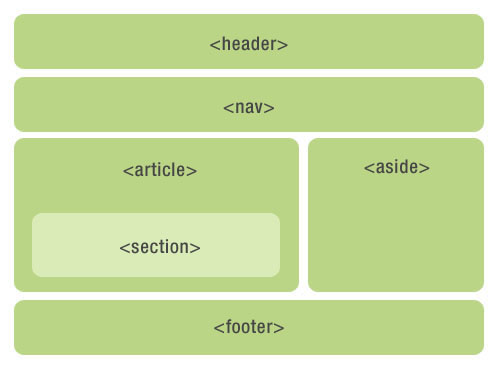
HTML5 <section> Element
The <section> tag defines a section (section, segment) in a document. Such as chapters, headers, footers, or other parts of a document.
According to W3C HTML5 documentation: A section contains a group of content and its heading.
Example
Try it Yourself »
HTML5 <article> Element
The <article> tag defines independent content.
Examples of <article> element usage:
- Forum post
- Blog post
- News story
- Comment
Example
Try it Yourself »
HTML5 <nav> Element
The <nav> tag defines a section of navigation links.
The <nav> element is used to define the navigation link section of a page. However, not all links need to be contained within the <nav> element!
Example
Try it Yourself »
HTML5 <aside> Element
The <aside> tag defines content outside the main content area of a page (such as a sidebar).
The content of the aside tag should be related to the content of the main area.
Example
Try it Yourself »
HTML5 <header> Element
The <header> element describes the header area of a document.
The <header> element is mainly used to define the introductory display area of content.
You can use multiple <header> elements in a page.
The following example defines the header of an article:
Example
Try it Yourself »
HTML5 <footer> Element
The <footer> element describes the bottom area of a document.
The <footer> element should contain information about its containing element.
A footer typically contains information about the author of the document, copyright information, links to terms of use, contact information, etc.
You can use multiple <footer> elements in a document.
Example
Try it Yourself »
HTML5 <figure> and <figcaption> Elements
The <figure> tag specifies independent flow content (images, diagrams, photos, code, etc.).
The content of the <figure> element should be related to the main content, but if removed, it should not affect the document flow.
The <figcaption> tag defines the caption of the <figure> element.
The <figcaption> element should be placed as the first or last child element of the "figure" element.
Example
Try it Yourself »
Can We Start Using These Semantic Elements?
The above elements are all block elements (except <figcaption>).
In order to make these block-level elements work in all versions of browsers, you need to set the following properties in the style sheet file (the following style code allows older browsers to support the block-level elements introduced in this chapter):
{
display: block;
}
Problems in Internet Explorer 8 and Earlier IE Versions
IE8 and earlier IE versions cannot render CSS effects in these elements, so you cannot use <header>, <section>, <footer>, <aside>, <nav>, <article>, <figure>, or other HTML5 elements.
Solution:You can use the HTML5 Shiv JavaScript script to solve the IE compatibility issue. HTML5 Shiv download address:https://lf26-cdn-tos.bytecdntp.com/cdn/expire-1-M/html5shiv/3.7.3/html5shiv.min.js
After downloading, place the following code into the web page:
<script src="html5shiv.js"></script>
<![endif]-->
The above code will load the html5shiv.js file when the browser version is less than IE9. You must place it in the <head> element, because IE browsers need to render these new HTML5 elements after loading the head.
Other Extensions