HTML5 MathML
HTML5 can use the <math>...</math> element in a document, corresponding to the <math>...</math> tag.
MathML is a mathematical markup language, a standard based on XML (a subset of the Standard Generalized Markup Language), used to write mathematical symbols and formulas.
Note:Currently, only Firefox or Safari browsers support it, and most browsers do not support the MathML tag. If your browser does not support this tag, you can use the latest version of Firefox or Safari to view.
We can also use third-party style libraries to support mathematical notation. The style library used in this chapter can be downloaded by clicking the button below:
Download mathml.zip
MathML Example
Here is a simple MathML instance:
instance
<html>
<head>
<meta charset="UTF-8">
<title>Example Tutorial (example.com)</title>
</head>
<body>
<math xmlns="http://www.w3.org/1998/Math/MathML">
<mrow>
<msup><mi>a</mi><mn>2</mn></msup>
<mo>+</mo>
<msup><mi>b</mi><mn>2</mn></msup>
<mo>=</mo>
<msup><mi>c</mi><mn>2</mn></msup>
</mrow>
</math>
</body>
</html>
Try it out »
Use third-party libraries to support:
instance
<html>
<head>
<meta charset="UTF-8">
<title>Example Tutorial (example.com)</title>
<script type="text/javascript" src="https://static.jyshare.com/assets/js/mathml/mspace.js"></script>
</head>
<body>
<math xmlns="http://www.w3.org/1998/Math/MathML">
<mrow>
<msup><mi>a</mi><mn>2</mn></msup>
<mo>+</mo>
<msup><mi>b</mi><mn>2</mn></msup>
<mo>=</mo>
<msup><mi>c</mi><mn>2</mn></msup>
</mrow>
</math>
</body>
</html>
Try it out »
Result image, as shown below:

Here is an instance with some operators added:
instance
<html>
<head>
<meta charset="UTF-8">
<title>Example Tutorial (example.com)</title>
</head>
<body>
<math xmlns="http://www.w3.org/1998/Math/MathML">
<mrow>
<mrow>
<msup>
<mi>x</mi>
<mn>2</mn>
</msup>
<mo>+</mo>
<mrow>
<mn>4</mn>
<mo></mo>
<mi>x</mi>
</mrow>
<mo>+</mo>
<mn>4</mn>
</mrow>
<mo>=</mo>
<mn>0</mn>
</mrow>
</math>
</body>
</html>
Try it out »
Use third-party libraries to support:
instance
<html>
<head>
<meta charset="UTF-8">
<title>Example Tutorial (example.com)</title>
<script type="text/javascript" src="https://static.jyshare.com/assets/js/mathml/mspace.js"></script>
</head>
<body>
<math xmlns="http://www.w3.org/1998/Math/MathML">
<mrow>
<mrow>
<msup>
<mi>x</mi>
<mn>2</mn>
</msup>
<mo>+</mo>
<mrow>
<mn>4</mn>
<mi>x</mi>
</mrow>
<mo>+</mo>
<mn>4</mn>
</mrow>
<mo>=</mo>
<mn>0</mn>
</mrow>
</math>
</body>
</html>
Try it out »
Result image, as shown below:

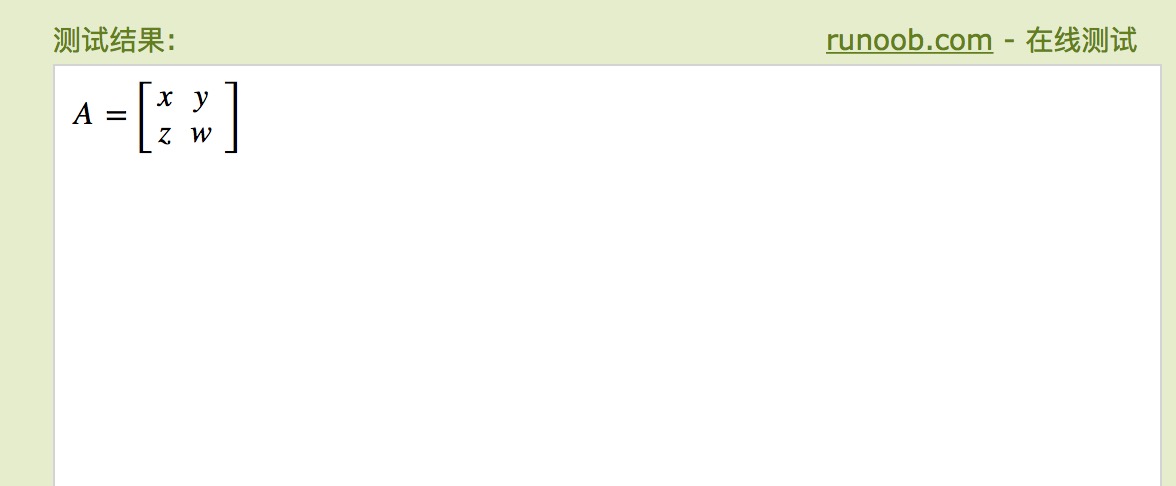
Here is a 2×2 matrix instance, which can be viewed in effect in Firefox 3.5 and above:
instance
<html>
<head>
<meta charset="UTF-8">
<title>Example Tutorial (example.com)</title>
</head>
<body>
<math xmlns="http://www.w3.org/1998/Math/MathML">
<mrow>
<mi>A</mi>
<mo>=</mo>
<mfenced open="[" close="]">
<mtable>
<mtr>
<mtd><mi>x</mi></mtd>
<mtd><mi>y</mi></mtd>
</mtr>
<mtr>
<mtd><mi>z</mi></mtd>
<mtd><mi>w</mi></mtd>
</mtr>
</mtable>
</mfenced>
</mrow>
</math>
</body>
</html>
Try it out »
Use third-party libraries to support:
instance
<html>
<head>
<meta charset="UTF-8">
<title>Example Tutorial (example.com)</title>
<script type="text/javascript" src="https://static.jyshare.com/assets/js/mathml/mspace.js"></script>
</head>
<body>
<math xmlns="http://www.w3.org/1998/Math/MathML">
<mrow>
<mi>A</mi>
<mo>=</mo>
<mfenced open="[" close="]">
<mtable>
<mtr>
<mtd><mi>x</mi></mtd>
<mtd><mi>y</mi></mtd>
</mtr>
<mtr>
<mtd><mi>z</mi></mtd>
<mtd><mi>w</mi></mtd>
</mtr>
</mtable>
</mfenced>
</mrow>
</math>
</body>
</html>
Try it out »
Result image, as shown below: