TensorFlow tf.data API
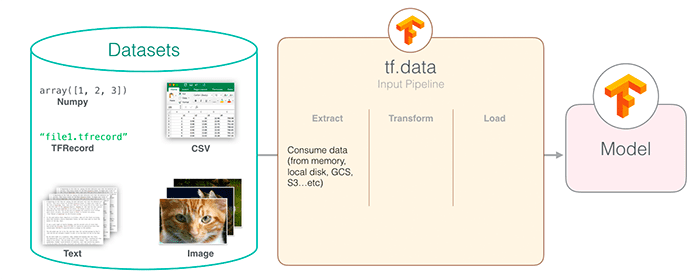
The TensorFlow tf.data API is an efficient data input pipeline building tool provided by TensorFlow, specifically designed for handling large-scale datasets.
The tf.data API solves the performance bottleneck issues of traditional data loading methods, enabling data preprocessing and model training to run in parallel.
Why do we need the tf.data API
- Performance advantages: 10-100x faster than traditional methods
- Memory efficiency: Supports streaming processing of very large datasets
- Flexibility: Composable data transformation operations
- Ease of use: Clean chainable API interface
Core Concepts
Dataset Object
Dataset is the core abstraction of the tf.data API, representing a sequence of elements, where each element contains one or more tensors.
Three main ways to create a Dataset
1. Create from in-memory data
Example
2. Create from files
Example
3. Create from generators
Example
for i in range(10):
yield i
dataset = tf.data.Dataset.from_generator(gen, output_types=tf.int32)
Data Transformation Operations
| Operation Type | Common Methods | Description |
|---|---|---|
| Single-element Transformation | map, filter |
Process each element individually |
| Multi-element Transformation | batch, window |
Operations involving multiple elements |
| Global Transformation | shuffle, repeat |
Affects the behavior of the entire dataset |
Detailed Explanation of Key Operations
1. map Operation
mapIs the most commonly used transformation operation, used to apply custom functions to each element.
Example
dataset = dataset.map(lambda x: x**2)
# Typical usage for processing image data
def process_image(image_path):
img = tf.io.read_file(image_path)
img = tf.image.decode_jpeg(img, channels=3)
img = tf.image.resize(img, [256, 256])
return img
image_dataset = image_dataset.map(process_image)
Best Practices:
- Use the
num_parallel_callsparameter to enable parallel processing - For CPU-intensive operations, set
tf.data.experimental.AUTOTUNE
2. batch Operation
Combines multiple elements into a batch.
Example
batched_dataset = dataset.batch(32)
# Padding batch for sequences of unequal length
padded_batch = dataset.padded_batch(
32,
padded_shapes=([None], []),
padding_values=(0.0, 0)
)
3. shuffle Operation
Shuffles the data order, which is crucial for training.
Example
shuffled = dataset.shuffle(buffer_size=10000)
# Best practice: buffer_size should be >= dataset size
full_shuffle = dataset.shuffle(buffer_size=len(dataset))
Performance Optimization Tips
Prefetch
Overlap data loading with model execution:
Example
Parallelization
Example
process_func,
num_parallel_calls=tf.data.experimental.AUTOTUNE
)
Caching Mechanism
Example
dataset = dataset.cache()
# File cache
dataset = dataset.cache(filename='/tmp/cache')
Complete Example
Image Classification Data Pipeline
Example
dataset = tf.data.Dataset.list_files(file_pattern)
if is_training:
dataset = dataset.shuffle(10000)
dataset = dataset.map(
lambda x: load_and_preprocess_image(x),
num_parallel_calls=tf.data.experimental.AUTOTUNE
)
dataset = dataset.batch(batch_size)
if is_training:
dataset = dataset.repeat()
return dataset.prefetch(buffer_size=tf.data.experimental.AUTOTUNE)
def load_and_preprocess_image(path):
image = tf.io.read_file(path)
image = tf.image.decode_jpeg(image, channels=3)
image = tf.image.resize(image, [224, 224])
image = tf.cast(image, tf.float32) / 255.0 # Normalization
return image
FAQ
Q1: How to handle very large datasets?
Solution:
- Use
tf.data.Dataset.list_filesto create a file dataset - Use interleaved reading (
interleave) to process multiple files in parallel - Consider using TFRecord format to store data
Q2: Why is my data pipeline slow?
Troubleshooting Steps:
- Check whether prefetch (
prefetch) - Ensure the map operation has set
num_parallel_calls - Verify that shuffle's buffer_size is large enough
- Consider using
tf.data.experimental.snapshotto cache intermediate results
Best Practices Summary
- Shuffle early: Apply shuffle early in the data pipeline
- Delay batching: Apply batching after applying map
- Leverage parallelism: Use parallel operations whenever possible
- Overlap execution: Use prefetch to overlap data loading and model execution
- Cache wisely: Cache data that doesn't change
By following these principles, you can build efficient data input pipelines, fully leverage GPU computing power, and significantly improve model training efficiency.
Other Extensions