SQL SELECT TOP, LIMIT, ROWNUMClauses
SQL SELECT TOP Clause
The SELECT TOP statement is used to limit the number of rows in the result set returned in SQL. It is typically used when you only need to query the first few rows of data, especially when the data set is very large, as it can significantly improve query performance.
The SELECT TOP clause is very useful for large tables with thousands of records.
Note:
SELECT TOPUsed in SQL Server and MS Access, while in MySQL and PostgreSQL useLIMITkeyword.- Before version 12c, Oracle did not have a directly equivalent keyword; it could
ROWNUMimplement similar functionality, but in version 12c and above, it introducedFETCH FIRST。 - When using
TOPorLIMIT, it is best to combine withORDER BYthe clause, to ensure that the returned rows are the first few rows in a specific order.
SQL Server / MS Access Syntax
SELECT TOP number|percent column1, column2, ...
FROM table_name;
number|percent: Specifies the number of rows or percentage to return.
number: Specific number of rows.percent: Percentage of the data set.
MySQL Syntax
SELECT column1, column2, ...
FROM table_name
LIMIT number;
Oracle Syntax
SELECT column1, column2, ...
FROM table_name
FETCH FIRST number ROWS ONLY;
PostgreSQL Syntax
SELECT column1, column2, ...
FROM table_name
LIMIT number;
Examples
Suppose we have a table named Employees, which contains the following data:
| EmployeeID | EmployeeName | Salary |
|---|---|---|
| 1 | John Smith | 50000 |
| 2 | Maria Garcia | 60000 |
| 3 | Liam Johnson | 70000 |
| 4 | Emma Wilson | 80000 |
| 5 | Oliver Brown | 90000 |
SQL Server and MS Access return the first 3 rows of data:
SELECT TOP 3 EmployeeName, Salary
FROM Employees;
Return the first 10% of the data:
SELECT TOP 10 PERCENT EmployeeName, Salary
FROM Employees;
MySQL returns the first 3 rows of data:
SELECT EmployeeName, Salary
FROM Employees
LIMIT 3;
PostgreSQL returns the first 3 rows of data:
SELECT EmployeeName, Salary
FROM Employees
LIMIT 3;
Oracle returns the first 3 rows of data:
SELECT EmployeeName, Salary
FROM Employees
FETCH FIRST 3 ROWS ONLY;
Demo Database
In this tutorial, we will use the EXAMPLE sample database.
Below is the data selected from the "Websites" table:
mysql> SELECT * FROM Websites;
+----+---------------+---------------------------+-------+---------+
| id | name          | url                       | alexa | country |
+----+---------------+---------------------------+-------+---------+
|  1 | Google        | https://www.google.cm/    |     1 | USA     |
|  2 | 淘宝          | https://www.taobao.com/   |    13 | CN      |
|  3 | Example       | http://www.example.com/    |  5000 | USA     |
|  4 | 微博           | http://weibo.com/         |    20 | CN      |
|  5 | Facebook      | https://www.facebook.com/ |     3 | USA     |
|  7 | stackoverflow | http://stackoverflow.com/ |     0 | IND     |
+----+---------------+---------------------------+-------+---------+
MySQL SELECT LIMIT Example
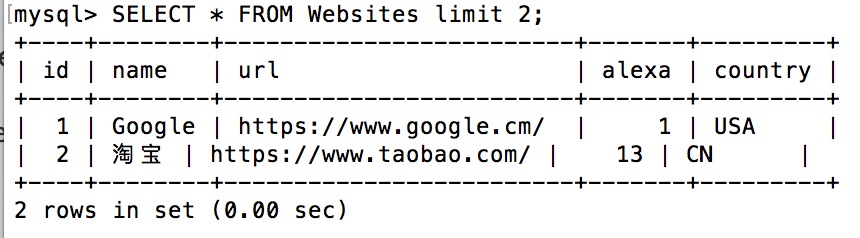
The following SQL statement selects the first two records from the "Websites" table:
Example
After executing the above SQL, the data is as follows:
SQL SELECT TOP PERCENT Example
In Microsoft SQL Server, you can also use a percentage as the parameter.
The following SQL statement selects the first 50 percent of records from the websites table:
Example
The following operations can be executed in a Microsoft SQL Server database.