SQL LEFT JOINKeywords
LEFT JOIN is a join keyword in SQL used to extract data from multiple tables.
The difference between LEFT JOIN and INNER JOIN is that LEFT JOIN returns all records from the left table, even if there are no matching records in the right table.
The LEFT JOIN keyword returns all rows from the left table (table1), even if there are no matches in the right table (table2). If there is no match in the right table, the result is NULL.
SQL LEFT JOIN Syntax
SELECT column_name(s)
FROM table1
LEFT JOIN table2
ON table1.column_name=table2.column_name;
Or:
SELECT column_name(s)
FROM table1
LEFT OUTER JOIN table2
ON table1.column_name=table2.column_name;
Note:In some databases, LEFT JOIN is called LEFT OUTER JOIN.
- table1: left table (primary table),
LEFT JOINall records of this table will be retained. - table2: right table (secondary table), if there is no matching data, use
NULLto fill the corresponding columns. - ON table1.column_name=table2.column_name: specify the join condition, usually the common field of the two tables.
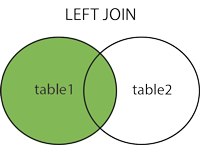
Features:
- Returnsall records in the left table, even if the right table has no matching data.
- If the right table has no matching record, the right table fields for that row in the result will be
NULL。
Suppose there are two tables:CustomersandOrders。
Customers table:
| CustomerID | Name |
|---|---|
| 1 | Alice |
| 2 | Bob |
| 3 | Charlie |
| 4 | David |
Orders table:
| OrderID | CustomerID | Product |
|---|---|---|
| 101 | 1 | Laptop |
| 102 | 2 | Smartphone |
Query using LEFT JOIN:
SELECT Customers.Name, Orders.Product
FROM Customers
LEFT JOIN Orders
ON Customers.CustomerID = Orders.CustomerID;
Query output result:
| Name | Product |
|---|---|
| Alice | Laptop |
| Bob | Smartphone |
| Charlie | NULL |
| David | NULL |
Explanation:LEFT JOINreturnedCustomersall records in the table. ForCharlieandDavid, because inOrderstable there is no matchingCustomerID, their correspondingProductcolumn isNULL。
Demo Database
In this tutorial, we will use the EXAMPLE sample database.
Below is the data selected from the "Websites" table:
+----+--------------+---------------------------+-------+---------+
| id | name         | url                       | alexa | country |
+----+--------------+---------------------------+-------+---------+
| 1  | Google       | https://www.google.cm/    | 1     | USA     |
| 2  | 淘宝          | https://www.taobao.com/   | 13    | CN      |
| 3  | Example      | http://www.example.com/    | 4689  | CN      |
| 4  | 微博          | http://weibo.com/         | 20    | CN      |
| 5  | Facebook     | https://www.facebook.com/ | 3     | USA     |
| 7  | stackoverflow | http://stackoverflow.com/ |   0 | IND     |
+----+---------------+---------------------------+-------+---------+
Below is the data from the "access_log" website access log table:
mysql> SELECT * FROM access_log;
+-----+---------+-------+------------+
| aid | site_id | count | date       |
+-----+---------+-------+------------+
|   1 |       1 |    45 | 2016-05-10 |
|   2 |       3 |   100 | 2016-05-13 |
|   3 |       1 |   230 | 2016-05-14 |
|   4 |       2 |    10 | 2016-05-14 |
|   5 |       5 |   205 | 2016-05-14 |
|   6 |       4 |    13 | 2016-05-15 |
|   7 |       3 |   220 | 2016-05-15 |
|   8 |       5 |   545 | 2016-05-16 |
|   9 |       3 |   201 | 2016-05-17 |
+-----+---------+-------+------------+
9 rows in set (0.00 sec)
SQL LEFT JOIN Example
The following SQL statement will return all websites and their visit counts (if any).
In the following example, we use Websites as the left table and access_log as the right table:
Example
FROM Websites
LEFT JOIN access_log
ON Websites.id=access_log.site_id
ORDER BY access_log.count DESC;
After executing the above SQL, the output results are as follows:
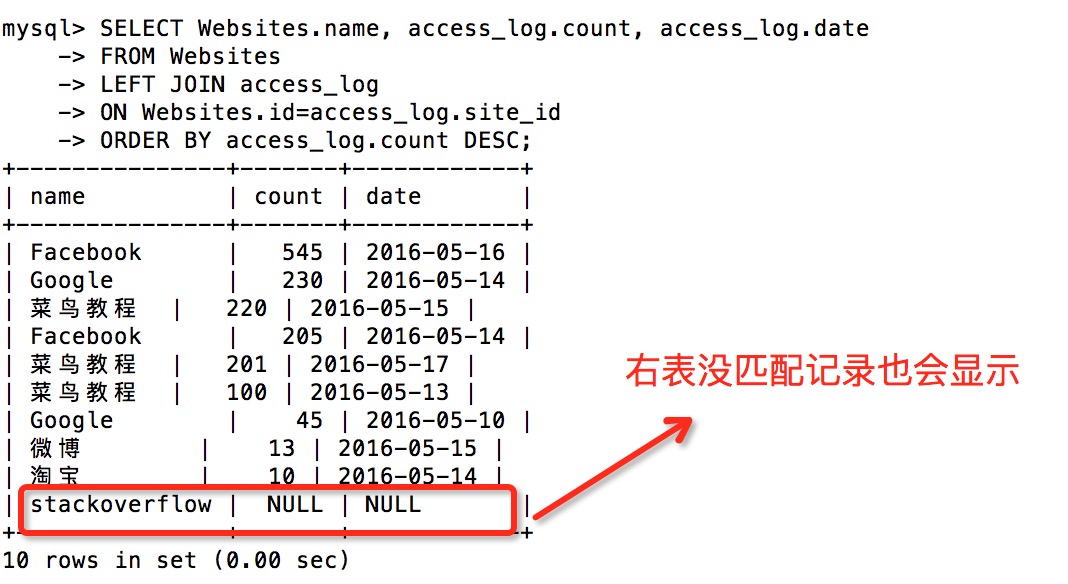
Note:The LEFT JOIN keyword returns all rows from the left table (Websites), even if there are no matches in the right table (access_log).
Other Extensions