Skills Basic Structure
The core essence of Skills is to provide AI with operational guidelines that define standardized execution processes. Once written, these rules can be repeatedly invoked and directly reused, just like program functions.
Skills are stored as Markdown text and do not directly execute functions themselves.
Skills feature on-demand loading and progressive invocation, efficiently accumulating work experience and enabling rapid reuse and precise transfer of capabilities.
The Core Structure of a Skill
The core of Skills is:One folder + one SKILL.md file。
The SKILL.md file contains:
- Metadata (at least a name and description)
- Instructions telling AI how to complete a specific task
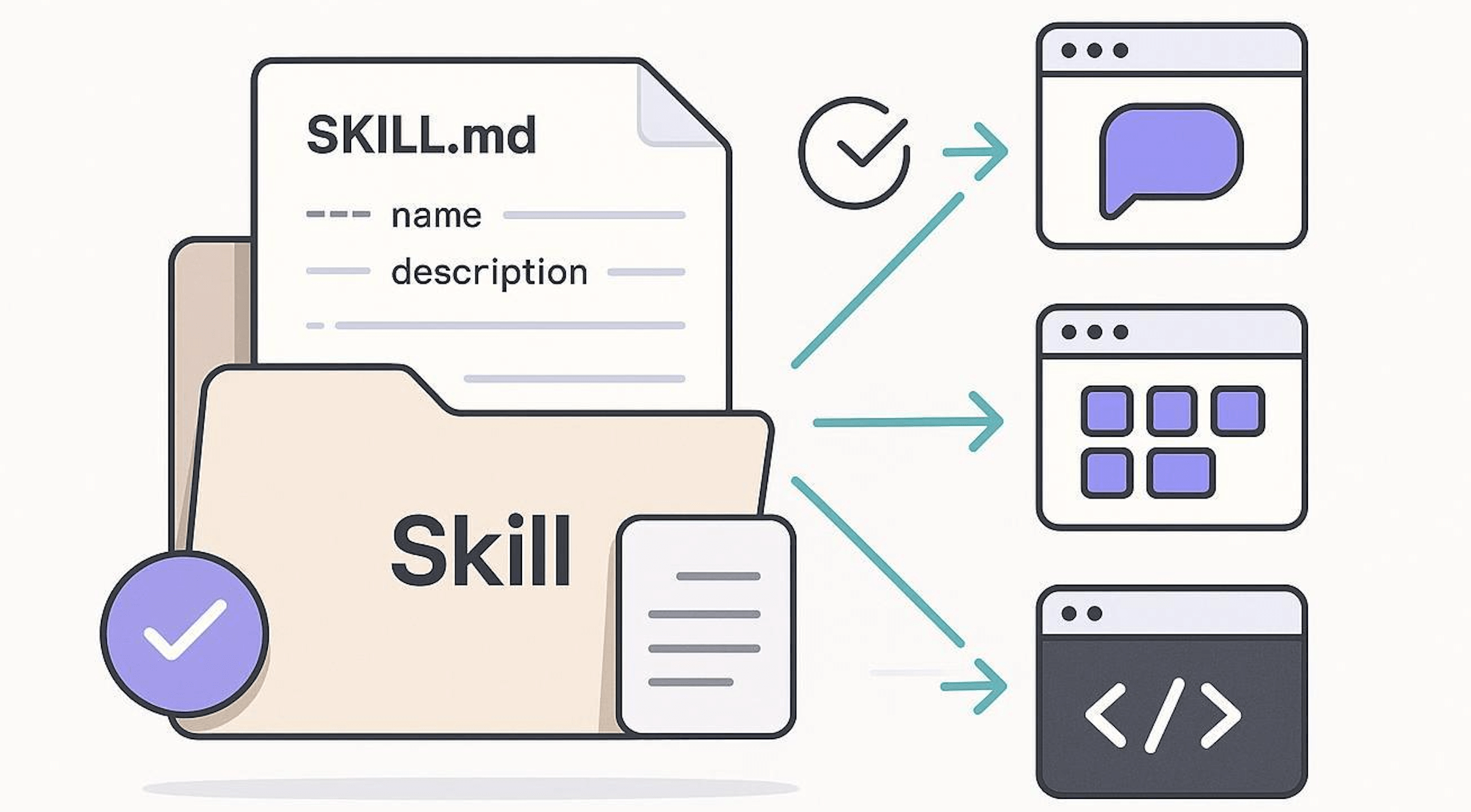
A Skill is essentially a Markdown file (with the filename fixed as SKILL.md)
my-skill/
└── SKILL.md   (唯一必需)
SKILL.md Basic Template:
---
name: your-skill-name
description: 一句话描述该 Skill 的功能和使用场景
---

# Skill 名称

## 使用指引
[给 AI 的分步骤行为指引]

## 示例
[该 Skill 的具体使用示例]
The entire SKILL.md is divided into two parts: the part wrapped with------ is the YAML frontmatter (header configuration), and the part below is the Markdown body (execution instructions).
| Field | Required | Description | Example |
|---|---|---|---|
name | Yes | The unique identifier of the Skill, named using kebab-case. It is referenced by / commands and is the key field for the system to identify the Skill. | web-design-guidelines |
description | Yes | A one-sentence description of the functionality and trigger scenarios. The more specific the content, the more accurate the triggering. | UI/UX design review for web pages |
Next, let's break down each part:

Frontmatter: Two Required Fields
Frontmatter is the YAML configuration block wrapped with --- at the top of SKILL.md, serving as the identity information of the entire Skill.
The official specification only requires two fields:
Field 1: name (Skill name)
The name field is up to 64 characters and can only contain lowercase letters, numbers, and hyphens.
name: processing-pdfs        # 好:动名词形式,清晰描述功能
name: analyzing-spreadsheets # 好:一眼知道用途
name: my-brand-guidelines    # 好:组织专属知识

name: helper      # 差:太模糊
name: MySkill     # 差:包含大写字母(不合规)
name: data files  # 差:包含空格(不合规)
It is recommended to use the gerund form (verb + -ing) for naming, such as processing-pdfs, analyzing-spreadsheets, to clearly describe the activity or capability the Skill provides.
| Recommended | Not Recommended | Reason |
|---|---|---|
code-reviewer | CodeReviewer | Use consistent lowercase and hyphens to avoid cross-platform compatibility issues |
sql-optimizer | sql_optimizer | kebab-case is the conventional format, keeping it consistent with the directory name |
deploy-check | deploy-check-tool-v2 | The name should be short; version information goes in the file's internal description |
Field 2: description (trigger condition description)
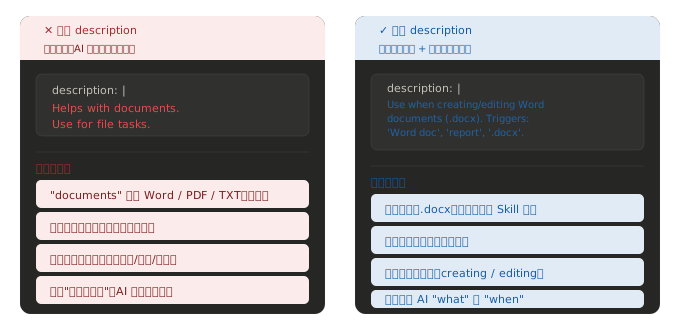
This is the most important field. At startup, the system only preloads the name and description of all Skills into the system prompt.
Only when the AI determines that the description is relevant to the current task will it read the full content of SKILL.md.
The description should contain two parts:What this Skill does, and when Claude should use it.
description: |
  Use when the user needs to create, read, edit, or generate Word
  documents (.docx). Triggers include: 'Word doc', 'word document',
  '.docx', 'report', 'letter', 'memo', or any request to produce
  a formatted document for sharing or printing.
Markdown Body: Internal Structure of Execution Instructions
| Recommended | Not Recommended | Reason |
|---|---|---|
| "Scan Python code for SQL injection risks and provide fix suggestions" | "A security tool" | The description is too vague to trigger accurately |
| "Convert Markdown to HTML emails that comply with brand guidelines" | "Convert file formats" | Lacks specific scenarios and may be mistakenly triggered in other tasks |
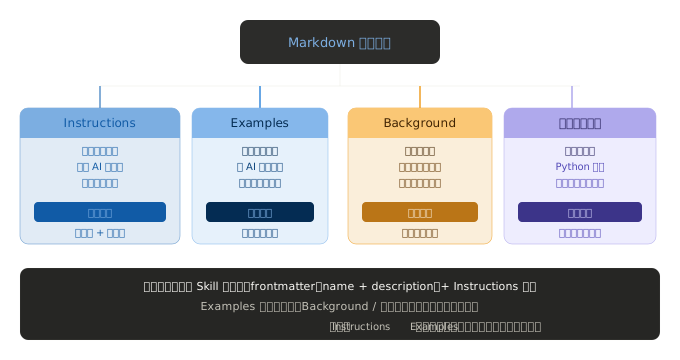
After the Frontmatter is the Markdown body, which tells the AI exactly how to do things.
It contains at least two sections:
SKILL.md Examples
SKILL.md Basic Template:
---
name: pdf-processing
description: 从 PDF 中提取文本和表格,填写表单,并合并文档
---

# PDF 处理

## 使用场景
当需要对 PDF 文件进行操作时使用,例如:

- 提取 PDF 文本或表格数据
- 填写 PDF 表单
- 合并多个 PDF 文件

## 提取文本
- 使用 `pdfplumber` 提取文本型 PDF 内容
- 扫描版 PDF 需配合 OCR 工具

## 填写表单
- 读取 PDF 表单字段
- 按输入数据填充并生成新文件
Minimal Required Example:
---
name: skill-name
description: 说明该 Skill 的功能以及适用场景
---
Example with Optional Fields:
---
name: pdf-processing
description: 从 PDF 中提取文本和表格,填写表单,并合并文档
license: Apache-2.0
metadata:
  author: example-org
  version: "1.0"
---
Field Descriptions:
| Field | Required | Description |
|---|---|---|
| name | Yes | Skill name, up to 64 characters; can only contain lowercase letters, numbers, and hyphens-, and must not-start or end with a hyphen |
| description | Yes | Description of functionality and usage scenarios, up to 1024 characters, cannot be empty |
| license | no | License name or a pointer to the license file bundled with the Skill |
| compatibility | no | Environment and dependency description (products, system packages, network permissions, etc.), up to 500 characters |
| metadata | no | Custom key-value pairs for extending metadata (such as author, version) |
| allowed-tools | no | List of allowed tools (space-separated, experimental feature) |
Skill File Directory Structure
A Skill is a folder that contains at least one SKILL.md file, and can also contain other directories and files as needed.
To avoid context bloat:
- Core rules →
SKILL.md - Detailed materials → separate files
- Practical logic → script execution (not loaded)
Recommended Structure:
my-skill/
├── SKILL.md          # 必需:元数据 + 指令
├── scripts/          # 可选:可执行代码
      └── helper.py
├── references/       # 可选:参考文档
├── assets/           # 可选:模板、资源
└── ...               # 其他文件或目录
The function of each directory is as follows:
- SKILL.md: Required file, containing the Skill's metadata and execution instructions
- scripts/: Optional directory, containing executable code the agent can run
- references/: Optional directory, containing detailed reference materials
- assets/: Optional directory, containing static assets such as templates, images, etc.
 Other Extensions