Superpowers
Superpowers is a development workflow skill pack for AI coding tools. It makes AI clarify requirements and make plans before writing code, reducing the number of repeated revisions.
Common difficulties in AI coding
After you describe the requirements, AI immediately starts writing code. Only after writing hundreds of lines do you realize the direction is off -- edge cases aren't handled, interface style doesn't match, and key logic is misunderstood.
Then you go back and forth making changes, sometimes spending more time correcting course than initially writing the code.
What's worse is complex requirements involving multiple modules and phased implementation. AI gradually drifts off course while writing, and by the time you notice, many files have already been changed, making rollback troublesome.
Root cause
The default behavior of AI coding tools after receiving requirements isto write code directly。
This is fine for simple tasks, but for slightly more complex requirements, "writing directly" skips a critical step:fully understanding the requirements。
Every ambiguity in the requirements eventually becomes a problem in the code. AI doesn't proactively ask questions, nor does it have a systematic implementation plan. It just moves forward based on its current understanding, and if it goes off track, it has to come back and fix things.
If AI could first clarify requirements, list an implementation plan, and confirm boundaries before writing code, then finally start coding, the whole process would be much more stable.
What is Superpowers?
Superpowers is a set ofdevelopment workflow skill packs for AI coding tools.。
It organizes key stages of software development -- requirement clarification, implementation planning, test-driven development, code review, and branch management -- into skill files. Once loaded into AI coding tools, AI automatically triggers the corresponding workflow at the right time, without needing manual prompts each time.
In one sentence:Install a development methodology into AI, let it work according to the process, not start coding as soon as it receives requirements.。
| Project | Information |
|---|---|
| GitHub repository | https://github.com/obra/superpowers |
| License | MIT |
| Supported tools | Claude Code、Cursor、Codex CLI、Codex App、Gemini CLI、GitHub Copilot CLI |
Workflow overview
Superpowers' core process is divided into four phases. Each phase has clear goals and outputs, and AI will not skip any step.

| Phase | Name | What it does | Output |
|---|---|---|---|
| 1 | Requirement clarification | AI asks questions back, clarifies ambiguities, and presents design plans in sections for confirmation. | Confirmed requirements document |
| 2 | Implementation planning | Break the work into concrete tasks of 2-5 minutes each. Each task includes files, code, and verification methods. | Executable task list |
| 3 | Execute tasks | Execute tasks one by one. After each task, perform a two-round check (spec + quality). | Verified code |
| 4 | Deliver code | Confirm all tasks are complete, and the code meets design specifications and quality standards. | Deliverable code |
Installation
Different AI coding tools have different installation methods. Choose the method that matches the tool you're using.
Claude Code (recommended)
Claude Code can be installed directly from the official plugin marketplace.
# 从官方插件市场安装(推荐)
/plugin install superpowers@claude-plugins-official
It can also be installed through Superpowers' own marketplace.
# 添加 Superpowers 市场
/plugin marketplace add obra/superpowers-marketplace

# 从 Superpowers 市场安装
/plugin install superpowers@superpowers-marketplace
Cursor
Install by entering a command in Cursor's Agent dialog box.
# 在 Agent 对话框里输入
/add-plugin superpowers
You can also search in the plugin marketplacesuperpowersand install.
Codex CLI
# 打开插件管理界面
/plugins

# 搜索 superpowers,选择 Install Plugin
Gemini CLI
# 通过扩展安装
gemini extensions install https://github.com/obra/superpowers
Each tool needs to be installed separately. Installing it in Claude Code doesn't mean it's also available in Cursor.
| Tool | Installation method | Whether an additional marketplace is required |
|---|---|---|
| Claude Code | /plugin install | Only the official marketplace is needed, or you can use the Superpowers marketplace |
| Cursor | /add-pluginor search the plugin marketplace | Not needed |
| Codex CLI | /pluginsSearch and install in the interface | Not needed |
| Gemini CLI | gemini extensions install | Not needed |
Experience after installation
After installation, you don't need to learn new commands or change your work habits. Just describe requirements as usual; Superpowers will automatically intervene in the background.
When starting a new feature
After you describe the requirements, AIwill notimmediately start writing code.
It will first ask you a few questions back, clarify ambiguities, and present the design plan in sections for your confirmation.
This phase is calledbrainstorming, the purpose is to align requirements before starting work. After you confirm, AI moves to the next step.
Entering the implementation phase
Once requirements are confirmed, AI generates an implementation plan, breaking the work into specific tasks of 2-5 minutes each.
Each task includes: which files are involved, what code to write, and how to verify.
The granularity of the plan will be detailed enough that "a junior engineer can execute it given the description" -- this design is to let subagents reliably execute each step and reduce understanding deviations during execution.
Execution phase
After the plan is confirmed, AI executes tasks one by one.
After each task is completed, it performstwo rounds of checks: first check whether it meets the design specifications, then check code quality.
If problems are found, they are resolved within the current task, not carried forward.
You don't need to watch over the entire execution process. Just let AI run. If it gets stuck, it will pause and come to you.
Verifying installation
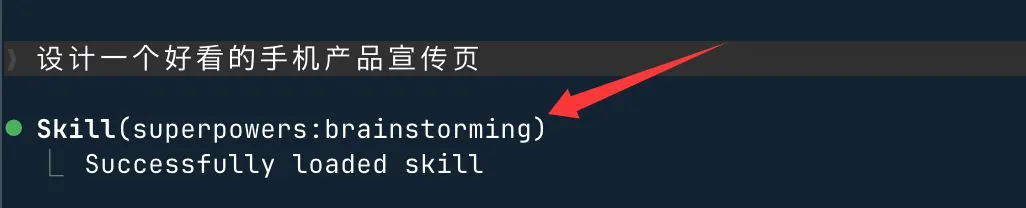
For example, we enter in Claude Code:
Design an attractive mobile phone product promotional page.
You will see superpowers:brainstorming, which means the installation was successful:
A typical beginner scenario: developing a Todo app from scratch
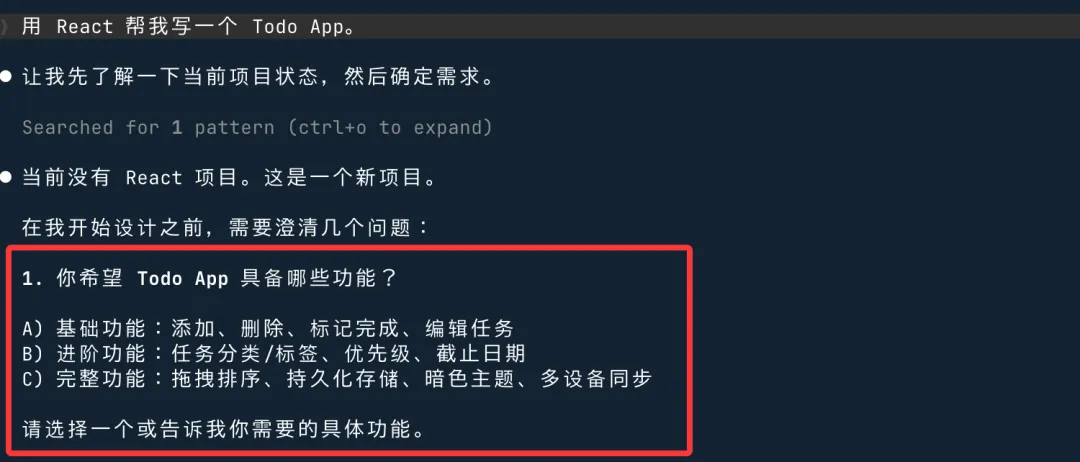
Suppose we want to implement a Todo app supporting CRUD (React + local storage).
Traditional direct-prompt approach:
用 React 帮我写一个 Todo App。
AI usually generates a large amount of code at once. On the surface it looks feature-complete, but in reality the following problems may exist:
- Improper state management
- Missing unit tests
- Edge cases (e.g., empty lists, concurrent operations) not handled
- Modifying one place can easily introduce other bugs
- The result is often code that's hard to maintain, with high iteration costs later.
Superpowers' structured approach is completely different. It doesn't let AI immediately enter the coding phase, but proceeds with the following steps:
Detailed explanation of core workflows
Superpowers provides three core workflows, each covering a different part of development.
Test-driven development (TDD)
test-driven-developmentThe skill forces AI to follow the RED-GREEN-REFACTOR sequence.
First write a failing test, watch it fail, then write the minimal code to make it pass, and finally refactor.
If AI writes code before writing tests, this skill will require it to delete the code and start over.
| Step | Name | What it does |
|---|---|---|
| RED | Write failing test | First write a test case that currently fails, clarifying the expected behavior. |
| GREEN | Write minimal code to pass | Only write the minimal code to make the test pass, nothing more. |
| REFACTOR | Refactor | Optimize the code structure under the protection of tests, ensuring tests still pass. |
For projects not accustomed to TDD, this process may feel a bit uncomfortable, but it does reduce situations where bugs are discovered later and you have to go back and fix them.
Git Worktree isolation
using-git-worktreesAfter design confirmation, automatically create an isolated work branch.
This way, AI's code changes don't directly pollute the main branch. It's useful for parallel multitasking or when rollback is needed.
Git Worktree is a native Git feature that allows you to check out multiple branches into different directories simultaneously in the same repository, compared togit stash + git checkoutcleaner.
Systematic debugging
systematic-debuggingThe skill makes AI follow a 4-step troubleshooting process when encountering problems, rather than guessing.
When encountering an error, first identify the root cause, then address it, rather than directly starting to modify code and seeing what happens.
| Steps | What to do | Why |
|---|---|---|
| 1. Reproduce the issue | Confirm it can be reliably reproduced and record the trigger conditions | A bug that cannot be reproduced cannot be verified as fixed |
| 2. Identify the root cause | Narrow down the scope step by step to find the specific code line causing the problem | Fixes that only treat symptoms will introduce new problems |
| 3. Implement the fix | Modify the code based on the root cause | Minimize the scope of changes |
| 4. Verify the fix | Confirm the issue is resolved and no new problems are introduced | Ensure the fix is effective |
A few things to know before using
The process becomes longer
After installing Superpowers, even simple requirements will go through requirement analysis and planning before writing code.
If you're just fixing a small bug or adding a line of configuration, this process may feel excessive.
Superpowers is suitable for feature development with a certain level of complexity. For simple tasks, just let the AI write the code directly—no need to apply this whole workflow.
Requires your participation in early discussions
brainstormingThe phase requires you to answer questions and confirm plans.
If you're thinking "just hand it to the AI and let it run fully automatically," this design will make you uncomfortable.
Superpowers is positioned ascollaborative development between humans and AI, not fully automated code generation.
Experience varies across different tools
The README mentions that Claude can run for two hours without deviating from the plan, but this performance varies depending on the tool, project, and task complexity, so the actual experience may differ.
| Points to note | Description | Applicable scenarios |
|---|---|---|
| Longer process | Even simple requirements go through analysis before implementation | Feature development of medium or higher complexity |
| Requires participation in discussions | The brainstorming phase requires you to confirm the plan | Developers willing to spend time aligning upfront |
| Experience differences | Performance varies across different tools and projects | All users need to be aware |